
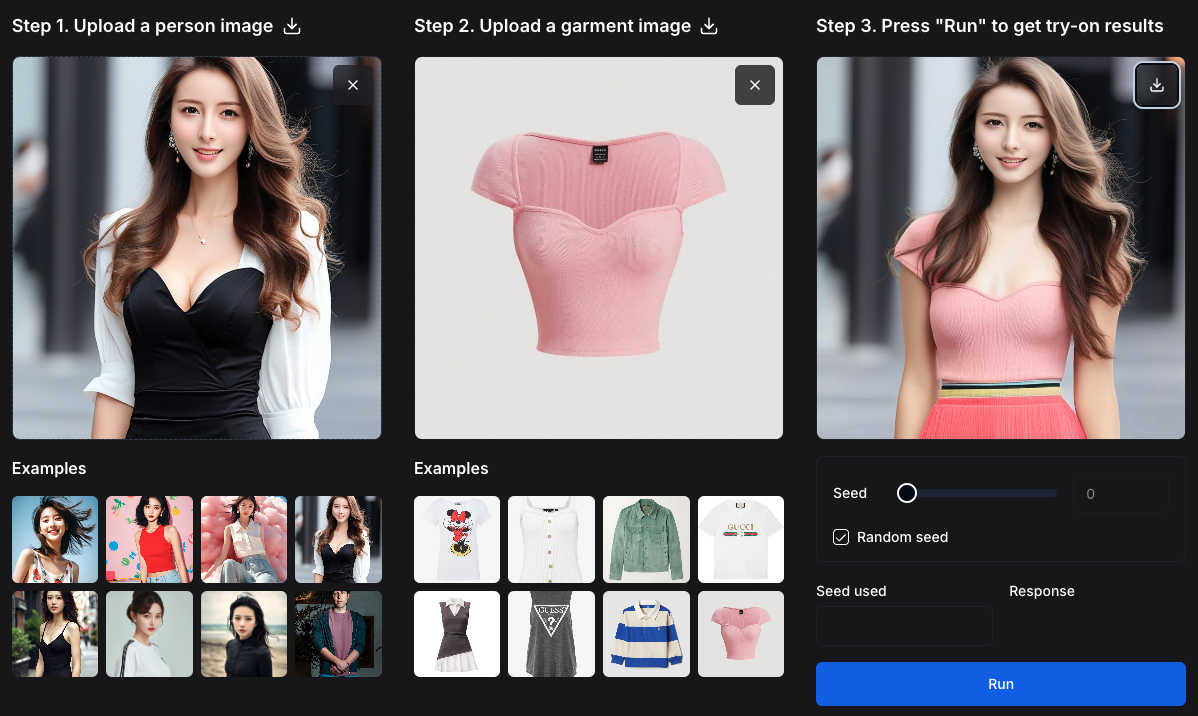
About AI Video/Image Generator
FLUX.1 Kontext Image Generator is a revolutionary AI-powered tool designed to solve the complex challenges of professional image creation and editing. It goes beyond simple text-to-image generation by understanding and preserving context, allowing users to create, transform, and edit images using a combination of text instructions and reference images. This technology is built on the advanced FLUX.1 Kontext suite of generative flow matching models, enabling a level of control and consistency previously difficult to achieve. It is ideal for digital marketers, content creators, graphic designers, and businesses that need to produce high-quality, consistent visual assets rapidly. The core value proposition lies in its ability to maintain character and object consistency across multiple scenes, perform precise local edits without altering the entire composition, and follow complex iterative instructions with minimal latency. This transforms time-consuming, multi-step design processes into a streamlined, intuitive workflow, empowering users to bring their creative visions to life with unprecedented speed and accuracy.
Features of AI Video/Image Generator
Context-Aware Image Generation & Editing
This feature solves the problem of inconsistent character and object generation across multiple images. By understanding and preserving context from reference images, it allows you to create a character or product and then consistently place it in new scenes or poses using text prompts. This eliminates the frustrating trial-and-error of traditional AI generators, ensuring brand assets and visual narratives remain coherent.
Precise Local Editing with Text Guidance
Addressing the challenge of making specific changes without starting from scratch, this feature enables targeted modifications. You can select an area of an image and use a text prompt to change it-for instance, altering clothing, adding an accessory, or modifying the background-while the rest of the composition remains perfectly intact. This provides granular control that mirrors professional editing software but with AI speed.
Complex Multi-Step Instruction Following
This capability tackles the difficulty of executing detailed, sequential creative requests. The model can process and execute a series of instructions in a single prompt, such as "create a scene, then change the weather, then add a character in the foreground." This reduces the need for multiple generations and manual compositing, streamlining complex creative workflows into a single, efficient step.
Advanced 3D Reconstruction with Any 3D
This integrated feature solves the high barrier to 3D model creation. The Any 3D module can transform any standard 2D image into a detailed, textured 3D object or human model in seconds. It includes specialized models for objects/scenes and human body estimation, handling occlusions and complex postures. This turns simple photos into interactive 3D assets instantly, bypassing the need for expensive scanning equipment or expert modeling skills.
Use Cases of AI Video/Image Generator
Marketing & Advertising Campaigns
Create entire suites of consistent visual assets for campaigns. Generate a product hero image, then produce numerous contextual banners, social media posts, and ad variations featuring that product in different settings, all while maintaining perfect visual consistency. This drastically speeds up campaign rollout and ensures strong brand recognition.
Concept Art & Storyboarding
Rapidly visualize ideas for films, games, or books. Artists and directors can generate key scenes, iteratively edit character designs or environments based on feedback, and maintain character consistency across a sequence of storyboard frames. This accelerates the pre-production process and helps teams align on creative direction faster.
E-commerce & Product Visualization
Generate lifestyle images for products without expensive photoshoots. Upload a product photo and place it consistently in various room settings or usage scenarios. Furthermore, use the Any 3D feature to create interactive 3D models of products from a single catalog image, enhancing online shopping experiences with spin-to-view functionality.
Architectural Visualization & Interior Design
Quickly create and modify visualizations of spaces. Start with a reference image of a room, then use text prompts to change furniture styles, wall colors, or lighting conditions. For existing structures, use Any 3D to convert 2D building photos into 3D models for preliminary analysis or client presentations.
Frequently Asked Questions
What makes FLUX.1 Kontext different from other AI image generators?
FLUX.1 Kontext is specifically engineered for professional workflows requiring consistency and control. Its core differentiator is its advanced context preservation, allowing you to use reference images to maintain exact details of characters, objects, or styles across multiple generations. This solves the common problem of AI generators producing variable results, making it reliable for branding and sequential storytelling.
How does the Any 3D feature work, and what can I create with it?
Any 3D uses state-of-the-art AI models trained on millions of images to predict and reconstruct 3D geometry from a single 2D photo. You can upload an image of an object, a scene, or a person, and it will generate a fully textured 3D model. It is perfect for creating 3D assets for games, AR/VR, online product displays, or simple visualizations from everyday photographs.
Do I need any 3D modeling experience to use this tool?
No, you do not need any prior 3D modeling experience. The tool is designed to be accessible. For image generation and editing, you guide the AI using text prompts and reference images. For 3D creation, you simply upload a 2D image, and the AI handles the complex reconstruction process automatically. The interface and workflow are built for creators of all skill levels.
Can I use this tool for commercial projects?
Yes, the generated images and 3D models are intended for commercial use. This makes it a powerful asset for businesses, marketers, and freelancers who need to produce original visual content for clients, advertising, products, or publications without licensing concerns. Always refer to the specific terms of service for detailed usage rights.
Explore more in this category:
Similar to AI Video/Image Generator

A free browser-based toolkit for creating, cutting, converting, and previewing sprite sheet animations.

Free AI attractiveness test and face analysis with private, on-device photo processing.

Turn any image into editable layers with AI—separate subject, background, and objects as transparent PNG layers.

Turn videos, images, and files into secure direct links for sharing, embedding, and automated workflows.

NanoEditor is an AI-powered D&D portrait generator that turns character details like ancestry, class and gear into focused fantasy RPG art.

Free AI image editor that edits, retouches, and transforms photos with natural-language text prompts.

Private browser-based AI image generation and editing with text-to-image, targeted edits, and multi-image references.

Turn table photos and screenshots into editable Excel files with Photo to Excel. Merge images, remove duplicates, preview, and download free.