
X11.social
X11.social transforms your spoken ideas into scheduled X posts with AI editing, virality tips, and effortless.
Visit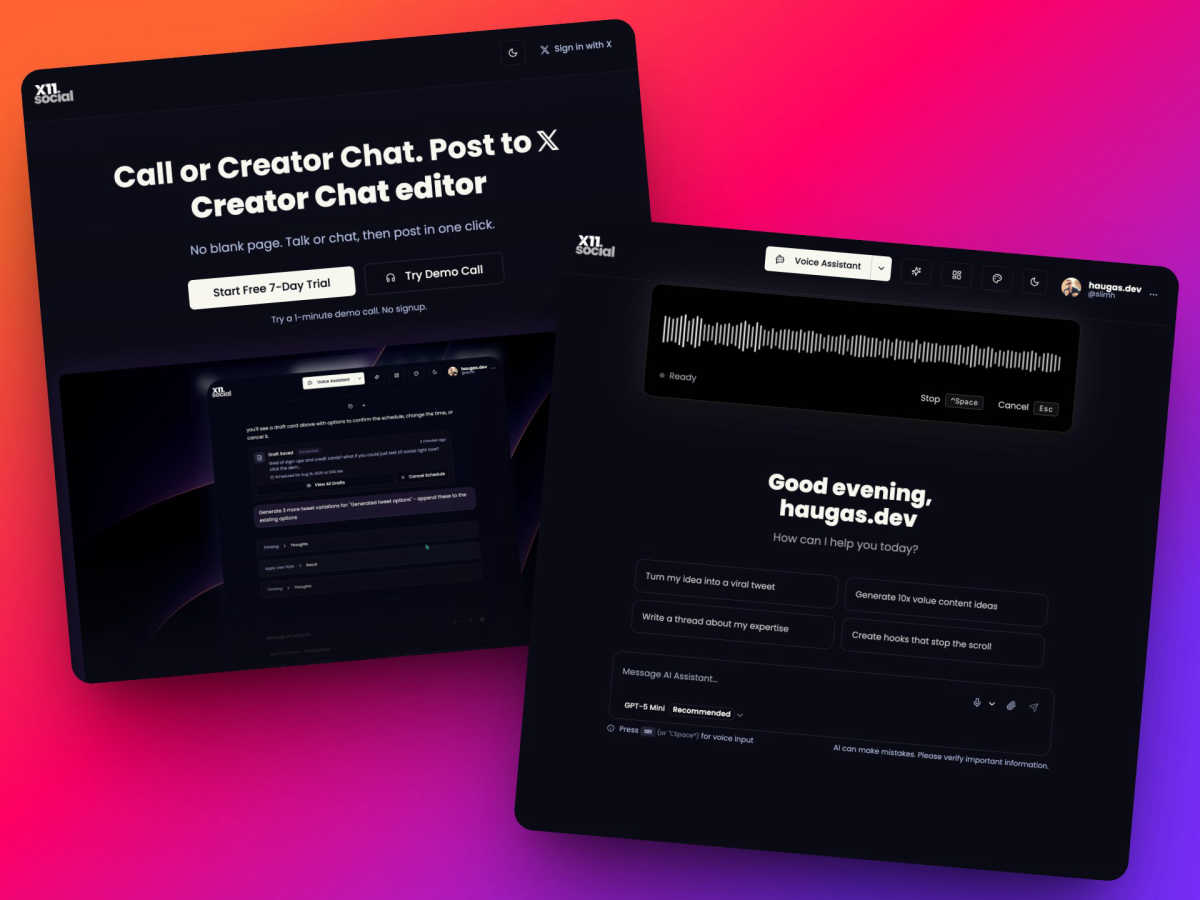
About X11.social
X11.social is an innovative, AI-powered content creation platform tailored for creators on X (formerly Twitter) and busy professionals who struggle to convert spontaneous ideas into polished content. Designed to solve the common problem of forgotten post ideas, X11.social enables users to capture thoughts through a hands-free phone call or a unique chat editor. This flexibility caters to various scenarios—whether commuting, exercising, or managing a hectic lifestyle. The platform's core value proposition is simple and powerful: it ensures that you never lose a post idea again while allowing you to publish authentic content that reflects your voice, but with enhanced clarity and professionalism. With features like smart action buttons embedded in the chat interface, posting, scheduling, and attaching media becomes seamless, saving time and eliminating tedious tasks. X11.social is perfect for anyone looking to grow their presence on X while maintaining a consistent flow of quality content, all with minimal effort.
Features of X11.social
Hands-Free Phone Call Posting
X11.social allows you to capture ideas on the go through a hands-free phone call. Simply dial a local number, share your thoughts, and the AI will transform them into ready-to-publish posts. This feature is perfect for busy individuals who find themselves generating ideas while driving or multitasking.
Context-Aware Voice Assistant
The platform's AI understands the context of what you're reading or viewing. For instance, if you're watching a YouTube video, you can ask the AI to summarize it or discuss key points, and it will create a coherent thread or post for you. This capability makes it easy to turn external content into your own insights effortlessly.
Smart Action Buttons
X11.social enhances the user experience with smart action buttons that appear when needed. These buttons allow you to post, schedule, adjust the tone, or attach media directly from the chat interface. This streamlined functionality minimizes the need for manual input and keeps your workflow efficient.
Virality Analytics
Before you hit send, X11.social provides insights into the potential performance of your posts through virality analytics. This feature helps you understand why certain posts might underperform, enabling you to make adjustments and optimize your content for better engagement.
Use Cases of X11.social
Capturing Ideas on the Go
Imagine you're on a morning commute and a brilliant post idea strikes you. With X11.social, you can quickly call to record your thoughts without needing to stop or write anything down, ensuring that no inspiration is lost.
Creating Content from Videos
While watching a long YouTube video, you find key takeaways that could resonate with your audience. Using X11.social, you can summarize the video and instantly create an engaging thread, transforming your viewing time into valuable content for your X account.
Scheduling Daily Brain Dumps
If you often forget to write down your ideas, X11.social can help by scheduling daily brain dump calls. These calls allow you to talk through your thoughts at a set time, with the AI handling everything from capturing ideas to formatting them into posts.
Engaging with Your Audience
X11.social makes it easy to engage with followers by allowing you to check notifications and respond to tweets through a phone call. You can manage your social interactions effortlessly, ensuring you stay connected with your audience while on the move.
Frequently Asked Questions
How does X11.social ensure my voice is maintained in the posts?
X11.social's AI learns your voice and writing style over time. When you speak, it captures your unique tone and personality, ensuring that the published content sounds authentically like you, but with added polish and clarity.
Can I use X11.social while multitasking?
Absolutely! X11.social is designed for busy professionals. You can create posts while driving, cooking, or exercising, allowing you to maximize productivity without needing to stop what you're doing.
What if I need to make changes to my posts after they are created?
The platform allows for easy editing before posting. You can review and modify your content as needed, ensuring that it meets your standards before it goes live.
Is there a trial period available for new users?
Yes, X11.social offers a 7-day free trial with no credit card required. This allows you to explore all features of the platform and see how it can benefit your content creation process without any commitment.
Explore more in this category:
Similar to X11.social

CleanSmart removes duplicates, fixes formatting, fills gaps, and flags anomalies in one automated pass. No code. No data engineers.

A focused two-photo AI studio for original duet videos or portraits, with paid credits and MP4 export.

The #1 Native Form Builder Plugin for Framer - No Code, No Embeds, No External Platforms.

Create AI UGC video ads from a product URL, image, or script with AI creators, natural voices, captions, product visuals, and calls to action.

Create videos from prompts and images with an independent Runway AI video generator, plus task tracking and API resources.

Create readable text, logos, posters, ads, packaging, and ecommerce visuals with Ideogram 4 AI workflows.

Vidu AI video generator for consistent Vidu Q3 videos from text, images, and up to seven references.

AI motion control video generator for reference-driven character animation