BarBrain vs securememo.app
Side-by-side comparison to help you choose the right product.

BarBrain
BarBrain streamlines inventory management for hospitality, cutting your counting time in half with accurate, automated reports and seamless device.
Last updated: April 4, 2026
securememo.app
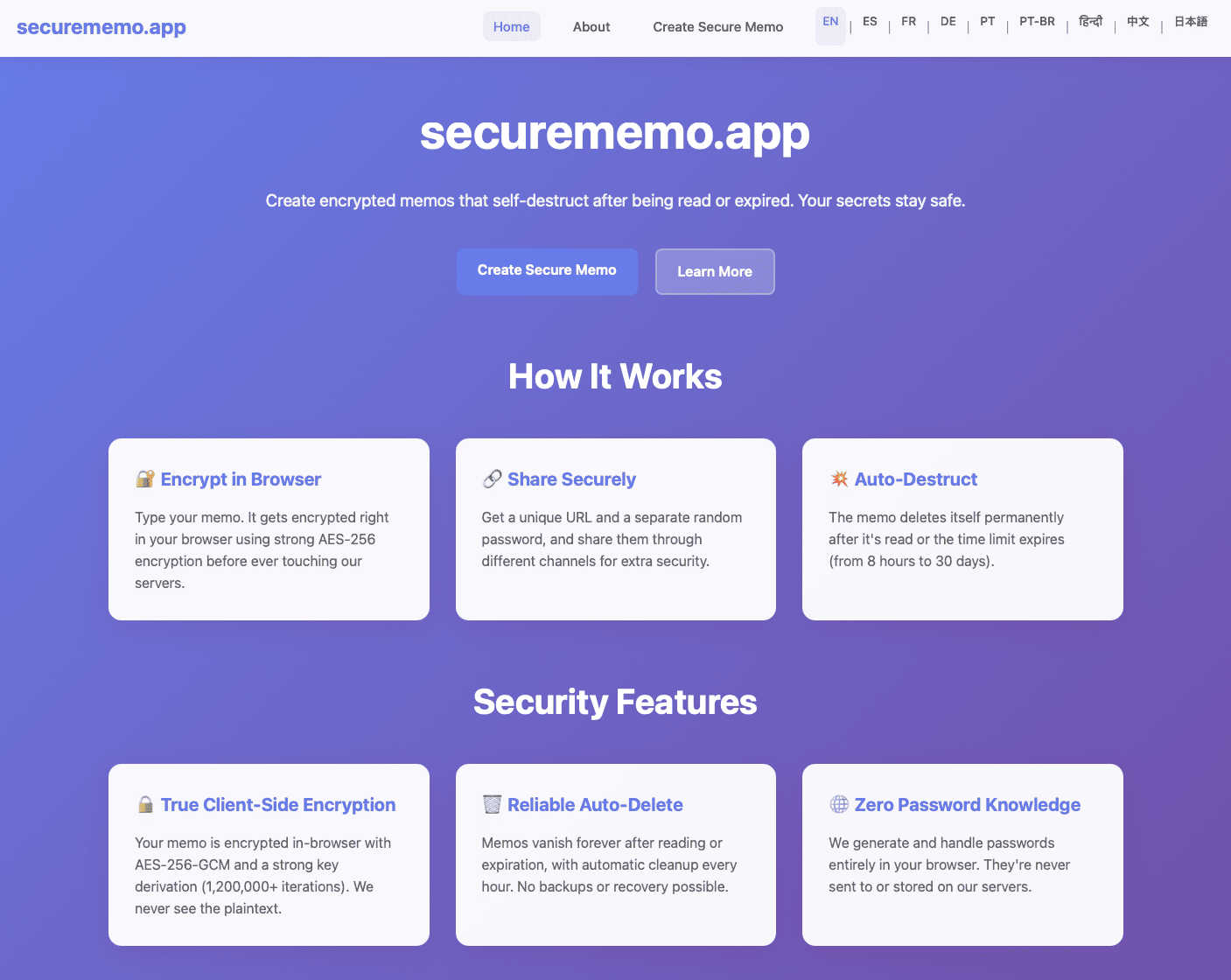
Secure, open-source memos with client-side encryption and no accounts required.
Visual Comparison
BarBrain

securememo.app
Feature Comparison
BarBrain
Parallel Counting on Multiple Devices
BarBrain allows users to conduct inventory counts simultaneously on multiple iOS and Android devices. This feature significantly reduces the time spent on inventory, allowing teams to operate more efficiently and effectively.
Extensive Product Catalog
With over 30,000 products in its catalog, BarBrain covers a wide range of items, including spirits, non-alcoholic beverages, food items, and housekeeping supplies. This comprehensive catalog ensures that users can accurately count everything they need without missing any important items.
Automated Inventory Reports
After each inventory count, BarBrain automatically generates a complete and detailed inventory report. This feature eliminates the need for manual data entry, reducing errors and saving time on post-inventory processing.
Food Level Slider for Open Items
BarBrain simplifies the tracking of food and beverage products with a user-friendly fill level slider that allows for easy input of both opened and unopened items. This ensures accurate accounting for all inventory, including perishables.
securememo.app
Client-Side End-to-End Encryption
This is the foundational security feature. All encryption and decryption processes happen exclusively within your web browser on your local device. Your sensitive note is transformed into unreadable ciphertext using a strong password before it is ever transmitted to securememo.app's servers. This guarantees that the service provider, internet intermediaries, or potential attackers who breach the server can never access the original content of your memo, as they never possess the decryption key.
Self-Destructing Notes with Unique Links
Each memo you create generates a unique, one-time-use URL. Once this link is accessed and the note is decrypted with the correct password, the note is permanently deleted from the server. This ephemeral nature ensures that sensitive information does not persist indefinitely in a digital vault, drastically reducing the risk of exposure from future data breaches or unauthorized access. It enforces a "read-once" principle for maximum confidentiality.
Zero-Knowledge Password Generation
For maximum security, securememo.app generates a strong, random decryption password entirely on your device. This password is never sent to or stored by their servers. You must share this password with your intended recipient through a separate, secure channel (like a secure messaging app or in person). This separation of the encrypted data and its key is a critical security practice, ensuring that even if the memo link were somehow compromised, the content remains protected without the password.
No-Account-Anonymity & Global Access
You can use securememo.app immediately without creating an account, providing an email address, or submitting any personal information. This design prioritizes user anonymity and simplifies the process. Combined with availability in over 20 languages, the service is accessible to a global audience, removing technical and linguistic barriers to secure communication for users everywhere, regardless of their technical expertise.
Use Cases
BarBrain
Independent Bars
Independent bar owners can use BarBrain to streamline their inventory processes, saving time and resources. By digitizing inventory management, they can focus more on customer service and less on manual counting.
Multi-Location Restaurants
For restaurant groups operating multiple locations, BarBrain provides a unified inventory system, enabling consistent tracking across all venues. This holistic view helps identify trends and manage inventory more effectively.
Hotels and Hospitality
Hotels can benefit from BarBrain by managing their food and beverage inventory across various outlets, ensuring that all products are accounted for and that waste is minimized, which ultimately enhances profitability.
Food Trucks and Mobile Vendors
Mobile food vendors can leverage BarBrain for quick inventory checks and efficient stock management, allowing them to maintain high operational efficiency even while on the move.
securememo.app
Sharing Login Credentials Securely
Instead of sending a username and password via email or Slack—where it remains in logs and inboxes—you can create an encrypted memo. Share the link with your colleague or client and the password via a different method (e.g., a quick phone call or Signal message). They access the credentials once, and the note self-destructs, leaving no permanent, vulnerable record of your sensitive login information on any server.
Sending Confidential Documents or Messages
Professionals such as lawyers, accountants, or HR managers can use securememo.app to send confidential contract details, financial reports, or sensitive personal feedback. The client-side encryption ensures the content is protected in transit and at rest, while the self-destruct feature guarantees the information isn't stored beyond its intended single use, maintaining client confidentiality and compliance with data protection principles.
Secure Communication for Journalists and Sources
Journalists can provide a securememo.app link to a source as a dead-drop for sensitive tips, documents, or statements. The source can encrypt their information without needing an account, preserving their anonymity. The zero-knowledge architecture means the journalist's platform cannot be compelled to hand over data it does not possess, protecting the source's identity and the integrity of the information.
One-Time Private Notes for Personal Use
Individuals can use the service for their own personal security needs. This includes creating a memo with emergency recovery codes for online accounts, a copy of a will's location, or private financial PINs, and saving the link and password in separate, secure places. It acts as a secure, ephemeral digital safe-deposit box that only you can open, without relying on a potentially vulnerable cloud note-taking service.
Overview
About BarBrain
BarBrain is a cutting-edge inventory management software specifically designed for the hospitality industry, addressing the unique challenges faced by bar and restaurant owners. Traditional inventory methods often involve tedious hours spent counting bottles and reconciling spreadsheets, leading to inaccuracies and wasted resources. BarBrain streamlines this process, allowing users to count stock in mere minutes, providing real-time insights into costs per drink and dish, and minimizing waste and shrinkage. With a user-friendly interface, BarBrain eliminates the need for extensive training, making it an ideal solution for single-location bars or multi-venue restaurant groups. By providing accurate, actionable data, BarBrain empowers operators to protect their profit margins and optimize their inventory management, ensuring that no money is left on the table.
About securememo.app
Securememo.app is a privacy-first, web-based tool designed for creating and sharing sensitive information with uncompromising security. It solves the common problem of needing to send confidential data—like passwords, financial details, or private messages—through insecure channels like email or standard messaging apps, where they can be intercepted, read by service providers, or linger indefinitely. The core value proposition is absolute data sovereignty for the user. By employing client-side, end-to-end encryption, securememo.app ensures that your sensitive content is encrypted on your own device before it ever touches their servers. This means the service itself has "zero knowledge" of your data; they cannot read, access, or share your memos. The platform is built for anyone who values digital privacy, including professionals sharing credentials, journalists communicating with sources, individuals sending personal data, or anyone wanting a secure, ephemeral way to pass information. With no account registration required and support for over 20 languages, it prioritizes both anonymity and global accessibility, making top-tier encryption practical and easy to use for everyone directly from their web browser.
Frequently Asked Questions
BarBrain FAQ
How does BarBrain improve inventory accuracy?
BarBrain eliminates manual errors commonly associated with traditional inventory methods by automating data entry and providing real-time updates, ensuring that businesses have reliable inventory figures.
Can BarBrain be used on multiple devices?
Yes, BarBrain supports simultaneous use on multiple iOS and Android devices, allowing teams to conduct parallel inventory counts and save valuable time.
Is training required to use BarBrain effectively?
No extensive training is required. BarBrain is designed with a user-friendly interface, allowing users to start counting inventory right away without the need for complicated manuals.
How do I get started with BarBrain?
Getting started with BarBrain is easy. Simply schedule a free demo, set up your account, and you can begin your first digital inventory count within no time, experiencing the benefits of enhanced efficiency and accuracy.
securememo.app FAQ
How does securememo.app ensure my notes are secure?
Security is ensured through client-side, end-to-end encryption. Your note is encrypted in your web browser using a strong password before it is sent to our servers. We never receive or store the encryption password. Therefore, we have zero knowledge of your note's content. The encrypted data is stored temporarily and is permanently deleted immediately after the intended recipient decrypts and views it using the unique link and password.
What happens if someone guesses the password or the link is intercepted?
The security of your memo relies on the strength of the randomly generated password and the secrecy of the link. We generate very strong, random passwords to make guessing practically impossible. However, if both the link and the password are intercepted by an unauthorized party, they could access the memo. This is why we strongly recommend sharing the link and password through separate communication channels to minimize this risk.
Do I need to install any software or create an account?
No. Securememo.app is a web application that runs entirely in your browser. There is no software to download or install. More importantly, you do not need to create an account or provide any personal information like an email address to use the service. This protects your anonymity and makes the tool instantly accessible.
In how many languages is securememo.app available?
Securememo.app is designed for a global user base and is currently available in over 20 languages. This broad language support ensures that users from different regions can use the service comfortably in their native language, making secure communication accessible to a wider audience without language being a barrier to privacy.