BRCKS vs Tinyart.io
Side-by-side comparison to help you choose the right product.

BRCKS is a construction project platform that updates automatically from WhatsApp, keeping your entire team in sync without disruption.
Last updated: April 4, 2026

Tinyart.io
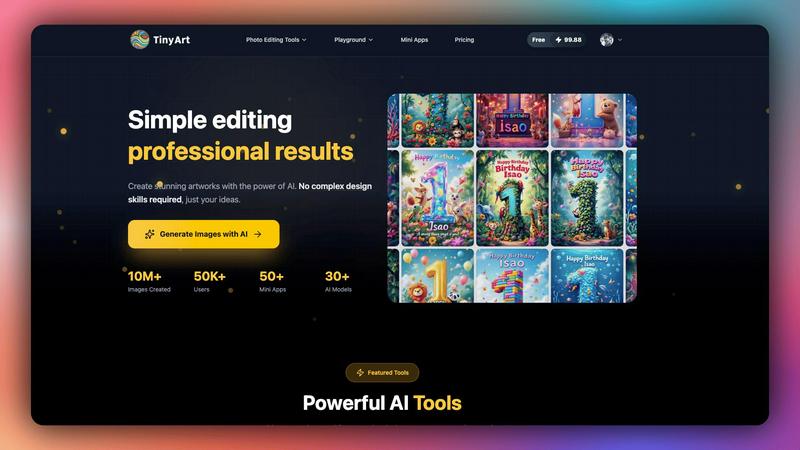
Tinyart.io simplifies image creation with powerful AI tools, enabling stunning artwork without any design skills.
Last updated: March 2, 2026
Visual Comparison
BRCKS

Tinyart.io
Feature Comparison
BRCKS
BRCKS Bot for WhatsApp
Update projects and manage tasks without ever leaving WhatsApp. Simply text the BRCKS Bot to create tasks, check off checklist items, or get instant project updates. This feature ensures all critical site communication flowing through WhatsApp is automatically captured and organised in BRCKS, eliminating app-switching and keeping the entire team aligned in real-time from the tool they already use.
Free Subcontractor Access
Invite every trade and subcontractor to their relevant projects at no extra cost. They receive full access to project checklists, calendars, files, and schedules, fostering collaboration and accountability without adding to their overhead. This removes the traditional barrier of software cost per user, enabling true whole-team adoption and ensuring everyone works from the same, up-to-date information.
Dedicated Client Portal
Provide homeowners and clients with a beautiful, read-only view of their project's progress. They can see key updates, milestone photos, and general progress without gaining access to internal tools or sensitive communications. This keeps clients informed and engaged, building trust, while preventing them from disrupting the team's operational workflow with direct messages across multiple channels.
Unified Project Feed & Checklists
See all project updates, messages, and actions in one chronological feed for complete oversight. Combine this with dynamic digital checklists to assign, track, and monitor task progress. This replaces paper lists and mental notes, ensuring nothing is missed, providing clear accountability, and giving managers a real-time view of site progress and pending actions.
Tinyart.io
Image Generator
The image generator feature allows users to create stunning visuals from text prompts effortlessly. This tool harnesses advanced AI models to translate ideas into images, making it ideal for those with no design background.
Background Remover
Tinyart.io's background remover instantly isolates image subjects, enabling users to process multiple files at once. This feature eliminates the tediousness of manual editing, streamlining the workflow for product photos and social media graphics.
Upscale Image
This feature enhances image resolution without compromising quality. Users can upscale their visuals to meet various requirements, ensuring that every image looks professional, whether for print or online use.
Smart Mini Apps
Tinyart.io offers a suite of mini apps designed to address specific needs, such as creating ID photos, restoring old images, or swapping faces in pictures. These tools provide users with versatile solutions tailored to diverse creative challenges.
Use Cases
BRCKS
Streamlining Daily Site Communication and Task Management
Site managers and foremen use BRCKS to replace chaotic WhatsApp groups and radio calls. They create daily checklists for each trade, and workers update progress via the BRCKS Bot directly from WhatsApp. All updates flow into the central platform, giving the manager a live view of task completion without chasing people down, saving hours daily and preventing tasks from being overlooked.
Managing Subcontractor Coordination and Handovers
Main contractors use BRCKS to coordinate multiple subcontractors seamlessly. By inviting all trades for free, they ensure plumbers, electricians, and carpenters all see the same schedule and task lists. This clarity smooths handovers, reduces downtime, and provides a clear audit trail of who did what and when, minimising disputes over delays or incomplete work.
Enhancing Client Reporting and Transparency
Builders and renovators use the Client Portal to provide structured, professional updates to homeowners. Instead of sending sporadic photos through text, they can share milestone achievements, progress galleries, and key decisions in one dedicated space. This manages client expectations proactively, reduces anxiety-driven calls, and builds a reputation for organised, transparent communication.
Centralising Project Documentation and Meeting Records
Project managers use BRCKS as a single source of truth for all project records. They upload files, site photos, and meeting notes directly to the project. The meeting recordings feature ensures action points and discussions are never forgotten. This creates a searchable historical record for snagging, compliance, and post-project reviews, protecting the business.
Tinyart.io
E-commerce Product Photography
Tinyart.io is perfect for e-commerce businesses that need to create eye-catching product images. With features like background removal and image upscaling, users can produce professional-grade photos quickly.
Social Media Marketing
Marketers can leverage Tinyart.io to generate engaging visuals for social media campaigns. The platform's intuitive design tools and templates allow for rapid creation, ensuring timely content delivery.
Content Creation for Blogs
Content creators can utilize Tinyart.io to enhance their blog posts with custom images that align with their written content. The AI-powered image generator helps in creating visuals that resonate with the audience.
Personal Projects and Art
Individuals pursuing personal art projects can benefit from Tinyart.io's creative tools. Whether it's for digital art or photo editing, the platform provides an easy way to bring personal visions to life without extensive technical skills.
Overview
About BRCKS
BRCKS is a practical, no-disruption construction project management and communication platform built specifically for residential builders, tradespeople, and homeowners. It solves the fundamental problem of chaotic, scattered project information by centralising every critical element—from daily site conversations and task checklists to meeting notes, files, and photos—into one single, controlled platform. Designed for real construction teams, BRCKS eliminates the reliance on fragmented tools like WhatsApp, email, and scattered documents, where crucial details and decisions are easily lost, leading to delays, rework, and miscommunication. Its core value proposition is seamless integration with existing workflows; your team can continue using WhatsApp as normal, while BRCKS automatically organises all updates into a structured project hub. This approach requires no training, causes zero disruption, and saves teams an average of over two hours daily. With unique features like free access for unlimited subcontractors and a dedicated client portal, BRCKS provides one platform for the entire project team, ensuring clarity, accountability, and a clear record from first fix to final sign-off.
About Tinyart.io
Tinyart.io is a groundbreaking AI-powered platform tailored for developers, marketers, and creators eager to craft visually striking content without needing advanced design expertise. Unlike conventional AI image generators that focus solely on image creation, Tinyart.io integrates both creation and editing functionalities, allowing users to convert raw concepts into market-ready visuals swiftly. The platform features a developer-first design editor that includes smart templates, automatic brand color detection, and one-click resizing capabilities for various platforms. With over 10 million images generated and a vibrant community of 50,000 users, Tinyart.io is reshaping how non-designers can produce high-quality visuals efficiently. Utilizing advanced AI technologies, the platform empowers users to create impressive artworks easily, optimizing their creative processes while saving both time and money.
Frequently Asked Questions
BRCKS FAQ
How does BRCKS work with WhatsApp?
Your team continues using WhatsApp exactly as they do now. You add the BRCKS Bot as a contact in your project WhatsApp group. When anyone sends a relevant update, photo, or task message, the BRCKS Bot automatically interprets it and logs it into the correct project within the BRCKS platform. This means no behaviour change for the team, but all information becomes organised and accessible.
Do my subcontractors really get free access?
Yes. You can invite an unlimited number of subcontractors and tradespeople to collaborate on projects at no additional cost to you or to them. They get full access to the features they need for their work on your project, like checklists, calendars, and files. You only pay for seats for your core, internal team members.
Is the Client Portal secure and private?
Absolutely. The Client Portal is a read-only, walled-garden view designed specifically for client communication. Clients can only see the information, photos, and updates you explicitly choose to share with them. They cannot see internal team chats, financials, or any sensitive operational discussions, keeping your internal workflow private.
What if my team isn't tech-savvy?
BRCKS is built for construction teams, not tech experts. The primary interface for daily updates is WhatsApp, which most people already know how to use. The web platform is designed to be simple and intuitive. The zero-training, zero-disruption approach means adoption is quick and natural, focusing on solving communication problems rather than learning complex software.
Tinyart.io FAQ
How does Tinyart.io work?
Tinyart.io uses advanced AI algorithms to generate and edit images based on user inputs. Users can create visuals from text prompts, edit existing images, and utilize various tools designed for specific tasks.
Is Tinyart.io suitable for beginners?
Yes, Tinyart.io is designed for users of all skill levels. Its intuitive interface and smart features make it accessible for beginners who may not have any prior design experience.
Can I use Tinyart.io for commercial purposes?
Absolutely. Tinyart.io allows users to create images that can be used for commercial purposes, including marketing and product photography, making it a valuable tool for businesses.
Are there any limitations on image generation?
While Tinyart.io offers robust capabilities, users should be aware of any potential limitations based on their subscription plan. It's advisable to check the platform for specific usage terms and conditions.
Alternatives
BRCKS Alternatives
BRCKS is a construction project management and communication software designed to centralise site activity. It falls into the productivity and management category, specifically serving residential builders, tradespeople, and homeowners by keeping conversations, tasks, and documents in one organised platform. Users may explore alternatives for various reasons. These can include budget constraints, the need for different feature sets like advanced scheduling or accounting integration, or a requirement for software that works on specific devices or scales for larger commercial projects. It's a common step to ensure the tool fits the unique demands of a business. When evaluating other options, focus on core needs. Key considerations should be ease of use for on-site teams, robust communication tools to replace scattered emails and messages, reliable document and photo management, and clear task tracking. The right alternative should solve the specific communication and organisation gaps your projects face.
Tinyart.io Alternatives
Tinyart.io is a cutting-edge AI-powered platform that enables users—from developers to marketers—to create stunning, professional-quality images without needing extensive design skills. As a productivity and management tool, it streamlines the visual creation process by providing advanced features like an image generator, background remover, and smart mini apps. Users often seek alternatives to Tinyart.io for various reasons, including pricing, specific feature sets, or platform compatibility. When evaluating alternatives, it’s essential to consider factors such as ease of use, the range of available tools, integration options, and community support to ensure that the chosen solution effectively meets creative needs and enhances workflows.