Image3D AI vs Proofapp
Side-by-side comparison to help you choose the right product.

Image3D AI
Transform any 2D image into a high-quality 3D model in minutes, no skills required.
Last updated: March 1, 2026

Proofapp
Transform feedback with visual comments on any webpage, streamlining design reviews and boosting productivity.
Last updated: March 4, 2026
Visual Comparison
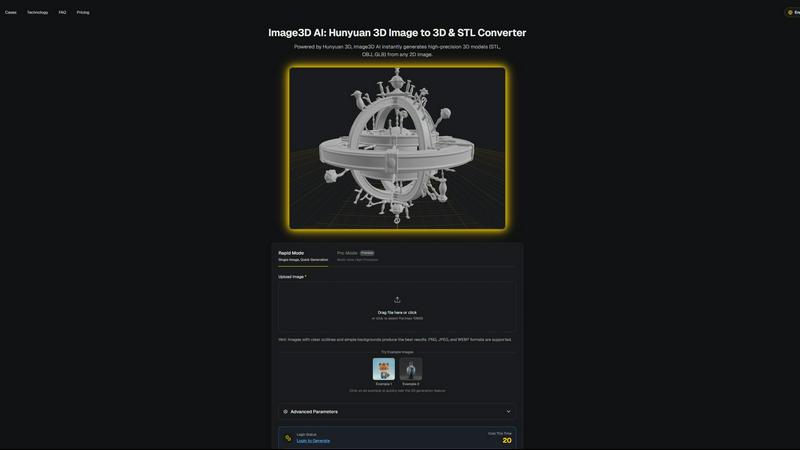
Image3D AI
Proofapp

Feature Comparison
Image3D AI
Hunyuan 3D-Powered AI Engine
At the core of Image3D AI is Tencent's Hunyuan 3D engine, a state-of-the-art technology that performs intelligent, physically accurate 3D reconstructions from 2D data. This advanced AI inference allows for single-image generation, understanding depth, geometry, and texture from a single photograph. It ensures the output models are high-fidelity and production-ready, setting it apart from simpler conversion tools that produce low-quality meshes.
Dual Generation Modes for Flexibility
The platform offers two distinct modes to match different project needs and quality requirements. Rapid Mode is perfect for quick iterations, generating a 3D model from a single image in seconds. Pro Mode utilizes multi-view images (front, side, back) to enable a more precise and detailed reconstruction, which is ideal for complex objects like products or shoes where accuracy is paramount.
Multi-Format Export for Any Workflow
Image3D AI exports models in the industry-standard formats you need. Choose from STL for immediate 3D printing, OBJ for editing in traditional 3D software like Blender or Maya, and GLB for modern web, AR, and real-time applications. This versatility ensures the generated assets seamlessly integrate into your existing professional or personal workflow without requiring additional conversion steps.
Optimized Input Guidance and Best Practices
To guarantee the best results, the tool provides clear, practical guidance. It recommends using images with clear outlines and simple backgrounds, offers free example images for testing, and includes a comprehensive Best Practices Guide. This support system helps users understand how to prepare their source material to boost conversion quality by up to 90%, making the technology accessible and effective for everyone.
Proofapp
Visual Commenting
Proofapp enables users to click anywhere on a website screenshot to leave contextual feedback, eliminating vague instructions like "top left, under the nav." This feature ensures that comments are precise and easily understood, leading to improved communication.
Multi-Breakpoint Testing
Automatically capture and review your website at both desktop and mobile breakpoints. This feature allows for comprehensive testing and feedback collection, ensuring that designs are optimized for all devices without any additional setup.
Real-time Collaboration
Experience instantaneous feedback with real-time commenting. As team members and clients leave their thoughts, you can reply, resolve issues, and track progress together, significantly speeding up the revision process.
Secure Share Links
Generate secure, expirable links to share projects with clients. This feature allows clients to view and comment on the design without needing an account, making the process more accessible and user-friendly.
Use Cases
Image3D AI
3D Printing and Prototyping
Transform a simple sketch or photo of an object into a ready-to-print STL file. Hobbyists, engineers, and product designers can rapidly prototype ideas, create custom parts, or produce artistic models for resin or FDM 3D printers without needing to learn complex CAD software, drastically speeding up the iteration from concept to physical object.
Game Development and Asset Creation
Game developers and indie creators can generate game-ready 3D assets directly from character concept art, prop sketches, or environment references. With support for PBR materials and low-poly mode options, these assets can be quickly imported into engines like Unity or Unreal Engine, accelerating the content creation pipeline for games and interactive experiences.
E-commerce and Product Visualization
Online retailers can convert flat product photographs into interactive 3D models and AR previews. This enhances online shopping experiences by allowing customers to view items from every angle, leading to increased engagement, reduced return rates, and a more modern, interactive showcase compared to static 2D images.
Architectural Design and Presentation
Architects and interior designers can quickly generate basic 3D massing models or detailed site elements from sketches or reference photos. This saves immense modeling time from scratch, allowing for faster client presentations, concept visualizations, and efficient integration of site-specific objects into larger digital models.
Proofapp
Freelancers
Freelancers can leverage Proofapp to streamline client feedback, presenting a professional interface that saves time and reduces the number of revisions. The visual feedback mechanism helps ensure that clients' requests are clearly articulated and easily actionable.
Small Development Teams
Small development teams can use Proofapp to manage client approvals efficiently without the burden of high costs. The platform’s visual comment feature minimizes miscommunication and helps teams ship projects faster.
Design Agencies
Design agencies can benefit from Proofapp's multi-page support and collaborative tools, allowing them to manage multiple client projects seamlessly. By keeping all feedback organized in one dashboard, agencies can enhance their workflow and deliver better results.
Marketing Teams
Marketing teams can utilize Proofapp to review landing pages and campaigns visually with the entire team. This visual approach facilitates clearer communication and ensures that all stakeholders are aligned on project goals.
Overview
About Image3D AI
Image3D AI is a groundbreaking solution that solves the complex, time-intensive problem of 3D asset creation. It is an AI-powered platform that instantly converts standard 2D images into production-ready 3D models, eliminating the need for manual modeling skills or expensive software. Powered by Tencent's advanced Hunyuan 3D engine, it delivers high-precision results in about 60 seconds. The tool is designed for a wide range of users, from hobbyists and 3D printing enthusiasts to professional game developers, e-commerce managers, and architects. Its core value proposition is democratizing 3D content creation; anyone with a photograph or sketch can now generate usable 3D files (STL, OBJ, GLB) for physical printing, game development, architectural visualization, or online AR showcases. By streamlining this traditionally technical process into a simple upload-and-generate workflow, Image3D AI dramatically enhances creativity, accelerates project timelines, and boosts productivity across multiple industries.
About Proofapp
Proofapp is a visual feedback and website review platform designed to enhance collaboration among designers, developers, and their clients. With its user-friendly interface, Proofapp allows users to upload any website URL and automatically captures screenshots for both desktop and mobile views. This streamlines the feedback process by enabling reviewers to leave comments directly on the design, eliminating the confusion that often arises from traditional email communication. By facilitating real-time collaboration, Proofapp helps teams address feedback quickly and efficiently. Its robust features, including Slack integration and customizable options, make it an ideal solution for freelancers, small teams, and agencies managing multiple projects. Ultimately, Proofapp transforms the feedback process from a chaotic, email-driven experience into a structured, visual, and actionable workflow.
Frequently Asked Questions
Image3D AI FAQ
What image formats and quality work best?
For optimal image to 3D conversion, use high-contrast PNG, JPEG, or WEBP images (max 10MB) with clear outlines and a simple, uncluttered background. Avoid blurry, low-light, or occluded subjects. High-quality source images with a well-defined silhouette yield the most accurate and clean 3D geometry, especially for STL printing.
What is the difference between Rapid Mode and Pro Mode?
Rapid Mode uses a single image for fast generation, ideal for logos, sketches, or simple objects. Pro Mode requires multiple images (multi-view) of an object from different angles (e.g., front, side, top) to perform a more physically accurate and detailed 3D reconstruction. Pro Mode is recommended for complex real-world objects where precision is critical.
Which output file format should I choose?
The choice depends on your intended use. Select .STL for 3D printing, as it is the universal standard for slicer software. Choose .OBJ if you plan to edit the model further in 3D editing software. Opt for .GLB if you need a modern, compact file for web display, AR applications, or game engines, as it contains the model, textures, and materials in one file.
Do I need any 3D modeling experience to use this tool?
No, absolutely no 3D skills are required. Image3D AI is designed specifically to make 3D model generation accessible to everyone. The process is as simple as uploading an image, selecting your mode, and downloading the generated 3D file. The platform's guidance and best practices help users of all skill levels achieve great results.
Proofapp FAQ
How does Proofapp improve the feedback process?
Proofapp enhances the feedback process by allowing users to leave visual comments directly on website screenshots. This reduces miscommunication and ensures that feedback is specific and actionable.
Is there a free trial available?
Yes, Proofapp offers a 2-month free trial with full access and no credit card required. This allows potential users to explore the platform's features before committing to a paid plan.
Can I integrate Proofapp with other tools?
Absolutely! Proofapp features Slack integration, enabling real-time notifications and updates directly within your team’s communication platform, enhancing collaboration.
What security measures does Proofapp have?
Proofapp offers enterprise-level security features, including role-based permissions and audit logs. This ensures that data handling is secure and that users can collaborate confidently without compromising sensitive information.
Alternatives
Image3D AI Alternatives
Image3D AI is a powerful tool in the category of AI-powered 3D modeling software. It specializes in converting 2D photographs into detailed, textured 3D models, streamlining asset creation for 3D printing, game development, and design projects. Users often explore alternatives for various practical reasons. These can include budget constraints, the need for different export formats or integration capabilities, a preference for a different user interface, or a requirement for more advanced manual editing tools that go beyond AI generation. When evaluating other options, it's wise to consider the core factors that impact your workflow. Key aspects to compare are the quality and accuracy of the 3D output, supported file formats, the level of post-generation control offered, pricing models and subscription terms, and the specific use cases the software is optimized for, such as prototyping versus final production assets.
Proofapp Alternatives
Proofapp is a visual feedback and website review platform designed to enhance collaboration among designers, developers, and clients. By capturing screenshots of websites and allowing users to pin comments directly on the design, it streamlines the feedback process and ensures clarity in communication. This tool falls under the design tools category, catering to professionals who prioritize efficiency and organization in their workflow. Users often seek alternatives to Proofapp for various reasons, including pricing structures, feature sets, or specific platform requirements. As businesses and freelancers evolve, their needs may shift, prompting them to explore other options that align better with their project demands or budget constraints. When choosing an alternative, consider factors such as usability, integration capabilities, customer support, and any unique features that may enhance your design review process.