ImaginePro vs RemoveTexts
Side-by-side comparison to help you choose the right product.

ImaginePro
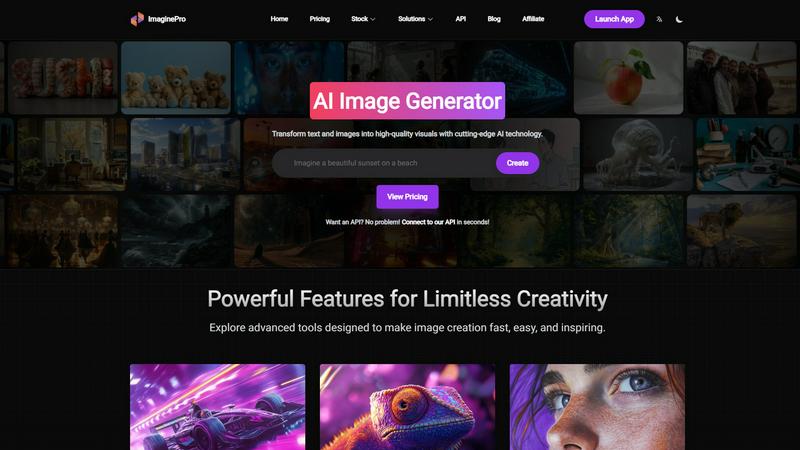
ImaginePro transforms your text and images into stunning, high-quality visuals in seconds using advanced AI technology.
Last updated: March 1, 2026

RemoveTexts
RemoveTexts is a free AI tool that instantly removes any text or watermark from your images with a simple brush.
Last updated: March 11, 2026
Visual Comparison
ImaginePro
RemoveTexts

Feature Comparison
ImaginePro
Instant Masterpieces
ImaginePro enables you to create professional-quality images in seconds using top-tier AI models. This feature is perfect for producing content across various platforms, ensuring that your visuals are always impressive and tailored to your needs.
Creative Control
With the creative control feature, users can fine-tune their images with precise style references, color adjustments, and various effects. This allows for customization at every detail level, ensuring that the final product aligns perfectly with your vision.
High-Quality Images
ImaginePro generates lifelike, high-resolution images that stand out in any context. This feature is ideal for commercial use, ensuring that your projects have a polished and professional finish, ready for immediate application.
Background Removal
Effortlessly remove backgrounds from your images with the background removal feature. This tool is perfect for creating product images for e-commerce, professional headshots, social media content, and graphic design projects, saving you time and effort in the editing process.
RemoveTexts
Paint to Remove
This feature gives you precise control over the text removal process. Simply upload your image and use a digital brush to paint directly over the specific words, watermarks, or captions you want to erase. The AI then processes only the painted areas, ensuring you can remove text selectively while keeping other desired text intact. It's perfect for targeted edits where auto-detection might be too broad.
Auto Remove All Text
For images cluttered with multiple text elements, this one-click feature is a massive time-saver. The AI automatically scans your entire image, detects every instance of text—including watermarks, subtitles, date stamps, and overlays—and removes it all simultaneously. It seamlessly reconstructs the background in each area, delivering a completely clean image in seconds without any manual selection required.
Edit & Replace Text
Go beyond simple removal by editing existing text directly within your image. This powerful feature allows you to change words or phrases, and the AI will generate new text that matches the original font style, size, and color. It intelligently blends the new text into the background, making it look as if it was part of the original image, which is ideal for updating graphics or correcting mistakes.
Remove Objects
While focused on text, RemoveTexts also provides a versatile object removal tool. You can erase unwanted visual elements like logos, people, or distracting objects from your photos. Using the same brush tool, you paint over the object, and the AI fills in the space by analyzing the surrounding pixels, effectively removing the element while preserving the natural look of the image background.
Use Cases
ImaginePro
Social Media Content Creation
ImaginePro is an excellent tool for social media managers and content creators, allowing them to quickly generate eye-catching images that enhance engagement on platforms like Instagram, Facebook, and Twitter.
E-commerce Product Listings
For online retailers, ImaginePro simplifies the creation of product images, enabling users to generate high-quality visuals that attract customers and improve conversion rates without the hassle of complex editing software.
Graphic Design Projects
Designers can leverage ImaginePro to create unique visuals for their projects, from promotional materials to digital art. Its intuitive interface and powerful features enable efficient design workflows.
Marketing and Advertising Campaigns
ImaginePro is an invaluable resource for marketers looking to produce compelling visuals for campaigns. With the ability to create stunning images quickly, teams can focus on strategy and messaging rather than getting bogged down in design details.
RemoveTexts
Cleaning Product Photos for E-commerce
Online sellers can use RemoveTexts to quickly clean up product images by erasing promotional watermarks, price tags, or distracting text overlays from supplier photos. This results in professional, brand-consistent imagery for their storefronts and marketing materials, helping products look their best and improving conversion rates without a graphic designer.
Preparing Professional Screenshots and Presentations
Professionals creating tutorials, reports, or presentations often need clean screenshots. RemoveTexts allows them to easily brush away irrelevant UI elements, browser tabs, personal data, or system watermarks from screenshots. This ensures the focus remains on the intended content, making documents and slides look polished and professional.
Redacting Sensitive Information
Legal, real estate, and administrative professionals frequently need to share documents while protecting private data. RemoveTexts provides a fast way to redact names, addresses, account numbers, or other sensitive text from scanned documents or photos before distribution, helping maintain confidentiality and comply with privacy regulations.
Creating Clean Social Media and Marketing Graphics
Content creators and marketers can repurpose existing images by removing outdated captions, website URLs, or competitor logos. This feature is perfect for refreshing old graphics, creating versatile visual assets from branded templates, or simply removing unwanted text from memes and photos to make them more shareable and on-brand.
Overview
About ImaginePro
ImaginePro is a groundbreaking AI image generator that empowers users to transform their concepts into visually stunning graphics in mere seconds. Tailored for professionals, designers, and creatives, this innovative tool leverages state-of-the-art AI technology to simplify the creative process. Whether you need captivating visuals for social media, e-commerce platforms, or personal projects, ImaginePro streamlines the creation of polished images without requiring extensive editing skills. Users can effortlessly generate images from straightforward text prompts, remove backgrounds with ease, and strategically position text behind subjects for a polished appearance. With flexible pricing plans—Free, Standard, and Premium—ImaginePro is designed to accommodate everyone's needs, from hobbyists to commercial users. It combines a user-friendly interface with powerful features, allowing you to experience the magic of your imagination brought to life through high-quality visuals.
About RemoveTexts
RemoveTexts is a free, AI-powered online tool designed to solve a common digital problem: removing unwanted text and elements from images quickly and professionally. It eliminates the need for complex software like Photoshop by offering a simple, one-click solution. The tool uses advanced deep learning inpainting technology, similar to that pioneered by industry leaders, to intelligently detect text and seamlessly reconstruct the background, leaving no trace behind. It's built for anyone who works with images, from marketers and social media creators needing clean product photos and social graphics, to professionals redacting sensitive information from documents, or individuals wanting to tidy up personal screenshots and memes. The core value proposition is delivering high-quality, 4K output results in under 30 seconds without requiring any technical skills or design expertise, making professional image editing accessible to everyone.
Frequently Asked Questions
ImaginePro FAQ
What types of images can I create with ImaginePro?
ImaginePro allows you to create a wide range of images, from realistic product photos to imaginative digital art, catering to various needs whether for personal or commercial use.
Is there a learning curve to using ImaginePro?
Not at all! ImaginePro features an intuitive web interface that makes it easy for both beginners and experienced users to generate images with minimal effort and no complex prompts required.
Can I use ImaginePro for commercial projects?
Yes, ImaginePro is designed for both personal and commercial use, providing high-quality images suitable for marketing, advertising, e-commerce, and more.
What if I need assistance with using ImaginePro?
ImaginePro offers robust support and resources, including a blog and API documentation, to help users navigate the platform and maximize their creative potential.
RemoveTexts FAQ
How does RemoveTexts work?
RemoveTexts uses a sophisticated deep learning model called an inpainting neural network. When you paint over text or use the auto-remove feature, the AI analyzes the pixels surrounding the selected area. It then intelligently predicts and generates a new background that seamlessly matches the texture, color, and patterns of the original image, effectively filling in the space where the text was located without leaving any traces.
What image formats and sizes are supported?
The tool supports common image formats including JPG, PNG, and WebP. You can upload files up to 10 MB in size. This covers most high-resolution images from smartphones, cameras, and screenshots, ensuring the tool is versatile enough for a wide range of projects while maintaining a fast processing time.
Is RemoveTexts really free to use?
Yes, RemoveTexts is a free online tool. You can upload images, remove text or objects, and download the processed results without any cost or subscription. The service is designed to be accessible to everyone, and there is no watermark added to the images you download after using the tool.
What are the limitations of the tool?
The primary limitations are based on content and file size. The tool does not support processing NSFW (Not Safe For Work) content. Additionally, it is not designed for the removal of copyrighted logos or trademarks, as this could infringe on intellectual property rights. For optimal performance, ensure your uploaded image is under the 10 MB size limit.
Alternatives
ImaginePro Alternatives
ImaginePro is an advanced AI image generator designed to transform text and images into high-quality visuals quickly and efficiently. As a tool primarily for professionals, designers, and creatives, it streamlines the process of creating stunning images suitable for various applications, such as social media and marketing. Despite its impressive capabilities, users often seek alternatives due to factors such as pricing, feature sets, or specific platform requirements that better align with their needs. When considering alternatives to ImaginePro, it's essential to evaluate the features offered, the level of creative control, and the quality of the generated images. Additionally, users should assess pricing structures to ensure the chosen solution fits their budget, whether for personal projects or commercial use. Ultimately, the right alternative should provide similar or enhanced functionalities while catering to individual preferences and requirements.
RemoveTexts Alternatives
RemoveTexts is an AI-powered image editing tool that specializes in removing text and objects from any image in seconds. It belongs to the category of automated, AI-driven photo editing software designed for simplicity and speed, eliminating the need for complex programs like Photoshop. Users often explore alternatives for various reasons. Some may have specific budget constraints or require a different pricing model. Others might need features that cater to a particular workflow, such as batch processing or integration with other platforms. The choice of operating system or a preference for a one-time purchase over a subscription can also drive the search for different solutions. When evaluating other options, it's crucial to consider core needs. Key factors include the accuracy and quality of the AI's inpainting technology, the speed of processing, output resolution, and ease of use. Also, assess the range of features, such as object removal or text replacement, and ensure the tool supports the languages and file types you work with most often.