Facejam vs Imgezy
Side-by-side comparison to help you choose the right product.

Facejam
Transform selfies into professional headshots in minutes with FaceJam's AI-powered photo generation.
Last updated: February 26, 2026

Imgezy
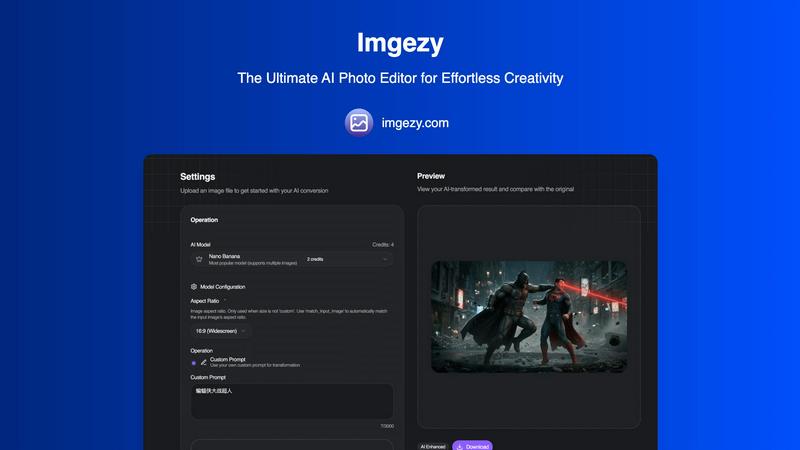
Imgezy is an AI photo editor that instantly removes objects and changes backgrounds for you.
Last updated: March 1, 2026
Visual Comparison
Facejam

Imgezy
Feature Comparison
Facejam
100+ Professional Styles
FaceJam boasts over 100 professional styles to choose from, allowing users to find the perfect look that resonates with their industry. From corporate to creative, you can effortlessly select a template that reflects your professional persona.
Quick Turnaround
With FaceJam, you can generate stunning headshots in just minutes. Forget about the lengthy processes associated with traditional photography. Simply upload your selfies, choose a style, and download your polished images immediately.
High-Quality Output
The AI technology behind FaceJam ensures that the headshots produced are of high resolution and comparable to those taken by professional photographers. You can expect images that look authentic and studio-quality, enhancing your personal brand.
Privacy and Ownership
When using FaceJam, you retain full ownership of your AI-generated photos. Your uploaded images are private, and the platform guarantees that they will not be used to train its models or shared with third parties.
Imgezy
AI-Powered Object Removal
This feature intelligently identifies and seamlessly removes any unwanted element from your photos, such as photobombers, distracting objects, power lines, or blemishes. The AI doesn't just delete; it reconstructs the background with pixel-perfect accuracy, ensuring no trace is left behind. This allows you to salvage otherwise perfect shots that were marred by minor distractions, saving you from having to retake photos or perform complex manual edits.
Instant Background Replacement
Change the backdrop of any image with just a few words. Whether you need a solid color for a product shot, a professional office setting for a portrait, or a tropical beach for a vacation photo, Imgezy can swap backgrounds instantly. The AI carefully isolates the subject and blends it into the new environment, creating a natural and convincing composite without the need for precise manual selection or masking tools.
One-Click Photo Enhancement
Automatically improve the overall quality of your images with smart enhancement. This feature analyzes your photo and intelligently adjusts colors, contrast, lighting, and sharpness to make the image pop. It's designed to correct common issues like dull colors, poor exposure, or soft focus, transforming a good photo into a great one with a single click, ensuring your images always look their best.
Batch Processing for Efficiency
Save significant time on large projects by editing multiple photos at once. This feature is essential for professionals and businesses, such as e-commerce stores needing to process dozens of product images. You can apply consistent edits, like background changes or enhancements, across an entire set of photos simultaneously, streamlining your workflow and maintaining a uniform look for all your visual assets.
Use Cases
Facejam
Professional Networking
FaceJam is perfect for creating polished LinkedIn headshots that stand out. A professional image can significantly enhance your networking opportunities and make a lasting impression on potential employers or clients.
Corporate Branding
Businesses can utilize FaceJam to generate consistent and professional images for team pages, company directories, and pitch decks. This helps maintain a unified brand image across various platforms.
Personal Branding
For entrepreneurs and freelancers, having a cohesive set of professional headshots for websites and social media is crucial. FaceJam allows you to create a series of images that align with your brand identity, ensuring consistency.
Marketing Materials
FaceJam headshots can be incorporated into marketing materials, such as brochures, email signatures, and business cards. High-quality images can elevate your marketing efforts and present a more professional image to clients.
Imgezy
E-Commerce Product Listings
Online sellers can use Imgezy to create clean, professional product photos at scale. Quickly remove distracting backgrounds and replace them with pure white or branded settings, and eliminate dust spots or imperfections from items. This results in a cohesive, high-quality catalog that boosts product appeal and credibility, directly influencing customer trust and conversion rates without a costly photography studio.
Social Media Content Creation
Content creators and influencers can rapidly produce eye-catching visuals for platforms like Instagram, TikTok, and Facebook. Easily remove unwanted objects from travel photos, change backgrounds to match a theme, or enhance selfies and food pictures to stand out in crowded feeds. This enables consistent, high-quality posting that engages followers and strengthens a personal or brand aesthetic with minimal effort.
Real Estate Photography
Real estate agents can enhance property listing photos to make them more attractive to potential buyers. Use Imgezy to remove clutter, trash bins, or parked cars from the exterior, change a gloomy sky to a bright blue one, and improve interior lighting. These subtle yet powerful edits present the property in its best possible light, helping it sell faster and potentially at a higher value.
Personal Photo Restoration and Improvement
Anyone with old, damaged, or imperfect personal photos can use Imgezy to restore and improve them. Repair blurry areas, remove scratches or stains, and enhance faded colors from old scanned photographs. You can also edit recent family photos by removing strangers in the background or improving the overall composition, preserving precious memories in a polished and beautiful way.
Overview
About Facejam
FaceJam is a cutting-edge AI tool that transforms your selfies into professional-grade headshots, ideal for various business and personal branding needs. By simply uploading a few photos of yourself and selecting from over 50 tailored styles, you can generate high-quality images in mere minutes. This innovative platform caters to individuals across multiple sectors, including real estate, law, consulting, and creative industries, providing stylized options that align with industry standards. FaceJam eliminates the need for costly photoshoots, allowing users to bypass the hassle of scheduling appointments and waiting for edits. With a focus on speed, cost-effectiveness, and realistic results, FaceJam ensures that you can present yourself professionally across platforms like LinkedIn, resumes, and corporate directories, all while maintaining ownership and privacy of your uploaded images.
About Imgezy
Imgezy is the definitive AI-powered photo editing solution designed to eliminate the complexity and time traditionally associated with professional image manipulation. It serves as a smart creative partner for anyone who needs to edit photos, from complete beginners to seasoned professionals. The core value proposition is simple: achieve professional-grade results without needing professional skills or software. By leveraging advanced artificial intelligence, Imgezy translates simple text descriptions into powerful edits. You can instruct the tool to remove unwanted objects, change backgrounds, or enhance photo quality, and it executes these tasks in seconds. This solves the common problems of tedious manual editing, expensive software subscriptions, and the steep learning curve of programs like Photoshop. Trusted by a community of over 200,000 users, Imgezy is particularly valuable for e-commerce sellers, social media content creators, travel photographers, and marketing professionals who require high-quality, polished images quickly and efficiently to enhance their visual content.
Frequently Asked Questions
Facejam FAQ
How does your AI headshot generator work?
FaceJam operates through a straightforward two-step process: upload your selfies and select your desired template. This simplicity allows for quick and efficient headshot generation without the need for a photographer.
What do you do with my uploaded photos?
The photos you provide are solely used to train the AI to create accurate representations of you. Your images are never utilized for improving the AI model or for other users, ensuring your privacy and data security.
How many good photos can I expect?
FaceJam guarantees at least one high-quality image in every pack. Your results may vary depending on the quality of the photos you upload, but many users report receiving 5-10 exceptional images with careful adherence to guidelines.
Who owns my AI photos?
You maintain complete ownership of your AI-generated photos. FaceJam grants you full commercial rights to use the images however you see fit, ensuring that your personal branding remains under your control.
Imgezy FAQ
How does Imgezy's AI editing work?
Imgezy uses advanced machine learning models trained on millions of images. When you upload a photo and provide a text prompt (like "remove the car"), the AI analyzes the image, identifies the relevant elements, and executes the edit by understanding the context and content of both the image and your instruction. It then reconstructs the image seamlessly, delivering a natural-looking result in seconds.
Do I need any design experience to use Imgezy?
No, you do not need any prior design or photo editing experience. Imgezy is built specifically for users of all skill levels. The interface is intuitive, and the process is driven by simple text descriptions. You describe what you want changed, and the AI handles the complex technical execution, allowing anyone to achieve professional-looking edits.
What image formats does Imgezy support?
Imgezy supports all major image formats, including JPG, PNG, and WebP. You can upload photos from your computer, drag and drop them into the tool, and download your edited results in high-resolution formats without any loss of quality, ensuring your final images are ready for any use, from web to print.
Is there a limit to how many images I can edit?
Yes, editing is based on a credit system. Each edit consumes a certain number of credits, which vary by the complexity of the task and the AI model used. Different subscription plans offer different monthly credit allowances. For example, the Basic plan provides 200 credits (approximately 100 images per month), while the Pro plan offers 800 credits for more intensive usage.
Alternatives
Facejam Alternatives
Facejam is an innovative platform that utilizes AI technology to transform your selfies into studio-quality headshots. This service falls under the image and photo category, making it an appealing solution for anyone seeking professional-quality images without the hassle of traditional photography. Users often look for alternatives to Facejam due to various reasons, including pricing concerns, specific feature requirements, or platform compatibility. When selecting an alternative, it is essential to consider the quality of the generated images, the range of styles available, the speed of the service, and the overall user experience. A good alternative should also prioritize user privacy and the security of personal photos.
Imgezy Alternatives
Imgezy is an AI-powered photo editor in the image enhancement category, known for its ability to edit photos using simple text commands. It specializes in tasks like object removal, background changes, and overall photo enhancement, making professional edits accessible to everyone. Users often explore alternatives for various practical reasons. These can include budget constraints, the need for different or more advanced features, compatibility with specific operating systems or workflows, or simply a desire to compare options before committing to a tool. When evaluating other photo editors, consider your primary needs. Key factors include the core AI capabilities for editing, the overall cost and subscription model, the platform availability (like web, desktop, or mobile), and the learning curve. Prioritizing what matters most for your projects will help you find the best fit.