
Kane AI vs URL to Any
Side-by-side comparison to help you choose the right product.

Kane AI
Kane AI simplifies quality engineering by enabling teams to create and evolve tests effortlessly using natural language.
Last updated: February 26, 2026

URL to Any
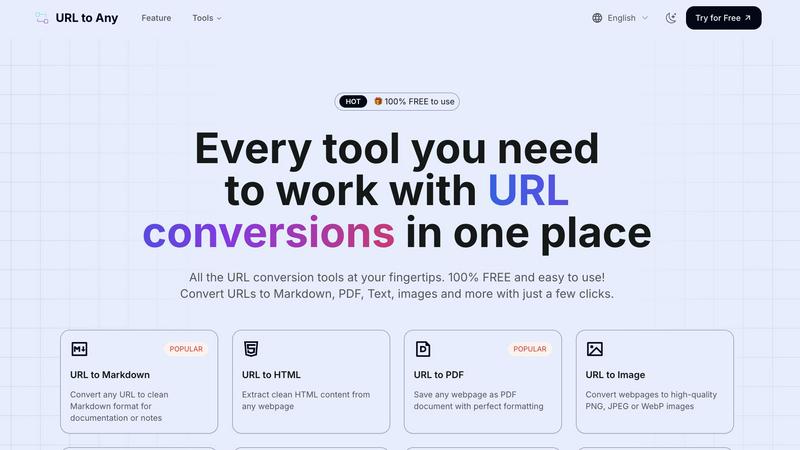
Transform any webpage into your desired format for easy offline access with URL to Any's versatile conversion tools.
Last updated: March 2, 2026
Visual Comparison
Kane AI

URL to Any
Feature Comparison
Kane AI
Intelligent Test Generation
Kane AI utilizes NLP-based instructions to facilitate intelligent test generation. Users can converse with Kane AI to create structured test cases from high-level objectives, reducing the complexity typically associated with test authoring. This feature allows teams to focus on critical testing aspects without needing extensive technical knowledge.
Unified Testing Framework
Kane AI provides an all-in-one testing framework that supports end-to-end testing across various layers, including databases, APIs, accessibility, and more. This unified approach ensures comprehensive testing coverage, allowing teams to validate every component of their applications seamlessly.
Smart Bug Detection and Reporting
With its advanced bug detection capabilities, Kane AI identifies failures during test execution and allows users to raise tickets directly in Jira or Azure DevOps. This streamlined process enhances communication within teams and ensures prompt resolutions, ultimately improving the software development lifecycle.
Dynamic Test Data Generation
Kane AI automatically generates test data during the authoring flow, eliminating the need for manual setup. This feature not only saves time but also ensures that tests are based on real-world scenarios, leading to more accurate and reliable testing outcomes.
URL to Any
URL to Markdown
Convert any webpage to clean Markdown format seamlessly. This feature is particularly helpful for documentation and note-taking, allowing users to retain the structure and essential elements of the original content without unnecessary formatting clutter.
URL to PDF
Easily save any webpage as a PDF document with impeccable formatting. This feature is perfect for users who need to create offline copies of web pages for reading, sharing, or archiving, ensuring that the content looks just as it does online.
URL to Image
Transform webpages into high-quality images in formats like PNG, JPEG, or WebP. This feature allows users to capture visual representations of web content, which is ideal for presentations, visual documentation, or social media sharing.
URL to QR Code
Generate QR codes from any URL for easy sharing. This feature simplifies the process of sharing links, especially in print media or presentations, enabling quick access to web content with a simple scan.
Use Cases
Kane AI
Effortless Test Case Creation
Teams can input various formats like text, JIRA tickets, PDFs, and even multimedia to create structured test cases with Kane AI. This flexibility allows for comprehensive and efficient test case authoring that adapts to existing documentation and artifacts.
Real-Time Network and API Testing
Kane AI enables teams to validate APIs in conjunction with UI flows, ensuring that all components work together flawlessly. With real-time network checks, teams can monitor responses and payloads, ensuring reliable application performance.
Continuous Testing Integration
By integrating seamlessly with tools like Jira and Azure DevOps, Kane AI allows teams to trigger test automation directly from conversations or tasks. This capability supports continuous testing practices, enhancing the development speed while maintaining quality.
Accessibility and Database-Ready Tests
Kane AI incorporates accessibility testing into its framework, promoting inclusive design without delaying release cycles. Additionally, it connects directly to databases, generating tests from real queries, leading to more robust testing strategies.
URL to Any
Content Creation
Writers and bloggers can use URL to Any to quickly convert web articles into Markdown or PDF formats, streamlining their research process and helping them compile resources efficiently.
Academic Research
Students and researchers can benefit from converting webpages to PDF or text formats for easy citation and reference. This ensures they have all necessary materials in a manageable format for their studies.
Web Development
Developers can utilize the URL to JSON or XML features to extract structured data from websites, which can be crucial for web applications and data analysis projects.
Marketing and SEO
Digital marketers can use the URL Meta Tags Extractor to analyze SEO elements of competitor websites, enabling them to improve their strategies and content performance based on real-time insights.
Overview
About Kane AI
Kane AI by TestMu AI is a pioneering GenAI-native testing agent tailored for Quality Engineering teams focused on high-speed development. This innovative tool empowers teams to author, manage, debug, and evolve tests using natural language, significantly cutting down the time and expertise needed to initiate and scale test automation. Unlike traditional low-code tools, Kane AI is engineered to navigate complex workflows seamlessly across various programming languages and frameworks without sacrificing performance. Its core value proposition lies in enabling intelligent test generation through natural language processing (NLP), allowing teams to interact conversationally with Kane AI to automate tests effortlessly. With features like intelligent test planning, multi-language code export, and support for API testing, Kane AI aligns testing efforts with business objectives while enhancing the overall quality of software delivery. Its ability to execute tests across over 3000 browsers, operating systems, and devices ensures comprehensive coverage and reliability, making it an invaluable asset for any development team striving for excellence.
About URL to Any
URL to Any is an innovative web content conversion tool that addresses the challenge of extracting and repurposing information from the vast expanse of the internet. In an era where information is scattered across countless websites, this tool offers users a straightforward and effective solution to convert any public webpage URL into various useful formats. Whether you need Markdown, PDF, plain text, images, HTML, or QR codes, URL to Any simplifies the process in just a few clicks. Its main value proposition lies in its remarkable accessibility, being completely free to use without any sign-ups, subscriptions, or hidden fees. The tool is designed for a diverse audience, including content creators, researchers, developers, and students, who require a reliable method to capture, archive, or reformat online information swiftly and effortlessly. By eliminating the complexities and costs generally associated with content conversion tools, URL to Any empowers users to focus on their work rather than the cumbersome mechanics of conversion.
Frequently Asked Questions
Kane AI FAQ
What programming languages does Kane AI support?
Kane AI is designed to handle complex workflows across all major programming languages and frameworks, ensuring that teams can utilize it regardless of their technology stack.
How does Kane AI ensure test coverage?
Kane AI executes tests across over 3000 browsers, operating systems, and devices, providing comprehensive coverage and improving the reliability of software releases.
Can Kane AI integrate with existing tools?
Yes, Kane AI integrates seamlessly with tools like Jira and Azure DevOps, allowing for a streamlined workflow from test authoring to execution without additional setup.
Is there a learning curve for new users?
Kane AI minimizes the learning curve by allowing users to author tests using natural language, which means that even those without extensive technical expertise can efficiently create and manage tests.
URL to Any FAQ
Is URL to Any completely free to use?
Yes, URL to Any is entirely free with no sign-up requirements, subscriptions, or hidden fees, making it accessible for everyone.
What formats can I convert URLs to?
You can convert URLs to a variety of formats, including Markdown, PDF, plain text, images (PNG, JPEG, WebP), JSON, XML, and more, catering to a wide range of needs.
How quickly can I get my converted content?
The tool is designed for instant processing, allowing users to receive their converted content in just seconds after submitting their URL and selecting a format.
Is my data safe when using URL to Any?
Yes, your data is processed securely and is not stored on our servers, ensuring your privacy and safety while using the tool.
Alternatives
Kane AI Alternatives
Kane AI is a groundbreaking GenAI-native testing agent designed specifically for high-speed Quality Engineering teams. It facilitates test authoring, management, debugging, and evolution through natural language, making test automation more accessible and efficient. As a solution in the AI Assistants category, Kane AI aims to reduce the time and expertise needed for teams to implement and scale their testing processes effectively. Users often seek alternatives to Kane AI for various reasons, including pricing considerations, feature sets, or specific platform requirements that may not be fully addressed by Kane AI. When exploring alternatives, it’s crucial to evaluate key factors such as compatibility with existing workflows, the range of supported programming languages, and the overall user experience. Additionally, consider how well the alternative can integrate with other tools in your tech stack to ensure a seamless testing process.
URL to Any Alternatives
URL to Any is a versatile web content conversion tool that allows users to transform any public webpage into various formats, including PDF, Markdown, plain text, and more. As an all-in-one solution in the realm of digital content management, it caters to a diverse audience, including researchers, developers, and content creators, who require quick access to web information in a usable format. Users often seek alternatives to URL to Any due to factors such as pricing, additional features, or specific platform compatibility that better fits their needs. When choosing an alternative, it's essential to consider the range of supported output formats, ease of use, speed of conversion, and whether the tool requires any sign-up or fees, as these elements can significantly impact the user experience.