
Nano Banana Pro vs Shrinkpad
Side-by-side comparison to help you choose the right product.

Nano Banana Pro
Nano Banana Pro generates consistent, 4K-ready AI images with advanced editing tools for creators.
Last updated: February 28, 2026

Shrinkpad
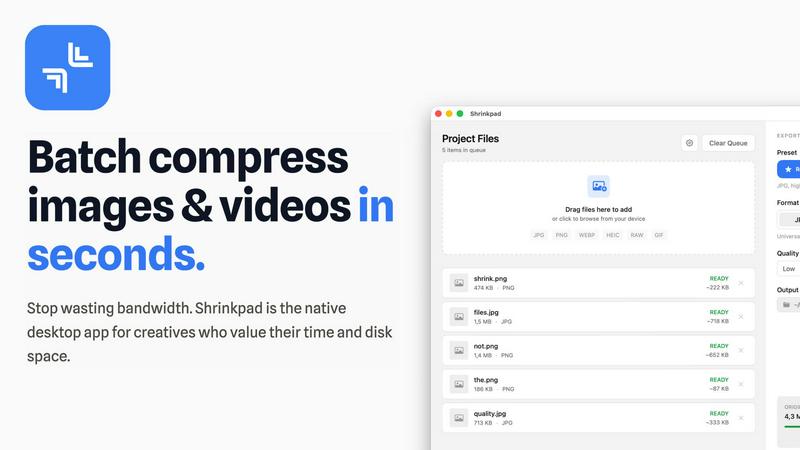
Shrinkpad compresses images and videos in bulk on Mac to save you time and disk space effortlessly.
Last updated: February 28, 2026
Visual Comparison
Nano Banana Pro

Shrinkpad
Feature Comparison
Nano Banana Pro
Perfect Character Consistency
Nano Banana Pro excels at maintaining flawless character continuity across multiple generated images. This is powered by advanced multi-image understanding technology, ensuring that a character's facial features, style, and attire remain consistent. This solves a major industry pain point, making the tool ideal for creating comic series, storyboards, or developing a stable brand mascot without manual correction between scenes.
15% Faster Generation Speed
Leveraging the gemini 3 pro image preview and an optimized architecture, Nano Banana Pro generates images 15% faster than standard models. This acceleration significantly reduces iteration time, allowing creators to experiment with prompts and refine concepts more rapidly, thereby streamlining the creative workflow from initial idea to final, polished asset.
Advanced Image-to-Image Editing
Go beyond text prompts with Nano Banana Edit. This powerful feature allows you to upload up to 10 existing images and transform them using AI-driven instructions. You can reimagine photos as artwork, add or remove elements, or completely alter a scene while intelligently preserving key features, offering unparalleled creative control over your existing visual assets.
11 Flexible Aspect Ratios & Superior Text Rendering
Nano Banana Pro supports 11 different aspect ratios, from a standard 1:1 square to a cinematic 21:9 ultrawide, ensuring perfect formatting for any platform or project. Coupled with an advanced text engine, it delivers crystal-clear, high-fidelity text within images, solving the common issue of garbled letters and making it perfect for creating posters, logos, and typography-based designs.
Shrinkpad
Intelligent Batch Compression
Shrinkpad automates the most complex part of compression: choosing the right settings. It automatically analyzes the visual complexity of each image and video to apply the perfect compression ratio, avoiding artifacts and preserving quality. You can process thousands of files in a single batch, mixing images and videos together, and the app will handle each format with optimal settings, saving you from manually guessing and adjusting sliders for every file.
Folder Mode & Smart Detection
Stop dragging files individually. With Folder Mode, you simply drop any folder onto Shrinkpad, and it instantly scans and identifies all supported media files within, including those in subfolders. It smartly detects over 50 formats, from common JPGs and PNGs to RAW photos and HEIC images, plus major video formats like MP4 and MOV. Non-media files are safely ignored, making bulk organization and compression incredibly straightforward.
Local Processing & Privacy-First Design
Every compression task happens locally on your Mac using native macOS frameworks. This means your original high-resolution assets, client work, or sensitive media are never uploaded to a remote server. You maintain complete control and privacy, while also benefiting from faster processing speeds since there's no bandwidth bottleneck for uploading and downloading large files.
Advanced Workflow Features for Professionals
Beyond basic compression, Shrinkpad includes power features tailored for professional workflows. It can automatically rename batches of files, strip metadata for cleaner assets, and handle massive file sizes without crashing. Optimized for Apple Silicon, it uses multi-threaded processing for lightning-fast performance, allowing you to quickly optimize app bundles, website assets, or project archives.
Use Cases
Nano Banana Pro
Serialized Content & Storyboarding
Creators working on comic books, graphic novels, or animation storyboards can rely on Nano Banana Pro for consistent character and scene generation. The character consistency feature ensures that protagonists and settings remain uniform across hundreds of panels, saving countless hours of manual adjustment and maintaining narrative coherence from the first page to the last.
Brand & Marketing Material Creation
Marketing teams and agencies can rapidly produce high-quality, on-brand visual assets. From social media posts in various aspect ratios to product mock-ups, ad banners, and branded character illustrations, the tool ensures visual consistency and professional quality across all marketing channels, enhancing brand recognition and campaign effectiveness.
Concept Art & Prototyping
Game developers, filmmakers, and product designers can use Nano Banana Pro to quickly visualize concepts. Generate multiple iterations of a character, environment, or item based on descriptive text. The fast generation speed and image-to-image editing allow for rapid prototyping and exploration of different artistic styles and directions during the pre-production phase.
Personalized Art & Portraits
Users can create unique, personalized artwork such as caricature portraits in specific styles (e.g., Pixar or hyper-realistic), fantasy avatars, or reimagined family photos. The detailed prompt control and editing tools enable the creation of custom gifts, social media profile pictures, or artistic pieces that reflect individual personality and style preferences.
Shrinkpad
Optimizing Website and App Assets
Developers and web designers can use Shrinkpad to batch compress hero images, product shots, icons, and promotional videos. Reducing these asset sizes by 70-90% directly leads to faster website load times, improved Lighthouse performance scores (like LCP), and smaller app bundle sizes, enhancing the end-user experience and SEO rankings without a tedious, file-by-file optimization process.
Managing Photography and Design Projects
Photographers and digital artists often export high-resolution files from Lightroom or Photoshop, resulting in massive folders. Shrinkpad allows them to export everything at full quality, then quickly run the entire project folder through compression. This reclaims terabytes of disk space over time while keeping a high-quality visual archive, perfect for client delivery, portfolio sites, or cloud backup.
Preparing Content for Social Media and Marketing
Content creators and marketing teams need to prepare dozens of images and video clips for social platforms, email campaigns, and ads. Shrinkpad streamlines this by letting them drop a week's worth of content into the app, compressing it all in one go to meet platform file size limits while maintaining visual fidelity, ensuring faster upload times and efficient use of storage.
Archiving and Cleaning Up Digital Libraries
Anyone with a large personal library of photos, screenshots, or home videos can use Shrinkpad for digital spring cleaning. Dragging the entire "Pictures" or "Downloads" folder into the app can compress years of accumulated media, freeing up significant space on a Mac's drive for new projects and files, all while keeping the library visually intact and accessible.
Overview
About Nano Banana Pro
Nano Banana Pro is a professional-grade AI image generator engineered to solve the most persistent challenges faced by creators, designers, and developers. It transforms text descriptions into stunning, 4K-ready visuals or intelligently edits existing photos, providing a reliable and versatile tool for high-quality visual content creation. The core value proposition addresses critical pain points: inconsistent character portrayal across images, slow processing speeds, and poor text rendering. Powered by advanced technology like the gemini 3 pro image preview, Nano Banana Pro ensures perfect character continuity, making it indispensable for serialized projects like comic books, storyboards, or consistent brand character design. With a 15% faster generation speed, support for 11 flexible aspect ratios, and powerful Image-to-Image editing tools, it streamlines the entire creative workflow. Whether you are crafting social media graphics, marketing materials, concept art, or personalized portraits, Nano Banana Pro delivers the precision, speed, and reliability needed to bring complex visions to life efficiently and effectively.
About Shrinkpad
Shrinkpad is a powerful, native desktop application for macOS designed to solve the critical problem of bloated media files. It specializes in batch compressing images and videos directly on your Mac, eliminating the need for slow, privacy-compromising cloud uploads. This tool is built for photographers, designers, content creators, developers, and anyone who regularly handles large volumes of photos, screenshots, or video clips that consume excessive disk space and slow down workflows. The core value proposition is threefold: immense speed through local processing with Apple Silicon optimization, uncompromising privacy as files never leave your computer, and intelligent compression that can reduce file sizes by up to 90% without perceptible loss in quality. By allowing users to drag and drop hundreds of files or entire folders for processing in seconds, Shrinkpad transforms a tedious, manual task into an automated, efficient process, saving hours of busywork and reclaiming gigabytes of storage.
Frequently Asked Questions
Nano Banana Pro FAQ
What is the main advantage of Nano Banana Pro over other AI image generators?
The primary advantage is its superior character consistency across multiple images, which is a common failure point for other generators. Combined with 15% faster speed, excellent text rendering, and versatile Image-to-Image editing, it provides a more reliable and efficient professional workflow for projects requiring serialized or branded visual content.
How does the Image-to-Image editing feature work?
You can upload up to 10 existing images into the Nano Banana Edit tool. Then, using a text prompt, you instruct the AI on how to transform the uploaded photo. The AI intelligently alters the image based on your description—changing the style, adding elements, or modifying the scene—while striving to preserve key compositional features from the original upload.
What image formats and resolutions does it support?
Nano Banana Pro generates high-quality images suitable for 4K resolution. The output format can be set to PNG, ensuring lossless quality for professional use. This high resolution makes the generated assets ready for print, digital displays, and further editing without loss of detail.
Is there a free trial available for new users?
Yes, new users receive 8 free credits to try Nano Banana Pro. This allows you to generate several images and test the core features, including text-to-image and character consistency, before committing to a paid plan. This helps you evaluate if the tool's capabilities match your creative needs.
Shrinkpad FAQ
What file formats does Shrinkpad support?
Shrinkpad supports a wide range of over 50 image and video formats. This includes common types like JPG, PNG, GIF, WEBP, and AVIF, professional formats like HEIC and RAW camera files (from Canon, Nikon, Sony, etc.), and major video formats including MP4, MOV, AVI, and more. A full list is available on the official website.
Does Shrinkpad support video compression?
Yes, Shrinkpad fully supports batch video compression alongside images. You can mix video and photo files in the same batch queue. The app applies intelligent, format-specific compression to videos, significantly reducing their file size—often by 65% or more—while aiming to preserve visual quality, frame rate, and resolution.
Are my files uploaded to the cloud?
No. Shrinkpad is built on a core principle of privacy. All compression processing is performed locally on your Mac using the computer's own hardware. Your original files, compressed files, and any data never leave your device or get uploaded to any external server, ensuring complete security and privacy for sensitive or client work.
How many files can I process at once?
Shrinkpad is built for heavy-duty batch processing with no artificial limits in its paid plans. You can process thousands of files in a single batch. The app efficiently manages large queues without crashing, a key advantage over many web-based tools that struggle with high volumes or large file sizes.
Alternatives
Nano Banana Pro Alternatives
Nano Banana Pro is a professional-grade AI image generator in the design and creative tools category. It is engineered to solve key challenges like inconsistent character generation and poor text rendering, delivering high-quality, 4K-ready images with advanced editing capabilities for serious creators. Users often explore alternatives for various practical reasons. These can include budget constraints, the need for a different feature set like specific art styles or integrations, or platform compatibility issues such as requiring a desktop application versus a web-based tool. The search for the right tool is highly personal to one's workflow and project demands. When evaluating other options, focus on your core needs. Key considerations should be the tool's ability to maintain character consistency for serial projects, the quality and speed of its image generation, the depth of its editing features like image-to-image transformation, and the overall value relative to its cost. The goal is to find a solution that reliably streamlines your creative process.
Shrinkpad Alternatives
Shrinkpad is a dedicated macOS application for batch compressing images and videos, falling squarely into the image and photo optimization category. It's designed to save users significant time and disk space by processing large volumes of media files locally on their computer. Users often explore alternatives for various practical reasons. These can include budget constraints, a need for different features like advanced editing tools or format support, or a requirement to use the software on other platforms such as Windows or online. The search for a different tool is a normal part of finding the perfect fit for one's specific workflow and technical environment. When evaluating other options, key considerations should include the supported platforms, the range of input and output formats, the level of control over compression settings, and where the processing occurs. Prioritizing tools that handle your most common file types and align with your privacy preferences regarding local versus cloud processing will lead to a more satisfactory choice.