
Phishly vs Zovo
Side-by-side comparison to help you choose the right product.

Phishly
Phishly uses AI to instantly detect phishing emails in your Gmail inbox.

Unlock 20 privacy-first Chrome extensions for developers and writers, built by a solo developer with your needs in mind.
Last updated: February 26, 2026
Visual Comparison
Phishly
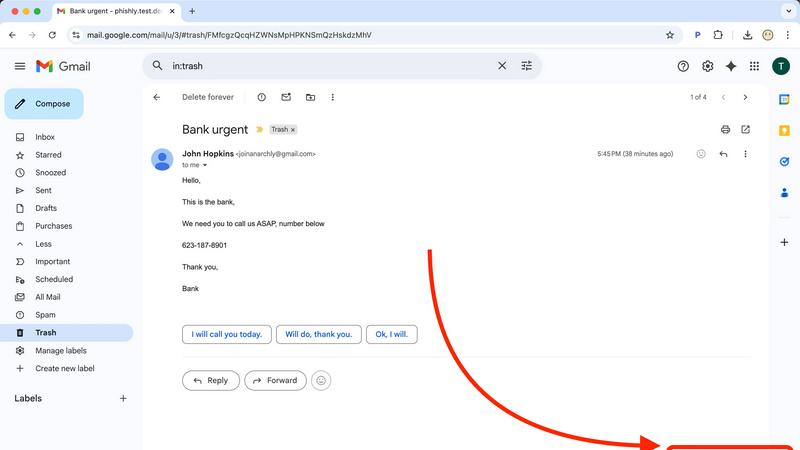
Zovo

Feature Comparison
Phishly
One-Click Gmail Integration
Phishly operates seamlessly within your existing workflow as a lightweight Chrome extension. Once installed, a "Scan with Phishly" button appears directly in your Gmail interface. When you open any email that raises suspicion, a single click initiates a comprehensive AI analysis without you having to copy, paste, or navigate away from your inbox. This frictionless integration ensures that security checks are effortless, encouraging regular use and making safe email habits easy to maintain.
AI-Powered Multi-Indicator Detection
The core intelligence of Phishly lies in its trained AI model, which scrutinizes emails across multiple threat vectors simultaneously. It doesn't rely on a single check but evaluates a combination of factors including suspicious domain names and URLs, grammatical inconsistencies, the use of urgent or threatening language designed to provoke a quick response, attempts to spoof legitimate sender addresses, and sophisticated social engineering tactics. This holistic approach catches a wider range of phishing attempts, from crude scams to highly targeted spear-phishing campaigns.
Clear, Actionable Risk Assessment
After analysis, Phishly doesn't just provide a raw score or complex technical data. It delivers a straightforward, color-coded verdict: Safe, Medium Risk, or High Risk. Each result is accompanied by a detailed breakdown explaining exactly which red flags were detected. For example, it might highlight that the sender's domain is misspelled, the link points to an unsecured website, and the language creates an artificial sense of urgency. This transparency helps you understand the threat and learn to identify similar patterns in the future.
Privacy-First Web Tool for Any Email
For emails received outside of Gmail or for those who prefer not to use an extension, Phishly offers a versatile web-based tool. You can simply copy the full headers and content of any suspicious email—from Outlook, Apple Mail, or any other client—and paste it into the tool on the Phishly website for an instant, private analysis. This method guarantees that Phishly never automatically accesses your inbox; it only ever analyzes the specific text you provide, putting you in complete control of your data.
Zovo
BeLikeNative
BeLikeNative is Zovo's flagship extension, designed to help users write like native speakers effortlessly. With one keystroke, users can rewrite text in 80 languages, making it an essential tool for anyone looking to improve their writing skills or communicate more effectively in a foreign language. This feature works seamlessly across various platforms, enabling instant rewrites in any text field.
Tab Suspender Pro
Tab Suspender Pro helps users manage their browser tabs by automatically suspending inactive ones. This feature is essential for those who often juggle multiple tasks, as it preserves memory and improves browsing speed. With smart detection and memory tracking capabilities, users can enjoy a smoother experience without the hassle of manually managing tabs.
Clipboard History Pro
Never lose important copied text again with Clipboard History Pro. This extension allows users to store up to 10,000 clips, enabling instant searches for previously copied items. Its smart paste functionality ensures that users can easily retrieve and paste any text they need, streamlining their workflow and eliminating the frustration of forgotten snippets.
Form Filler Pro
Form Filler Pro simplifies online form submissions by allowing users to fill out any form with just one click. This feature supports multiple profiles, enabling users to save different sets of information for various scenarios. With 100% local data handling, users can complete forms quickly and securely, reducing the time spent on repetitive tasks.
Use Cases
Phishly
Verifying Urgent Financial or Work Requests
You receive an email from your CEO or a colleague urgently requesting a wire transfer, gift card purchase, or sensitive company data. The request feels unusual, but the pressure to comply is high. Instead of acting immediately or spending time manually investigating, you click "Scan with Phishly." The AI can detect if the sender's email is subtly spoofed or if the language uses classic social engineering pressure tactics, giving you the evidence needed to pause and verify the request through another channel, potentially preventing a devastating business email compromise (BEC) attack.
Checking Legitimacy of Account Security Alerts
A concerning email arrives claiming to be from your bank, PayPal, or Netflix, stating your account is compromised and urging you to click a link to "secure it." These are among the most common and effective phishing lures. With Phishly, you can instantly scan the email. The AI will analyze the link destination (often a fake login page), check for inconsistencies in the sender's address, and assess the alarming tone, providing a clear risk level so you can safely ignore the scam and contact the service directly through their official website or app.
Screening Marketing Offers and Prize Notifications
Too-good-to-be-true offers, lottery wins you didn't enter, or exclusive deal notifications can be phishing attempts to harvest personal information or distribute malware. When curiosity strikes, use Phishly to scan these emails. The tool will evaluate the credibility of the sending domain, look for hidden tracking pixels or malicious attachments, and analyze the content for deceptive promises, helping you distinguish between a legitimate promotional email and a fraudulent trap designed to exploit your interest.
Educating Teams and Family on Phishing Signs
For small business owners or individuals concerned about less tech-savvy family members, Phishly serves as an excellent educational tool. By scanning suspicious emails together and reviewing the detailed breakdown of detected risks—like a mismatched "reply-to" address or a disguised hyperlink—you can provide concrete, real-world examples of what phishing looks like. This hands-on demonstration is far more effective than abstract advice, building critical thinking and safer email habits for everyone involved.
Zovo
Enhancing Writing Skills
Whether you're a student, professional, or casual writer, BeLikeNative makes it easy to enhance your writing skills. By providing instant rewrites, users can learn from their mistakes and improve their language proficiency without the pressure of traditional learning methods.
Managing Browser Performance
For users who often have numerous tabs open, Tab Suspender Pro is a game-changer. It helps to manage browser performance by suspending inactive tabs, ensuring that your device runs smoothly and efficiently, which is especially beneficial for those working on resource-intensive tasks.
Streamlining Workflows
With Clipboard History Pro, professionals can streamline their workflows by keeping track of essential copied texts. This tool is particularly useful for writers, marketers, and researchers who frequently need to reference snippets of information without the risk of losing them.
Efficient Online Shopping
Form Filler Pro greatly enhances the online shopping experience by allowing users to fill out billing and shipping information quickly. This feature saves time and reduces frustration, enabling users to complete purchases swiftly without repetitive data entry.
Overview
About Phishly
Phishing attacks are a constant, evolving threat designed to trick you into revealing sensitive information. Phishly is the practical, AI-powered solution that puts powerful detection in your hands, instantly. It's a simple Chrome extension for Gmail and a web-based tool that acts as your personal security analyst. When you receive an email that seems off—whether it's an urgent request from your "boss," a too-good-to-be-true offer, or a suspicious link from a familiar service—you can scan it with one click. Phishly's advanced AI instantly analyzes the content for classic phishing indicators like spoofed sender addresses, deceptive domains, manipulative language, and hidden threats. It then provides a clear, actionable risk assessment: Safe, Medium Risk, or High Risk, complete with a plain-English explanation of what it found. Designed for individuals, remote workers, and small to medium businesses, Phishly offers enterprise-grade detection without the complexity or cost. It respects your privacy by only scanning emails you explicitly choose to analyze, requires no technical setup, and is completely free to use. In a world of sophisticated scams, Phishly delivers the instant clarity and confidence you need to navigate your inbox safely.
About Zovo
Zovo is a comprehensive suite of 20 Chrome extensions meticulously crafted by a solo developer with over 10 years of experience and a proven track record of earning $400K on Upwork with a 100% success rate. Designed for everyone from casual users to professionals, Zovo's flagship extension, BeLikeNative, empowers more than 3,300 users to write like native speakers with a single keystroke rewrite feature that supports 80 languages. The extensions cater to various needs, including memory management with Tab Suspender Pro, data manipulation with JSON Formatter Pro, and enhanced productivity with tools like Clipboard History Pro and Form Filler Pro. Every extension prioritizes user privacy, ensuring that data never leaves your device, with a commitment to zero data harvesting and no external investors. Zovo thrives on community input, allowing users to vote on features and influence the development roadmap, with new extensions released monthly and early access provided to community members.
Frequently Asked Questions
Phishly FAQ
How does Phishly protect my privacy?
Phishly is built with a strict privacy-first principle. The Chrome extension only activates when you explicitly click the "Scan with Phishly" button on an open email. It does not automatically scan, read, or store any emails from your inbox. The web tool only analyzes the specific text you copy and paste into it. We do not store personal data or email content after the analysis is complete. You are always in control of what gets scanned.
Is Phishly really free to use?
Yes, Phishly is completely free to use. Our goal is to make essential phishing protection accessible to everyone, from individuals to small businesses. You can use the Chrome extension for Gmail and the web-based analysis tool without any cost, subscription, or tiered limits. We believe effective cybersecurity should not be a financial barrier.
What makes Phishly different from my email provider's spam filter?
Your email provider's spam filter works automatically in the background to catch obvious spam, but sophisticated phishing emails are designed to bypass these filters by mimicking legitimate correspondence. Phishly acts as your second layer of defense for the emails that land in your primary inbox. It allows you to proactively investigate and analyze any email that triggers your suspicion, providing a detailed, human-readable explanation of potential threats that a generic spam filter does not offer.
Do I need technical knowledge to use Phishly?
Absolutely not. Phishly is designed for ease of use by anyone. Installing the Chrome extension is as simple as adding it from the Chrome Web Store. From there, using it requires just one click in Gmail. The results are presented in plain language with clear risk categories (Safe, Medium, High) and straightforward explanations, requiring no technical expertise to understand and act upon.
Zovo FAQ
How does Zovo ensure user privacy?
Zovo prioritizes user privacy by ensuring that all data remains on your device. There is no data harvesting, and user information is not shared with third parties, providing a secure browsing experience.
Can I request new features for Zovo extensions?
Yes, users are encouraged to submit feature requests directly. The developer reviews every request, with the most-requested features taking priority in development, ensuring that the tools evolve based on user needs.
How often are new extensions released?
New extensions are typically released monthly. Additionally, community members receive early access to these new tools, usually 1-2 weeks before they are made available to the public.
What support options are available for Zovo users?
Zovo users can reach out directly via email or through the Discord community for support. The developer personally addresses questions and issues, ensuring a responsive and human-centric support experience.