ScopeSnap vs TinyFast
Side-by-side comparison to help you choose the right product.

ScopeSnap
ScopeSnap transforms your discovery notes into structured project scopes and polished proposals, streamlining your freelance workflow.
Last updated: March 18, 2026

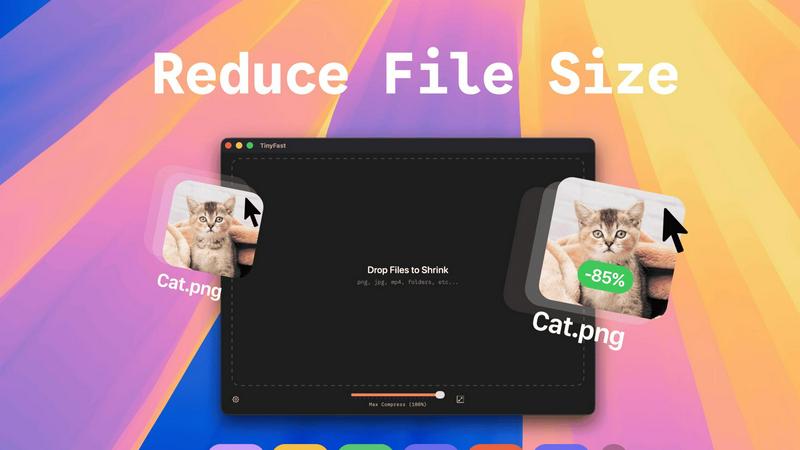
TinyFast instantly and privately compresses your files on your Mac without any uploads.
Last updated: February 28, 2026
Visual Comparison
ScopeSnap

TinyFast
Feature Comparison
ScopeSnap
AI-Driven Scope Generation
ScopeSnap leverages advanced AI technology to transform raw discovery notes into structured project scopes. By analyzing transcripts, emails, and notes, it identifies key requirements and generates a comprehensive backlog, ensuring nothing is overlooked.
Iterative Refinement Process
With ScopeSnap, users can iteratively refine their project scopes. This feature allows developers to review and adjust the structured backlog, assign roles, set estimates, and address any open questions, leading to well-defined project requirements.
Automated Proposal Creation
Once the scope is established, ScopeSnap takes the next step by automatically generating polished proposals or statements of work. This feature saves time and effort, allowing users to focus on project execution rather than proposal formatting.
Comprehensive Backlog Management
ScopeSnap provides a structured backlog management system, where users can visualize their project tasks. Developers can easily track epics, scope items, and any assumptions or questions, ensuring a clear understanding of the project at all times.
TinyFast
100% Local & Private Compression
Your files never leave your Mac. TinyFast processes all compression tasks directly on your device, eliminating the need to upload sensitive documents, client assets, or confidential materials to unknown cloud servers. This privacy-by-design approach ensures total data security, making it ideal for professionals bound by NDAs or anyone who values their digital privacy. You get the benefits of file optimization without any of the security risks.
Blazing-Fast Batch Processing
Drop entire folders of files and get optimized output in seconds. TinyFast uses optimized native engines built for speed on macOS, allowing you to compress multiple images, videos, or documents simultaneously. This batch functionality saves immense time compared to handling files one by one, streamlining your workflow when preparing assets for projects, presentations, or digital delivery.
Universal File Type Support
TinyFast isn't limited to just images. It supports a comprehensive range of common file types you encounter daily. This includes images (PNG, JPG, HEIC, WEBP, GIF, SVG, BMP, TIFF), videos (MP4, MOV, M4V), documents (PDF, DOCX), audio (MP3), and even code files (JS, CSS, JSON). This versatility means you can rely on a single, trusted tool for all your compression needs across different media.
Integrated Resolution Resizing
Beyond simple compression, TinyFast gives you control over the physical dimensions of your images and videos. You can set it to automatically resize the resolution during the compression process. This is perfect for reducing file sizes even further by scaling down high-resolution assets to the exact dimensions needed for web use, social media, or email attachments, all in one step.
Use Cases
ScopeSnap
Freelance Project Scoping
Freelancers can use ScopeSnap to convert their discovery calls into structured project scopes. By inputting their notes, they can generate a clear and organized backlog, making it easier to provide accurate estimates and proposals.
Agency Collaboration
Software agencies can utilize ScopeSnap for team collaboration on client projects. The tool allows multiple team members to contribute to the scope, ensuring all perspectives are considered and enhancing the overall quality of the project plan.
Proposal Standardization
Agencies and freelancers can benefit from ScopeSnap's automated proposal creation feature. By standardizing the proposal format, users can ensure consistency in their client communications while saving significant time on document preparation.
Client Communication Enhancement
ScopeSnap improves communication with clients by providing clear and structured project scopes. This transparency helps build trust, as clients can see a detailed breakdown of the project, making it easier to align expectations and requirements.
TinyFast
Preparing Client Deliverables Securely
Designers and developers can compress project assets like high-fidelity mockups, screenshots, and demo videos before sending them to clients. Since TinyFast works locally, there's no risk of confidential work-in-progress files being stored on a third-party server, ensuring client confidentiality and meeting professional security standards effortlessly.
Optimizing Web and App Assets
Web developers and digital creators can quickly shrink folders full of website images, icons (SVG), and video content directly on their Mac. This reduces page load times and improves user experience without relying on slow online tools or complex command-line utilities. Batch processing makes optimizing an entire project's asset library fast and simple.
Managing Email Attachments
Professionals who need to email large presentations, PDF reports, or image collections can use TinyFast to reduce file sizes below typical email attachment limits. The drag-and-drop simplicity means you can compress files instantly right before attaching them, avoiding bounce-backs and ensuring your important communications are delivered without hassle.
Freeing Up Local Storage Space
Anyone running low on disk space can use TinyFast to compress old project folders, photo libraries, or video archives directly on their Mac's hard drive. By reducing the size of these files locally, you can reclaim valuable storage without deleting important work or moving files to external drives, maintaining both access and organization.
Overview
About ScopeSnap
ScopeSnap is an innovative AI-driven tool designed specifically for freelance developers and software agencies. It streamlines the often chaotic process of turning discovery notes into structured project scopes, precise estimates, and polished client proposals. Many developers find the estimation phase of custom software projects to be slow and fraught with risks; critical requirements can be overlooked, scopes remain vague, and assembling proposals can take hours. ScopeSnap addresses these challenges by providing a clear workflow that helps users break down project ideas into well-defined tasks. By iteratively refining the scope, developers can ensure that every feature is thoroughly understood and confidently estimated. Once the scope is finalized, ScopeSnap automatically generates a professional proposal or statement of work, ready for client delivery. This efficiency makes ScopeSnap an invaluable resource for freelancers, consultants, and agencies engaged in custom development projects.
About TinyFast
TinyFast is a powerful, privacy-focused macOS application designed to solve the common and frustrating problem of large file sizes. It provides instant, local compression for a wide array of file types including images (PNG, JPEG, WebP, GIF, SVG), videos (MP4, MOV), documents (PDF), and even code files (JS, CSS, JSON). The core value proposition is simple: shrink your files quickly without ever uploading them to the internet. This addresses critical pain points for professionals who handle sensitive or confidential materials, such as developers, designers, and content creators. By processing everything directly on your Mac, TinyFast eliminates the security risks, slow upload/download times, and usage limits associated with online compression tools. Its drag-and-drop interface makes it incredibly simple to use, whether you're compressing a single screenshot or an entire folder of project assets. TinyFast is built for those who prioritize speed, security, and a seamless workflow, offering a reliable and efficient way to reduce file sizes for email, web use, or storage, all while keeping your data completely private.
Frequently Asked Questions
ScopeSnap FAQ
How does ScopeSnap improve project estimation?
ScopeSnap enhances project estimation by breaking down project ideas into clear, estimatable tasks using AI. This reduces the risk of missing important requirements and helps ensure accurate estimates.
Can multiple users collaborate on a project in ScopeSnap?
Yes, ScopeSnap supports collaboration among team members. Users can work together to refine the project scope, assign roles, and review estimates, making it ideal for agencies and teams.
What types of documents can ScopeSnap generate?
ScopeSnap can automatically generate polished proposals and statements of work from the structured project scope. This feature allows users to present professional documents to clients quickly.
Is ScopeSnap suitable for all types of development projects?
ScopeSnap is specifically designed for freelance developers, consultants, and software agencies focusing on custom development projects. Its features are tailored to address the unique challenges faced in these environments.
TinyFast FAQ
Is TinyFast really free to use?
Yes, TinyFast offers a free tier forever. This plan allows you to compress up to 5 files per day with access to all core features. It's a great way to test the app's speed and privacy benefits extensively. For unlimited use, you can upgrade to a one-time lifetime purchase or a monthly subscription, both of which start with a 3-day free trial.
How does local compression work?
Local compression means all processing happens directly on your Mac's processor. When you drag a file into TinyFast, the app uses its built-in, optimized algorithms to analyze and reduce the file size. The data is never sent over the internet to an external server. The compressed file is then saved to your chosen location on your computer, ensuring complete privacy and faster speeds.
What file types does TinyFast support?
TinyFast supports a wide variety of common file types. This includes images (PNG, JPG/JPEG, TIFF, HEIC, WEBP, GIF, BMP, SVG), videos (MP4, MOV, M4V), documents (PDF, DOCX), audio (MP3), and code files (JavaScript .JS, Cascading Style Sheets .CSS, JSON). This broad support makes it a universal tool for most file compression needs.
Can I compress an entire folder at once?
Absolutely. One of TinyFast's key features is batch processing. You can simply drag and drop an entire folder onto the app, and it will automatically compress all the supported files within it. This saves significant time compared to selecting and compressing files individually, making it ideal for optimizing project assets or cleaning up directories in bulk.
Alternatives
ScopeSnap Alternatives
ScopeSnap is an AI-driven tool designed to streamline the project scoping and proposal process for freelancers, software agencies, and consultants. By transforming fragmented discovery notes into structured project scopes and client-ready proposals, it enhances productivity and minimizes the risks associated with estimating custom software projects. Users often seek alternatives to ScopeSnap for various reasons, including pricing concerns, the need for different features, or compatibility with specific platforms. When considering an alternative, it's crucial to evaluate the tool's usability, the comprehensiveness of its features, and how well it integrates into your existing workflow to ensure a seamless transition and continued efficiency.
TinyFast Alternatives
TinyFast is a privacy-focused macOS application for local file compression. It instantly reduces the size of images, videos, PDFs, and more directly on your computer, ensuring your sensitive data never leaves your machine. This places it in the category of desktop optimization and productivity tools for Mac users. Users often explore alternatives for various reasons. Some may seek different pricing models, such as a one-time purchase versus a subscription. Others might need support for additional file formats, more advanced compression controls, or a tool that works across multiple platforms like Windows or online. When evaluating alternatives, key considerations include your primary need for privacy versus convenience, the specific file types you work with most, and your budget. It's crucial to determine if you require cloud-based accessibility or if a local, offline tool better suits your security requirements and workflow speed.