Shrinkpad vs Skene
Side-by-side comparison to help you choose the right product.

Shrinkpad
Shrinkpad compresses images and videos in bulk on Mac to save you time and disk space effortlessly.
Last updated: February 28, 2026

Skene transforms your codebase into a self-sustaining engine for user activation and retention without external.
Last updated: February 28, 2026
Visual Comparison
Shrinkpad
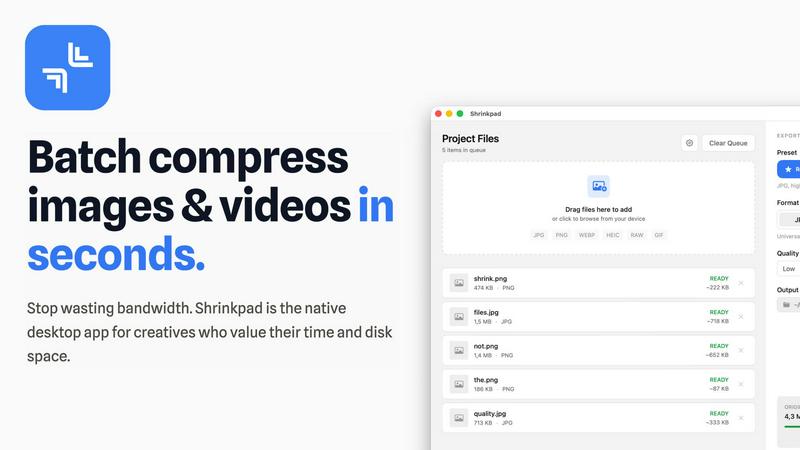
Skene

Feature Comparison
Shrinkpad
Intelligent Batch Compression
Shrinkpad automates the most complex part of compression: choosing the right settings. It automatically analyzes the visual complexity of each image and video to apply the perfect compression ratio, avoiding artifacts and preserving quality. You can process thousands of files in a single batch, mixing images and videos together, and the app will handle each format with optimal settings, saving you from manually guessing and adjusting sliders for every file.
Folder Mode & Smart Detection
Stop dragging files individually. With Folder Mode, you simply drop any folder onto Shrinkpad, and it instantly scans and identifies all supported media files within, including those in subfolders. It smartly detects over 50 formats, from common JPGs and PNGs to RAW photos and HEIC images, plus major video formats like MP4 and MOV. Non-media files are safely ignored, making bulk organization and compression incredibly straightforward.
Local Processing & Privacy-First Design
Every compression task happens locally on your Mac using native macOS frameworks. This means your original high-resolution assets, client work, or sensitive media are never uploaded to a remote server. You maintain complete control and privacy, while also benefiting from faster processing speeds since there's no bandwidth bottleneck for uploading and downloading large files.
Advanced Workflow Features for Professionals
Beyond basic compression, Shrinkpad includes power features tailored for professional workflows. It can automatically rename batches of files, strip metadata for cleaner assets, and handle massive file sizes without crashing. Optimized for Apple Silicon, it uses multi-threaded processing for lightning-fast performance, allowing you to quickly optimize app bundles, website assets, or project archives.
Skene
Automated Growth Optimization
Skene automates the continuous optimization of user onboarding, activation, and retention. By analyzing user interactions and identifying friction points, it autonomously generates enhanced user flows that improve overall user experience without manual intervention.
Seamless Codebase Integration
Skene connects directly with your GitHub or GitLab repository to derive signals from your codebase. This integration allows for real-time analysis and updates to growth strategies, ensuring that your product's growth mechanisms evolve alongside its development.
Outcome-Based Pricing Model
With Skene’s outcome-based pricing, you only pay when customers successfully complete their onboarding journey. This model encourages effective growth strategies, as it aligns the pricing with tangible results rather than flat fees.
Real-Time Analytics Dashboard
Skene provides a robust analytics dashboard that delivers insights into user progress, completion rates, and engagement metrics. This data-driven approach helps identify bottlenecks in the onboarding process, enabling continuous improvement based on real user behavior.
Use Cases
Shrinkpad
Optimizing Website and App Assets
Developers and web designers can use Shrinkpad to batch compress hero images, product shots, icons, and promotional videos. Reducing these asset sizes by 70-90% directly leads to faster website load times, improved Lighthouse performance scores (like LCP), and smaller app bundle sizes, enhancing the end-user experience and SEO rankings without a tedious, file-by-file optimization process.
Managing Photography and Design Projects
Photographers and digital artists often export high-resolution files from Lightroom or Photoshop, resulting in massive folders. Shrinkpad allows them to export everything at full quality, then quickly run the entire project folder through compression. This reclaims terabytes of disk space over time while keeping a high-quality visual archive, perfect for client delivery, portfolio sites, or cloud backup.
Preparing Content for Social Media and Marketing
Content creators and marketing teams need to prepare dozens of images and video clips for social platforms, email campaigns, and ads. Shrinkpad streamlines this by letting them drop a week's worth of content into the app, compressing it all in one go to meet platform file size limits while maintaining visual fidelity, ensuring faster upload times and efficient use of storage.
Archiving and Cleaning Up Digital Libraries
Anyone with a large personal library of photos, screenshots, or home videos can use Shrinkpad for digital spring cleaning. Dragging the entire "Pictures" or "Downloads" folder into the app can compress years of accumulated media, freeing up significant space on a Mac's drive for new projects and files, all while keeping the library visually intact and accessible.
Skene
Streamlining Onboarding for New Users
Indie developers can leverage Skene to create a smooth onboarding experience for new users. By automating the onboarding process, Skene helps users quickly understand the product's value, leading to higher activation rates and reduced churn.
Enhancing Feature Adoption
Skene can identify opportunities for feature adoption by analyzing user behavior. By optimizing the activation flows, it ensures that users engage with key features, maximizing the product's value and enhancing user satisfaction.
Retention Loop Optimization
For early-stage startups, retaining users is crucial. Skene automates the analysis of user behavior to optimize retention loops, ensuring that users remain engaged over time and reducing the risk of churn through timely interventions.
Facilitating Continuous Improvement
With its self-learning capabilities, Skene facilitates a cycle of continuous improvement. By regularly analyzing user interactions and updating growth strategies, it helps developers adapt their products to meet changing user needs and preferences.
Overview
About Shrinkpad
Shrinkpad is a powerful, native desktop application for macOS designed to solve the critical problem of bloated media files. It specializes in batch compressing images and videos directly on your Mac, eliminating the need for slow, privacy-compromising cloud uploads. This tool is built for photographers, designers, content creators, developers, and anyone who regularly handles large volumes of photos, screenshots, or video clips that consume excessive disk space and slow down workflows. The core value proposition is threefold: immense speed through local processing with Apple Silicon optimization, uncompromising privacy as files never leave your computer, and intelligent compression that can reduce file sizes by up to 90% without perceptible loss in quality. By allowing users to drag and drop hundreds of files or entire folders for processing in seconds, Shrinkpad transforms a tedious, manual task into an automated, efficient process, saving hours of busywork and reclaiming gigabytes of storage.
About Skene
Skene is an innovative, fully automated Product-Led Growth (PLG) iteration engine tailored for indie developers and early-stage startups. It eliminates the need for dedicated growth teams by automating the optimization of key processes such as onboarding, activation, and retention. Skene's core value proposition is its ability to analyze user behavior to identify friction points, enabling it to autonomously create and test improved user flows. This self-learning growth engine not only enhances the onboarding experience but also streamlines activation and optimizes retention loops over time. By simplifying traditional growth strategies, Skene acts as a "growth team in a box," allowing developers to concentrate on product development while Skene efficiently manages growth. Its infrastructure connects directly to the codebase, ensuring that growth is seamlessly integrated into the development process, fostering a product-first approach to user engagement.
Frequently Asked Questions
Shrinkpad FAQ
What file formats does Shrinkpad support?
Shrinkpad supports a wide range of over 50 image and video formats. This includes common types like JPG, PNG, GIF, WEBP, and AVIF, professional formats like HEIC and RAW camera files (from Canon, Nikon, Sony, etc.), and major video formats including MP4, MOV, AVI, and more. A full list is available on the official website.
Does Shrinkpad support video compression?
Yes, Shrinkpad fully supports batch video compression alongside images. You can mix video and photo files in the same batch queue. The app applies intelligent, format-specific compression to videos, significantly reducing their file size—often by 65% or more—while aiming to preserve visual quality, frame rate, and resolution.
Are my files uploaded to the cloud?
No. Shrinkpad is built on a core principle of privacy. All compression processing is performed locally on your Mac using the computer's own hardware. Your original files, compressed files, and any data never leave your device or get uploaded to any external server, ensuring complete security and privacy for sensitive or client work.
How many files can I process at once?
Shrinkpad is built for heavy-duty batch processing with no artificial limits in its paid plans. You can process thousands of files in a single batch. The app efficiently manages large queues without crashing, a key advantage over many web-based tools that struggle with high volumes or large file sizes.
Skene FAQ
What is PLG software?
PLG (Product-Led Growth) software enables users to discover the value of a product without manual intervention from sales or customer success teams. It automates the user journey, guiding users towards activation and strengthening retention through the product itself.
How is Skene different from traditional customer experience software?
Unlike traditional customer experience tools that require manual setup and maintenance, Skene reads your codebase to automatically generate onboarding processes and lifecycle automation. This means that when you push code updates, your growth strategies update automatically without additional effort.
How long does it take to set up?
Setting up Skene takes less than 60 seconds. Simply connect your GitHub or GitLab repository for read-only access, and Skene will analyze your codebase to generate the necessary PLG flows without requiring code changes or API modifications.
Is my code secure with Skene?
Yes, your code is secure. Skene requires only read-only access to your repository, and all analyses take place in a secure, isolated environment. This ensures that your intellectual property remains protected while benefiting from Skene’s capabilities.
Alternatives
Shrinkpad Alternatives
Shrinkpad is a dedicated macOS application for batch compressing images and videos, falling squarely into the image and photo optimization category. It's designed to save users significant time and disk space by processing large volumes of media files locally on their computer. Users often explore alternatives for various practical reasons. These can include budget constraints, a need for different features like advanced editing tools or format support, or a requirement to use the software on other platforms such as Windows or online. The search for a different tool is a normal part of finding the perfect fit for one's specific workflow and technical environment. When evaluating other options, key considerations should include the supported platforms, the range of input and output formats, the level of control over compression settings, and where the processing occurs. Prioritizing tools that handle your most common file types and align with your privacy preferences regarding local versus cloud processing will lead to a more satisfactory choice.
Skene Alternatives
Skene is an innovative tool that automates onboarding and growth for indie developers and early-stage startups, positioning itself within the Product-Led Growth (PLG) category. Users often seek alternatives to Skene due to various reasons, such as pricing concerns, specific feature sets, or compatibility with their existing platforms. Understanding what to look for in an alternative is crucial; prioritize features that align with your growth strategy, ensure the solution can integrate seamlessly with your tech stack, and consider the scalability of the options available. When searching for alternatives, it’s essential to evaluate how each solution can deliver on automation, user flow optimization, and analytics capabilities similar to Skene. Look for tools that provide real-time insights into user behavior and offer flexible pricing models to suit your budget. Additionally, ensure that the alternative can grow with your needs, supporting both onboarding and retention strategies effectively while minimizing the need for extensive manual intervention.