Shrinkpad vs SparkPix
Side-by-side comparison to help you choose the right product.

Shrinkpad
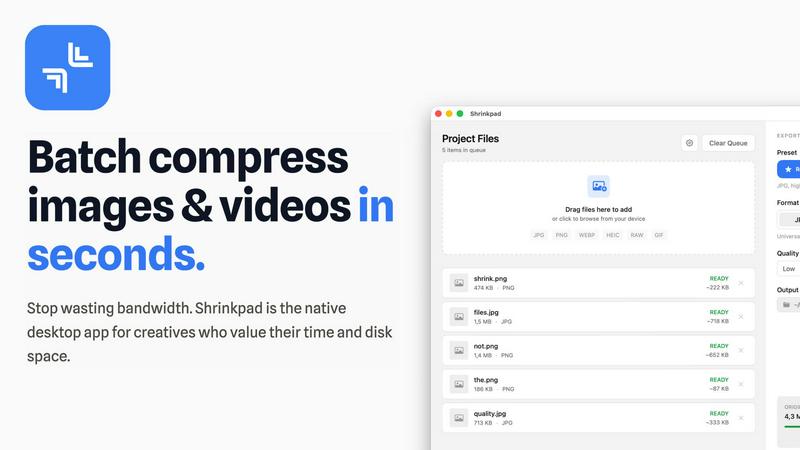
Shrinkpad compresses images and videos in bulk on Mac to save you time and disk space effortlessly.
Last updated: February 28, 2026

SparkPix
Transform your photos effortlessly by typing your edits to remove backgrounds, enhance quality, and restore images with SparkPix.
Last updated: March 11, 2026
Visual Comparison
Shrinkpad
SparkPix

Feature Comparison
Shrinkpad
Intelligent Batch Compression
Shrinkpad automates the most complex part of compression: choosing the right settings. It automatically analyzes the visual complexity of each image and video to apply the perfect compression ratio, avoiding artifacts and preserving quality. You can process thousands of files in a single batch, mixing images and videos together, and the app will handle each format with optimal settings, saving you from manually guessing and adjusting sliders for every file.
Folder Mode & Smart Detection
Stop dragging files individually. With Folder Mode, you simply drop any folder onto Shrinkpad, and it instantly scans and identifies all supported media files within, including those in subfolders. It smartly detects over 50 formats, from common JPGs and PNGs to RAW photos and HEIC images, plus major video formats like MP4 and MOV. Non-media files are safely ignored, making bulk organization and compression incredibly straightforward.
Local Processing & Privacy-First Design
Every compression task happens locally on your Mac using native macOS frameworks. This means your original high-resolution assets, client work, or sensitive media are never uploaded to a remote server. You maintain complete control and privacy, while also benefiting from faster processing speeds since there's no bandwidth bottleneck for uploading and downloading large files.
Advanced Workflow Features for Professionals
Beyond basic compression, Shrinkpad includes power features tailored for professional workflows. It can automatically rename batches of files, strip metadata for cleaner assets, and handle massive file sizes without crashing. Optimized for Apple Silicon, it uses multi-threaded processing for lightning-fast performance, allowing you to quickly optimize app bundles, website assets, or project archives.
SparkPix
AI Photo Editor
The AI Photo Editor feature allows users to type specific instructions such as "remove background" or "restore this old photo." The AI processes these requests in under 30 seconds, providing a seamless editing experience. This feature is ideal for users who want quick results without needing extensive editing knowledge.
Background Remover
With the one-click background removal tool, users can easily isolate subjects in portraits, product photos, and complex scenes. This feature is designed to save time and enhance the professional look of images, making it perfect for e-commerce and personal branding.
Unblur Image
The Unblur Image feature utilizes advanced AI algorithms to fix issues like motion blur, out-of-focus shots, and compression artifacts. Users can transform blurry images into clear, detailed visuals, ensuring that no precious memories are lost due to poor image quality.
Photo Restoration
SparkPix offers a dedicated Photo Restoration feature that repairs old, faded, scratched, or damaged photographs. This is an invaluable tool for preserving family archives and historical images, allowing users to breathe new life into cherished memories with minimal effort.
Use Cases
Shrinkpad
Optimizing Website and App Assets
Developers and web designers can use Shrinkpad to batch compress hero images, product shots, icons, and promotional videos. Reducing these asset sizes by 70-90% directly leads to faster website load times, improved Lighthouse performance scores (like LCP), and smaller app bundle sizes, enhancing the end-user experience and SEO rankings without a tedious, file-by-file optimization process.
Managing Photography and Design Projects
Photographers and digital artists often export high-resolution files from Lightroom or Photoshop, resulting in massive folders. Shrinkpad allows them to export everything at full quality, then quickly run the entire project folder through compression. This reclaims terabytes of disk space over time while keeping a high-quality visual archive, perfect for client delivery, portfolio sites, or cloud backup.
Preparing Content for Social Media and Marketing
Content creators and marketing teams need to prepare dozens of images and video clips for social platforms, email campaigns, and ads. Shrinkpad streamlines this by letting them drop a week's worth of content into the app, compressing it all in one go to meet platform file size limits while maintaining visual fidelity, ensuring faster upload times and efficient use of storage.
Archiving and Cleaning Up Digital Libraries
Anyone with a large personal library of photos, screenshots, or home videos can use Shrinkpad for digital spring cleaning. Dragging the entire "Pictures" or "Downloads" folder into the app can compress years of accumulated media, freeing up significant space on a Mac's drive for new projects and files, all while keeping the library visually intact and accessible.
SparkPix
Family Photo Restoration
Users can restore old family photos that may have been damaged over the years. By using the Photo Restoration feature, customers can repair scratches and fading, making it possible to preserve family history for generations to come.
E-commerce Product Images
For online sellers, SparkPix is a game-changer. The Background Remover and AI Photo Editor features enable sellers to create professional-quality product images without needing a photographer. This helps enhance product listings and attract more customers.
Social Media Content Creation
Influencers and social media managers can utilize SparkPix to create eye-catching visuals quickly. With the ability to apply artistic styles and enhance images, users can produce engaging content that stands out in crowded feeds.
Instant Image Transformation
With the AI Image Generator, users can create new images based on text prompts. This feature is particularly useful for graphic designers and marketers who need unique visuals tailored to specific themes or campaigns.
Overview
About Shrinkpad
Shrinkpad is a powerful, native desktop application for macOS designed to solve the critical problem of bloated media files. It specializes in batch compressing images and videos directly on your Mac, eliminating the need for slow, privacy-compromising cloud uploads. This tool is built for photographers, designers, content creators, developers, and anyone who regularly handles large volumes of photos, screenshots, or video clips that consume excessive disk space and slow down workflows. The core value proposition is threefold: immense speed through local processing with Apple Silicon optimization, uncompromising privacy as files never leave your computer, and intelligent compression that can reduce file sizes by up to 90% without perceptible loss in quality. By allowing users to drag and drop hundreds of files or entire folders for processing in seconds, Shrinkpad transforms a tedious, manual task into an automated, efficient process, saving hours of busywork and reclaiming gigabytes of storage.
About SparkPix
SparkPix is a revolutionary AI-powered photo editing tool designed for users of all skill levels. Whether you are a professional photographer or a casual social media user, SparkPix simplifies the photo editing process by allowing you to edit images just by typing commands. It eliminates the need for complex software like Photoshop, making advanced editing accessible to everyone. Users can remove backgrounds, enhance image quality, restore old photos, and apply artistic styles—all at the click of a button. With its intuitive interface and fast processing times, SparkPix is perfect for anyone looking to improve their photos quickly and efficiently. Enjoy the freedom of creativity without the steep learning curve and let AI do the heavy lifting.
Frequently Asked Questions
Shrinkpad FAQ
What file formats does Shrinkpad support?
Shrinkpad supports a wide range of over 50 image and video formats. This includes common types like JPG, PNG, GIF, WEBP, and AVIF, professional formats like HEIC and RAW camera files (from Canon, Nikon, Sony, etc.), and major video formats including MP4, MOV, AVI, and more. A full list is available on the official website.
Does Shrinkpad support video compression?
Yes, Shrinkpad fully supports batch video compression alongside images. You can mix video and photo files in the same batch queue. The app applies intelligent, format-specific compression to videos, significantly reducing their file size—often by 65% or more—while aiming to preserve visual quality, frame rate, and resolution.
Are my files uploaded to the cloud?
No. Shrinkpad is built on a core principle of privacy. All compression processing is performed locally on your Mac using the computer's own hardware. Your original files, compressed files, and any data never leave your device or get uploaded to any external server, ensuring complete security and privacy for sensitive or client work.
How many files can I process at once?
Shrinkpad is built for heavy-duty batch processing with no artificial limits in its paid plans. You can process thousands of files in a single batch. The app efficiently manages large queues without crashing, a key advantage over many web-based tools that struggle with high volumes or large file sizes.
SparkPix FAQ
How does SparkPix work?
SparkPix utilizes advanced AI technology to process user commands for photo editing. By simply typing your desired edits, the AI interprets and applies these changes in a matter of seconds, making the editing process straightforward and efficient.
Do I need to download SparkPix?
No, SparkPix is a web-based platform, meaning you can access it directly from any browser on your desktop, iPhone, or Android device without the need for downloads or installations.
Is there a free trial available?
Yes, SparkPix offers a free tier that includes 5 credits to get started. Users can explore the platform and try out various features without needing to provide credit card information.
What are credits used for in SparkPix?
Credits in SparkPix are used to access various editing features. For instance, each generation or photo edit may cost a specific number of credits, allowing users to manage their usage based on their needs and budget.
Alternatives
Shrinkpad Alternatives
Shrinkpad is a dedicated macOS application for batch compressing images and videos, falling squarely into the image and photo optimization category. It's designed to save users significant time and disk space by processing large volumes of media files locally on their computer. Users often explore alternatives for various practical reasons. These can include budget constraints, a need for different features like advanced editing tools or format support, or a requirement to use the software on other platforms such as Windows or online. The search for a different tool is a normal part of finding the perfect fit for one's specific workflow and technical environment. When evaluating other options, key considerations should include the supported platforms, the range of input and output formats, the level of control over compression settings, and where the processing occurs. Prioritizing tools that handle your most common file types and align with your privacy preferences regarding local versus cloud processing will lead to a more satisfactory choice.
SparkPix Alternatives
SparkPix is an innovative online AI photo editor designed to simplify the photo editing process. Users can enhance their images, restore old photographs, and apply artistic styles by simply typing commands, making it accessible for anyone, regardless of their technical skills. As the demand for user-friendly photo editing tools grows, many individuals seek alternatives to SparkPix for various reasons, including pricing, specific features, or platform compatibility. When searching for alternatives, users should consider factors such as ease of use, available features, pricing plans, and whether the tool works across multiple devices and operating systems. It’s essential to evaluate how well the alternative meets your unique editing needs, especially if you require specific functionalities or a more tailored user experience.