SimpleDraw vs Supermachine
Side-by-side comparison to help you choose the right product.

SimpleDraw
Easily create precise floor plans and scale drawings online with SimpleDraw's intuitive, free web tool.
Last updated: March 1, 2026

Supermachine
Supermachine helps creators generate stunning, commercial-ready AI images and videos quickly with over 60 models.
Last updated: March 18, 2026
Visual Comparison
SimpleDraw
Supermachine

Feature Comparison
SimpleDraw
Accurate Measurements & Scale Drawing
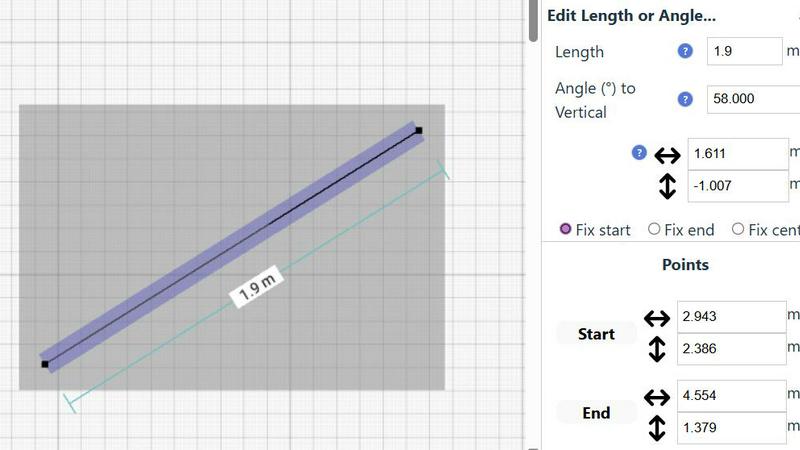
SimpleDraw offers precise measurements and smart alignment, ensuring that your drawings are accurate and to scale. This feature is vital for anyone looking to create professional-looking layouts without the steep learning curve associated with CAD software.
Specialized Floor Plan Creator
With a dedicated Floor Plan Mode, users can create intricate drawings featuring walls, doors, windows, and furniture with just a single click. It allows for real-time measurement adjustments, making it easier to visualize and modify designs as needed.
Smart Alignment System
The smart alignment system aids users in placing points and lines precisely where they want them. This intuitive feature provides clear visual indications, making it easier to achieve accuracy without needing advanced technical skills.
Comprehensive Measurement System
SimpleDraw includes a comprehensive measurement system that gives users fine control over displayed measurements. Users can choose between metric or standard US units, and contextual measurements are dynamically displayed as they work, enhancing the overall drawing experience.
Supermachine
Curated AI Model Library
Supermachine provides access to a carefully selected collection of over 60 high-performing AI models. This curation solves the problem of model overload and inconsistency by integrating only the most reliable and useful models for image and video generation. You get top-tier results without wasting time testing unstable or low-quality alternatives, ensuring professional output for every creation.
AI Video Generation
Go beyond static images and create engaging short-form videos directly with AI. This feature tackles the challenge of expensive and complex video production, enabling users to quickly generate dynamic content for social media, ads, or presentations. It simplifies the video creation process, putting powerful motion graphics and storytelling tools at your fingertips.
AI Image Edit Tool (Photoshop AI)
This powerful editing feature allows for precise manipulation and enhancement of generated or uploaded images. Solve common post-creation problems like removing unwanted objects, altering details, or extending images seamlessly. It functions like an AI-powered Photoshop, giving you granular control to perfect your visuals without needing separate, complex software.
ControlNet & Custom Sizes
Gain advanced control over your AI generations with features like ControlNet, which lets you guide the AI using sketches or poses, and custom size outputs for any platform. This solves the problem of AI being too random or generating incorrectly sized assets. You can dictate composition and ensure every image is perfectly formatted for its intended use, from social media banners to print materials.
Use Cases
SimpleDraw
Kitchen & Bathroom Floor Plans
Homeowners planning renovations can use SimpleDraw to create accurate kitchen and bathroom layouts. This tool allows them to visualize their designs effectively before commencing any physical work, reducing the chances of costly mistakes.
Room Layouts & Furniture Planning
Users can design bedroom, living room, or office layouts to ensure that furniture will fit appropriately before making purchases. This feature saves time and money by allowing for adjustments in the design phase.
House & Apartment Plans
Real estate agents and property owners can create complete floor plans for home projects or rental listings. SimpleDraw helps in space planning by providing accurate representations of available layouts.
Community-Driven Development
Users can suggest features and improvements through the SimpleDraw community. This collaborative approach ensures that the tool evolves based on real user feedback, making it a continually improving solution for everyone.
Supermachine
Social Media Content Creation
Social media managers and influencers can rapidly produce a high volume of fresh, eye-catching images and short videos for daily posts, stories, and ads. This solves the constant pressure to create engaging visual content, enabling quick turnaround for trends and campaigns without needing a graphic designer or extensive production time.
Marketing & Advertising Visuals
Marketers and small business owners can craft professional campaign visuals, product mock-ups, and ad creatives in minutes. This use case addresses the high cost and slow pace of traditional photo shoots or stock photo subscriptions, allowing for the creation of custom, brand-specific imagery that resonates with target audiences and drives conversions.
Digital Art & NFT Projects
Artists and creators exploring digital mediums can use Supermachine to brainstorm concepts, generate unique base artwork, and create collections for NFT projects. It solves creative block and technical barriers by providing a suite of tools to experiment with styles and ideas, accelerating the artistic workflow from concept to final piece.
Blog & Thumbnail Enhancement
Content creators, bloggers, and YouTubers can generate compelling featured images, article illustrations, and high-click-through-rate video thumbnails. This tackles the challenge of finding or creating visuals that accurately represent content and capture audience attention, directly supporting growth and engagement metrics.
Overview
About SimpleDraw
SimpleDraw is a free, web-based tool that addresses the common challenge of creating precise and accurate scale drawings without the complication and expense associated with professional CAD software. It is ideal for casual users, DIY enthusiasts, homeowners, and anyone who needs to visualize a space or project to scale. Whether planning a room layout, sketching a garden design, or mapping out a home renovation, SimpleDraw offers the digital equivalent of pen and paper, enhanced with greater flexibility and precision. Its main value proposition lies in delivering intuitive and powerful drawing capabilities through an accessible interface that requires no installation, login, or prior technical experience. By focusing on a streamlined set of smart tools, SimpleDraw empowers users to quickly and easily translate their ideas into clear, measured drawings, making the planning process more accurate and less frustrating.
About Supermachine
Supermachine is an all-in-one AI creative studio designed to solve the core problem of time-consuming, technically complex content creation. It empowers creators of all skill levels—from social media managers and marketers to digital artists and small business owners—to generate professional-quality images and videos in seconds. The platform's main value proposition is delivering speed and simplicity without sacrificing quality. You don't need to be an expert in prompt engineering; Supermachine streamlines the process, allowing you to produce stunning visuals for ads, social posts, illustrations, NFTs, and thumbnails rapidly. Trusted by over 100,000 creators who generate a million images weekly, its reliability stems from a curated, selective approach. Instead of overwhelming users with every new AI model, Supermachine integrates and offers access to over 60 high-performing, genuinely useful models that have been vetted for top-tier results. This ensures consistent, dependable output for every project, making advanced AI creativity accessible and practical for daily use.
Frequently Asked Questions
SimpleDraw FAQ
Is SimpleDraw really free to use?
Yes, SimpleDraw is completely free to use. There is no need for subscription fees, hidden costs, or trial periods, allowing anyone to access its features without financial commitment.
Do I need to create an account to use SimpleDraw?
No, SimpleDraw does not require any account creation or login. Users can start drawing immediately in their web browser, making it incredibly accessible and user-friendly.
Can I use SimpleDraw on my mobile device?
While SimpleDraw is primarily designed for web browsers, it can be accessed on mobile devices. However, the user experience may vary depending on the device's screen size and capabilities.
How can I provide feedback or suggest features?
Users are encouraged to join the SimpleDraw Discord community, where they can share their feedback, request new features, and connect with other users. This community-driven approach helps shape the future development of the tool.
Supermachine FAQ
Who is Supermachine for?
Supermachine is designed for a wide range of creators, including social media managers, digital marketers, small business owners, artists, bloggers, and content creators. Essentially, it's for anyone who needs to produce high-quality visual content regularly but may lack the time, budget, or technical expertise for traditional design software or complex AI tools.
How fast can I create content?
The platform is built for speed, with a core promise of generating stunning images and short videos in under 15 seconds. This rapid generation time allows for incredible iteration, enabling you to quickly explore multiple ideas and variations to find the perfect visual for your project without long waits.
What makes Supermachine different from other AI art tools?
The key differentiator is its curated model library. While other platforms may offer hundreds of unstable or niche models, Supermachine selectively integrates only the top 60+ models that have proven to be high-performing and reliable. This solves the problem of inconsistent quality, ensuring you get professional results every time without the guesswork.
Do I need to be good at writing AI prompts?
No, Supermachine is specifically designed to simplify the process and minimize complex prompt engineering. The interface and curated models are built to help users of all skill levels achieve great results with simpler inputs, making advanced AI creativity accessible to beginners while still offering depth for experienced users.
Alternatives
SimpleDraw Alternatives
SimpleDraw is a free, web-based tool designed for creating accurate scale drawings and floor plans. It falls under the category of design tools aimed at casual users, DIY enthusiasts, and homeowners who need to visualize spaces or projects with precision. Users often seek alternatives to SimpleDraw for various reasons, including the desire for additional features, different pricing models, or compatibility with specific platforms. When choosing an alternative, it's essential to consider factors such as user-friendliness, available features, and the ability to meet specific project needs without overwhelming complexity. --- [{"question": "What is SimpleDraw?", "answer": "SimpleDraw is a free, web-based tool that enables users to create accurate scale drawings and floor plans easily."},{"question": "Who is SimpleDraw for?", "answer": "SimpleDraw is designed for casual users, DIY enthusiasts, homeowners, and anyone needing to visualize a space or project to scale."},{"question": "Is SimpleDraw free?", "answer": "Yes, SimpleDraw is a completely free tool available for anyone to use without the need for installation or login."},{"question": "What are the main features of SimpleDraw?", "answer": "SimpleDraw offers dedicated floor plan mode, smart alignment and precision control, and non-destructive editing for full control over designs."}]
Supermachine Alternatives
Supermachine is an all-in-one AI creative studio in the design tools category, specializing in generating commercial-ready images and videos. It simplifies the process for creators of all levels by offering a curated selection of over 60 high-performing AI models, enabling the creation of professional visuals in seconds. Users often explore alternatives for various reasons. This can include budget constraints, a need for different or more specialized features, or a preference for a different platform or user experience. The specific requirements of a project or workflow can also lead creators to seek other tools. When evaluating alternatives, consider your primary needs. Key factors include the quality and variety of AI models offered, the speed and simplicity of the generation process, pricing structure, and the types of output supported, such as images, videos, or both. The goal is to find a tool that aligns with your creative goals and practical requirements.