Code Word Solver - Missing Words Finder vs StudyPal
Side-by-side comparison to help you choose the right product.

Code Word Solver - Missing Words Finder
Easily find missing words in codewords with our intuitive solver—unlock your puzzles quickly and efficiently.
Last updated: February 26, 2026

StudyPal
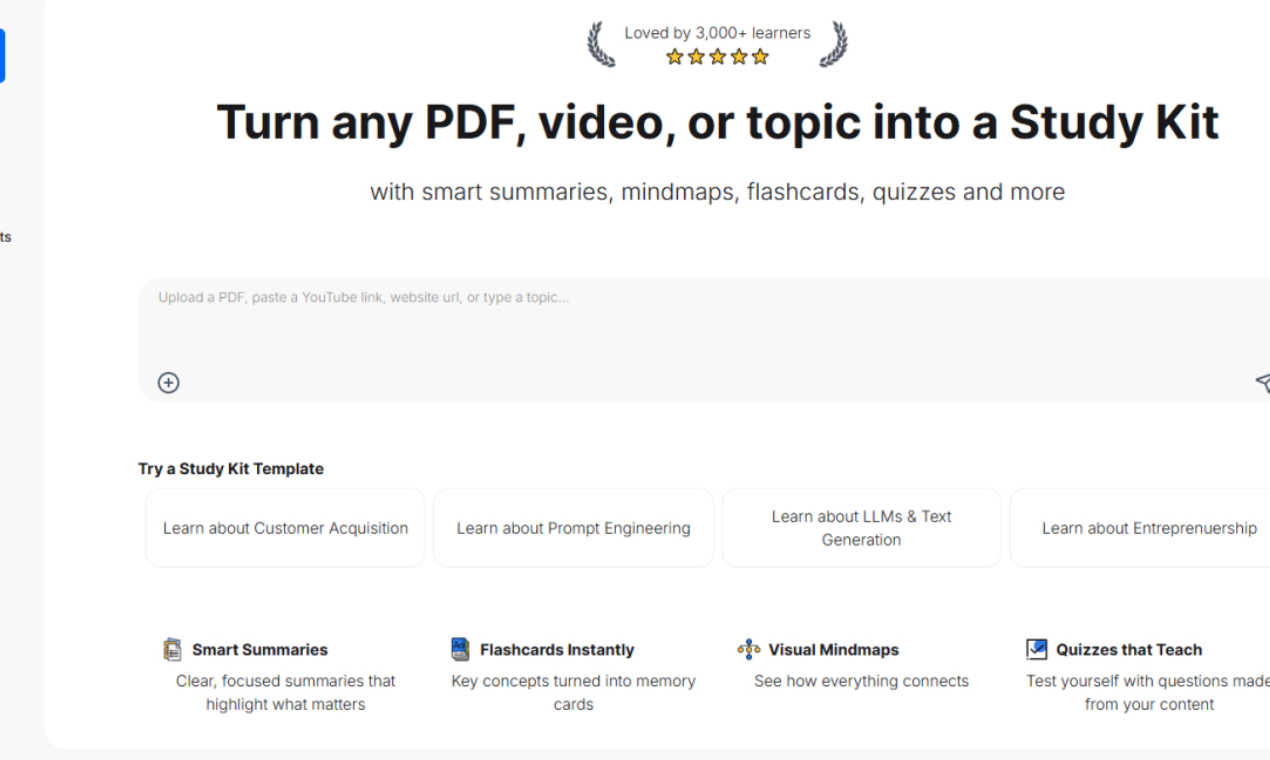
StudyPal transforms PDFs and videos into smart summaries, flashcards, and quizzes for efficient learning.
Last updated: March 1, 2026
Visual Comparison
Code Word Solver - Missing Words Finder

StudyPal
Feature Comparison
Code Word Solver - Missing Words Finder
Single Pattern Solving
The single pattern solving feature allows users to input one specific word pattern, making it easy to generate a list of matching word candidates. This feature is perfect for when you have a partial answer and need assistance to fill in the gaps, thus speeding up the puzzle-solving process.
Multi-Pattern Solving
This feature enables users to enter two patterns simultaneously, which is particularly useful when dealing with linked words that share the same number/letter relationships. By solving these patterns side-by-side, users can find answers more efficiently, reducing the time spent on deduction.
User-Friendly Pattern Input
The tool offers a straightforward method for users to input their known letters, utilizing symbols like '.' or '?' for unknown letters, while numbers can represent repeated unknown letters. This allows for precise filtering of potential word candidates, ensuring a tailored experience that matches the user's specific needs.
Customizable Difficulty Dictionaries
Code Word Solver provides users with the ability to choose from different dictionary sizes, allowing them to adapt the word list to their skill level. With options including Hard (260k words), Normal (115k words), and Easy (20k words), users can select the dictionary that best fits their puzzle-solving style.
StudyPal
Smart Summaries
Smart Summaries provide clear and focused overviews that highlight essential information from any source material. This feature helps learners quickly grasp critical concepts without sifting through unnecessary details, making studying more efficient and effective.
Flashcards Instantly
Flashcards Instantly transforms key concepts into memory cards that facilitate active recall and spaced repetition. This feature enables learners to reinforce their understanding of important topics and enhances memory retention through engaging, bite-sized learning.
Visual Mindmaps
Visual Mindmaps create an organized, graphical representation of how different ideas and concepts connect. This feature allows users to visualize relationships between topics, fostering a deeper understanding and better recall of the material.
Quizzes that Teach
Quizzes that Teach are tailored assessments derived from the user's content, designed to test knowledge and reinforce learning. These interactive quizzes provide immediate feedback, helping learners identify areas for improvement and solidifying their grasp of the subject matter.
Use Cases
Code Word Solver - Missing Words Finder
Casual Puzzle Solvers
For casual puzzle enthusiasts who enjoy codeword puzzles as a pastime, this tool provides a quick and effective way to find answers without excessive guesswork. It enhances the enjoyment of solving puzzles by making the process more efficient.
Competitive Puzzle Players
For those who participate in puzzle competitions, the multi-pattern solving feature can be a game-changer. It allows players to solve complex puzzles quickly, giving them a competitive edge over others who may still be grappling with their answers.
Educators and Students
Educators can use Code Word Solver as a teaching tool to help students understand letter patterns and enhance their vocabulary. Students can practice their problem-solving skills in a supportive environment, making learning fun and engaging.
Community Contributors
Users who encounter words not found in the database can contribute to the tool's improvement by submitting new words or definitions. This collaborative aspect not only enhances the tool's coverage but also fosters a sense of community among users.
StudyPal
Efficient Exam Preparation
Students facing imminent exams can utilize StudyPal to quickly distill their textbooks and lecture notes into essential study kits. This feature allows them to focus on the most relevant information, ensuring they maximize their study time and improve their chances of success.
Professional Development
Professionals looking to upskill in new fields, such as machine learning or entrepreneurship, can leverage StudyPal to streamline their learning process. By converting industry-relevant resources into interactive study kits, they can efficiently acquire the knowledge needed for career advancement.
Lifelong Learning
Individuals dedicated to continuous education can benefit from StudyPal by exploring diverse topics. The platform enables them to create tailored study kits that cater to their interests, facilitating an engaging and enriching learning experience.
Collaborative Learning
StudyPal can be used in group study settings, where learners can share study kits with peers. This collaborative approach allows for more dynamic discussions and collective understanding, making it easier to tackle complex subjects together.
Overview
About Code Word Solver - Missing Words Finder
Code Word Solver - Missing Words Finder is an innovative tool designed to enhance the experience of solving codeword puzzles, also known as code-cracker puzzles. This product is ideal for puzzle enthusiasts who often find themselves stumped by challenging grids. With its intelligent pattern recognition capabilities, the tool allows users to input known letters and receive a list of potential solutions. The primary value proposition lies in its ability to eliminate guesswork, enabling users to decode puzzles with confidence and efficiency. By understanding the numerical representation of letters (1-26), users can easily apply their findings across the entire puzzle, making it a valuable companion for both casual players and seasoned solvers alike. Whether you're tackling a single word or multiple patterns, Code Word Solver is here to streamline your code-solving journey.
About StudyPal
StudyPal is an innovative AI-powered study companion designed to address the common challenges of inefficient learning. It streamlines the study process by transforming any source material—such as dense PDFs, lengthy YouTube lectures, or simple typed topics—into a comprehensive, interactive study kit in mere minutes. This tool is especially beneficial for students preparing for finals, professionals looking to upskill in fields like machine learning or entrepreneurship, and lifelong learners eager to explore new subjects. The main value proposition of StudyPal lies in its ability to save time significantly while enhancing knowledge retention through engaging, multi-format learning experiences. With personalized learning paths that include clear summaries, visual mind maps, flashcards, quizzes, and curated video recommendations, StudyPal adapts to individual learning needs. The built-in AI tutor serves as a 24/7 personal instructor, ready to answer questions and clarify complex concepts whenever necessary. By centralizing and automating the creation of study materials, StudyPal empowers users to manage overwhelming information effectively, turning it into knowledge that can be mastered with confidence.
Frequently Asked Questions
Code Word Solver - Missing Words Finder FAQ
How do I input my letter patterns into the solver?
To input your letter patterns, simply enter the letters you already know, using '.' or '?' for unknown letters and numbers for repeated unknown letters. For example, '11.E' would match "ooze".
Can I use the solver for multiple words at once?
Yes, the Code Word Solver allows you to enter two patterns simultaneously for multi-pattern solving. This is particularly useful when the same number/letter relationships exist across different words.
What dictionaries can I choose from?
You have the option to select from three difficulty levels: Hard (260k words), Normal (115k words), and Easy (20k words). This allows you to customize your experience based on your skill level.
How can I contribute to the word database?
If you find a word that is not in the database, you can submit it through the tool. This helps improve the coverage and accuracy of the solver, making it more useful for all users.
StudyPal FAQ
How does StudyPal transform content into study materials?
StudyPal uses advanced AI algorithms to analyze and distill content from various sources, such as PDFs and videos, into structured study kits. This process includes generating summaries, flashcards, mind maps, and quizzes tailored to the user’s learning objectives.
Can I customize my learning path in StudyPal?
Yes, StudyPal allows users to create personalized learning paths based on their specific needs and goals. The platform adapts to your preferences, ensuring that the study materials you receive are relevant and useful for your educational journey.
Is there support available if I have questions about using StudyPal?
Absolutely! StudyPal provides 24/7 access to its built-in AI tutor, which can assist with questions and clarify complex concepts. Additionally, users can access customer support for any technical issues or inquiries regarding the platform.
What types of content can I use with StudyPal?
You can use a variety of content types with StudyPal, including PDFs, video lectures, articles, and other digital resources. The platform is designed to handle diverse formats, making it versatile for different learning materials.
Alternatives
Code Word Solver - Missing Words Finder Alternatives
Code Word Solver - Missing Words Finder is a specialized tool designed to assist users in solving codeword puzzles efficiently. This product falls under the category of puzzle-solving aids, providing a structured approach to decoding complex word grids by utilizing existing patterns. Users often seek alternatives to this type of tool for various reasons, including pricing disparities, feature sets that better align with personal preferences, or compatibility with different platforms. When exploring alternatives, it’s essential to consider factors such as user interface, dictionary size, and the specific features that cater to individual puzzle-solving needs. --- [{"question": "What is Code Word Solver - Missing Words Finder?", "answer": "Code Word Solver - Missing Words Finder is an online tool designed to help users solve codeword puzzles by narrowing down possible answers based on known patterns."}, {"question": "Who is Code Word Solver - Missing Words Finder for?", "answer": "This tool is ideal for puzzle enthusiasts and anyone looking to enhance their codeword solving skills, regardless of experience level."}, {"question": "Is Code Word Solver - Missing Words Finder free?", "answer": "While the specific pricing model isn't mentioned, users should check the website for details on access and any potential costs."}, {"question": "What are the main features of Code Word Solver - Missing Words Finder?", "answer": "Main features include single and multi-pattern solving, a customizable dictionary size, and community-powered word coverage for improved accuracy."}]
StudyPal Alternatives
StudyPal is an innovative AI-powered study companion that streamlines the learning process by generating summaries, flashcards, and quizzes from various source materials, including PDFs and videos. As a valuable tool in the education and learning category, StudyPal addresses the common challenges of inefficient study habits and information overload, making it easier for users to absorb and retain knowledge effectively. Many users seek alternatives to StudyPal for reasons such as pricing, desired features, or specific platform compatibility. When choosing an alternative, consider factors like the types of content supported, ease of use, customization options, and the overall effectiveness of the learning tools provided. Ensuring that the alternative aligns with your personal learning style and goals will lead to a more beneficial study experience.