TinyFast vs WA Reminders
Side-by-side comparison to help you choose the right product.

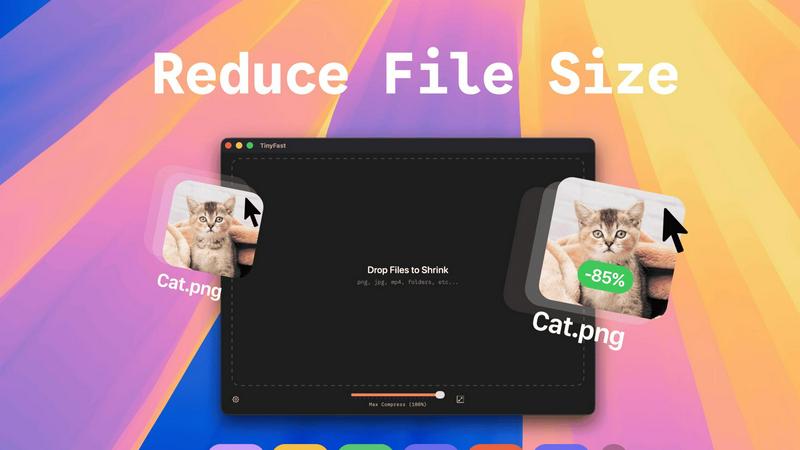
TinyFast instantly and privately compresses your files on your Mac without any uploads.
Last updated: February 28, 2026

WA Reminders
WA Reminders schedules WhatsApp messages from your calendar to save time and ensure timely client communication.
Last updated: April 4, 2026
Visual Comparison
TinyFast
WA Reminders

Feature Comparison
TinyFast
100% Local & Private Compression
Your files never leave your Mac. TinyFast processes all compression tasks directly on your device, eliminating the need to upload sensitive documents, client assets, or confidential materials to unknown cloud servers. This privacy-by-design approach ensures total data security, making it ideal for professionals bound by NDAs or anyone who values their digital privacy. You get the benefits of file optimization without any of the security risks.
Blazing-Fast Batch Processing
Drop entire folders of files and get optimized output in seconds. TinyFast uses optimized native engines built for speed on macOS, allowing you to compress multiple images, videos, or documents simultaneously. This batch functionality saves immense time compared to handling files one by one, streamlining your workflow when preparing assets for projects, presentations, or digital delivery.
Universal File Type Support
TinyFast isn't limited to just images. It supports a comprehensive range of common file types you encounter daily. This includes images (PNG, JPG, HEIC, WEBP, GIF, SVG, BMP, TIFF), videos (MP4, MOV, M4V), documents (PDF, DOCX), audio (MP3), and even code files (JS, CSS, JSON). This versatility means you can rely on a single, trusted tool for all your compression needs across different media.
Integrated Resolution Resizing
Beyond simple compression, TinyFast gives you control over the physical dimensions of your images and videos. You can set it to automatically resize the resolution during the compression process. This is perfect for reducing file sizes even further by scaling down high-resolution assets to the exact dimensions needed for web use, social media, or email attachments, all in one step.
WA Reminders
Dual Scheduling Methods
Schedule messages flexibly either through the WA Reminders app itself or directly from your Google Calendar. When using Google Calendar, simply add an internationally formatted phone number to any event's title or description, and the reminder will be sent automatically. This provides a seamless workflow for those who already manage their appointments in a calendar, eliminating the need to switch between multiple tools.
Automatic Contact List Import
When scheduling from the WA Reminders app, your full phone contact list is automatically imported and synced. This removes the tedious, error-prone process of manually typing or copying phone numbers for each reminder. You can quickly select clients from your existing contacts, ensuring messages reach the right person every time and speeding up the entire scheduling process significantly.
Messages Sent From Your Own Number
All scheduled reminders are delivered to your clients directly from your own (or your company's) WhatsApp phone number. This maintains a personal and trusted line of communication. After the automated reminder is sent, you can continue the conversation naturally within your main WhatsApp account, providing a seamless experience for both you and your client without any confusing third-party sender labels.
Recurring Event & Calendar Integration
WA Reminders supports scheduling for recurring events, both from within its app and via Google Calendar. This is perfect for weekly appointments, monthly payment reminders, or regular follow-ups. The integration extends to tools like Calendly when Google Calendar is enabled, creating a powerful automated ecosystem that captures new appointments and triggers reminders without any manual intervention.
Use Cases
TinyFast
Preparing Client Deliverables Securely
Designers and developers can compress project assets like high-fidelity mockups, screenshots, and demo videos before sending them to clients. Since TinyFast works locally, there's no risk of confidential work-in-progress files being stored on a third-party server, ensuring client confidentiality and meeting professional security standards effortlessly.
Optimizing Web and App Assets
Web developers and digital creators can quickly shrink folders full of website images, icons (SVG), and video content directly on their Mac. This reduces page load times and improves user experience without relying on slow online tools or complex command-line utilities. Batch processing makes optimizing an entire project's asset library fast and simple.
Managing Email Attachments
Professionals who need to email large presentations, PDF reports, or image collections can use TinyFast to reduce file sizes below typical email attachment limits. The drag-and-drop simplicity means you can compress files instantly right before attaching them, avoiding bounce-backs and ensuring your important communications are delivered without hassle.
Freeing Up Local Storage Space
Anyone running low on disk space can use TinyFast to compress old project folders, photo libraries, or video archives directly on their Mac's hard drive. By reducing the size of these files locally, you can reclaim valuable storage without deleting important work or moving files to external drives, maintaining both access and organization.
WA Reminders
Reducing Appointment No-Shows for Clinics
Medical and wellness clinics can schedule automatic appointment reminders 24 or 48 hours before a scheduled session. This gentle nudge significantly reduces forgotten appointments (no-shows), ensuring better utilization of the professional's time and maintaining a steady workflow. Clients appreciate the professional touch, and staff save hours otherwise spent on manual calls or texts.
Automating Payment Follow-Ups
Freelancers, coaches, and small business owners can use WA Reminders to schedule polite payment reminder messages for invoices. By automating this follow-up process, they ensure timely collections without awkward manual chasing. This improves cash flow and reduces the administrative burden of tracking down late payments, allowing them to focus more on their core service delivery.
Managing Client Confirmations for Small Shops
Small retail shops or service providers that work by appointment, such as salons or repair services, can confirm bookings automatically. After a customer books a slot, a confirmation message can be scheduled to send immediately, and a reminder can be set for the day before. This builds trust, reduces last-minute cancellations, and presents a highly organized business front.
Streamlining Team Reminders for Managers
Business owners or managers can use the tool to schedule internal reminders for their team or providers. For example, sending a recurring WhatsApp message about weekly meeting links, deadline alerts, or important operational updates. This ensures critical information is communicated reliably through a channel everyone uses, without relying on individual memory.
Pricing Comparison
TinyFast
TinyFast offers flexible pricing to suit different needs. The Free plan allows compression of up to 5 files per day with full feature access. For unlimited use, the Lifetime Plan is a one-time payment of €17.99, granting unlimited local compressions, lifetime updates, and support for future development. Alternatively, the Monthly Subscription is €2.99 per month (after a 3-day free trial), also offering unlimited compressions and feature access. Both paid options include the initial 3-day trial period.
WA Reminders
WA Reminders offers three straightforward monthly plans tailored to different business needs. All plans include reminders sent from your own number, contact import, and sync with Google Calendar and recurring events. Each plan varies by the volume of messages you can send per month.
Basic ($19/month): Perfect for solo professionals and one-person businesses, this plan allows you to send up to 200 WhatsApp messages per month.
Startup ($29/month): Designed for small teams or growing companies, this plan includes everything in Basic and increases the limit to 500 messages per month for higher-volume follow-ups and campaigns.
Business ($39/month): Ideal for medium-sized companies, this top-tier plan provides everything in Startup with a capacity of 1,000 messages per month to scale reminders across an entire organization.
All pricing is in US dollars and includes a 14-day money-back guarantee. If WA Reminders is not a fit, you can request a full refund with no questions asked.
Overview
About TinyFast
TinyFast is a powerful, privacy-focused macOS application designed to solve the common and frustrating problem of large file sizes. It provides instant, local compression for a wide array of file types including images (PNG, JPEG, WebP, GIF, SVG), videos (MP4, MOV), documents (PDF), and even code files (JS, CSS, JSON). The core value proposition is simple: shrink your files quickly without ever uploading them to the internet. This addresses critical pain points for professionals who handle sensitive or confidential materials, such as developers, designers, and content creators. By processing everything directly on your Mac, TinyFast eliminates the security risks, slow upload/download times, and usage limits associated with online compression tools. Its drag-and-drop interface makes it incredibly simple to use, whether you're compressing a single screenshot or an entire folder of project assets. TinyFast is built for those who prioritize speed, security, and a seamless workflow, offering a reliable and efficient way to reduce file sizes for email, web use, or storage, all while keeping your data completely private.
About WA Reminders
WA Reminders is a specialized scheduling app designed to automate WhatsApp messaging for appointment-based businesses and professionals. It directly tackles the costly problem of client no-shows and inefficient manual follow-ups by allowing you to schedule messages to be sent automatically at a future date and time. The core value proposition is saving valuable time and increasing revenue by ensuring clients receive timely reminders, payment follow-ups, and confirmations directly through the world's most popular messaging platform. It works seamlessly with both regular WhatsApp and WhatsApp Business, sending messages from your own phone number so all conversations remain within your familiar WhatsApp interface. Ideal for physiotherapy clinics, independent consultants, small shops, and service providers, WA Reminders offers two powerful scheduling methods: directly through its intuitive app or by syncing with Google Calendar, making it a versatile and central hub for managing all your business communications and reducing administrative overhead.
Frequently Asked Questions
TinyFast FAQ
Is TinyFast really free to use?
Yes, TinyFast offers a free tier forever. This plan allows you to compress up to 5 files per day with access to all core features. It's a great way to test the app's speed and privacy benefits extensively. For unlimited use, you can upgrade to a one-time lifetime purchase or a monthly subscription, both of which start with a 3-day free trial.
How does local compression work?
Local compression means all processing happens directly on your Mac's processor. When you drag a file into TinyFast, the app uses its built-in, optimized algorithms to analyze and reduce the file size. The data is never sent over the internet to an external server. The compressed file is then saved to your chosen location on your computer, ensuring complete privacy and faster speeds.
What file types does TinyFast support?
TinyFast supports a wide variety of common file types. This includes images (PNG, JPG/JPEG, TIFF, HEIC, WEBP, GIF, BMP, SVG), videos (MP4, MOV, M4V), documents (PDF, DOCX), audio (MP3), and code files (JavaScript .JS, Cascading Style Sheets .CSS, JSON). This broad support makes it a universal tool for most file compression needs.
Can I compress an entire folder at once?
Absolutely. One of TinyFast's key features is batch processing. You can simply drag and drop an entire folder onto the app, and it will automatically compress all the supported files within it. This saves significant time compared to selecting and compressing files individually, making it ideal for optimizing project assets or cleaning up directories in bulk.
WA Reminders FAQ
How will my WhatsApp reminder messages look?
Your scheduled messages will appear in your client's WhatsApp chat list exactly as if you sent them manually from your phone at that moment. They come from your verified phone number, preserving the personal and direct nature of WhatsApp communication. The content is fully customizable by you when you schedule the reminder.
Can I send reminders directly from Google Calendar?
Yes, this is a core feature. You can schedule a WhatsApp message by simply adding a phone number (in international format) to the title or description of any Google Calendar event. WA Reminders syncs with your calendar and will automatically send the reminder based on the event time, making it incredibly efficient for those who already manage their schedule in Google Calendar.
Do you have a Calendly integration?
WA Reminders integrates with Calendly through Google Calendar. When a client books an appointment via your Calendly link, it creates an event in your connected Google Calendar. As long as the phone number is included in that calendar event, WA Reminders will automatically pick it up and send the scheduled reminder, creating a fully automated booking-to-reminder workflow.
Can I import or use the contacts from my phone?
Absolutely. When you use the WA Reminders application to schedule a message, it automatically imports and syncs your phone's full contact list. This allows you to easily select recipients from your existing contacts without having to manually enter phone numbers, saving time and preventing errors.
Alternatives
TinyFast Alternatives
TinyFast is a privacy-focused macOS application for local file compression. It instantly reduces the size of images, videos, PDFs, and more directly on your computer, ensuring your sensitive data never leaves your machine. This places it in the category of desktop optimization and productivity tools for Mac users. Users often explore alternatives for various reasons. Some may seek different pricing models, such as a one-time purchase versus a subscription. Others might need support for additional file formats, more advanced compression controls, or a tool that works across multiple platforms like Windows or online. When evaluating alternatives, key considerations include your primary need for privacy versus convenience, the specific file types you work with most, and your budget. It's crucial to determine if you require cloud-based accessibility or if a local, offline tool better suits your security requirements and workflow speed.
WA Reminders Alternatives
WA Reminders is a productivity tool designed to help businesses schedule automated WhatsApp messages. It falls into the category of appointment reminder and business communication software, specifically leveraging the widespread use of WhatsApp to reduce missed appointments and improve client follow-up. Users often explore alternatives for various reasons. These can include budget constraints, the need for features beyond basic scheduling, or a requirement to integrate with other platforms like specific CRM systems. Some may also seek solutions that work across multiple messaging channels, not just WhatsApp. When evaluating other options, consider your core needs. Key factors are cost-effectiveness, ease of use, reliability of message delivery, and the specific integrations that fit your existing workflow. The right tool should seamlessly support your business operations without adding complexity.