
ExpenseManager vs Tradepal
Side-by-side comparison to help you choose the right product.

ExpenseManager
Manage your finances effortlessly with ExpenseManager to track spending, split bills, and forecast cash flow.
Last updated: February 26, 2026

Tradepal
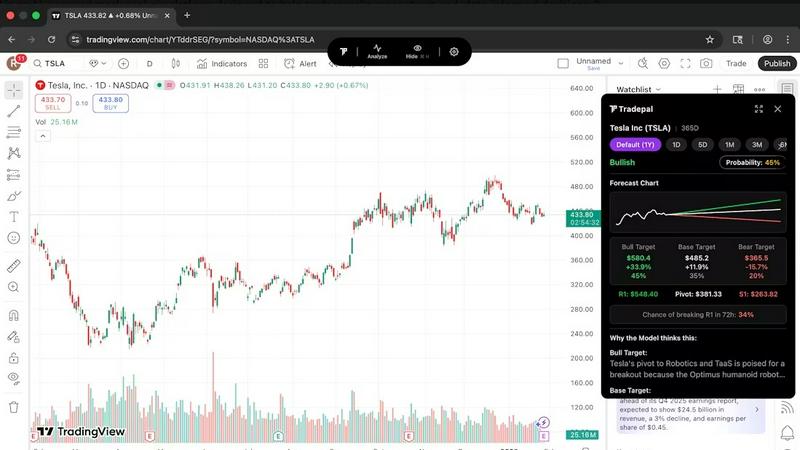
Tradepal transforms stock chart screenshots into actionable insights with AI-driven analysis and real-time sentiment.
Last updated: February 26, 2026
Visual Comparison
ExpenseManager

Tradepal
Feature Comparison
ExpenseManager
AI-Powered Receipt Scanning
With ExpenseManager's AI-driven OCR technology, users can quickly snap photos of their receipts, making expense tracking effortless. This feature automatically extracts essential data like amount, category, and merchant, saving users time and ensuring accuracy in their financial records.
Budget Tracking and Alerts
Users can set personalized budgets within the app and receive timely alerts at critical thresholds of 50%, 75%, and 90%. This proactive approach helps individuals and groups manage their finances effectively, ensuring they stay within their spending limits and avoid unexpected financial strain.
Flexible Cost Splitting
ExpenseManager offers multiple methods for splitting costs, including equal splits, percentage-based divisions, or custom amounts. This flexibility is perfect for couples, roommates, and friends on trips, ensuring that everyone knows exactly what they owe and when to settle debts.
Multi-Currency Support
For those traveling or dealing with international expenses, ExpenseManager supports over 30 currencies. This feature allows users to easily manage and convert expenses, making it a valuable tool for international travelers or anyone dealing with cross-border transactions.
Tradepal
Real-Time AI Forecasts
Tradepal provides intraday forecasts for price ranges, reversals, and volatility, utilizing a blended AI ensemble that updates in real time. This feature allows traders to see potential risks before they impact price movements, enabling more proactive decision-making.
Price Cone Projections
With Tradepal, users can visualize forward price cones directly on their charts. This feature comes with an intuitive layout that can be personalized to fit individual trading styles. Users can save their preferred views for future sessions, enhancing the trading experience.
News and Sentiment Analysis
Track the market mood effortlessly with Tradepal's integrated news and sentiment analysis. This feature aggregates insights from professional trader sources and financial news, allowing users to recognize shifts in crowd conviction before they translate into price movements.
Breakout Signals
Tradepal identifies early signals of strength or potential failure by monitoring live sentiment streams, order flow hints, and momentum shifts. This capability helps traders act quickly on opportunities and manage risks effectively by staying ahead of market trends.
Use Cases
ExpenseManager
Couples Managing Household Expenses
ExpenseManager simplifies financial interactions for couples by providing clear visibility into shared expenses. By tracking who paid for what and displaying outstanding balances, it helps avoid misunderstandings and fosters a healthier financial relationship.
Individuals Monitoring Personal Spending
For individuals, ExpenseManager serves as a personal finance tracker that allows users to categorize their spending and set savings goals. This feature is particularly useful for freelancers or those with variable incomes, providing insights that help users maintain financial stability.
Group Travel Expense Management
When traveling with friends or family, ExpenseManager makes it easy to split costs for accommodations, meals, and activities. Users can quickly add expenses and choose their preferred splitting method, ensuring seamless financial transactions without post-trip disputes.
Roommates Sharing Bills
ExpenseManager is an ideal solution for roommates managing shared living expenses. The app allows them to track rent, utilities, and other bills effortlessly, ensuring that everyone is aware of their financial obligations and can settle debts promptly.
Tradepal
Validating Trading Ideas
Traders can utilize Tradepal to validate their trading ideas by running their chosen stock charts through the AI analysis. This ensures that decisions are based on solid technical insights rather than emotional impulses.
Enhancing Day Trading
Active day traders can leverage Tradepal's real-time forecasts and breakout signals to capitalize on intraday volatility. The ability to receive instant feedback on market conditions allows them to make quicker, informed decisions.
Risk Management
By utilizing Tradepal's price cone projections and sentiment analysis, traders can better manage risks associated with their positions. This feature enables users to see potential price movements and adjust their strategies accordingly.
Creating Smart Watchlists
Traders can create customized watchlists with smart alerts for unusual activity, risk stress events, and optimal sizing. This feature allows users to stay prepared and informed without constantly monitoring the markets.
Overview
About ExpenseManager
ExpenseManager is a comprehensive financial management app designed to simplify personal budgeting and shared expense tracking. Unlike other apps, it uniquely combines features for both individuals and groups, making it suitable for couples sharing household costs, roommates splitting rent and bills, and travelers managing multi-currency expenses. With ExpenseManager, users can snap a photo of their receipts, and its AI-powered Optical Character Recognition (OCR) technology instantly extracts critical details such as the amount, category, and merchant. The app also allows users to set budgets and receive alerts when they reach 50%, 75%, or 90% of their limits, helping them avoid overspending. By facilitating easy cost splitting and automatic debt settlement, ExpenseManager provides clarity on spending for anyone seeking better financial awareness and control.
About Tradepal
Tradepal is an innovative AI-powered trading assistant designed specifically for active traders and investors seeking fast and objective chart analysis without the hassle of manual guesswork. This powerful tool allows users to analyze any U.S.-listed stock chart by either clicking the "Analyze" button when the chart is displayed or by uploading a screenshot through the web app. Tradepal employs advanced algorithms to detect key technical patterns, identify support and resistance levels, assess trend strength, and evaluate momentum. The platform produces clear bull, base, and bear scenarios, complete with confidence scores and price targets.
Unlike traditional trading platforms that facilitate trade execution, Tradepal serves as a valuable second opinion, helping traders validate their ideas, mitigate emotional bias, and make more informed decisions. It seamlessly integrates with popular charting platforms and is engineered to be lightweight, fast, and trader-focused, making it an ideal choice for those who want AI assistance integrated naturally into their existing workflow.
Frequently Asked Questions
ExpenseManager FAQ
What is the Founding Member offer?
The Founding Member offer provides the first 100 users with lifetime access to all premium features of ExpenseManager at no cost. This limited-time opportunity allows early adopters to benefit from the app without any financial commitment.
What happens if I don't stay active?
If users do not remain active, their accounts may become inactive, but ExpenseManager aims to keep the experience user-friendly. Users are encouraged to engage with the app regularly to maintain their access to its features and benefits.
Is my financial data secure?
Yes, ExpenseManager prioritizes user security by employing AES-256 bank-grade encryption to protect financial data. Users can trust that their sensitive information is safeguarded against unauthorized access and breaches.
What platforms are supported?
ExpenseManager is designed to be accessible on multiple platforms, making it easy to use on smartphones and tablets. This cross-platform compatibility ensures that users can manage their finances conveniently, whether at home or on the go.
Tradepal FAQ
How do I use Tradepal?
After signing up, you can easily download Tradepal for macOS or Windows. The app remains accessible on your screen while you trade. When you view a U.S.-listed stock chart on any platform, simply click "Analyze" to receive immediate insights from Tradepal.
Is Tradepal financial advice?
Tradepal is not a financial advisor. It provides AI-driven insights and analysis to support your trading decisions. However, it is essential to conduct your own research and consult with a financial advisor when necessary.
What charts are compatible with Tradepal?
Tradepal is compatible with any platform that displays U.S.-listed stock charts. It can analyze charts from various sources, ensuring flexibility in how traders operate and make decisions.
Do I need trading experience to use Tradepal?
While prior trading experience can be beneficial, Tradepal is designed to be user-friendly for traders of all skill levels. Its intuitive interface and clear insights make it accessible for both beginners and seasoned professionals.
Alternatives
ExpenseManager Alternatives
ExpenseManager is an all-in-one app designed to help individuals, couples, and groups track expenses, split bills, scan receipts, and forecast cash flow. It falls under the Business & Finance category, making it a useful tool for anyone looking to manage their personal budgeting and shared financial responsibilities effectively. Users often seek alternatives to ExpenseManager due to various reasons such as pricing, specific features they might need, or compatibility with different platforms. When searching for a suitable alternative, it's essential to consider factors like the user interface, ease of expense tracking, support for multi-currency transactions, and the ability to set budgets and alerts. Identifying the primary needs and preferences will help in finding the most fitting solution.
Tradepal Alternatives
Tradepal is an AI-powered trading assistant designed for active traders and investors seeking fast, objective stock chart analysis without the hassle of manual guesswork. By enabling users to analyze U.S.-listed stock charts through screenshots or direct interactions, it provides insights into key technical patterns, support and resistance levels, and market momentum. This innovative tool helps traders validate their ideas and make informed decisions while seamlessly integrating into their existing trading workflows. Users often seek alternatives to Tradepal for various reasons, including pricing, specific feature sets, and compatibility with preferred trading platforms. When evaluating alternatives, it's essential to consider factors such as user interface, analytical capabilities, integration options, and overall effectiveness in meeting individual trading needs. Selecting the right tool can enhance your trading experience and provide the insights needed for strategic decision-making.