ProcessBankStatement vs Tradepal
Side-by-side comparison to help you choose the right product.

ProcessBankStatement
Instantly convert PDF bank statements into clean, ready-to-use CSV files for analysis or accounting.
Last updated: March 19, 2026

Tradepal
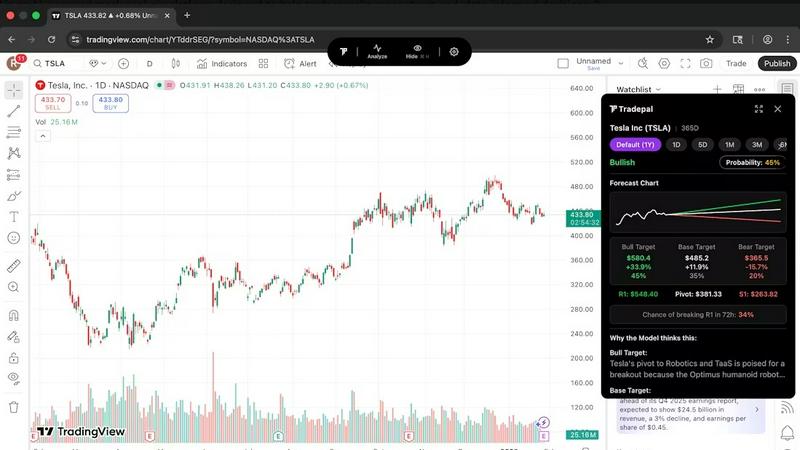
Tradepal transforms stock chart screenshots into actionable insights with AI-driven analysis and real-time sentiment.
Last updated: February 26, 2026
Visual Comparison
ProcessBankStatement

Tradepal
Feature Comparison
ProcessBankStatement
Universal PDF Support
ProcessBankStatement handles any PDF bank statement you throw at it. This includes both text-based PDFs downloaded directly from your online banking portal and scanned image PDFs of physical paper statements. The smart parsing engine is trained to accurately extract data from various layouts and formats, ensuring broad compatibility without the need for manual pre-processing or formatting adjustments.
Blazing-Fast Conversion
Experience conversion speeds that transform hours of work into mere seconds. The platform's optimized processing engine is designed for instant results, allowing you to upload a multi-page statement and receive a downloadable, organized CSV file almost immediately. This speed is consistent whether you're processing a single statement or utilizing batch upload capabilities for multiple files at once.
High-Volume & Batch Processing
Built to handle the demands of professionals, ProcessBankStatement supports batch uploads, enabling you to convert multiple bank statement PDFs in one go. This is ideal for monthly reconciliations, processing statements for multiple clients, or handling quarterly and annual financial reviews efficiently. It scales to meet high-volume needs without compromising on speed or accuracy.
Enterprise-Grade Data Security
Your financial data is handled with the utmost care. All file transfers are encrypted in transit, and you maintain full control over your data. You can delete uploaded statements and processed files from the platform at any time. The tool is designed with privacy and security as foundational principles, giving you confidence when processing sensitive financial documents.
Tradepal
Real-Time AI Forecasts
Tradepal provides intraday forecasts for price ranges, reversals, and volatility, utilizing a blended AI ensemble that updates in real time. This feature allows traders to see potential risks before they impact price movements, enabling more proactive decision-making.
Price Cone Projections
With Tradepal, users can visualize forward price cones directly on their charts. This feature comes with an intuitive layout that can be personalized to fit individual trading styles. Users can save their preferred views for future sessions, enhancing the trading experience.
News and Sentiment Analysis
Track the market mood effortlessly with Tradepal's integrated news and sentiment analysis. This feature aggregates insights from professional trader sources and financial news, allowing users to recognize shifts in crowd conviction before they translate into price movements.
Breakout Signals
Tradepal identifies early signals of strength or potential failure by monitoring live sentiment streams, order flow hints, and momentum shifts. This capability helps traders act quickly on opportunities and manage risks effectively by staying ahead of market trends.
Use Cases
ProcessBankStatement
Monthly Bookkeeping & Reconciliation
Accountants and bookkeepers can drastically reduce the time spent on monthly client work. Instead of manually typing transactions from PDF statements into QuickBooks or Xero, they can upload the documents and get a clean CSV for import in seconds. This streamlines reconciliation, minimizes human error, and frees up time for higher-value advisory services.
Small Business Financial Management
Small business owners who manage their own books can use ProcessBankStatement to quickly organize bank data for expense tracking, profit and loss analysis, and tax preparation. Converting statements to CSV makes it easy to categorize transactions in Excel, monitor cash flow, and prepare accurate financial records without accounting expertise.
Loan Application Processing
Loan officers and underwriters who must review and analyze bank statements for creditworthiness can automate the most tedious part of their workflow. The tool instantly extracts transaction data, allowing for faster analysis of income, expenses, and cash flow patterns, thereby accelerating the decision-making process for loan applications.
Audit and Financial Analysis Preparation
Auditors and financial analysts preparing for an engagement can quickly convert months or years of bank statements into structured data. This creates an easily searchable and analyzable dataset, facilitating trend analysis, anomaly detection, and the efficient gathering of evidence without manually sifting through hundreds of PDF pages.
Tradepal
Validating Trading Ideas
Traders can utilize Tradepal to validate their trading ideas by running their chosen stock charts through the AI analysis. This ensures that decisions are based on solid technical insights rather than emotional impulses.
Enhancing Day Trading
Active day traders can leverage Tradepal's real-time forecasts and breakout signals to capitalize on intraday volatility. The ability to receive instant feedback on market conditions allows them to make quicker, informed decisions.
Risk Management
By utilizing Tradepal's price cone projections and sentiment analysis, traders can better manage risks associated with their positions. This feature enables users to see potential price movements and adjust their strategies accordingly.
Creating Smart Watchlists
Traders can create customized watchlists with smart alerts for unusual activity, risk stress events, and optimal sizing. This feature allows users to stay prepared and informed without constantly monitoring the markets.
Overview
About ProcessBankStatement
ProcessBankStatement is an intelligent, web-based solution designed to eliminate the manual drudgery of data entry from bank statements. It automates the conversion of messy, unstructured PDF bank statements—whether they are digital downloads or scanned images of paper documents—into clean, structured CSV files in seconds. This tool is built specifically for finance professionals, accountants, bookkeepers, small business owners, and anyone who regularly processes financial data. Its core value proposition is simple: reclaim valuable hours every week by automating a frustrating, error-prone task. The platform offers remarkable speed and a high degree of accuracy, ensuring your data is ready for immediate import into accounting software like QuickBooks, spreadsheets like Excel, or any other analysis platform. With robust support for statements from all major U.S. banks and international institutions, ProcessBankStatement provides a secure, reliable, and efficient way to take control of your financial data processing workflow.
About Tradepal
Tradepal is an innovative AI-powered trading assistant designed specifically for active traders and investors seeking fast and objective chart analysis without the hassle of manual guesswork. This powerful tool allows users to analyze any U.S.-listed stock chart by either clicking the "Analyze" button when the chart is displayed or by uploading a screenshot through the web app. Tradepal employs advanced algorithms to detect key technical patterns, identify support and resistance levels, assess trend strength, and evaluate momentum. The platform produces clear bull, base, and bear scenarios, complete with confidence scores and price targets.
Unlike traditional trading platforms that facilitate trade execution, Tradepal serves as a valuable second opinion, helping traders validate their ideas, mitigate emotional bias, and make more informed decisions. It seamlessly integrates with popular charting platforms and is engineered to be lightweight, fast, and trader-focused, making it an ideal choice for those who want AI assistance integrated naturally into their existing workflow.
Frequently Asked Questions
ProcessBankStatement FAQ
What types of bank statement files are supported?
ProcessBankStatement currently supports PDF files exclusively. This includes both text-based PDFs (the standard format from online banking) and scanned PDFs (images of physical statements). The system's advanced OCR and parsing technology accurately reads data from both formats.
Is there a free trial available?
Yes, there is a free tier to try the service. Guest users can process up to 3 pages per day without registering. By creating a free account, users receive 5 pages per day to use, allowing you to test the tool's capabilities with your own statements risk-free.
How secure is my financial data?
Security is a top priority. All files are encrypted during upload and transit using secure protocols. You retain full control over your data and can permanently delete any uploaded statements or generated CSV files from your dashboard at any time. We do not use your data for any purpose other than providing the conversion service.
Do you support international bank statements?
Yes, ProcessBankStatement supports bank statements from financial institutions worldwide. While it is exceptionally robust with major U.S. banks like Chase and Bank of America, the parsing engine is designed to handle a wide variety of international statement formats and layouts.
Tradepal FAQ
How do I use Tradepal?
After signing up, you can easily download Tradepal for macOS or Windows. The app remains accessible on your screen while you trade. When you view a U.S.-listed stock chart on any platform, simply click "Analyze" to receive immediate insights from Tradepal.
Is Tradepal financial advice?
Tradepal is not a financial advisor. It provides AI-driven insights and analysis to support your trading decisions. However, it is essential to conduct your own research and consult with a financial advisor when necessary.
What charts are compatible with Tradepal?
Tradepal is compatible with any platform that displays U.S.-listed stock charts. It can analyze charts from various sources, ensuring flexibility in how traders operate and make decisions.
Do I need trading experience to use Tradepal?
While prior trading experience can be beneficial, Tradepal is designed to be user-friendly for traders of all skill levels. Its intuitive interface and clear insights make it accessible for both beginners and seasoned professionals.
Alternatives
ProcessBankStatement Alternatives
ProcessBankStatement is a specialized tool in the business and finance software category, designed to automate the conversion of PDF bank statements into structured CSV data. It solves the common pain point of manual data entry, saving significant time for professionals who handle financial records. Users often explore alternatives for various reasons. These can include budget constraints, the need for different feature sets like direct accounting software integration, or a preference for a downloadable desktop application versus a web-based service. Some may also seek tools that support international banks or offer different subscription models. When evaluating other options, key considerations should be accuracy and reliability of the data extraction, the security protocols for handling sensitive documents, the range of supported banks and statement formats, and the overall ease of use. The goal is to find a solution that reliably automates this tedious task without creating new complications.
Tradepal Alternatives
Tradepal is an AI-powered trading assistant designed for active traders and investors seeking fast, objective stock chart analysis without the hassle of manual guesswork. By enabling users to analyze U.S.-listed stock charts through screenshots or direct interactions, it provides insights into key technical patterns, support and resistance levels, and market momentum. This innovative tool helps traders validate their ideas and make informed decisions while seamlessly integrating into their existing trading workflows. Users often seek alternatives to Tradepal for various reasons, including pricing, specific feature sets, and compatibility with preferred trading platforms. When evaluating alternatives, it's essential to consider factors such as user interface, analytical capabilities, integration options, and overall effectiveness in meeting individual trading needs. Selecting the right tool can enhance your trading experience and provide the insights needed for strategic decision-making.