NanoBanana 2 vs Ultra Face Swap
Side-by-side comparison to help you choose the right product.

NanoBanana 2
NanoBanana 2 is an advanced AI photo editing tool that delivers professional-quality enhancements and intelligent retouching effortlessly.
Last updated: March 18, 2026

Ultra Face Swap
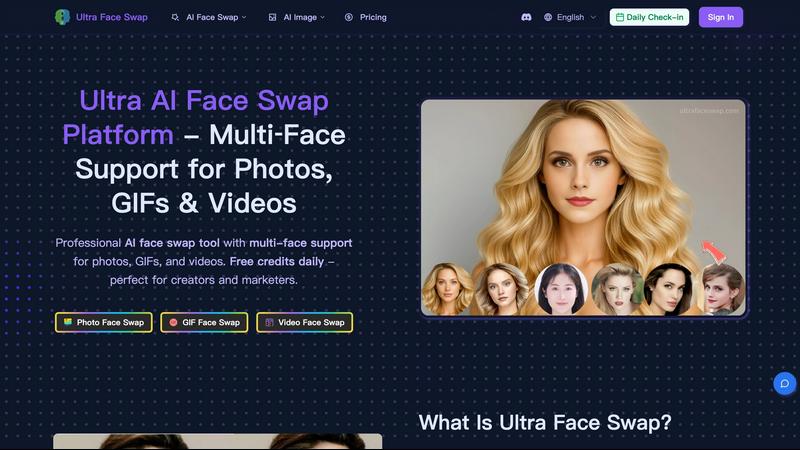
Swap faces in photos, GIFs, and videos with realistic, high-quality AI for free daily.
Last updated: February 28, 2026
Visual Comparison
NanoBanana 2

Ultra Face Swap
Feature Comparison
NanoBanana 2
Smart Auto-Enhancement
Smart Auto-Enhancement automatically analyzes each photo and applies optimal enhancements based on the image's unique characteristics. This feature saves time and effort, allowing creators to achieve stunning results without needing extensive manual adjustments.
Advanced Color Correction
With Advanced Color Correction, users can achieve professional-quality color grading and correction. Powered by deep learning algorithms, this feature ensures that colors are vivid and accurate, bringing images to life while maintaining their natural look.
Noise Reduction AI
The Noise Reduction AI feature effectively eliminates unwanted noise from images while preserving fine details. This capability is essential for producing clean, high-quality visuals, especially in low-light conditions where noise can be problematic.
Batch Processing
Batch Processing allows creators to edit multiple images simultaneously, significantly increasing efficiency. This feature is particularly beneficial for photographers and teams handling large volumes of content, ensuring consistent quality across all images.
Ultra Face Swap
Unified Multi-Scenario Processing
Ultra Face Swap operates on a single, streamlined pipeline that handles photos, GIFs, and videos with equal proficiency. This means you don't need to learn different tools for different media types. Whether you're swapping a face in a static image, an animated GIF, or a full video, the process is identical: upload, swap, and download. This unified approach saves significant time and simplifies the creative workflow for all users.
Stable Multi-Face Tracking
The AI doesn't just detect faces; it intelligently locks onto and tracks multiple faces throughout a video or across a group photo. This advanced tracking ensures that swapped faces maintain proper alignment with the original subject's movements, expressions, and perspective. The result is a stable, artifact-free output where the new face looks naturally integrated, avoiding the "floating" or drifting effect that plagues lesser tools, especially in complex group scenes.
High-Fidelity Natural Blending
Going beyond simple overlay, Ultra Face Swap's AI deeply analyzes and blends critical elements like ambient lighting, skin texture, tone, and fine facial details. This sophisticated fusion ensures the swapped face matches its new environment perfectly. The technology minimizes unnatural edges, color mismatches, and halos, producing production-ready outputs that are remarkably realistic and convincing for both professional and personal use.
Efficient One-Tap Operation
Designed for speed and accessibility, the platform delivers powerful results through an incredibly simple interface. After uploading your source media and target face image, a single click initiates the AI processing. Users can expect high-quality results in approximately 20 to 40 seconds, making it possible to iterate quickly and create multiple versions without long wait times or a steep learning curve.
Use Cases
NanoBanana 2
Professional Photography
Professional photographers can utilize NanoBanana 2 to enhance their portfolio images quickly. The smart retouching and auto-enhancement features streamline the editing process, enabling photographers to focus more on capturing stunning shots rather than spending excessive time on post-processing.
Social Media Marketing
Marketers can leverage NanoBanana 2 to create eye-catching visuals for social media campaigns. With its advanced color correction and batch processing capabilities, users can produce a cohesive look across multiple posts, enhancing engagement and brand consistency.
E-commerce Product Photography
E-commerce businesses can benefit from NanoBanana 2 by enhancing product images for online listings. The tool's noise reduction and intelligent retouching ensure that products look their best, increasing the likelihood of sales through improved visual appeal.
Graphic Design Projects
Graphic designers can incorporate NanoBanana 2 into their workflow to enhance images for various projects. Whether creating promotional materials or designing websites, the AI-driven enhancements provide high-quality visuals that elevate the overall design.
Ultra Face Swap
Social Media Content Creation
Creators can instantly generate viral content for platforms like TikTok, Instagram Reels, and YouTube Shorts. By swapping faces into popular meme templates, celebrity interviews, or trending video formats, users can produce a high volume of engaging, humorous, and shareable content that captures audience attention and drives views, with some users reporting millions of views from a single swap.
Professional Headshot Generation
Professionals and marketers can create polished, high-quality headshots for LinkedIn, company websites, or marketing materials without scheduling a costly photoshoot. By swapping their face onto a variety of pre-existing professional portraits, they can ensure a consistent and impressive online presence that builds credibility and can lead to more client inquiries and career opportunities.
Enhancing Group and Event Photos
Fix imperfect group photos from weddings, reunions, or parties where someone has their eyes closed or an unflattering expression. Ultra Face Swap allows you to replace individual faces within the group using a better shot from the same event, ensuring every photo is picture-perfect for sharing and preserving memories, all without needing complex Photoshop skills.
Entertainment and Personal Fun
Users can explore creative fantasies and entertainment, such as virtually "meeting" a celebrity crush by swapping faces into a photo with them, experimenting with different historical or fictional looks, or creating hilarious GIFs and videos to share with friends. It provides an easy and safe outlet for creative expression and digital amusement.
Overview
About NanoBanana 2
NanoBanana 2 is a cutting-edge AI image editing model that takes the capabilities of its predecessor, NanoBanana, to new heights. Designed for photographers, designers, and content creators, this advanced tool enhances images with a level of quality and precision previously unattainable in traditional editing software. With its powerful AI-driven features, NanoBanana 2 automates the photo enhancement process, allowing users to achieve professional-grade results effortlessly. The model utilizes sophisticated machine learning algorithms for intelligent retouching, ensuring that natural details are preserved while enhancing image quality. Whether you are looking to improve personal photos, create stunning visuals for marketing campaigns, or streamline your editing workflow, NanoBanana 2 offers a comprehensive solution that meets the demands of today’s digital content creators.
About Ultra Face Swap
Ultra Face Swap is an advanced online platform that uses deep learning AI to seamlessly replace faces in photos, GIFs, and videos. It solves the common problem of complex, time-consuming photo editing by providing a one-click solution that delivers high-fidelity, realistic results. The tool is engineered for both casual users wanting to have fun and professional creators needing efficient, high-quality content. Its core value proposition lies in its ability to handle multiple faces in a single image or video frame with stable tracking and natural blending of lighting, skin tone, and expressions. This eliminates the jarring, low-quality artifacts typical of simpler face swap apps. With support for group photos and cross-gender or age transformations, Ultra Face Swap empowers users to create engaging, viral-ready content for social media, professional headshots for business profiles, or entertaining personal projects without requiring any technical skills or expensive software.
Frequently Asked Questions
NanoBanana 2 FAQ
What types of images can I edit with NanoBanana 2?
NanoBanana 2 supports all major image formats, including JPEG, PNG, and WEBP, allowing users to edit a wide variety of images from different sources.
Is there a free version of NanoBanana 2?
Yes, NanoBanana 2 offers a free version called NanoBanana Lite, which provides access to essential features for users looking to try out the tool before committing to a paid plan.
How does AI enhance my images?
AI enhances images by analyzing their content and applying optimal adjustments automatically, such as exposure correction, color grading, and noise reduction. This process results in professional-quality images with minimal manual intervention.
Can I use NanoBanana 2 for batch editing?
Absolutely! NanoBanana 2 features batch processing, enabling users to edit multiple images at once, thus improving workflow efficiency and maintaining consistency across all edited images.
Ultra Face Swap FAQ
What types of files does Ultra Face Swap support?
Ultra Face Swap supports a wide range of media formats for both input and output. You can upload photos (common formats like JPG, PNG), animated GIFs, and video files to use as your source material. The platform processes these and allows you to download the finished face-swapped result in a high-quality format suitable for its intended use, from social media to professional portfolios.
Is it possible to swap multiple faces in one image?
Yes, this is one of the platform's standout capabilities. Ultra Face Swap excels at multi-face detection and swapping. You can upload a group photo or a video with several people and replace one, several, or all of the faces in a single processing operation. The AI tracks each face independently to ensure stable and realistic replacements for everyone in the scene.
How realistic are the face swap results?
The results are designed for high fidelity and realism. The AI goes beyond simple cutting and pasting by performing deep fusion that matches lighting conditions, skin tones, textures, and facial expressions. This significantly reduces visible artifacts, mismatched edges, and unnatural blending, making the final output convincing and suitable for everything from casual fun to professional content.
Is there a watermark on the outputs?
No, outputs generated by Ultra Face Swap do not contain watermarks. This means you can use your created photos, GIFs, and videos freely on social media, in professional materials, or for personal projects without any branding from the tool obstructing your content, giving you full ownership and usability of your creations.
Alternatives
NanoBanana 2 Alternatives
NanoBanana 2 is a cutting-edge AI image editing model that offers advanced capabilities for photo enhancement and intelligent image processing. As a next-generation tool, it appeals to a wide range of users, from professional photographers to casual enthusiasts looking to elevate their images with ease. However, users often seek alternatives due to various reasons, including high pricing, specific feature requirements, or compatibility with different platforms. When searching for alternatives to NanoBanana 2, consider the specific features that meet your editing needs, the user interface and ease of use, and the overall value for money. It’s essential to assess how well an alternative integrates with your existing workflow and whether it offers the level of AI-driven capabilities that can enhance your photo editing experience.
Ultra Face Swap Alternatives
Ultra Face Swap is an AI-powered tool in the digital content creation category, specializing in seamlessly swapping faces across photos, GIFs, and videos. It uses deep learning to deliver high-quality, realistic results for both fun and professional projects. Users often seek alternatives for various practical reasons. These can include budget constraints, as some may need a free or more affordable option. Others might require specific features not offered, such as different output formats, more control over edits, or a dedicated desktop or mobile app instead of a web platform. When evaluating other options, consider your primary needs. Key factors are the quality and realism of the swaps, supported file types, processing speed, and ease of use. Also, assess the pricing model and privacy policy to ensure the tool aligns with your budget and data security expectations.