
RemoveTexts vs Ultra Face Swap
Side-by-side comparison to help you choose the right product.

RemoveTexts
RemoveTexts is a free AI tool that instantly removes any text or watermark from your images with a simple brush.
Last updated: March 11, 2026

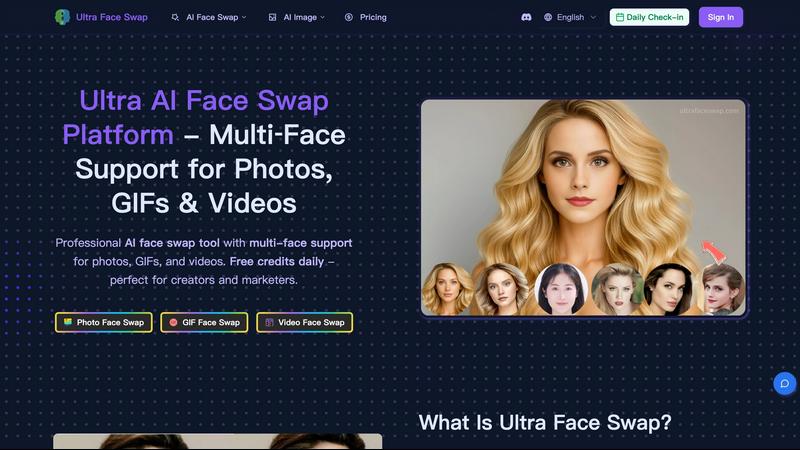
Ultra Face Swap
Swap faces in photos, GIFs, and videos with realistic, high-quality AI for free daily.
Last updated: February 28, 2026
Visual Comparison
RemoveTexts

Ultra Face Swap
Feature Comparison
RemoveTexts
Paint to Remove
This feature gives you precise control over the text removal process. Simply upload your image and use a digital brush to paint directly over the specific words, watermarks, or captions you want to erase. The AI then processes only the painted areas, ensuring you can remove text selectively while keeping other desired text intact. It's perfect for targeted edits where auto-detection might be too broad.
Auto Remove All Text
For images cluttered with multiple text elements, this one-click feature is a massive time-saver. The AI automatically scans your entire image, detects every instance of text—including watermarks, subtitles, date stamps, and overlays—and removes it all simultaneously. It seamlessly reconstructs the background in each area, delivering a completely clean image in seconds without any manual selection required.
Edit & Replace Text
Go beyond simple removal by editing existing text directly within your image. This powerful feature allows you to change words or phrases, and the AI will generate new text that matches the original font style, size, and color. It intelligently blends the new text into the background, making it look as if it was part of the original image, which is ideal for updating graphics or correcting mistakes.
Remove Objects
While focused on text, RemoveTexts also provides a versatile object removal tool. You can erase unwanted visual elements like logos, people, or distracting objects from your photos. Using the same brush tool, you paint over the object, and the AI fills in the space by analyzing the surrounding pixels, effectively removing the element while preserving the natural look of the image background.
About Ultra Face Swap
Unified Multi-Scenario Processing
Ultra Face Swap operates on a single, streamlined pipeline that handles photos, GIFs, and videos with equal proficiency. This means you don't need to learn different tools for different media types. Whether you're swapping a face in a static image, an animated GIF, or a full video, the process is identical: upload, swap, and download. This unified approach saves significant time and simplifies the creative workflow for all users.
Stable Multi-Face Tracking
The AI doesn't just detect faces; it intelligently locks onto and tracks multiple faces throughout a video or across a group photo. This advanced tracking ensures that swapped faces maintain proper alignment with the original subject's movements, expressions, and perspective. The result is a stable, artifact-free output where the new face looks naturally integrated, avoiding the "floating" or drifting effect that plagues lesser tools, especially in complex group scenes.
High-Fidelity Natural Blending
Going beyond simple overlay, Ultra Face Swap's AI deeply analyzes and blends critical elements like ambient lighting, skin texture, tone, and fine facial details. This sophisticated fusion ensures the swapped face matches its new environment perfectly. The technology minimizes unnatural edges, color mismatches, and halos, producing production-ready outputs that are remarkably realistic and convincing for both professional and personal use.
Efficient One-Tap Operation
Designed for speed and accessibility, the platform delivers powerful results through an incredibly simple interface. After uploading your source media and target face image, a single click initiates the AI processing. Users can expect high-quality results in approximately 20 to 40 seconds, making it possible to iterate quickly and create multiple versions without long wait times or a steep learning curve.
Use Cases
RemoveTexts
Cleaning Product Photos for E-commerce
Online sellers can use RemoveTexts to quickly clean up product images by erasing promotional watermarks, price tags, or distracting text overlays from supplier photos. This results in professional, brand-consistent imagery for their storefronts and marketing materials, helping products look their best and improving conversion rates without a graphic designer.
Preparing Professional Screenshots and Presentations
Professionals creating tutorials, reports, or presentations often need clean screenshots. RemoveTexts allows them to easily brush away irrelevant UI elements, browser tabs, personal data, or system watermarks from screenshots. This ensures the focus remains on the intended content, making documents and slides look polished and professional.
Redacting Sensitive Information
Legal, real estate, and administrative professionals frequently need to share documents while protecting private data. RemoveTexts provides a fast way to redact names, addresses, account numbers, or other sensitive text from scanned documents or photos before distribution, helping maintain confidentiality and comply with privacy regulations.
Creating Clean Social Media and Marketing Graphics
Content creators and marketers can repurpose existing images by removing outdated captions, website URLs, or competitor logos. This feature is perfect for refreshing old graphics, creating versatile visual assets from branded templates, or simply removing unwanted text from memes and photos to make them more shareable and on-brand.
Ultra Face Swap
Social Media Content Creation
Creators can instantly generate viral content for platforms like TikTok, Instagram Reels, and YouTube Shorts. By swapping faces into popular meme templates, celebrity interviews, or trending video formats, users can produce a high volume of engaging, humorous, and shareable content that captures audience attention and drives views, with some users reporting millions of views from a single swap.
Professional Headshot Generation
Professionals and marketers can create polished, high-quality headshots for LinkedIn, company websites, or marketing materials without scheduling a costly photoshoot. By swapping their face onto a variety of pre-existing professional portraits, they can ensure a consistent and impressive online presence that builds credibility and can lead to more client inquiries and career opportunities.
Enhancing Group and Event Photos
Fix imperfect group photos from weddings, reunions, or parties where someone has their eyes closed or an unflattering expression. Ultra Face Swap allows you to replace individual faces within the group using a better shot from the same event, ensuring every photo is picture-perfect for sharing and preserving memories, all without needing complex Photoshop skills.
Entertainment and Personal Fun
Users can explore creative fantasies and entertainment, such as virtually "meeting" a celebrity crush by swapping faces into a photo with them, experimenting with different historical or fictional looks, or creating hilarious GIFs and videos to share with friends. It provides an easy and safe outlet for creative expression and digital amusement.
Overview
About RemoveTexts
RemoveTexts is a free, AI-powered online tool designed to solve a common digital problem: removing unwanted text and elements from images quickly and professionally. It eliminates the need for complex software like Photoshop by offering a simple, one-click solution. The tool uses advanced deep learning inpainting technology, similar to that pioneered by industry leaders, to intelligently detect text and seamlessly reconstruct the background, leaving no trace behind. It's built for anyone who works with images, from marketers and social media creators needing clean product photos and social graphics, to professionals redacting sensitive information from documents, or individuals wanting to tidy up personal screenshots and memes. The core value proposition is delivering high-quality, 4K output results in under 30 seconds without requiring any technical skills or design expertise, making professional image editing accessible to everyone.
About Ultra Face Swap
Ultra Face Swap is an advanced online platform that uses deep learning AI to seamlessly replace faces in photos, GIFs, and videos. It solves the common problem of complex, time-consuming photo editing by providing a one-click solution that delivers high-fidelity, realistic results. The tool is engineered for both casual users wanting to have fun and professional creators needing efficient, high-quality content. Its core value proposition lies in its ability to handle multiple faces in a single image or video frame with stable tracking and natural blending of lighting, skin tone, and expressions. This eliminates the jarring, low-quality artifacts typical of simpler face swap apps. With support for group photos and cross-gender or age transformations, Ultra Face Swap empowers users to create engaging, viral-ready content for social media, professional headshots for business profiles, or entertaining personal projects without requiring any technical skills or expensive software.
Frequently Asked Questions
RemoveTexts FAQ
How does RemoveTexts work?
RemoveTexts uses a sophisticated deep learning model called an inpainting neural network. When you paint over text or use the auto-remove feature, the AI analyzes the pixels surrounding the selected area. It then intelligently predicts and generates a new background that seamlessly matches the texture, color, and patterns of the original image, effectively filling in the space where the text was located without leaving any traces.
What image formats and sizes are supported?
The tool supports common image formats including JPG, PNG, and WebP. You can upload files up to 10 MB in size. This covers most high-resolution images from smartphones, cameras, and screenshots, ensuring the tool is versatile enough for a wide range of projects while maintaining a fast processing time.
Is RemoveTexts really free to use?
Yes, RemoveTexts is a free online tool. You can upload images, remove text or objects, and download the processed results without any cost or subscription. The service is designed to be accessible to everyone, and there is no watermark added to the images you download after using the tool.
What are the limitations of the tool?
The primary limitations are based on content and file size. The tool does not support processing NSFW (Not Safe For Work) content. Additionally, it is not designed for the removal of copyrighted logos or trademarks, as this could infringe on intellectual property rights. For optimal performance, ensure your uploaded image is under the 10 MB size limit.
Ultra Face Swap FAQ
What types of files does Ultra Face Swap support?
Ultra Face Swap supports a wide range of media formats for both input and output. You can upload photos (common formats like JPG, PNG), animated GIFs, and video files to use as your source material. The platform processes these and allows you to download the finished face-swapped result in a high-quality format suitable for its intended use, from social media to professional portfolios.
Is it possible to swap multiple faces in one image?
Yes, this is one of the platform's standout capabilities. Ultra Face Swap excels at multi-face detection and swapping. You can upload a group photo or a video with several people and replace one, several, or all of the faces in a single processing operation. The AI tracks each face independently to ensure stable and realistic replacements for everyone in the scene.
How realistic are the face swap results?
The results are designed for high fidelity and realism. The AI goes beyond simple cutting and pasting by performing deep fusion that matches lighting conditions, skin tones, textures, and facial expressions. This significantly reduces visible artifacts, mismatched edges, and unnatural blending, making the final output convincing and suitable for everything from casual fun to professional content.
Is there a watermark on the outputs?
No, outputs generated by Ultra Face Swap do not contain watermarks. This means you can use your created photos, GIFs, and videos freely on social media, in professional materials, or for personal projects without any branding from the tool obstructing your content, giving you full ownership and usability of your creations.
Alternatives
RemoveTexts Alternatives
RemoveTexts is an AI-powered image editing tool that specializes in removing text and objects from any image in seconds. It belongs to the category of automated, AI-driven photo editing software designed for simplicity and speed, eliminating the need for complex programs like Photoshop. Users often explore alternatives for various reasons. Some may have specific budget constraints or require a different pricing model. Others might need features that cater to a particular workflow, such as batch processing or integration with other platforms. The choice of operating system or a preference for a one-time purchase over a subscription can also drive the search for different solutions. When evaluating other options, it's crucial to consider core needs. Key factors include the accuracy and quality of the AI's inpainting technology, the speed of processing, output resolution, and ease of use. Also, assess the range of features, such as object removal or text replacement, and ensure the tool supports the languages and file types you work with most often.
Ultra Face Swap Alternatives
Ultra Face Swap is an AI-powered tool in the digital content creation category, specializing in seamlessly swapping faces across photos, GIFs, and videos. It uses deep learning to deliver high-quality, realistic results for both fun and professional projects. Users often seek alternatives for various practical reasons. These can include budget constraints, as some may need a free or more affordable option. Others might require specific features not offered, such as different output formats, more control over edits, or a dedicated desktop or mobile app instead of a web platform. When evaluating other options, consider your primary needs. Key factors are the quality and realism of the swaps, supported file types, processing speed, and ease of use. Also, assess the pricing model and privacy policy to ensure the tool aligns with your budget and data security expectations.