
Juntos
Juntos is a free platform to create and host live multiplayer quizzes for any group, no app required.
VisitPublished on:
January 20, 2026
Pricing:
About Juntos
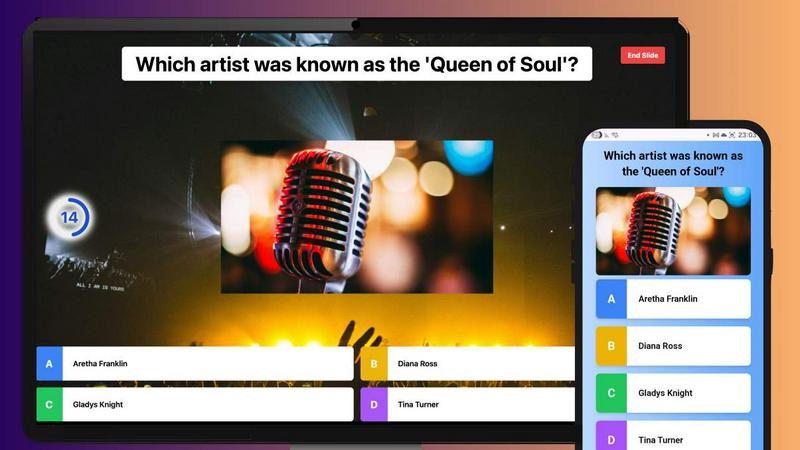
Juntos is a free, interactive quiz and poll platform designed to solve the pervasive problem of disengagement in group settings. Whether your audience is virtual or in-person, Juntos transforms passive listeners into active participants through real-time, multiplayer games. The platform is built with a core focus on eliminating friction, making it universally accessible for hosts and players alike. Anyone can launch a game in moments—no app downloads, user accounts, or technical hurdles required. Participants simply join from any device using a shared game code, instantly connecting everyone in a shared, fun experience. This makes Juntos an ideal, no-cost alternative to platforms like Kahoot, perfect for educators seeking dynamic classroom tools, corporate trainers aiming to energize workshops, event organizers looking to break the ice, and families wanting to host memorable trivia nights. Its main value proposition lies in its seamless simplicity and powerful ability to foster connection, energy, and active learning in any gathering.
Features of Juntos
Frictionless, Instant Play
Juntos removes all barriers to participation. Hosts can start a game in seconds, and players can join immediately from any smartphone, tablet, or computer by simply entering a short game code. There is no requirement to download an app, create an account, or navigate a complex login process. This instant-access model ensures maximum participation and keeps the focus on fun and interaction, not technical setup.
Custom Quiz Creation with Intuitive Editor
Hosts are empowered to create fully personalized quizzes tailored to their specific audience and topic. Using the platform's intuitive editor, you can easily add custom questions, set answer timers, configure scoring rules, and incorporate images. This feature allows for complete creative control, enabling the creation of anything from a professional training assessment to a lighthearted family trivia night, all built in minutes.
Real-Time Multiplayer Gameplay
Juntos facilitates live, synchronized gameplay where all participants answer the same questions simultaneously. Players see real-time scoreboards, creating a sense of friendly competition and collective excitement. This interactive, multiplayer dynamic is key to transforming a standard presentation or meeting into an engaging, communal event where everyone is involved and invested in the outcome.
Extensive Library of Ready-to-Use Quizzes
For hosts who want to start playing immediately, Juntos offers a vast, curated library of pre-made quizzes on a wide array of topics. From "World Cuisine Trivia" and "Space and Astronomy" to "Multiplication Tables" and "90s Pop Culture," these community quizzes are categorized by age group and topic, providing a perfect, zero-prep solution to instantly inject energy into any gathering.
Use Cases of Juntos
Energizing Corporate Training & Workshops
Replace monotonous slides with interactive quizzes to boost engagement and knowledge retention during employee training, onboarding sessions, or team workshops. Use Juntos to conduct live polls, review key concepts, or break up long meetings with a fun team-building challenge, ensuring your audience stays attentive and involved.
Making Classroom Learning Dynamic
Educators can use Juntos to transform review sessions, introduce new topics, or conduct formative assessments in a game-based format. The competitive, fun environment motivates students, provides immediate feedback on understanding, and makes learning collaborative and memorable for all age groups.
Hosting Virtual Social Events & Happy Hours
Combat screen fatigue and foster genuine connection during virtual gatherings. Host a themed trivia night for a remote team happy hour, a family reunion, or a friend group catch-up. Juntos provides a structured, shared activity that sparks conversation, laughter, and a sense of togetherness, even when participants are miles apart.
Powering Interactive Conferences & Live Events
Event organizers can use Juntos to engage large audiences during conferences, seminars, or town halls. Launch live polls to gather instant feedback, run trivia related to the event topic to warm up the crowd, or use quizzes as interactive session breaks to maintain high energy levels and audience participation throughout the day.
Frequently Asked Questions
Is Juntos really free to use?
Yes, Juntos is completely free to use. The platform operates on a "free forever" model, meaning hosts can create and run unlimited quizzes, and an unlimited number of players can join, all without any cost, credit card requirement, or hidden fees.
Do participants need to create an account or download an app?
No, participants do not need an account or to download any software. Joining a game is designed to be effortless. Players simply visit the Juntos website on their device's browser, enter the unique game code provided by the host, and they are immediately in the game.
Can I create my own custom quizzes?
Absolutely. Juntos provides a user-friendly quiz editor that allows you to build custom quizzes from scratch. You can add your own questions, multiple-choice answers, set timers, assign points, and upload images to create a perfectly tailored experience for your specific event or audience.
What kind of topics are available in the pre-made quiz library?
The Juntos community library features a wide and growing range of quizzes suitable for all ages. Topics include general knowledge (World Capitals, Famous Landmarks), education (Human Body Systems, Literary Devices), pop culture (Music Artists, 90s Nostalgia), and pure fun (Riddles, True or False). Each quiz is marked with a suggested age range.
Similar to Juntos

Indie product playground — ship, and collect pins

Learn languages with real movie and TV show clips.

Adopt a virtual baby who grows, learns, and remembers you.

Free, Live 3D Satellite, Space Weather & Climate Tracker in real time on an interactive globe alongside articles and insights.


Learn French through visual stories told by a native speaker. Words you meet come back on their own, right before you'd forget them.

A 20MB AI-powered mind mapping app with 100% local data privacy. Your ideas stay local, and so does your privacy.
