AI Formatter vs CleanPaste.org
Side-by-side comparison to help you choose the right product.
AI Formatter instantly transforms your text or files into polished documents using 1000+ professional templates.
Last updated: March 1, 2026

CleanPaste.org
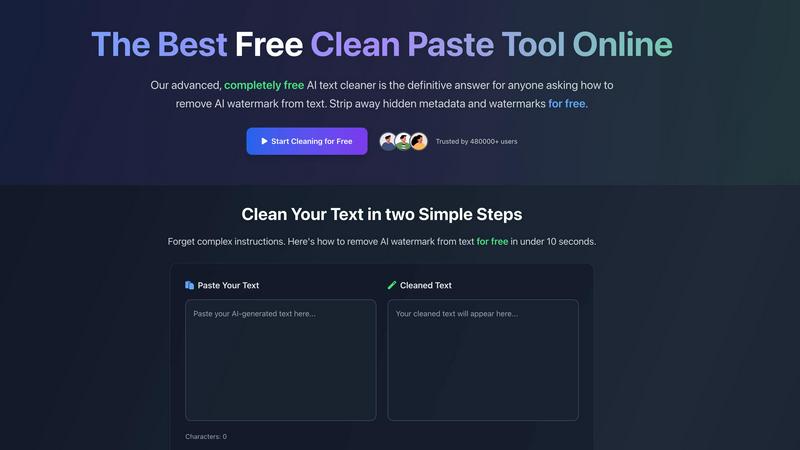
CleanPaste.org instantly removes invisible characters and AI watermarks from your text for free.
Last updated: March 2, 2026
Visual Comparison
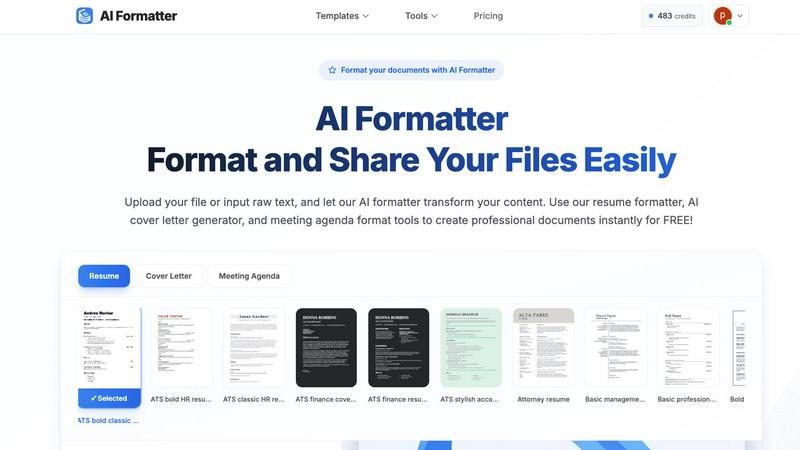
AI Formatter
CleanPaste.org
Feature Comparison
AI Formatter
ATS-Optimized Templates
AI Formatter offers over 162 professionally designed templates specifically optimized for ATS. This ensures that your resumes and cover letters meet the necessary formatting standards to pass through automated screening systems, increasing your chances of getting noticed by recruiters.
Real-Time Customization Editor
With our intuitive online editor, users can fully customize their documents. Adjust fonts, colors, and layouts to match personal branding or professional standards, giving you complete control over the final appearance of your documents.
Multi-Format Export Options
AI Formatter allows users to download their formatted documents in various formats, including PDF, DOC, and DOCX. This flexibility ensures that you can share your documents seamlessly across different platforms and with various stakeholders.
Instant Formatting Process
The AI Formatter streamlines the document creation process by automatically formatting uploaded files or raw text. In just a few clicks, users can transform their content into a polished document, saving significant time and effort.
CleanPaste.org
Instant AI Watermark Removal
This core feature strips away the subtle linguistic patterns and markers that AI models embed into generated text. By removing these digital fingerprints, CleanPaste.org ensures your content passes through AI detection scanners, transforming AI-assisted drafts into text that reads as naturally human-authored without altering the core message or quality of the writing.
Deep-Scan for Invisible Characters & Metadata
The tool employs an advanced algorithm that performs a deep scan of your pasted text. It detects and eliminates various hidden elements like zero-width spaces, non-printable characters, and formatting metadata that are often invisible to the naked eye but can reveal a text's synthetic origin or cause formatting issues in documents and publishing platforms.
Real-Time Processing with Auto-Paste
CleanPaste.org offers a streamlined, two-step process for immediate results. The interface features an auto-paste function and real-time processing, allowing users to clean their text in under 10 seconds. Simply paste your content, and with one click, the cleaned version is generated instantly, maximizing efficiency for users under time constraints.
100% Free with No Usage Limits
Unlike many online tools, CleanPaste.org is completely free with no hidden paywalls, premium tiers, or account requirements. Every feature, from watermark removal to metadata stripping, is available to all users without restrictions on the number of uses or the length of text processed, making professional-grade text cleaning accessible to everyone.
Use Cases
AI Formatter
Job Seekers
Job seekers can utilize AI Formatter to create polished resumes and cover letters that are ATS-compliant. This increases the likelihood of their applications being seen by hiring managers, enhancing their chances of landing interviews.
Businesses
Businesses can leverage AI Formatter to generate professional invoices and meeting agendas. This tool ensures that all business correspondence maintains a high standard of professionalism and clarity, which is essential for effective communication.
Academics
Academics can benefit from AI Formatter by formatting research papers, theses, and presentations. The ability to create structured documents quickly helps them focus more on content creation and less on formatting issues.
Freelancers
Freelancers can use AI Formatter to prepare polished proposals and project reports for clients. By providing well-formatted documents, freelancers can enhance their professional image and improve client relationships.
CleanPaste.org
For Students Submitting Academic Work
Students using AI to brainstorm or draft essays can utilize CleanPaste.org to remove any trace of AI assistance before submission. This ensures their work maintains academic integrity by appearing original, helping them avoid potential flags from institutional plagiarism and AI detection software, all while being completely free.
For Content Creators & SEO Professionals
Bloggers, writers, and SEO specialists can refine AI-generated article drafts and website content. CleanPaste.org removes watermarks and hidden characters, ensuring the content aligns with a brand's authentic voice, ranks better by appearing human-written to search engines, and resonates more naturally with the target audience.
For Professionals Drafting Business Communications
Professionals, including non-native English speakers, who use AI to draft emails, reports, or client communications can rely on this tool. It polishes the text by removing synthetic markers, ensuring the final message sounds professional, natural, and trustworthy, thereby enhancing credibility in corporate and client interactions.
For Researchers and Publishers
Individuals preparing manuscripts, research papers, or content for publication can use CleanPaste.org to clean text copied from various AI-assisted writing tools or digital sources. This process strips out problematic hidden formatting and metadata, ensuring the text is clean and ready for submission to journals or publishing platforms without technical issues.
Overview
About AI Formatter
AI Formatter, crafted by Sun Sky LLC, is a groundbreaking cloud-based document formatting platform that utilizes advanced artificial intelligence technology to convert raw text and uploaded files into expertly formatted, professional documents in mere seconds. This tool is designed to aid job seekers, professionals, businesses, and academics in producing tailored, industry-specific documents with remarkable efficiency. With a focus on enhancing productivity, AI Formatter boasts an impressive 95%+ pass rate for Applicant Tracking Systems (ATS), ensuring that resumes, cover letters, meeting agendas, and invoices are not only aesthetically pleasing but also compliant with recruitment software. Users benefit from a selection of over 100 meticulously designed templates suited for various industries and document types. The platform includes a real-time online editor for complete customization of fonts, colors, and layouts, alongside multi-format export options for easy sharing. Users start with 10 free credits, allowing them to format up to 10 pages, and can choose from various flexible pricing plans to suit their needs.
About CleanPaste.org
CleanPaste.org is a powerful, free online utility designed to solve a critical problem in the age of AI-assisted writing: digital fingerprints. It meticulously removes AI watermarks, invisible characters, and hidden metadata from text, ensuring the final output is clean, authentic, and undetectable by AI content detection systems. The tool serves a wide audience, including students, content creators, bloggers, SEO specialists, and professionals who utilize AI for drafting essays, articles, reports, and communications. Its core value proposition is delivering instant, reliable text sanitization without any cost or barriers. With no sign-up required, no usage limits, and a completely free model, CleanPaste.org empowers users to maintain the originality and integrity of their work, allowing them to confidently submit or publish content that appears genuinely human-written. Trusted by over 480,000 users, it stands as the definitive solution for anyone needing to seamlessly enhance and humanize their AI-generated text.
Frequently Asked Questions
AI Formatter FAQ
How does AI Formatter ensure ATS compliance?
AI Formatter uses over 162 templates that are specifically designed to meet ATS formatting standards. This helps ensure that your documents are easily readable by automated systems.
What file formats does AI Formatter support?
AI Formatter supports various file formats including PDF, DOC, DOCX, and TXT, allowing users to upload their existing documents or input raw text for formatting.
Can I customize my documents after formatting?
Yes! AI Formatter includes a real-time online editor that allows users to customize fonts, colors, and layouts after the initial formatting, ensuring that the final document meets your preferences.
How many pages can I format for free?
Users can start with 10 free credits, which allows them to format up to 10 pages at no cost. This is a great way to try out the service and see the quality of the formatting before committing to a paid plan.
CleanPaste.org FAQ
How does CleanPaste.org remove invisible characters?
CleanPaste.org uses sophisticated algorithms specifically designed to detect and isolate non-standard, invisible elements within text. It scans for and removes zero-width spaces, hidden formatting commands, AI watermark patterns, and other metadata that are not meant to be displayed, leaving only the clean, intended human-readable text behind.
Is CleanPaste.org truly free? What's the catch?
Yes, it is 100% free with absolutely no catch. There are no usage limits, no premium features locked behind a paywall, and no requirement to create an account or sign up. The tool is offered as a complete service to provide accessible text cleaning for all users without any financial commitment.
What types of hidden characters does the tool remove?
The tool removes a comprehensive range of hidden characters and artifacts. This includes zero-width spaces and joiners, non-printable Unicode characters, leftover formatting metadata from AI platforms and word processors, and the specific linguistic watermarks embedded by AI text generation models.
Will using CleanPaste.org alter my original content?
No, the primary function of CleanPaste.org is to remove only the invisible, non-essential elements that serve as fingerprints or formatting noise. It is designed to preserve your original wording, sentence structure, and meaning entirely unchanged. The goal is to clean the text, not rewrite it.
Alternatives
AI Formatter Alternatives
AI Formatter is a cloud-based document formatting platform developed by Sun Sky LLC that utilizes artificial intelligence to convert raw text and files into polished, professional documents quickly. It falls under the productivity and management category, catering to job seekers, professionals, businesses, and academics in need of industry-specific documents. Users often seek alternatives due to various reasons, including pricing constraints, specific feature requirements, or compatibility with different platforms. When looking for an alternative, it's essential to consider factors such as the range of templates offered, customization options, ease of use, and the ability to export in multiple formats. --- [{"question": "What is AI Formatter?", "answer": "AI Formatter is a cloud-based platform that transforms raw text and files into polished documents using artificial intelligence."},{"question": "Who is AI Formatter for?", "answer": "AI Formatter is designed for job seekers, professionals, businesses, and academics needing to create industry-specific documents."},{"question": "Is AI Formatter free?", "answer": "AI Formatter offers 10 free credits for users to format up to 10 pages, with flexible pricing plans available thereafter."},{"question": "What are the main features of AI Formatter?", "answer": "Key features include an extensive template library, AI-powered formatting, a real-time online editor, and multi-format export options."}]
CleanPaste.org Alternatives
CleanPaste.org is a specialized online tool in the AI content assistant category. Its primary function is to process text by removing AI-generated watermarks, invisible formatting characters, and hidden metadata. This ensures the final content appears authentically human-written and can bypass AI detection systems. Users often seek alternatives for various practical reasons. Some may require a tool with a different feature set, such as integrated grammar checking or more advanced rewriting capabilities. Others might need a downloadable application instead of a web-based service, or they could be evaluating options based on specific privacy policies or supported text volume limits. When choosing an alternative tool, consider your core needs. Key factors include the effectiveness of AI detection removal, the depth of text cleaning and humanization, ease of use, and the overall value proposition. It's also wise to assess the tool's security measures regarding your text and whether its output consistently meets your standards for natural, clean writing.