audiovideogenerator vs Magic Hour
Side-by-side comparison to help you choose the right product.

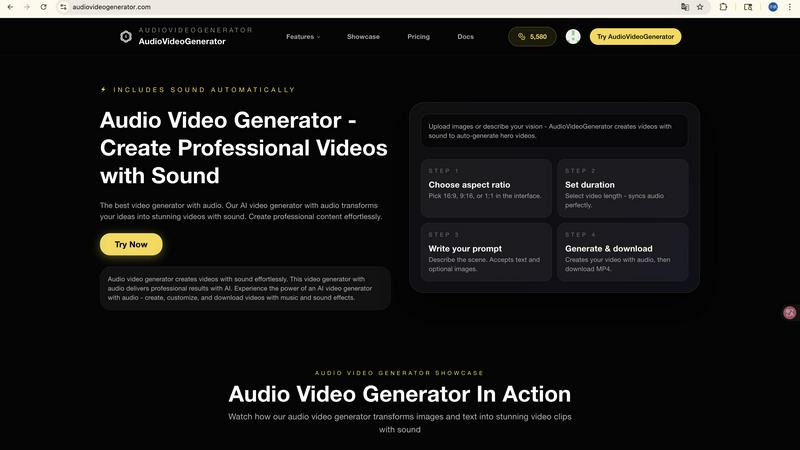
audiovideogenerator
Create professional videos with sound automatically using AI, no production team needed.

Magic Hour
Magic Hour is a free AI studio that empowers you to create stunning videos and images in seconds with over 100 tools.
Last updated: March 4, 2026
Visual Comparison
audiovideogenerator
Magic Hour

Feature Comparison
audiovideogenerator
Multi-Model AI Video Generation
AudioVideoGenerator provides access to multiple state-of-the-art AI models to suit different needs and quality requirements. You can choose from models like OpenAI's Sora 2 for longer, detailed narratives, Google's Veo 3.1 for premium cinematic quality, or Wan 2.5 for faster generation from images or audio. This flexibility ensures you have the right tool for any project, whether it's a quick social media clip or a high-end promotional video, all within the same platform.
Automatic and Synchronized Audio Integration
This is the platform's defining feature. Unlike standard video generators, AudioVideoGenerator automatically adds and perfectly synchronizes a full audio track to your visuals. It intelligently generates or matches background music, sound effects, and ambient audio that complements the video's mood, pace, and content. This solves the manual hassle of sourcing royalty-free music and painstakingly editing audio timelines, delivering a complete, polished audiovisual product.
Text-to-Video and Image-to-Video Conversion
Turn simple text descriptions or static images into dynamic video content with ease. The text-to-video feature interprets your written prompts to generate original video scenes from scratch. The image-to-video feature animates your existing photos or graphics, bringing them to life with motion. Both workflows automatically include the platform's signature synchronized audio, making it incredibly simple to create content from basic starting materials.
Scenario-Optimized Templates and Outputs
The platform is designed with specific use cases in mind, offering optimizations for various applications. Whether you're creating content for Instagram Reels, YouTube shorts, product demos, or educational tutorials, AudioVideoGenerator can tailor the aspect ratio, style, and audio tone to fit the platform and purpose. This ensures your final video is not only professionally made but also formatted correctly for its intended destination and audience.
Magic Hour
AI Video Creation
Magic Hour offers an extensive suite of AI video tools, including text-to-video and video-to-video features. Users can quickly generate high-quality videos from scripts or transform existing footage with new styles, making it easier than ever to produce visually stunning content.
AI Image Editing
With an intuitive AI image editor, users can edit images using simple text commands. This feature allows for rapid adjustments and enhancements, helping creators achieve the desired look and feel without needing advanced graphic design skills.
Face Swap Technology
The face swap feature enables users to easily swap faces in both photos and videos. This innovative tool can be used creatively for various projects, from entertainment to marketing campaigns, enhancing engagement and viewer interest.
AI Headshot Generator
Magic Hour includes an AI headshot generator that creates professional-quality headshots in minutes. This feature is particularly useful for businesses or individuals needing high-quality images for profiles, resumes, or promotional materials.
Use Cases
audiovideogenerator
Social Media Content Creation
Create engaging, platform-optimized videos for Instagram, TikTok, and YouTube in minutes. Generate trending content, short tutorials, or brand stories with eye-catching visuals and perfectly matched background music. This use case is ideal for influencers, social media managers, and brands that need to maintain a consistent and high-quality posting schedule without a large production budget or time investment.
Marketing and Promotional Videos
Produce compelling advertisements, product showcases, and brand story videos effortlessly. The AI can generate professional visuals that highlight product features and benefits, automatically layered with persuasive background scores and sound effects. This enables marketers and small businesses to create high-impact promotional material that drives engagement and conversions, rivaling the quality of agency-produced content.
Educational and Tutorial Content
Transform lesson plans, how-to guides, and presentations into engaging video lessons. Educators and trainers can input text or image-based materials, and the platform will generate a dynamic video with clear visuals and supportive audio. This enhances knowledge retention and allows for scalable creation of online course material, making learning more accessible and interactive for students.
Event Highlights and Recaps
Quickly produce memorable highlight reels from events, conferences, or personal gatherings. By uploading key images or describing the event's atmosphere, users can generate a cinematic recap video complete with music that captures the event's energy and emotion. This is perfect for event organizers, community managers, or anyone looking to professionally document and share memorable moments.
Magic Hour
Content Creation for Social Media
Social media managers can leverage Magic Hour's tools to quickly generate eye-catching videos and images tailored to specific platforms, ensuring timely and engaging content that resonates with their audience.
Marketing Campaigns
Marketers can utilize the platform to create personalized content for campaigns, using AI-generated visuals and animations that capture target audiences' attention, driving engagement and conversions effectively.
Educational Material Development
Educators and trainers can produce high-quality training videos and instructional materials with ease. Magic Hour's tools allow for rapid iteration and customization, making it simpler to create engaging educational content.
Event Promotions
Event organizers can design promotional videos and graphics that highlight key features of their events. With Magic Hour, they can create visually appealing teasers that attract attendees and generate buzz around their events.
Overview
About audiovideogenerator
AudioVideoGenerator is an all-in-one AI-powered platform designed to solve a fundamental problem in digital content creation: the time-consuming and technically complex process of producing professional videos with perfectly synchronized audio. It transforms your ideas, text, images, or audio files into stunning, ready-to-publish videos complete with background music, sound effects, and voiceovers, all automatically generated and aligned. This tool eliminates the need for separate audio editing software, expensive production teams, and extensive technical skills. It is built for a wide range of users, including content creators, marketers, educators, social media managers, and small business owners who need to produce high-engagement video content quickly and efficiently. The core value proposition is delivering speed, creativity, and professional quality in one streamlined workflow, enabling users to bring their visions to life in minutes rather than days, ensuring every video is not just seen, but heard and felt.
About Magic Hour
Magic Hour is a revolutionary browser-based AI studio that transforms the way creators develop professional-quality videos and images. Catering to a diverse audience—from solo creators and marketers to large teams—Magic Hour simplifies the creative process, making it accessible for anyone regardless of their skill level. The platform consolidates over 100 powerful AI tools into a single, user-friendly interface, allowing users to generate, edit, and enhance media in mere seconds. Whether you need to create a video from a script using text-to-video, apply artistic styles to existing footage with video-to-video, or personalize content through AI Face Swap and Lip Sync, Magic Hour covers all bases. The platform fosters rapid iteration, enabling users to produce multiple variations and maintain consistent branding across social media, advertisements, training clips, and more—all without the need for expensive equipment or complex software installations.
Frequently Asked Questions
audiovideogenerator FAQ
What types of audio does AudioVideoGenerator add to my videos?
AudioVideoGenerator automatically creates a complete audio track for your video. This includes context-aware background music that matches the mood of your visuals, relevant sound effects to emphasize actions or transitions, and ambient audio to create atmosphere. The audio is intelligently synchronized to the video's pacing and key moments, providing a professional, layered sound design.
Do I need any video or audio editing experience to use this tool?
No, you do not need any prior editing experience. AudioVideoGenerator is designed for ease of use. The entire process is guided: you provide your input (text, image, or audio), and the AI handles the complex tasks of video generation, audio creation, and synchronization. The platform is built to empower creators of all skill levels to produce professional results.
Can I use my own audio files with the generated video?
Yes, the platform supports an "Audio to Video" (A2V) model. You can upload your own audio file, such as a voiceover, podcast, or song, and the AI will generate a video that visually interprets and synchronizes with your provided audio. This is perfect for creating music videos, narrated stories, or videos where you want to maintain a specific audio track.
What is the difference between the various AI models like Veo 3.1 and Sora 2?
The different AI models offer varying strengths in video generation. Models like Veo 3.1 (Fast) are optimized for speed, producing shorter videos quickly. Veo 3.1 (standard) and Sora 2 focus on higher cinematic quality, longer durations, and more detailed visual storytelling. Wan 2.5 is excellent for transforming images or audio into video. The choice depends on your priority: speed, maximum quality, video length, or specific input type.
Magic Hour FAQ
What types of media can I create with Magic Hour?
With Magic Hour, you can create videos, images, and animations tailored for various platforms. The tools are designed to cater to different media types, enhancing your creative possibilities.
Is Magic Hour suitable for beginners?
Absolutely! Magic Hour is designed to be user-friendly, making it accessible for creators of all skill levels. Its intuitive interface and straightforward tools allow anyone to produce professional-quality content without prior experience.
Do I need any special software or equipment to use Magic Hour?
No. Magic Hour is a browser-based platform, meaning you can access it from any device with internet connectivity. There is no need for expensive equipment or complex software installations.
Can I collaborate with my team on Magic Hour?
Yes! Magic Hour is built for collaboration, making it easy for teams to work together on projects. You can share your creations, get feedback, and make adjustments in real-time, streamlining the creative workflow.