
conceptviz vs Gomotion
Side-by-side comparison to help you choose the right product.

conceptviz
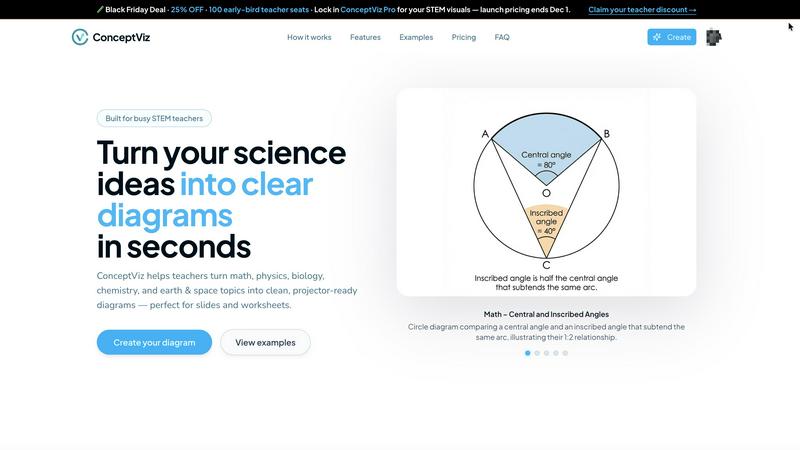
ConceptViz instantly creates clear, accurate science and math diagrams for teaching and learning.
Last updated: February 28, 2026

Gomotion
Gomotion transforms text and images into stunning animations, making motion graphics creation effortless for all.
Last updated: February 28, 2026
Visual Comparison
conceptviz
Gomotion

Feature Comparison
conceptviz
Plain English Description Interface
The most user-friendly feature is the ability to generate diagrams by simply typing a short description of what you need. There is no need for design skills, coding, or complex menu navigation. You describe the concept, subject, and grade level in everyday language, such as "potential vs kinetic energy in a roller coaster for middle school," and ConceptViz's AI interprets your request to create a tailored visual. This removes the technical barrier entirely, making professional diagram creation accessible to every educator and student regardless of their technical background.
Subject & Grade Level Presets
ConceptViz is pre-configured with intelligent presets for core STEM subjects and U.S. grade bands. Users can start by selecting their topic—Physics, Biology, Chemistry, Earth & Space, or Math—and the intended grade level, such as elementary, middle, or high school. These presets ensure the generated diagram uses appropriate terminology, complexity, and visual styling for the target audience. This means a diagram on "the structure of an atom" will look fundamentally different for a 5th grader versus a 12th grader, ensuring the visual aid is perfectly aligned with the lesson's learning objectives.
Projector-Ready & Print-Optimized Output
Every diagram is engineered for real-world classroom and academic use. The software automatically applies design principles for maximum clarity: thick, legible lines and text labels, simple backgrounds with minimal visual noise, and high-contrast color schemes. Diagrams are generated in a widescreen aspect ratio ideal for PowerPoint or Google Slides and on clean white backgrounds perfect for printing on worksheets. Downloads are provided in high-resolution PNG format, ensuring they stay sharp and clear whether displayed on a large projector screen or included in a printed handout.
Time-Saving Prompt Reusability
ConceptViz is built to streamline repetitive teaching tasks. Once you craft an effective prompt for a diagram, you can save and reuse it across different classes, sections, or academic years. This creates a personal library of reliable visuals. It eliminates the need to repeatedly hunt online for "almost right" images or redraw diagrams from scratch, allowing educators to focus on teaching and customizing content rather than on tedious graphic creation. This feature is especially valuable for teaching multiple sections of the same course.
Gomotion
Transform Words Into Motion
Gomotion allows you to animate text from a simple prompt, eliminating the need for complex keyframes. Just describe how you want your text to move, and Gomotion will instantly create engaging animations for titles, captions, and logos, perfect for product demos and creators seeking professional results.
Discover the Narrative Mode
With the Gomotion narrative mode, you can turn scripts into fully animated stories that sync images and videos seamlessly. This feature enables you to create ads or short videos in just minutes, streamlining the production process for marketers and content creators.
Design for Any Screen
Gomotion is designed to create animations that look great on any screen, from mobile devices to desktop displays. This versatility ensures that whether you are designing for Instagram, TikTok, or any other platform, your content will be perfectly aligned and visually appealing.
Complex Animations Made Easy
Gomotion simplifies the creation of complex animations, such as animated charts and simulations. This feature is ideal for explainers, presentations, and simulations, allowing users to communicate data effectively and engage their audience with visually striking content.
Use Cases
conceptviz
Creating Custom Lesson Materials
Teachers can rapidly generate unique diagrams that perfectly match their lesson plan and teaching style. Instead of adapting generic textbook images, they can create visuals that highlight specific principles they want to emphasize. For example, a physics teacher can generate a series of free-body diagrams for different incline angles within minutes, creating custom practice worksheets or slide decks that provide consistent, clear examples for students to follow, thereby improving comprehension and engagement.
Enhancing Student Projects and Reports
Students at any level can use ConceptViz to produce professional-quality visuals for their science fair projects, lab reports, and presentations. This empowers them to clearly communicate their understanding and findings without being hindered by a lack of artistic skill. A high school student studying mitosis can generate a precise, labeled sequence of the stages to include in their biology report, ensuring their work is both accurate and visually compelling.
Accelerating Academic Research Visualization
Researchers and graduate students can use the tool to quickly draft figures for papers, grant proposals, and conference presentations. While complex data visualizations may require specialized software, ConceptViz excels at creating clear explanatory diagrams of experimental setups, conceptual models, or methodological workflows. Describing an "acid-base titration setup" yields a clean, labeled schematic ready for insertion into a research manuscript, saving valuable time in the publication process.
Developing Differentiated Instructional Resources
Educators can easily create differentiated materials for diverse learners within the same classroom. For a lesson on plant biology, a teacher could generate a simple diagram with basic labels for some students and a more detailed, complex cross-section with advanced terminology for others, all from slightly adjusted prompts. This allows for tailoring support and challenge without requiring extensive additional preparation time.
Gomotion
Marketing Campaigns
Marketers can use Gomotion to create eye-catching animations for social media campaigns, enhancing brand visibility and engagement. The tool's ease of use allows for quick turnaround times, making it perfect for fast-paced marketing environments.
Content Creation
Content creators can leverage Gomotion to generate professional-quality animations for their videos and presentations. Whether it is for YouTube, TikTok, or other platforms, Gomotion helps elevate the visual storytelling of their content.
Educational Materials
Educators and trainers can use Gomotion to create animated explainers and presentations that simplify complex topics. The ability to animate charts and simulations helps make learning more engaging and accessible for students.
Brand Storytelling
Businesses can utilize Gomotion to craft compelling brand stories through animated content. By importing brand assets seamlessly, companies can create unique videos that resonate with their audience and enhance their brand identity.
Overview
About conceptviz
ConceptViz is a specialized AI-powered diagram generator designed to solve a critical problem in STEM education: the lack of time and resources to create accurate, high-quality visuals. It enables teachers, students, and researchers to generate classroom-ready and publication-quality diagrams in seconds using simple English descriptions. The tool is built specifically for scientific and mathematical subjects, including physics, biology, chemistry, earth science, and mathematics, catering to all educational levels from K-12 worksheets to advanced university research. Its core value proposition is dramatically reducing lesson preparation time while enhancing educational effectiveness. Instead of searching for imperfect stock images or struggling with complex drawing software, educators can describe the exact visual they need—like "labeled plant cell cross-section for 8th grade" or "convex lens ray diagram"—and receive a clear, precise, and projector-ready diagram. ConceptViz focuses on practical output, ensuring visuals have high contrast, readable labels, and layouts that work seamlessly in slideshows, handouts, and research papers, making it an indispensable tool for anyone who needs to turn complex concepts into understandable visuals efficiently.
About Gomotion
Gomotion is an innovative AI-powered motion design tool that transforms how brands and creators approach animation. Bridging the gap between the complexity of traditional software like After Effects and the simplicity of user-friendly platforms, Gomotion enables users of all skill levels to create stunning animations effortlessly. Whether you are a marketer, content creator, or designer, Gomotion allows you to generate high-quality animations from simple text and image prompts. Its primary value proposition is to simplify the animation process, removing the steep learning curve that often hinders creativity. Users can animate titles, captions, and logos with cinematic flair, making it an invaluable asset for enhancing visual storytelling. With Gomotion, bringing ideas to life becomes a quick and effective endeavor, allowing brands to communicate their messages powerfully without needing extensive animation expertise.
Frequently Asked Questions
conceptviz FAQ
What subjects and grade levels does ConceptViz support?
ConceptViz is specifically built for STEM education and supports core subjects including Physics, Biology, Chemistry, Earth & Space Science, and Mathematics. It is designed to accommodate a wide range of educational levels, from elementary school (K-5) and middle school (6-8) to high school (9-12) and even university-level research. The subject and grade presets help tailor the complexity and language of the generated diagrams appropriately.
Do I need any design or drawing skills to use ConceptViz?
No, you do not need any design or drawing skills whatsoever. ConceptViz is designed for educators and students, not graphic designers. The entire process is driven by describing what you need in plain English. The AI handles all the complex layout, drawing, and labeling tasks, delivering a finished, polished diagram based solely on your text description.
What format are the diagrams, and how do I use them?
Diagrams are generated as high-resolution PNG image files. This is a universal format compatible with virtually all software. You can directly download the image and then drag-and-drop or insert it into PowerPoint, Google Slides, Keynote, Word documents, Google Docs, or worksheets. The widescreen format and clean backgrounds make them instantly ready for slideshows and printing.
Is there a free trial or a free plan available?
Yes, ConceptViz offers a free tier that allows users to create diagrams without requiring a credit card. This free plan includes access to generate diagrams and provides output in 4K Ultra HD quality, making it fully functional for trying out the service and for light use. This allows teachers and students to test the tool's capabilities with their specific needs before considering a paid plan.
Gomotion FAQ
What types of animations can I create with Gomotion?
With Gomotion, you can create a wide range of animations, including text animations, animated charts, and full narrative videos. The platform is designed to cater to various needs, from social media posts to complex presentations.
Is Gomotion suitable for beginners?
Absolutely! Gomotion is designed with user-friendliness in mind, making it accessible for beginners and experienced designers alike. Its intuitive interface allows users to create professional animations without extensive training.
Can I use my own images and branding in Gomotion?
Yes, Gomotion allows you to import your own images and brand assets easily. This feature ensures that your animations align with your brand's identity and style, providing a cohesive visual experience.
What platforms does Gomotion support for publishing animations?
Gomotion supports a variety of platforms, enabling you to export animations optimized for mobile, tablet, and desktop displays. This flexibility ensures your content looks great on any device, maximizing audience engagement.
Alternatives
conceptviz Alternatives
ConceptViz is a specialized AI-powered tool in the education technology and design software categories. It focuses on transforming complex STEM concepts into clear, classroom-ready diagrams through simple text descriptions. This streamlines lesson planning and enhances visual communication for educators and students. Users often explore alternatives for various practical reasons. These can include budget constraints, the need for different feature sets like animation or advanced data plotting, compatibility with specific operating systems or learning management systems, or a desire for tools that serve a broader range of subjects beyond STEM. When evaluating other options, key considerations should align with your core needs. Prioritize the tool's accuracy in your subject area, the ease and speed of creating usable visuals, output quality for presentations, and overall value for your specific educational or professional context. The right choice efficiently solves your diagram creation problem.
Gomotion Alternatives
Gomotion is an AI-powered motion design tool that simplifies the creation of stunning animations for users across various skill levels. It falls under the category of design tools, specifically for motion graphics, enabling marketers, content creators, and designers to bring their ideas to life quickly and effectively. Users often seek alternatives to Gomotion due to factors like pricing, specific features they may need, or compatibility with their preferred platforms. When searching for an alternative, it’s essential to consider the ease of use, the range of customizable templates, and the efficiency of the animation generation process. A solid alternative should also provide a user-friendly experience that caters to both beginners and experienced designers, allowing for seamless creativity without the steep learning curve typically associated with traditional motion design software.