
Cosy vs LuxSign
Side-by-side comparison to help you choose the right product.

Cosy automates Slack onboarding and member introductions, saving you hours and enhancing community engagement.
Last updated: February 28, 2026

LuxSign enables secure, legally valid electronic signatures across the EU, streamlining document signing in minutes.
Last updated: February 26, 2026
Visual Comparison
Cosy
LuxSign

Feature Comparison
Cosy
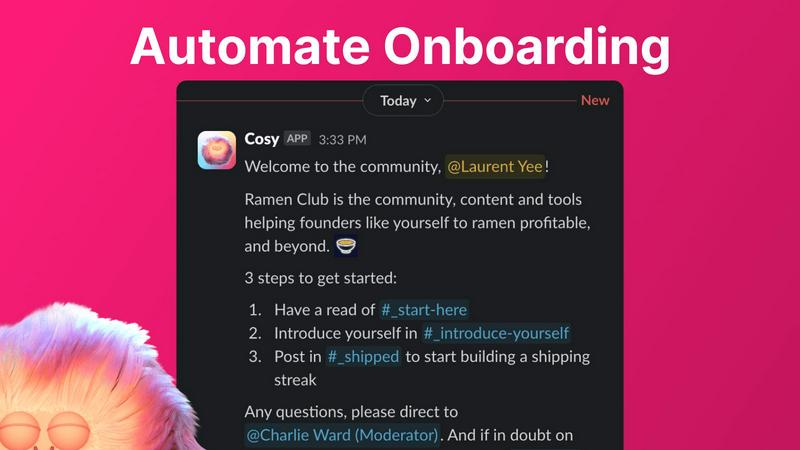
Automate Onboarding
Cosy simplifies the onboarding process by allowing community managers to create and automate up to 10 distinct welcome DM sequences. These messages can be sent from a community leader or the Cosy bot, ensuring that new members receive a warm welcome tailored to their preferences. The automation is customizable, allowing for personalized messages and time delays, ensuring that no new member is overlooked, even during off-hours.
Connect Your Members
To foster engagement, Cosy automatically introduces community members to each other through direct messages. This feature can be set to trigger at regular intervals, helping members connect and build relationships over time. The customizable introduction message and scheduling options allow for a tailored experience, enhancing community interaction without requiring manual effort from managers.
Member Directory
Cosy provides a searchable member directory that enables community members to find and connect with one another easily. Users can create and customize their profiles, while the directory allows for keyword searches and filtering. This feature enhances member interactions by making it easier to identify and reach out to others with shared interests or expertise, all within the Slack environment.
Content Highlights
With Cosy, community managers can quickly surface the most engaging posts through simple slash commands. This feature highlights the top 10 most engaged messages within a specific channel or across all public channels, as well as unreplied messages. This capability ensures that valuable content is not lost in the shuffle, helping to maintain an active and informed community.
LuxSign
Multiple Signature Methods
LuxSign provides users with various ways to sign documents, including drawing signatures with a mouse, typing names, or uploading image files. This flexibility accommodates different preferences and speeds up the signing process.
Advanced Security
The platform employs industry-standard encryption to safeguard documents during upload, storage, and transmission. With secure servers located in Luxembourg, LuxSign ensures compliance with EU data protection regulations and maintains the integrity of sensitive information.
Collaboration Workspaces
LuxSign allows teams to create shared workspaces for efficient document management. Users can organize documents into folders, control member access, and collaborate seamlessly on signing workflows, enhancing team productivity.
Complete Audit Trail
Every action taken within LuxSign is meticulously logged, providing a detailed audit trail that includes timestamps, IP addresses, and signer information. This feature is crucial for compliance and verification, offering transparency and accountability in document transactions.
Use Cases
Cosy
Streamlining New Member Onboarding
Community managers can utilize Cosy to automate the onboarding process for new members, ensuring they receive essential information and introductions without manual intervention. This allows community leaders to focus on engagement strategies rather than administrative tasks, enhancing the overall member experience.
Enhancing Member Connections
By using the automated member introduction feature, community leaders can increase engagement within their community. Regular introductions foster serendipitous connections among members, encouraging collaboration and interaction that might not occur otherwise.
Building a Comprehensive Member Directory
Cosy allows communities to create a searchable member directory, making it easier for members to find one another based on shared interests or expertise. This feature can be particularly valuable in larger communities where personal connections may be overlooked.
Highlighting Community Engagement
Community managers can leverage the content highlights feature to keep members informed about popular discussions and posts. By surfacing engaging content, managers can encourage participation and ensure that important conversations remain active, facilitating a vibrant community atmosphere.
LuxSign
Signing Contracts Remotely
Businesses can utilize LuxSign to sign contracts with clients and partners remotely, eliminating the need for physical meetings. This speeds up the contracting process while ensuring legal compliance.
Streamlining HR Processes
Human resources departments can use LuxSign to manage employment contracts, onboarding documents, and policy acknowledgments efficiently. The collaborative workspaces allow HR teams to streamline the signing process across multiple candidates.
Managing Client Agreements
Consultants and service providers can send client agreements for signature via LuxSign. The automated notifications keep all parties informed, ensuring that agreements are signed promptly.
Facilitating Legal Document Execution
Law firms can leverage LuxSign for executing various legal documents. The advanced security and complete audit trail features provide the necessary compliance and verification needed in legal transactions.
Overview
About Cosy
Cosy is a powerful Slack-native application that revolutionizes how communities operate within the Slack platform. Designed specifically for community managers, team leaders, and anyone responsible for fostering engagement, Cosy addresses the tedious manual tasks that often consume valuable time. With features like automated onboarding, intelligent member introductions, and a member directory, Cosy streamlines the process of welcoming new members and facilitating connections. This means less time spent on administrative tasks and more time focusing on strategic engagement. By creating a vibrant community experience directly within Slack, Cosy eliminates the need for external tools, ensuring that members can interact, collaborate, and access valuable content seamlessly. The application is built for diverse users, including startup founders, marketing leads, and dedicated community managers, making it the go-to tool for anyone looking to cultivate a thriving community.
About LuxSign
LuxSign is a comprehensive electronic signature platform designed specifically for businesses that require high compliance and security. Developed in Luxembourg, it provides a secure, cloud-based environment for signing and managing documents. LuxSign ensures that all documents are encrypted end-to-end and stored entirely within Luxembourg, complying with GDPR regulations. By supporting eIDAS SES standards, LuxSign offers legal validity for electronic contracts across the European Union. Tailored for small to large businesses, this platform streamlines the signing process with features such as parallel and sequential signing workflows, drag-and-drop signature field placement, and automated email notifications for signers. Whether you are a professional needing to sign documents or an enterprise looking for bulk signing options, LuxSign offers a solution that prioritizes security and efficiency.
Frequently Asked Questions
Cosy FAQ
How does Cosy automate the onboarding process?
Cosy automates the onboarding process by allowing community managers to set up welcome DM sequences that are triggered when new members join. These messages can be customized and delivered automatically, ensuring timely communication without manual effort.
Can I customize the member directory fields?
Yes, Cosy allows community managers to create a customizable member directory where they can select up to 10 fields for members to fill in. This can include various types of input, such as text entries and multiple-choice options, to tailor the directory to the community's needs.
What kind of content can Cosy highlight?
Cosy can highlight the top 10 most engaged posts within a specific channel or across all public channels. It can also identify unreplied messages, enabling community managers to surface important discussions and engage members effectively.
Is there a limit on the number of members I can have with Cosy?
Cosy offers a free tier for up to 250 members, while providing a 30-day trial for unlimited members. This allows communities of various sizes to experience the full capabilities of the tool before committing to a paid plan.
LuxSign FAQ
How does LuxSign ensure document security?
LuxSign secures documents using end-to-end encryption throughout the entire process, from upload to storage. All documents are hosted in Luxembourg, adhering to strict GDPR and EU data protection laws.
Is LuxSign compliant with EU regulations?
Yes, LuxSign complies with eIDAS regulations, providing Simple Electronic Signatures (SES) that are legally admissible across all EU member states, making it suitable for various business transactions.
What types of documents can I sign with LuxSign?
LuxSign supports a variety of document formats including PDF, DOC, and DOCX. Users can easily upload files up to 10MB, making it versatile for different business needs.
Can I track the signing process in real time?
Absolutely. LuxSign offers real-time tracking of document status, allowing users to monitor when documents are sent, viewed, and signed. This feature ensures you stay updated throughout the signing process.
Alternatives
Cosy Alternatives
Cosy is an innovative Slack-native application that automates community onboarding, member introductions, and content sharing to enhance productivity and engagement. It belongs to the productivity and management category, aimed at community managers and team leaders who strive to create a vibrant and self-sustaining workspace. Users often seek alternatives to Cosy for various reasons, including pricing, specific feature requirements, or compatibility with different platforms. When considering an alternative, it's essential to evaluate the features that align with your community's needs, the ease of use, and whether the solution integrates seamlessly with your existing tools and workflows.
LuxSign Alternatives
LuxSign is an electronic signature platform designed for businesses that require a high level of compliance and security. As a cloud-based solution developed in Luxembourg, it adheres to eIDAS SES standards, ensuring that electronic signatures are legally valid across all EU member states. Users typically seek alternatives to LuxSign for various reasons, such as pricing concerns, the need for additional features, or specific platform requirements that better align with their business processes. When searching for a suitable alternative, it is essential to consider factors like compliance with local regulations, security measures such as end-to-end encryption, and the ability to integrate with existing systems. Users should also assess the platform's user experience, the range of features offered, including signing workflows and collaboration tools, and the overall value for their investment. A tailored solution can enhance productivity and streamline document management.