
Cosy
Cosy automates Slack onboarding and member introductions, saving you hours and enhancing community engagement.
VisitPublished on:
November 13, 2025
Pricing:
About Cosy
Cosy is a powerful Slack-native application that revolutionizes how communities operate within the Slack platform. Designed specifically for community managers, team leaders, and anyone responsible for fostering engagement, Cosy addresses the tedious manual tasks that often consume valuable time. With features like automated onboarding, intelligent member introductions, and a member directory, Cosy streamlines the process of welcoming new members and facilitating connections. This means less time spent on administrative tasks and more time focusing on strategic engagement. By creating a vibrant community experience directly within Slack, Cosy eliminates the need for external tools, ensuring that members can interact, collaborate, and access valuable content seamlessly. The application is built for diverse users, including startup founders, marketing leads, and dedicated community managers, making it the go-to tool for anyone looking to cultivate a thriving community.
Features of Cosy
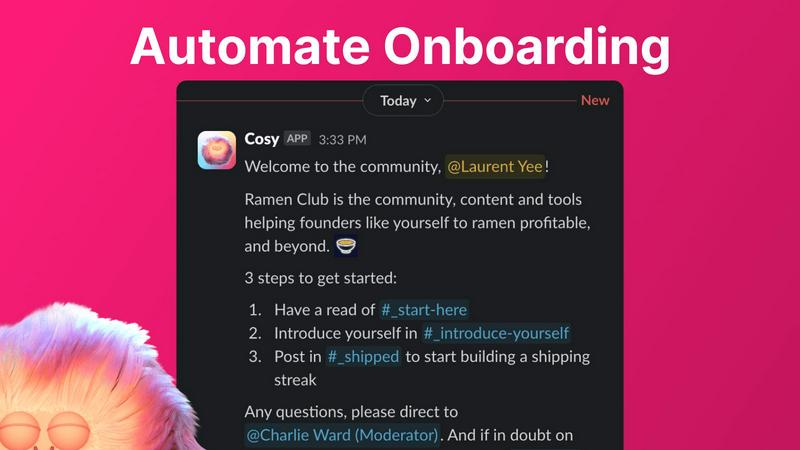
Automate Onboarding
Cosy simplifies the onboarding process by allowing community managers to create and automate up to 10 distinct welcome DM sequences. These messages can be sent from a community leader or the Cosy bot, ensuring that new members receive a warm welcome tailored to their preferences. The automation is customizable, allowing for personalized messages and time delays, ensuring that no new member is overlooked, even during off-hours.
Connect Your Members
To foster engagement, Cosy automatically introduces community members to each other through direct messages. This feature can be set to trigger at regular intervals, helping members connect and build relationships over time. The customizable introduction message and scheduling options allow for a tailored experience, enhancing community interaction without requiring manual effort from managers.
Member Directory
Cosy provides a searchable member directory that enables community members to find and connect with one another easily. Users can create and customize their profiles, while the directory allows for keyword searches and filtering. This feature enhances member interactions by making it easier to identify and reach out to others with shared interests or expertise, all within the Slack environment.
Content Highlights
With Cosy, community managers can quickly surface the most engaging posts through simple slash commands. This feature highlights the top 10 most engaged messages within a specific channel or across all public channels, as well as unreplied messages. This capability ensures that valuable content is not lost in the shuffle, helping to maintain an active and informed community.
Use Cases of Cosy
Streamlining New Member Onboarding
Community managers can utilize Cosy to automate the onboarding process for new members, ensuring they receive essential information and introductions without manual intervention. This allows community leaders to focus on engagement strategies rather than administrative tasks, enhancing the overall member experience.
Enhancing Member Connections
By using the automated member introduction feature, community leaders can increase engagement within their community. Regular introductions foster serendipitous connections among members, encouraging collaboration and interaction that might not occur otherwise.
Building a Comprehensive Member Directory
Cosy allows communities to create a searchable member directory, making it easier for members to find one another based on shared interests or expertise. This feature can be particularly valuable in larger communities where personal connections may be overlooked.
Highlighting Community Engagement
Community managers can leverage the content highlights feature to keep members informed about popular discussions and posts. By surfacing engaging content, managers can encourage participation and ensure that important conversations remain active, facilitating a vibrant community atmosphere.
Frequently Asked Questions
How does Cosy automate the onboarding process?
Cosy automates the onboarding process by allowing community managers to set up welcome DM sequences that are triggered when new members join. These messages can be customized and delivered automatically, ensuring timely communication without manual effort.
Can I customize the member directory fields?
Yes, Cosy allows community managers to create a customizable member directory where they can select up to 10 fields for members to fill in. This can include various types of input, such as text entries and multiple-choice options, to tailor the directory to the community's needs.
What kind of content can Cosy highlight?
Cosy can highlight the top 10 most engaged posts within a specific channel or across all public channels. It can also identify unreplied messages, enabling community managers to surface important discussions and engage members effectively.
Is there a limit on the number of members I can have with Cosy?
Cosy offers a free tier for up to 250 members, while providing a 30-day trial for unlimited members. This allows communities of various sizes to experience the full capabilities of the tool before committing to a paid plan.
Explore more in this category:
Similar to Cosy

AI Email Filter sorts incoming mail into folders using plain-language prompts you write. Works with any IMAP mailbox; bring your own LLM if you want.

Indie product playground — ship, and collect pins

Residential and datacenter proxy provider with 50M+ ethically sourced IPs across 150+ countries. Unlimited from $4.08/hr, pay-per-GB from $1.64/GB.

No-code 2D game editor: visual node logic, drag-and-drop scenes, live preview. Exports to Windows, macOS, Linux, Android, iOS, Web.

Free collection of online developer utilities, code formatters, and digital converters designed to streamline your daily workflow.


Online tally counter for tracking attendance, workouts, inventory, visitors, sports scores, habits, and everyday counting tasks.

Visual financial timelines for couples and young professionals: model cash flow, life events, and shared goals.