DocuExtractor vs Dokta
Side-by-side comparison to help you choose the right product.

DocuExtractor
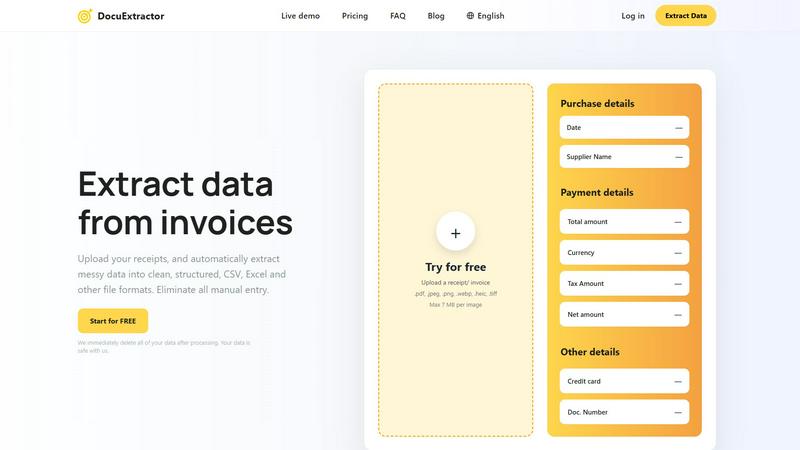
Effortlessly convert receipts and invoices into structured CSV or Excel files with our accurate data extraction tool.
Last updated: February 28, 2026

Dokta automates document management for freelancers and SMBs, streamlining invoicing, cash flow, and reminders in just three easy steps.
Last updated: April 4, 2026
Visual Comparison
DocuExtractor
Dokta

Feature Comparison
DocuExtractor
Advanced Optical Character Recognition (OCR)
DocuExtractor leverages state-of-the-art OCR technology to accurately read and interpret text from various documents, including receipts and invoices. This ensures that key data is extracted with a remarkable accuracy rate of 99.6%, reducing the likelihood of errors in financial records.
User-Friendly Interface
The platform is designed with user experience in mind, making it easy to navigate and operate. Users can quickly upload documents, select extraction presets, and download results without any technical expertise, saving time and minimizing learning curves.
Batch Processing Capabilities
DocuExtractor allows users to upload multiple documents simultaneously, thereby enhancing efficiency. This batch processing feature is particularly beneficial for businesses that deal with high volumes of financial documents, enabling quick and effective data extraction.
Multi-Format Export Options
After extracting data, users can choose to download their results in several formats, including CSV and Excel. This flexibility ensures that the extracted data seamlessly integrates into various accounting and financial software applications.
Dokta
Automated Invoice Management
Dokta provides an automated invoice management feature that allows users to upload any document—be it a photo, scan, or PDF. The platform's AI engine reads and processes the document, extracting essential details such as amounts, deadlines, and client information in less than 60 seconds. This instant analysis saves time and minimizes manual data entry.
Contract Creation and Management
Users can create professional invoices and quotes effortlessly with Dokta. The platform supports contracts with monthly billing, allowing for seamless management of recurring billing cycles. This feature ensures that users can focus on their core activities while Dokta takes care of all billing-related tasks.
Real-Time Cash Flow Monitoring
With Dokta's real-time cash flow monitoring, users gain immediate insights into their financial situation. The platform offers a comprehensive overview of billed revenue, received payments, unpaid invoices, and VAT. This transparency helps users make informed financial decisions and manage their cash flow effectively.
Client and Supplier Intelligence
Dokta enhances user efficiency by automatically enriching client and supplier data. It includes features such as SIRET enrichment, payment scoring, and a complete historical overview by entity. This intelligence allows users to maintain accurate and up-to-date records, thereby enhancing business relationships.
Use Cases
DocuExtractor
Streamlining Expense Reporting
Accountants can utilize DocuExtractor to convert numerous receipts and invoices into structured data swiftly. This minimizes the time spent on compiling expense reports, allowing finance teams to focus on analysis and strategy rather than manual data entry.
Efficient Invoice Management
Bookkeepers can leverage the software to automate the extraction of information from incoming invoices. By converting these documents into organized CSV or Excel files, they can expedite accounts payable processes and improve cash flow management.
Simplifying Tax Preparation
Finance professionals can use DocuExtractor to gather and structure data from various financial documents in preparation for tax season. This ensures that all necessary information is organized and readily available, simplifying the tax filing process.
Enhancing Financial Audits
During financial audits, auditors can benefit from DocuExtractor by quickly extracting relevant data from financial statements and receipts. This streamlined process enhances the effectiveness of audits and allows for more accurate reporting.
Dokta
Freelance Developers
Freelance developers benefit from Dokta's automated invoice generation and payment tracking. By automating the billing process, developers can focus more on coding and project completion, reducing the time spent on administrative tasks.
Creative Professionals
For creative freelancers, Dokta simplifies the process from the initial quote to the final invoice. With the ability to send quotes that clients can accept online, followed by automatic conversion to invoices, it streamlines project management from start to finish.
Auto-entrepreneurs
Auto-entrepreneurs can use Dokta to ensure compliance with invoicing regulations while tracking their income and expenses effectively. The platform provides alerts for important deadlines, such as URSSAF contributions, making compliance straightforward and stress-free.
Small Business Owners
Small business owners leverage Dokta to manage multiple aspects of their operations, from invoicing to contract management. The platform's ability to track cash flow and generate financial reports aids SMBs in maintaining a healthy financial status and preparing for tax obligations.
Overview
About DocuExtractor
DocuExtractor is a cutting-edge document conversion software tailored for accountants, bookkeepers, and finance professionals. This innovative tool streamlines the labor-intensive process of data entry by transforming cluttered receipts, invoices, and bank statements into neatly structured data formats like CSV and Excel. Powered by advanced Optical Character Recognition (OCR) technology, DocuExtractor boasts an impressive extraction accuracy rate of 99.6%, ensuring that vital information is captured with minimal errors. By automating this data extraction process, the software significantly reduces the time spent on manual entry, allowing users to redirect their focus towards more strategic financial tasks. With an intuitive user interface, a live demo option, and robust enterprise-grade security features, DocuExtractor stands out as the essential solution for businesses aiming to enhance their accounting workflows and overall productivity.
About Dokta
Dokta is an innovative AI-powered document management platform designed specifically to streamline the administrative tasks of freelancers, solo entrepreneurs, auto-entrepreneurs, and small to medium-sized businesses (SMBs). It simplifies the process of handling various documents including invoices, quotes, and contracts by leveraging advanced artificial intelligence to read, classify, and extract key data in under 60 seconds. The platform goes beyond just document storage; it automates the entire document lifecycle. Users can create professional invoices and quotes, track payments, send automated reminders for overdue invoices, manage contracts and deadlines, and even generate actionable tasks from documents automatically. By using Dokta, users can eliminate the chaos of lost files, missed deadlines, and the tedious administrative workload that often consumes precious time. It also builds a client database from uploaded documents, provides real-time cash flow tracking, and offers CSV export capabilities for accountants. Whether you are a freelance developer, consultant, trades contractor, or a growing SMB, Dokta positions your documents at the core of your business, all managed seamlessly by AI.
Frequently Asked Questions
DocuExtractor FAQ
How does DocuExtractor ensure data security?
DocuExtractor prioritizes user data security by implementing enterprise-grade security measures. Additionally, all uploaded documents are deleted immediately after processing, ensuring that sensitive information remains confidential.
What types of documents can be processed?
DocuExtractor supports a wide variety of document formats, including PDF, JPEG, PNG, and TIFF files. Users can upload receipts, invoices, and bank statements, among other financial documents, for data extraction.
Is there a limit on the size of documents I can upload?
Yes, individual documents uploaded to DocuExtractor must not exceed 7 MB in size. This ensures efficient processing and extraction while maintaining high performance.
Can I try DocuExtractor before purchasing?
Absolutely! DocuExtractor offers a free trial that allows users to upload documents and test out the extraction capabilities. This gives potential customers a hands-on experience of the software's functionality before committing to a purchase.
Dokta FAQ
How does Dokta ensure data security?
Dokta is fully compliant with GDPR regulations and hosts all data in Europe on AWS servers. This ensures that user data is secure and protected according to stringent data privacy laws.
Can I try Dokta for free?
Yes, Dokta offers a free tier that allows users to upload up to 15 documents per month without any cost. This lets potential customers explore the platform's features before committing to a paid plan.
What types of documents can I upload to Dokta?
Users can upload a variety of document types including invoices, quotes, contracts, and any PDF, photo, or scanned document. Dokta's AI engine will automatically analyze and extract relevant data from these documents.
How does Dokta help automate reminders for unpaid invoices?
Dokta automatically sends reminders for overdue invoices, allowing users to stay on top of their accounts receivable without the need for manual follow-ups. This feature helps maintain healthy cash flow and reduces the risk of missed payments.
Alternatives
DocuExtractor Alternatives
DocuExtractor is a powerful document converter software tailored for accountants, bookkeepers, and finance professionals. It specializes in automating the extraction of data from receipts, invoices, and bank statements, converting them into structured formats like CSV and Excel. Users frequently seek alternatives due to various reasons, including cost considerations, specific feature requirements, or compatibility with different platforms. When searching for an alternative, it is essential to evaluate the accuracy of data extraction, ease of use, and the range of supported file formats to ensure it meets your operational needs effectively.
Dokta Alternatives
Dokta is an AI-powered document management platform designed specifically for freelancers, solo entrepreneurs, auto-entrepreneurs, and small to medium-sized businesses (SMBs). It automates the handling of various document types such as invoices, quotes, and contracts, ensuring efficient data extraction and lifecycle management. Users often seek alternatives to Dokta for various reasons, including pricing, additional features, or specific platform requirements that may better align with their business processes. When exploring alternatives, it's essential to consider factors such as ease of use, integration capabilities with existing tools, pricing plans, and the range of features offered. A good alternative should not only meet your document management needs but also enhance your overall workflow, providing a seamless experience that supports your business's growth.