FanPage vs Melograph
Side-by-side comparison to help you choose the right product.

FanPage
FanPage is the all-in-one link-in-bio platform that helps musicians grow their audience and manage sales and events.
Last updated: February 26, 2026

Melograph
Melograph instantly turns your music tracks into professional, ready-to-post videos with no editing required.
Last updated: February 28, 2026
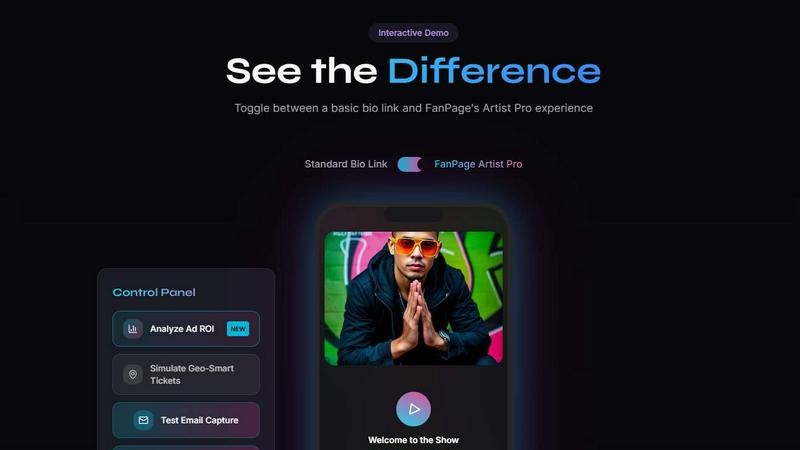
Visual Comparison
FanPage
Melograph

Feature Comparison
FanPage
Smart Deep Linking
Smart Deep Linking automatically opens music streaming apps like Spotify and Apple Music instead of a web browser, providing fans with a seamless listening experience. This feature ensures that your audience can access your music instantly, increasing engagement and listener retention.
Geo-Fenced Tour Dates
With geo-fenced tour dates, FanPage automatically displays the nearest shows to your fans based on their location. This feature enhances the concert-going experience by allowing fans to easily find and purchase tickets to your events, driving attendance and boosting ticket sales.
Server-Side Tracking (CAPI)
Server-side tracking, also known as CAPI, provides precise ad attribution, even in the face of privacy challenges such as ad blockers and iOS privacy updates. This feature enables artists to accurately measure their ad performance and understand the true return on investment from their marketing efforts.
Marketplace Integration
The integrated Marketplace allows artists to list and sell digital products, courses, and build paid communities directly from their FanPage. This feature not only diversifies revenue streams for musicians but also fosters a deeper connection with fans through exclusive content offerings.
Melograph
Audio-Reactive Visual Templates
Melograph provides a curated library of premium templates where the visuals are dynamically driven by your audio. Once you upload your track, the waveform and graphical elements within the template pulse, move, and react in real-time to the music's frequencies and amplitude. This creates a perfect, seamless sync between sound and image that is difficult and tedious to achieve manually, ensuring your visuals feel like a natural extension of your music.
No-Timeline, Quick Customization
The interface is built for speed, not complex editing. There is no timeline to manage. Customization happens through simple input fields: you upload your audio, type in your artist name and song title, and can add your logo or album art on supported templates. This streamlined approach means you go from idea to finished video in just a few clicks, bypassing the steep learning curve of conventional video editing software entirely.
Platform-Optimized Exports
Understanding that content is shared across different channels, Melograph generates export-ready videos in universally compatible 1080p MP4 format. The tool ensures that critical elements like text remain clean and readable even on small mobile screens, making the outputs perfect for platforms like TikTok, Instagram Reels, YouTube Shorts, and more without requiring any additional resizing or tweaking.
Fast, Local Browser Rendering
All processing happens directly in your web browser. This means your audio file doesn't need to be uploaded to a remote server for rendering, which significantly speeds up the export process and enhances privacy. You get a fast local render, resulting in a quick download of your final high-quality video file without long waits or concerns about file security.
Use Cases
FanPage
Personalized Music Promotion
Musicians can use FanPage to create a personalized landing page that showcases their latest releases, tour dates, and fan engagement opportunities. This customization helps convert casual listeners into dedicated fans by offering tailored experiences.
Event Management and Ticket Sales
With geo-fenced tour dates and ticket links that auto-update based on location, artists can efficiently manage their events and ticket sales. This capability simplifies the process for fans and maximizes attendance at shows.
Community Building
Artists can leverage the Marketplace feature to build paid communities and offer exclusive content. This approach not only creates a revenue stream but also strengthens the bond between the artist and their superfans, fostering loyalty.
Analytics Sharing
Musicians can generate secure, read-only links to share their FanPage analytics with managers, labels, and promoters. This transparency helps stakeholders understand the artist's growth and performance metrics, facilitating informed decision-making.
Melograph
Indie Artists Promoting New Releases
Independent musicians can use Melograph to create eye-catching video content for their new singles or albums instantly. By generating a professional visualizer, they can share their music on social media with engaging visuals that capture attention, helping their track stand out in crowded feeds and driving streams without needing a budget for a graphic designer or video editor.
DJs and Producers Creating Visual Backdrops
DJs and electronic music producers can quickly generate custom visual loops or full-length visualizers for their live sets, online mixes, or visualizer channels. By matching a template to the genre's vibe, they can have a consistent and reactive visual identity that enhances the audience's listening and viewing experience during performances or online uploads.
Record Labels Maintaining Brand Consistency
Small to medium record labels can standardize the visual presentation for their artists' releases. By using Melograph's templates, they can ensure a cohesive and professional look across multiple music videos and social clips for different artists, saving significant production costs and time while maintaining a high-quality brand image.
Content Creators Enhancing Music-Related Posts
Bloggers, streamers, and social media creators who feature music in their content can use Melograph to create custom visuals for song reviews, background music in vlogs, or promotional posts. It allows them to add a layer of polished, original video content that is directly synced to the audio, making their posts more dynamic and engaging for their audience.
Overview
About FanPage
FanPage is an innovative growth engine specifically crafted for musicians, empowering them to transform their link-in-bio into a comprehensive digital storefront and community hub. Unlike traditional bio links that treat every visitor uniformly, FanPage leverages intelligent automation to create personalized experiences for fans. It offers advanced features such as Smart Deep Linking, which allows seamless transitions to music streaming apps like Spotify and Apple Music, and geo-fenced tour dates that notify fans of upcoming shows in their vicinity. Additionally, the platform incorporates server-side tracking (CAPI) to ensure accurate ad attribution, enabling artists to evaluate their return on investment and track playlist growth effectively. With a built-in Marketplace, artists can list digital products, sell courses, and create paid communities without incurring transaction fees on Pro plans. FanPage is designed to help musicians grow their audience, engage fans, and monetize their art more effectively.
About Melograph
Melograph is a specialized, web-based tool designed to solve a specific and time-consuming problem for music creators: generating professional, engaging video content for their tracks without needing video editing skills. It eliminates the complexity of traditional video software, where musicians often waste hours learning timelines, plugins, and export settings. Instead, Melograph offers a streamlined, template-driven process. Users simply select a visual style that matches their music's vibe, upload their audio file, add basic text like artist and song name, and export a high-quality, audio-reactive video. The core value proposition is immense time savings and accessibility, enabling indie artists, producers, labels, DJs, and content creators to produce consistent, platform-ready visuals that enhance their releases and social media presence. By focusing solely on the needs of musicians, Melograph turns a multi-hour task into a matter of minutes, allowing creators to invest their energy back into making music while still having captivating visuals to promote it.
Frequently Asked Questions
FanPage FAQ
How does Smart Deep Linking improve user experience?
Smart Deep Linking enhances user experience by directing fans straight to music streaming apps, eliminating the need for them to navigate through a web browser. This process increases the likelihood of listeners engaging with your music.
Can I sell products directly through my FanPage?
Yes, the integrated Marketplace feature allows you to list and sell digital products, courses, and even build paid communities directly on your FanPage, helping you monetize your brand without transaction fees on Pro plans.
What kind of analytics does FanPage provide?
FanPage offers comprehensive analytics including playlist growth tracking, audience engagement metrics, and the ability to calculate your ad ROI. These insights help you make data-driven decisions to optimize your marketing strategies.
How does Geo-Fenced Tour Dates work?
Geo-Fenced Tour Dates automatically detects a fan's location and displays the nearest shows, complete with a convenient buy tickets button. This feature ensures that your fans never miss an opportunity to see you live, boosting attendance at your events.
Melograph FAQ
Do I need video editing experience to use Melograph?
No, you absolutely do not need any prior editing experience. Melograph is specifically designed for musicians and creators who want to avoid complex software. If you can select a template, upload an audio file, and type in text, you have all the skills needed to create and export a professional-looking music visualizer.
Will the exported videos work for TikTok, Reels, and Shorts?
Yes. Melograph exports videos in a 1080p MP4 format that is perfectly suited for all major social media platforms, including TikTok, Instagram Reels, and YouTube Shorts. The tool is built with mobile viewing in mind, ensuring text and graphics stay readable on smaller screens.
Can I use Melograph for multiple songs?
Yes. You can create visualizers for as many songs as you like. Your ability to export the final videos depends on your chosen plan. The subscription plans offer multiple export credits per month, while the pay-as-you-go option provides a single export credit for a one-time purchase, allowing you to create videos for different tracks as needed.
Is Melograph a web-based application?
Yes, Melograph is entirely web-based. It runs in your browser, so there is no software to download or install. You can access it from any computer with an internet connection, and all rendering is done locally on your machine for speed and privacy.
Alternatives
FanPage Alternatives
FanPage is a comprehensive link-in-bio platform tailored specifically for musicians, enabling them to monitor playlist growth, sell digital products, and manage tour RSVPs seamlessly. This innovative tool goes beyond the basic functionality of typical bio links, providing personalized experiences and intelligent automation to enhance user engagement and growth. Users often seek alternatives to FanPage due to factors like pricing, specific feature sets, or compatibility with their unique platform needs. When exploring alternatives, it's crucial to evaluate the range of features offered, ease of use, transaction fees, and the level of customization available to ensure a solution aligns with the artist's goals and audience engagement strategies.
Melograph Alternatives
Melograph is a web-based music visualizer maker, a tool designed to transform audio tracks into professional video content quickly. It falls into the category of automated video creation software, specifically tailored for musicians and creators who need to produce engaging visuals without deep video editing expertise. Users often explore alternatives for several practical reasons. These can include budget constraints, the need for different feature sets like more advanced customization or 3D effects, or a requirement for software that works on a specific platform like a desktop application or mobile app. The search for the right tool is a common step in finding the perfect fit for one's creative workflow and technical needs. When evaluating other options, key considerations should include the ease of use, the quality and style of available templates, export resolution and format support, and the overall cost structure. The goal is to find a solution that balances powerful visual output with an efficient process, allowing you to dedicate more time to your music.