Looktara vs vaethat
Side-by-side comparison to help you choose the right product.

Looktara
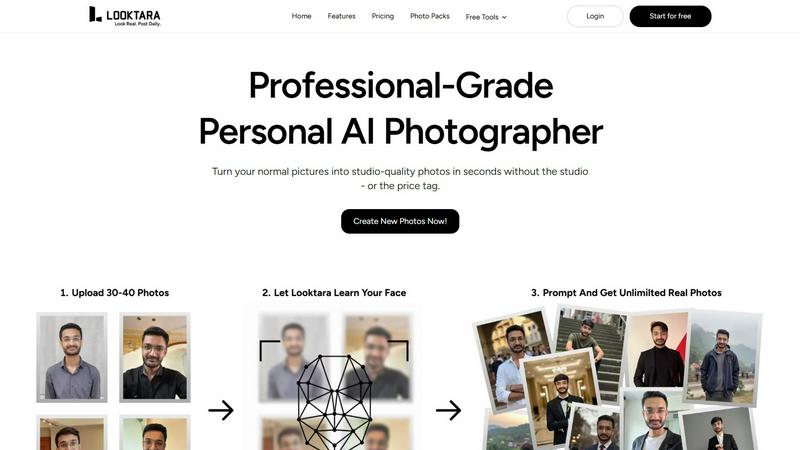
Looktara creates your personal AI model from 30 photos for authentic, tailored images in minutes.
Last updated: February 28, 2026

vaethat
Vaethat is an AI tool that effortlessly enhances 3D renders, improving clarity and detail while preserving your.
Last updated: February 26, 2026
Visual Comparison
Looktara
vaethat

Feature Comparison
Looktara
Private & Encrypted AI Model
Looktara prioritizes your privacy and security. Your personal AI model is trained exclusively on the photos you upload and is fully encrypted. This ensures your biometric data and generated images remain private and secure, giving you peace of mind that your unique look is not used for any other purpose or accessible to anyone else.
Authentic, Non-Plastic Results
The core technology is engineered to avoid the pitfalls of standard AI photo generation. Instead of producing images with over-smoothed, artificial skin and unnatural eyes, Looktara focuses on capturing authentic human details. The result is photography that preserves your genuine texture, expressions, and character, delivering realism that generic filters cannot achieve.
Context-Based Styling Control
You are in complete control of the narrative. Looktara allows you to specify the context and vibe you need—be it a professional headshot for LinkedIn, a warm and approachable photo for a client story, or a casual behind-the-scenes shot. The AI then generates images styled to match that specific context, ensuring your personal brand messaging is visually consistent and appropriate.
Rapid Training & Generation
The process is designed for efficiency without sacrificing quality. Training your personal AI model takes only about 10 minutes after uploading your initial photos. Once trained, you can generate a new, high-quality portrait in approximately 5 seconds. This speed eliminates the need for lengthy photoshoots and provides instant access to a variety of professional images.
vaethat
AI Render Upscaling
Vaethat employs sophisticated AI algorithms to increase the resolution and sharpness of 3D architectural renders. This feature ensures that the geometry remains clean and consistent, allowing for high-quality images suitable for any professional presentation.
Detail Refinement
The detail refinement capability enhances fine textures, edges, and small architectural elements within renders. This results in a crisper and more polished appearance, making your visuals stand out with a level of sharpness that captures attention.
Material and Lighting Enhancement
This feature improves the perceived realism of renders by boosting material definition, contrast, and lighting balance. By enhancing these elements, Vaethat helps create visually stunning images that accurately reflect the intended ambiance and design of architectural projects.
Noise and Artifact Cleanup
Vaethat effectively reduces noise and common rendering artifacts, resulting in cleaner, presentation-ready images. This cleanup process ensures that visual distractions do not detract from the overall quality of the architectural render, allowing the design to shine.
Use Cases
Looktara
Professional LinkedIn Headshots
Create a suite of polished, trustworthy, and industry-appropriate headshots for your LinkedIn profile. Ensure you have a consistent and professional image that makes a strong first impression on recruiters, clients, and professional connections, all without booking a photographer.
Consistent Social Media Branding
Maintain a cohesive visual identity across platforms like Instagram, Twitter, or professional blogs. Generate a variety of on-brand photos that match different content themes—from serious thought-leadership posts to more relaxed, engaging stories—all featuring the authentic you.
Personal Branding & Website Content
Easily source high-quality photos for your personal website, portfolio, "About Me" page, or speaker bio. Looktara provides the studio-grade imagery needed to build a professional online presence that tells your unique story and builds credibility with your audience.
Dating & Social Profile Photos
Craft authentic and appealing photos for dating apps like Tinder or other social profiles. Move beyond awkward selfies or outdated pictures by generating natural, flattering, and context-appropriate images that genuinely represent your personality for a better connection.
vaethat
Enhancing Portfolio Presentations
Architectural professionals can use Vaethat to enhance their portfolio images, ensuring that every render reflects the highest quality. By improving clarity and realism, Vaethat makes it easier to impress clients and stakeholders.
Preparing for Client Approvals
When presenting designs for client approvals, clear and polished images are crucial. Vaethat allows users to quickly upscale and enhance their renders, ensuring that clients receive visually appealing representations of the proposed projects.
Streamlining Workflow for Archviz Projects
Vaethat's Multi-Image Workspace enables users to upload entire folders of renders at once. This feature streamlines workflow, allowing architectural visualizers to process multiple images efficiently, saving time and effort.
Improving Marketing Materials
For marketing purposes, high-quality images are essential. Vaethat helps enhance renders used in brochures, websites, and social media, ensuring that the visual representation of projects is both engaging and professional.
Overview
About Looktara
Looktara is your dedicated personal AI photographer, designed to solve the practical problem of obtaining high-quality, authentic photos for your personal brand. It moves beyond generic AI image generators by creating a private, encrypted model trained exclusively on you. By uploading approximately 30 photos, the system learns your unique facial features, expressions, and essence in about 10 minutes. Once trained, it can generate studio-grade solo portraits tailored to your specific needs in roughly 5 seconds. This tool directly addresses the common flaws in AI photography—such as plastic-like skin, uncanny eyes, and awkward posing—by delivering images that look genuinely like you. It's built for professionals, creators, and anyone who needs a consistent and professional visual identity across different platforms like LinkedIn, Instagram, or a portfolio. With Looktara, you maintain full creative control, ensuring every image aligns with your desired tone, context, and message, effectively putting a professional photographer in your pocket, available anytime.
About vaethat
Vaethat is an advanced AI-powered tool specifically designed to upscale and enhance 3D renders for architectural visualization. Tailored for architectural visualization professionals, Vaethat enables users to produce clearer, sharper, and more realistic architectural images. The platform leverages specialized AI technology trained exclusively on architectural visuals, ensuring that enhancements are not only effective but also maintain the integrity of the original design. With a straightforward upload-and-export process, users can quickly boost the quality of their renders without the need for complicated adjustments or prompts. This makes Vaethat an essential tool for architects, visualizers, and designers aiming to elevate their presentations and portfolios with minimal effort.
Frequently Asked Questions
Looktara FAQ
How many photos do I need to upload to start?
You need to upload around 30 photos of yourself. This provides the AI with enough varied data to accurately learn your facial features, expressions, and unique look, enabling it to generate authentic and high-quality results in different contexts.
How long does it take to train my personal AI model?
The training process is remarkably fast. After you upload your photos, Looktara typically takes just about 10 minutes to train your private, encrypted AI model. Once training is complete, you can start generating new photos instantly.
Can I control the style and background of the generated photos?
Yes, you have significant control. Looktara is built for context-based styling. You can specify the desired vibe (e.g., professional, casual, warm) and the AI will generate images to match. This includes appropriate attire, expression, and background settings suited to your chosen context.
Are the generated photos truly private and secure?
Absolutely. Looktara emphasizes privacy. Your uploaded photos are used solely to train your personal AI model, which is encrypted. Your model and the generated images are private to you, ensuring your data is not shared or used for any other purpose.
vaethat FAQ
How does the AI render enhancer calculate credits?
Credits are calculated based on the number of images processed and the complexity of enhancements applied. Each enhancement consumes a specific amount of credits, allowing users to manage their usage effectively.
Can I use the archviz AI upscaler with V-Ray, Lumion, Enscape, 3ds Max, and SketchUp?
Yes, Vaethat is designed to work seamlessly with popular architectural rendering software like V-Ray, Lumion, Enscape, 3ds Max, and SketchUp, making it a versatile tool for various workflows.
What makes this AI post-production tool different from manual editing?
Vaethat eliminates the need for manual adjustments, which can be time-consuming and inconsistent. Its AI-driven enhancements provide quick, high-quality results without the complexity of traditional editing techniques.
Is there a free trial for the AI render enhancement service?
Yes, Vaethat offers a free trial for new users, allowing them to explore the capabilities of the AI render enhancer before committing to a subscription plan. This trial provides an opportunity to experience the tool's effectiveness firsthand.
Alternatives
Looktara Alternatives
Looktara is a personal AI photography tool in the generative art category. It creates a private AI model from your photos to produce authentic, tailored images for your personal brand in minutes. Users often explore alternatives for various reasons, such as budget constraints, a need for different artistic styles, or requirements for specific features like team collaboration or integration with other platforms. When evaluating other options, it's crucial to consider your primary needs. Key factors include the quality and realism of the AI-generated output, the privacy and security of your data during model training, the speed of image generation, and the flexibility to customize images for different professional and social contexts. The right tool should solve your specific photography challenges without compromising on the authentic representation of your personal brand.
vaethat Alternatives
Vaethat is an AI-powered tool designed specifically for architectural visualization professionals. It enhances and upscales 3D renders, improving clarity, sharpness, and realism while preserving the original design intent. As users seek ways to streamline their workflow and elevate their rendering quality, they often look for alternatives that can better meet their specific needs, whether due to pricing, feature sets, or compatibility with their existing platforms. When searching for alternatives, users should consider factors such as the tool's ability to upscale renders effectively, refine details, and enhance material and lighting. Additionally, ease of use, integration capabilities, and the overall value proposition are crucial elements in making an informed decision. A good alternative should not only meet technical requirements but also fit within the user's workflow seamlessly.