
FilexHost vs MeetingMind
Side-by-side comparison to help you choose the right product.

FilexHost
Effortlessly host and share any file with a simple drag and drop, generating shareable links in seconds.
Last updated: February 26, 2026

MeetingMind
Capture and summarize your Zoom meetings effortlessly with MeetingMind's automatic recording and intelligent.
Last updated: March 1, 2026
Visual Comparison
FilexHost

MeetingMind
Feature Comparison
FilexHost
Universal File Support
FileXHost supports a wide range of file types, including PDFs, images, videos, and HTML projects. This versatility means you can host anything from spreadsheets to entire websites, all within a single platform. The smart rendering engine ensures files are displayed in the best possible format, enhancing the viewer experience.
Instant Subdomains
When you upload a file, FileXHost provides an instant subdomain (e.g., your-file.filex.host) with zero setup required. This feature streamlines the sharing process, allowing you to get your files online quickly without complicated configurations.
Free SSL Encryption
Security is a top priority with FileXHost. Every link generated comes with free SSL encryption, ensuring that your files and data are protected during transit. This feature builds trust with your recipients, knowing their access is secure.
Optional Password Protection & Expiry Settings
FileXHost offers optional password protection and customizable expiry settings for your files. You can set links to expire anywhere from 24 hours to an indefinite period, providing control over who can access your files and for how long.
MeetingMind
Automatic Detection
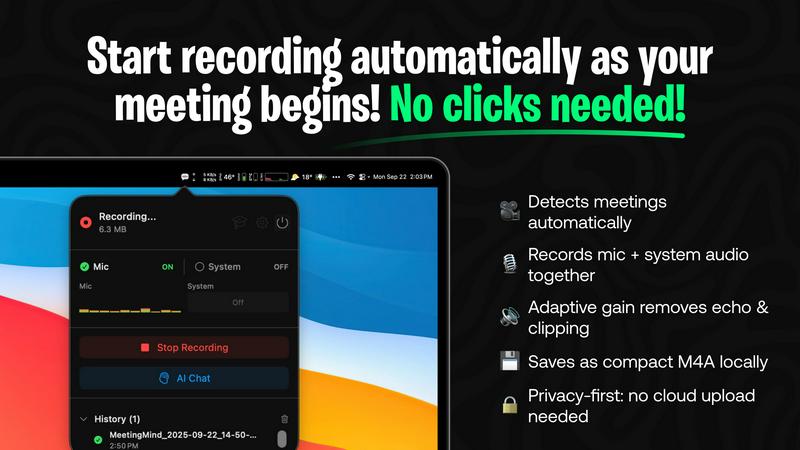
MeetingMind seamlessly detects Zoom meetings without any manual clicks required. As soon as you start or join a meeting, the tool springs into action, ensuring that every moment is captured effortlessly.
Records Everything
This feature allows MeetingMind to capture both microphone and system audio with adaptive gain, providing a comprehensive recording of your discussions. No detail is too small, and you can trust that everything will be documented accurately.
AI Assistant
Choose between a local AI solution or a cloud-based option for summaries and insights. This flexibility allows you to leverage cutting-edge technology to distill key points and action items from your meetings, enhancing your productivity.
Markdown Export
After your meeting, MeetingMind generates AI-driven summaries and transcripts, which are saved as neatly formatted markdown files. This makes it easy to share and reference notes, ensuring that all participants can stay aligned on key takeaways.
Use Cases
FilexHost
Professionals Sharing Reports
FileXHost is perfect for professionals who need to share client reports or sensitive documents. The instant link generation and secure sharing options allow for quick distribution without the hassle of traditional email attachments.
Developers Hosting Projects
Developers can use FileXHost to host landing pages or mock APIs effortlessly. The platform's support for HTML and other project files, combined with its fast upload speeds, makes it ideal for quick testing and sharing.
Creators Distributing Digital Products
Content creators can easily distribute digital products using FileXHost. By uploading files and sharing the generated links, creators can reach their audience without worrying about file size limits or access requests.
Teams Collaborating on Files
FileXHost is useful for teams working together on projects. Its features enable team members to upload and share files securely, ensuring everyone has access to the latest versions without unnecessary back-and-forth emails.
MeetingMind
Efficient Team Meetings
In team settings, MeetingMind can transform how meetings are conducted. With automatic recording and transcription, team members can concentrate on discussions, leading to more productive and engaging sessions without the distraction of manual note-taking.
Project Updates
For project managers, MeetingMind serves as an indispensable tool for capturing project updates. As meetings progress, the AI-generated summaries help keep track of milestones, responsibilities, and deadlines, ensuring that everyone is on the same page.
Client Consultations
During client meetings, professionals can focus on building relationships instead of worrying about note-taking. MeetingMind’s ability to capture every detail allows for a more personal interaction, while the transcripts serve as valuable references for follow-up conversations.
Training and Workshops
In training sessions or workshops, MeetingMind can be utilized to document discussions, feedback, and insights. The generated notes can be shared with participants, facilitating ongoing learning and ensuring that everyone has access to the same information.
Overview
About FilexHost
FileXHost is a versatile file hosting and sharing platform designed to simplify the way you manage and distribute files online. With its user-friendly interface, FileXHost allows you to upload any file type—documents, multimedia, spreadsheets, and even entire websites—without the need for complex configurations or server management. The standout feature is the "Drop & Share" workflow, which enables users to simply drag and drop their files, instantly receiving a secure URL for sharing. This makes it ideal for professionals needing to send client reports, developers wishing to host landing pages, and content creators looking to share digital products. With seamless integration of SSL encryption and smart rendering capabilities, FileXHost ensures that your files are not only secure but also presented in an optimal format for viewers. Whether you are an individual or part of a team, FileXHost offers the convenience and efficiency you need for hassle-free file sharing.
About MeetingMind
MeetingMind is an advanced meeting assistant tailored for professionals who frequently engage in virtual meetings, particularly those on Zoom. This innovative tool automates the process of capturing and organizing meeting notes, enabling users to focus on discussions rather than being distracted by manual note-taking. By automatically detecting and recording meetings, MeetingMind ensures that no important details are overlooked. Its powerful features include AI-generated summaries and transcription, which transform the recorded audio into searchable and interactive notes. This is especially beneficial for team leaders, project managers, and busy professionals who need to maintain productivity and collaboration. With a commitment to privacy, MeetingMind processes all data locally on your Mac, guaranteeing that sensitive information stays secure. Whether you are participating in daily stand-ups or complex brainstorming sessions, MeetingMind is designed to enhance your meeting experience by providing you with organized, accessible notes.
Frequently Asked Questions
FilexHost FAQ
What is FileXHost?
FileXHost is a cloud-based file hosting and sharing service that allows users to upload and share any type of file easily. It offers features like instant subdomains, SSL encryption, and smart rendering.
Is it really free?
Yes, FileXHost offers a free plan that allows you to host up to 1,000 files, with a maximum file size of 25MB and a 7-day expiry. This plan is ad-supported, making it accessible for casual users.
What file types are supported?
FileXHost supports a wide variety of file types, including documents (PDF, DOCX), spreadsheets (XLSX, CSV), images (JPG, PNG), media files (MP4, MP3), and even HTML projects, ensuring flexibility for all users.
How do I update my site?
To update your site, simply upload the new version of your file. FileXHost will generate a new link, and you can choose to share that link with your audience. There's no need for complicated updates or configurations.
MeetingMind FAQ
How does MeetingMind ensure privacy?
MeetingMind processes all recordings locally on your Mac, meaning that your sensitive information is never uploaded to the cloud. This commitment to privacy helps maintain confidentiality in all your meetings.
Is there a limit to how long I can record with the free version?
Yes, the free version allows for 60 minutes of recording per day. This is ideal for shorter meetings and daily stand-ups. If you require more recording time, you can upgrade to the unlimited version.
Can I use MeetingMind on platforms other than Zoom?
Currently, MeetingMind is specifically designed for Zoom meetings. However, there may be future updates to support additional platforms based on user feedback and demand.
What happens if I miss the automatic detection?
If you accidentally miss the automatic detection, you can manually start the recording at any point during the meeting. MeetingMind is flexible and allows you to capture important discussions whenever necessary.
Alternatives
FilexHost Alternatives
FilexHost is a user-friendly file hosting and sharing platform that allows individuals and businesses to quickly upload and share files with ease. By simply dragging and dropping a file, users can generate a shareable URL almost instantly. This service falls under the categories of productivity and management, as it streamlines the process of file sharing, making it ideal for various user needs. Users often seek alternatives to FilexHost for a variety of reasons, including pricing structures, specific feature sets, or unique platform requirements. Factors such as storage limits, security options, and user interface can significantly influence the choice of a file hosting service. When evaluating alternatives, it is important to consider the ease of use, file compatibility, sharing capabilities, and any additional features that may enhance the overall user experience.
MeetingMind Alternatives
MeetingMind is a sophisticated tool designed to enhance productivity and organization during virtual meetings by automatically capturing recordings, transcriptions, and AI-generated summaries. As an intelligent meeting assistant, it falls under the productivity and management category, tailored for busy professionals who need to streamline their note-taking processes during Zoom meetings. Users often seek alternatives to MeetingMind for various reasons, including budget constraints, specific feature requirements, or compatibility with different platforms. When considering alternatives, it's essential to evaluate factors such as ease of use, accuracy of transcriptions, integration capabilities with existing tools, and overall cost to ensure that the chosen solution effectively meets your unique meeting needs.