
MeetingMind
Capture and summarize your Zoom meetings effortlessly with MeetingMind's automatic recording and intelligent.
Visit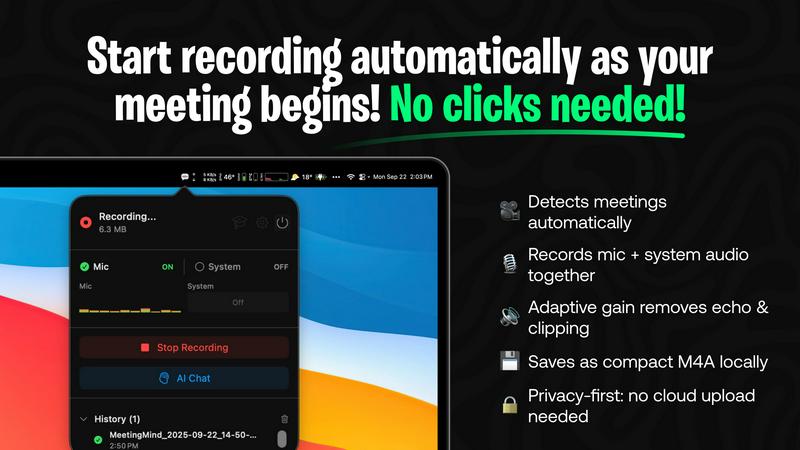
About MeetingMind
MeetingMind is an advanced meeting assistant tailored for professionals who frequently engage in virtual meetings, particularly those on Zoom. This innovative tool automates the process of capturing and organizing meeting notes, enabling users to focus on discussions rather than being distracted by manual note-taking. By automatically detecting and recording meetings, MeetingMind ensures that no important details are overlooked. Its powerful features include AI-generated summaries and transcription, which transform the recorded audio into searchable and interactive notes. This is especially beneficial for team leaders, project managers, and busy professionals who need to maintain productivity and collaboration. With a commitment to privacy, MeetingMind processes all data locally on your Mac, guaranteeing that sensitive information stays secure. Whether you are participating in daily stand-ups or complex brainstorming sessions, MeetingMind is designed to enhance your meeting experience by providing you with organized, accessible notes.
Features of MeetingMind
Automatic Detection
MeetingMind seamlessly detects Zoom meetings without any manual clicks required. As soon as you start or join a meeting, the tool springs into action, ensuring that every moment is captured effortlessly.
Records Everything
This feature allows MeetingMind to capture both microphone and system audio with adaptive gain, providing a comprehensive recording of your discussions. No detail is too small, and you can trust that everything will be documented accurately.
AI Assistant
Choose between a local AI solution or a cloud-based option for summaries and insights. This flexibility allows you to leverage cutting-edge technology to distill key points and action items from your meetings, enhancing your productivity.
Markdown Export
After your meeting, MeetingMind generates AI-driven summaries and transcripts, which are saved as neatly formatted markdown files. This makes it easy to share and reference notes, ensuring that all participants can stay aligned on key takeaways.
Use Cases of MeetingMind
Efficient Team Meetings
In team settings, MeetingMind can transform how meetings are conducted. With automatic recording and transcription, team members can concentrate on discussions, leading to more productive and engaging sessions without the distraction of manual note-taking.
Project Updates
For project managers, MeetingMind serves as an indispensable tool for capturing project updates. As meetings progress, the AI-generated summaries help keep track of milestones, responsibilities, and deadlines, ensuring that everyone is on the same page.
Client Consultations
During client meetings, professionals can focus on building relationships instead of worrying about note-taking. MeetingMind’s ability to capture every detail allows for a more personal interaction, while the transcripts serve as valuable references for follow-up conversations.
Training and Workshops
In training sessions or workshops, MeetingMind can be utilized to document discussions, feedback, and insights. The generated notes can be shared with participants, facilitating ongoing learning and ensuring that everyone has access to the same information.
Frequently Asked Questions
How does MeetingMind ensure privacy?
MeetingMind processes all recordings locally on your Mac, meaning that your sensitive information is never uploaded to the cloud. This commitment to privacy helps maintain confidentiality in all your meetings.
Is there a limit to how long I can record with the free version?
Yes, the free version allows for 60 minutes of recording per day. This is ideal for shorter meetings and daily stand-ups. If you require more recording time, you can upgrade to the unlimited version.
Can I use MeetingMind on platforms other than Zoom?
Currently, MeetingMind is specifically designed for Zoom meetings. However, there may be future updates to support additional platforms based on user feedback and demand.
What happens if I miss the automatic detection?
If you accidentally miss the automatic detection, you can manually start the recording at any point during the meeting. MeetingMind is flexible and allows you to capture important discussions whenever necessary.
Pricing of MeetingMind
Free: 60 minutes recording per day, automatic Zoom detection, live transcription, AI summaries, and local processing, forever free.
Best Value: Unlimited recording with a one-time purchase that includes everything in the free version, no time limits, lifetime updates, and no subscription fees. Check the Mac App Store for current pricing options.
Explore more in this category:
Similar to MeetingMind

Private email. Pure. Secure. Exclusive. No ads, no tracking, no data selling. GDPR compliant, EU-hosted.


Verla is an AI academic assistant for university and college students, combining AI essay writing, academic research, AI detection, AI humanization, p

Apps and files on an infinite canvas where people and AI agents work together.

Panzoe is an all-in-one AI platform for personal productivity, business automation, AI assistants, content creation, and custom AI solutions.

Signage and kiosk infrastructure for AI agents. Your agent publishes images, video, streams, web pages and apps to screens via one plugin.screenRIG is
