Magic Hour vs Nano Photo
Side-by-side comparison to help you choose the right product.

Magic Hour
Magic Hour is a free AI studio that empowers you to create stunning videos and images in seconds with over 100 tools.
Last updated: March 4, 2026

NanoPhoto.AI simplifies photo and video editing with powerful, accessible AI tools.
Last updated: March 1, 2026
Visual Comparison
Magic Hour

Nano Photo
Feature Comparison
Magic Hour
AI Video Creation
Magic Hour offers an extensive suite of AI video tools, including text-to-video and video-to-video features. Users can quickly generate high-quality videos from scripts or transform existing footage with new styles, making it easier than ever to produce visually stunning content.
AI Image Editing
With an intuitive AI image editor, users can edit images using simple text commands. This feature allows for rapid adjustments and enhancements, helping creators achieve the desired look and feel without needing advanced graphic design skills.
Face Swap Technology
The face swap feature enables users to easily swap faces in both photos and videos. This innovative tool can be used creatively for various projects, from entertainment to marketing campaigns, enhancing engagement and viewer interest.
AI Headshot Generator
Magic Hour includes an AI headshot generator that creates professional-quality headshots in minutes. This feature is particularly useful for businesses or individuals needing high-quality images for profiles, resumes, or promotional materials.
Nano Photo
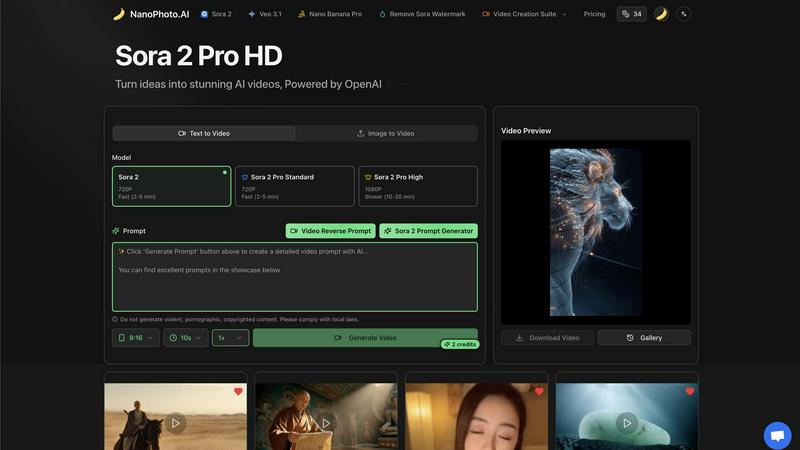
Sora 2 Pro HD Video Generation
This feature allows users to turn their ideas into high-definition AI videos powered by OpenAI's Sora 2 model. You can generate videos from text prompts or by uploading an image as a starting point. It offers different quality tiers, including a Pro High option for 1080p resolution, giving creators the flexibility to choose between speed and maximum visual fidelity for their projects.
Advanced Prompt Engineering Tools
Nano Photo includes specialized tools to help users craft the perfect instructions for the AI. The Sora 2 Prompt Generator assists in creating effective text prompts, while the Video Reverse Prompt tool can analyze existing video content to suggest prompts that could generate similar styles or concepts, streamlining the creative ideation process.
Comprehensive Video Creation Suite
Beyond simple generation, this suite provides a set of editing and enhancement tools. A key capability is the option to remove the Sora watermark from generated videos, allowing for cleaner, more professional final assets ready for public distribution or commercial use in marketing campaigns and social media.
Efficient Model and Format Options
The platform offers practical choices to match your project needs. You can select between different AI models (like Sora 2 or Veo 3.1) and output specifications, such as 9:16 format for social media stories or 10-second video lengths. This ensures the content is optimized for its intended platform without requiring manual resizing or editing.
Use Cases
Magic Hour
Content Creation for Social Media
Social media managers can leverage Magic Hour's tools to quickly generate eye-catching videos and images tailored to specific platforms, ensuring timely and engaging content that resonates with their audience.
Marketing Campaigns
Marketers can utilize the platform to create personalized content for campaigns, using AI-generated visuals and animations that capture target audiences' attention, driving engagement and conversions effectively.
Educational Material Development
Educators and trainers can produce high-quality training videos and instructional materials with ease. Magic Hour's tools allow for rapid iteration and customization, making it simpler to create engaging educational content.
Event Promotions
Event organizers can design promotional videos and graphics that highlight key features of their events. With Magic Hour, they can create visually appealing teasers that attract attendees and generate buzz around their events.
Nano Photo
Social Media Content Creation
Marketers and influencers can rapidly produce eye-catching, platform-optimized video clips for Instagram Reels, TikTok, or YouTube Shorts. By using text prompts to generate unique visuals or adapting trends with the prompt tools, they can maintain a consistent and engaging posting schedule without a video production team.
Prototyping and Storyboarding
Filmmakers, advertisers, and product designers can use Nano Photo to visualize concepts quickly. Generating video sequences from script ideas or mood images allows teams to create dynamic storyboards, pitch concepts to clients, and iterate on creative directions before committing to expensive live-action shoots.
Educational and Explainer Video Production
Educators, trainers, and businesses can create clear explainer videos to illustrate complex topics. The AI's ability to generate realistic scenes and animations from descriptive text makes it an ideal tool for producing engaging educational content that enhances learning and communication.
Enhanced E-commerce Marketing
Online stores can generate high-quality video showcases for their products. By uploading a product image and converting it into a short, professional video, they can create more dynamic and persuasive content for product pages, ads, and email campaigns, potentially increasing conversion rates.
Overview
About Magic Hour
Magic Hour is a revolutionary browser-based AI studio that transforms the way creators develop professional-quality videos and images. Catering to a diverse audience—from solo creators and marketers to large teams—Magic Hour simplifies the creative process, making it accessible for anyone regardless of their skill level. The platform consolidates over 100 powerful AI tools into a single, user-friendly interface, allowing users to generate, edit, and enhance media in mere seconds. Whether you need to create a video from a script using text-to-video, apply artistic styles to existing footage with video-to-video, or personalize content through AI Face Swap and Lip Sync, Magic Hour covers all bases. The platform fosters rapid iteration, enabling users to produce multiple variations and maintain consistent branding across social media, advertisements, training clips, and more—all without the need for expensive equipment or complex software installations.
About Nano Photo
Nano Photo is an AI-powered creative platform designed to simplify and accelerate the production of professional-grade visual content. It serves creators, marketers, and businesses who need to generate compelling videos and images but may lack extensive technical skills or large production budgets. The platform's core value proposition is its ability to deliver high-quality results quickly and efficiently by leveraging cutting-edge AI models like OpenAI Sora 2 and Google Veo 3.1. Users can transform simple text prompts or images into stunning videos, edit content with advanced tools, and remove unwanted watermarks, all within an intuitive interface. Nano Photo effectively bridges the gap between creative ambition and practical execution, empowering users to enhance their visual communication, boost engagement, and bring innovative ideas to life without the traditional complexities and high costs associated with media production.
Frequently Asked Questions
Magic Hour FAQ
What types of media can I create with Magic Hour?
With Magic Hour, you can create videos, images, and animations tailored for various platforms. The tools are designed to cater to different media types, enhancing your creative possibilities.
Is Magic Hour suitable for beginners?
Absolutely! Magic Hour is designed to be user-friendly, making it accessible for creators of all skill levels. Its intuitive interface and straightforward tools allow anyone to produce professional-quality content without prior experience.
Do I need any special software or equipment to use Magic Hour?
No. Magic Hour is a browser-based platform, meaning you can access it from any device with internet connectivity. There is no need for expensive equipment or complex software installations.
Can I collaborate with my team on Magic Hour?
Yes! Magic Hour is built for collaboration, making it easy for teams to work together on projects. You can share your creations, get feedback, and make adjustments in real-time, streamlining the creative workflow.
Nano Photo FAQ
What AI models does Nano Photo use?
Nano Photo primarily utilizes state-of-the-art AI models including OpenAI's Sora 2 and Google's Veo 3.1 for video generation. These models are integrated into the platform to provide users with powerful, cutting-edge capabilities for creating high-quality and realistic video content from text or image inputs.
Is there a free trial available?
The provided content does not specify a free trial. However, the platform frequently runs special offers, such as an annual payment plan at a half-price discount. For the most accurate and current information on trials or promotional pricing, visiting the official Nano Photo website or contacting their team is recommended.
Can I use the generated videos for commercial purposes?
Yes, content generated through Nano Photo, especially when using features like the watermark removal tool for Sora-generated videos, is intended for professional and commercial use. This allows businesses and creators to use the videos in marketing materials, social media, and other commercial projects.
How long does it take to generate a video?
Generation time varies based on the selected quality and model. For example, the Sora 2 Pro Standard setting in 720p is noted as "Fast (2-5 min)," while the higher-quality 1080p Sora 2 Pro High option may take longer, around 10-20 minutes. The platform provides clear estimates so you can plan your workflow accordingly.
Alternatives
Magic Hour Alternatives
Magic Hour is a free AI studio that falls into the content creation category, specializing in professional video and image generation. It provides users with an intuitive platform to create stunning content quickly and easily, making it accessible to solo creators, marketers, and teams alike. Despite its robust features, users may seek alternatives due to factors like pricing, specific feature sets, or platform compatibility. When looking for alternatives, it's essential to consider the range of features offered, user-friendliness, and whether the platform meets your specific content creation needs. Evaluate how each alternative aligns with your workflow, the tools you require, and the overall value for your investment. A good alternative should also support rapid content iterations and maintain quality across various media formats.
Nano Photo Alternatives
Nano Photo is an AI-powered video creation and editing platform. It falls into the category of AI video generators, designed to help users produce professional-grade visual content from simple text prompts. This tool is particularly focused on streamlining workflows for ads, storyboards, and social media videos. Users often explore alternatives for several practical reasons. Budget constraints can lead to searches for more affordable or freemium options. Others might need specific features Nano Photo lacks, require compatibility with different operating systems, or seek a platform with a different user interface and learning curve. The specific needs of a project, like a particular AI model or export format, can also prompt a search. When evaluating alternatives, consider your primary goal. Focus on the core features you use most, whether that's text-to-video generation, advanced editing controls, or template libraries. Compare pricing models and subscription tiers against your budget and usage frequency. Also, assess the platform's ease of use and the quality of its output to ensure it matches your creative standards and technical requirements.