Patrivox vs Tool.Video
Side-by-side comparison to help you choose the right product.

Patrivox
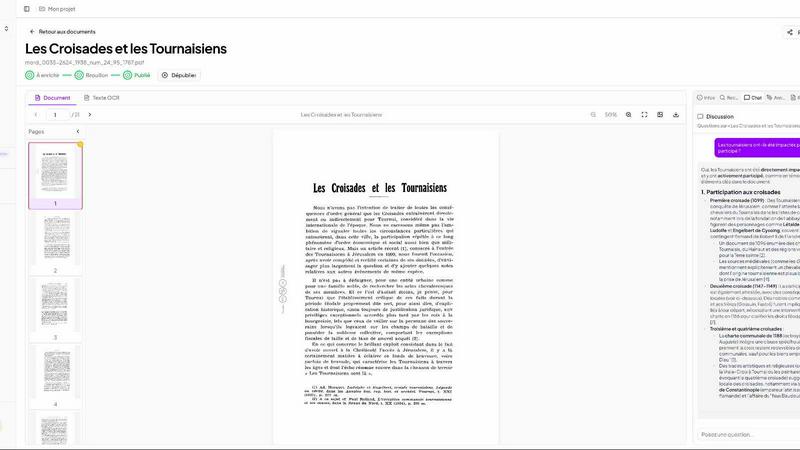
Patrivox transforms your documents into searchable archives in minutes using advanced AI for effortless access and.
Last updated: March 4, 2026

Tool.Video
Tool.Video is your all-in-one AI toolkit to generate videos, images, and music in minutes.
Last updated: March 1, 2026
Visual Comparison
Patrivox
Tool.Video

Feature Comparison
Patrivox
Intelligent OCR Technology
Patrivox utilizes next-gen OCR powered by Mistral AI to automatically read and classify documents. This feature ensures that every page is indexed without manual intervention, allowing users to focus on analysis rather than data entry.
Advanced Search Capabilities
With Patrivox, users can effortlessly conduct full-text searches across their entire document collection. The platform supports typo tolerance and offers filtering options by date, author, and type, making it easy to locate specific information quickly.
Interactive Knowledge Graph
The platform automatically identifies and links entities such as people, places, and organizations mentioned in the documents. This interactive knowledge graph allows users to explore connections and discover insights that may not have been apparent before.
Batch Import Functionality
Patrivox supports batch imports, enabling users to drag and drop hundreds of PDF files at once. This feature streamlines the digitization process, significantly reducing the time needed to make large collections searchable.
Tool.Video
Unified AI Video Generation
Tool.Video provides a centralized hub for video creation, featuring multiple state-of-the-art AI models. Its flagship integration is Sora 2, which generates realistic, high-motion videos from simple text prompts. Beyond a single model, the platform offers a multi-model video generator, allowing you to choose from different AI providers and styles to match your specific vision, ensuring you get the perfect output for any project, from cinematic scenes to animated explainers.
Comprehensive AI Media Suite
The platform extends far beyond video. It includes Nano Banana Pro for generating stunning, high-quality images from text or existing images, perfect for storyboards or standalone visuals. Simultaneously, the integrated Suno 5 AI allows for professional music generation, creating original songs with lyrics or custom background soundtracks tailored to your video's mood and genre, all within the same ecosystem.
Professional Video Utilities
Tool.Video includes essential post-production tools to polish your content. This features a robust Video Thumbnail Generator that can extract frames or use AI to suggest the most engaging image for clicks. Additional utilities like a Video Watermark Adder for branding, a Video Trimmer for quick edits, and a dedicated Sora Watermark Remover to clean up AI-generated content ensure your final video is ready for professional distribution.
Developer-Friendly API Integration
For businesses and developers looking to scale, Tool.Video offers API support for its core tools. This allows for the automation of video, image, and thumbnail generation, enabling seamless integration into existing applications, websites, or marketing workflows. This feature transforms the platform from a creative tool into a powerful backend engine for automated content production pipelines.
Use Cases
Patrivox
Municipal Archives Management
Municipal services can utilize Patrivox to digitize and catalog their deliberations, registers, and correspondence. This makes historical records easily accessible to the public and researchers, enhancing community engagement.
Historical Society Collections
Historical societies can benefit from Patrivox by making their bulletins and documentary collections searchable. This feature allows members and the public to explore rich histories with ease, promoting educational initiatives.
Heritage Library Accessibility
Heritage libraries can open their special collections to research and public access using Patrivox. This facilitates scholarly work and increases the visibility of valuable resources that may otherwise remain hidden.
Ecclesiastical Archive Preservation
Dioceses and parishes can preserve and index their parish registers and ecclesiastical archives efficiently. Patrivox ensures that these important documents are not only preserved but also made searchable for future generations.
Tool.Video
Social Media Content Creation
Marketers and influencers can rapidly produce a high volume of engaging short-form videos for platforms like TikTok, Instagram Reels, and YouTube Shorts. By quickly generating videos from trending text prompts, adding unique AI music, and creating eye-catching thumbnails, users can maintain a consistent and professional posting schedule without requiring extensive video editing skills or resources.
Advertising and Commercial Production
Businesses and agencies can use the AI TVC Generator to create professional-quality advertisement videos and commercials in minutes. From conceptualizing the storyboard with AI images to generating the final video scene and soundtrack, the platform significantly reduces the cost and time associated with traditional TVC production, making high-quality ad creation accessible to smaller teams and budgets.
Educational and Explainer Video Development
Educators, trainers, and SaaS companies can efficiently create explainer videos and educational content. The workflow allows for easy visualization of complex concepts through AI-generated storyboards and videos, paired with clear, AI-composed background music. This simplifies the process of turning scripts and lesson plans into compelling visual aids and tutorial content.
Automated Content Workflows for Developers
Developers can integrate Tool.Video's APIs to build automated systems for generating video content. Use cases include dynamically creating personalized video reports, generating product demo videos from database entries, or automatically producing video summaries for blog posts. This programmatic approach enables large-scale, customized video output without manual intervention.
Overview
About Patrivox
Patrivox is an innovative European SaaS platform designed specifically for organizations such as heritage institutions, municipal services, associations, and enterprises. Its primary function is to transform extensive collections of scanned documents into a fully searchable knowledge base. With a user-friendly drag-and-drop interface, Patrivox allows users to upload their PDFs seamlessly. The platform leverages Mistral AI's advanced optical character recognition (OCR) technology to extract text within minutes, making previously inaccessible knowledge searchable and shareable. Patrivox excels in entity recognition, identifying key figures, places, and organizations while connecting them in an interactive knowledge graph. This tool is a game changer for those needing quick and efficient access to information, enabling users to perform instant searches with typo tolerance and ask questions in natural language, all while providing sourced answers. Its main value proposition lies in democratizing access to knowledge, enhancing research capabilities, and facilitating public engagement.
About Tool.Video
Tool.Video is an all-in-one AI video generation platform designed to solve the complex, time-consuming, and often costly challenges of modern video content creation. It consolidates the most advanced AI models into a single, unified dashboard, eliminating the need to juggle multiple subscriptions and interfaces. The platform integrates cutting-edge tools like OpenAI's Sora 2 for text-to-video, Nano Banana Pro for image generation, and Suno 5 for music composition, providing a complete creative suite. This solution is built for a wide range of users: from social media marketers and content creators who need to produce engaging clips quickly, to developers and businesses seeking to automate video production through its API. The core value proposition is simplicity and efficiency. Tool.Video streamlines the entire workflow—from initial storyboard ideation and video generation to adding soundtracks and creating click-worthy thumbnails—empowering users to generate professional-quality, compelling multimedia content effortlessly and at scale.
Frequently Asked Questions
Patrivox FAQ
How does Patrivox ensure data security?
Patrivox is 100% hosted in Europe and is GDPR-native, ensuring compliance with data protection regulations. An audit log is also available to track access and modifications, providing peace of mind regarding data security.
Can I use Patrivox for large batches of documents?
Yes, Patrivox supports batch imports, allowing users to drag and drop hundreds of PDF files at once. This feature is designed to accommodate large collections efficiently.
Is there a limit on the number of users who can access my documents?
No, Patrivox offers unlimited reader access. You can share your digitized archives with as many researchers or public users as you wish without incurring additional costs.
What types of files can I upload to Patrivox?
Patrivox primarily supports PDF files for upload. Each file can be up to 250 MB, ensuring that even large documents can be processed without difficulty.
Tool.Video FAQ
What AI models does Tool.Video use?
Tool.Video integrates several leading AI models to provide a comprehensive toolkit. This includes OpenAI's Sora 2 for advanced text-to-video generation, Nano Banana Pro for high-quality image creation, and Suno 5 for professional AI music and soundtrack composition. The platform acts as a unified gateway to these powerful technologies.
Can I use Tool.Video for commercial projects?
Yes, content created using Tool.Video is intended for commercial use. This makes it suitable for marketers, businesses, and agencies creating client advertisements, social media content, and other commercial video materials. It is designed to help users produce professional-grade content efficiently.
Does Tool.Video offer an API?
Yes, Tool.Video provides API support for key features, including video generation, image creation, and thumbnail generation. This allows developers and businesses to integrate these AI capabilities directly into their own applications, websites, or automated workflows for scalable content production.
What is the typical workflow for creating a video?
The typical workflow on Tool.Video is a streamlined four-step process. First, use the AI image tools to create a storyboard and visualize your concept. Second, generate the main video footage using Sora 2 or another AI video model. Third, compose and add a fitting background soundtrack with the AI music generator. Finally, create an engaging thumbnail using the AI Thumbnail Generator to maximize your video's click-through rate.
Alternatives
Patrivox Alternatives
Patrivox is an innovative Software as a Service (SaaS) platform that leverages artificial intelligence to digitize and categorize documents swiftly, making them fully searchable. Primarily used by heritage institutions, municipal services, and enterprises, Patrivox transforms vast collections of scanned documents into easily accessible knowledge bases. Users can enjoy the benefits of advanced optical character recognition (OCR) technology, allowing them to search for information with ease. Users often seek alternatives to Patrivox for various reasons including pricing, specific feature requirements, or compatibility with their existing platforms. When looking for an alternative, it is essential to consider factors such as the speed of document processing, the accuracy of search results, user interface design, and support for different file formats. These elements can greatly impact the overall user experience and effectiveness of the solution.
Tool.Video Alternatives
Tool.Video is an all-in-one AI video creation platform that simplifies generating videos, images, and music from text prompts. It falls into the category of comprehensive, multi-modal AI content creation tools designed for creators, marketers, and developers. Users often explore alternatives for various reasons. These can include budget constraints, the need for a different feature set, or a requirement for a platform that integrates more deeply with a specific existing workflow. Some may seek tools focused solely on one aspect, like video or music generation, rather than a bundled suite. When evaluating other options, consider your primary goal. Look at the core AI models for video, image, and audio quality, the ease of use of the interface, and the availability of API access for developers. It's also crucial to assess pricing transparency and whether the tool scales effectively with your project volume and complexity.