BarBrain vs Refbox
Side-by-side comparison to help you choose the right product.

BarBrain
BarBrain streamlines inventory management for hospitality, cutting your counting time in half with accurate, automated reports and seamless device.
Last updated: April 4, 2026

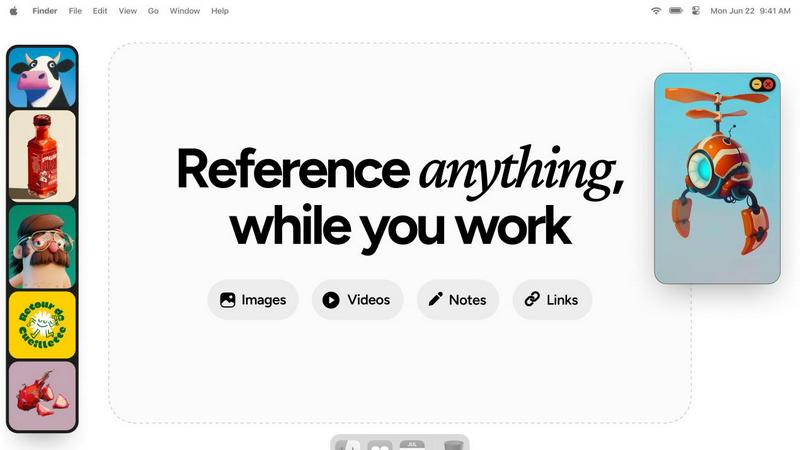
Refbox provides instant access to your images, videos, and notes, enhancing your workflow without distractions.
Last updated: February 28, 2026
Visual Comparison
BarBrain

Refbox
Feature Comparison
BarBrain
Parallel Counting on Multiple Devices
BarBrain allows users to conduct inventory counts simultaneously on multiple iOS and Android devices. This feature significantly reduces the time spent on inventory, allowing teams to operate more efficiently and effectively.
Extensive Product Catalog
With over 30,000 products in its catalog, BarBrain covers a wide range of items, including spirits, non-alcoholic beverages, food items, and housekeeping supplies. This comprehensive catalog ensures that users can accurately count everything they need without missing any important items.
Automated Inventory Reports
After each inventory count, BarBrain automatically generates a complete and detailed inventory report. This feature eliminates the need for manual data entry, reducing errors and saving time on post-inventory processing.
Food Level Slider for Open Items
BarBrain simplifies the tracking of food and beverage products with a user-friendly fill level slider that allows for easy input of both opened and unopened items. This ensures accurate accounting for all inventory, including perishables.
Refbox
Floating Reference Frames
Refbox allows users to float resizable frames over any application, keeping important references visible and accessible. This feature ensures that creatives can maintain focus without losing track of their inspiration, making tasks like sketching or designing more efficient.
Versatile Media Support
Users can pin a variety of media types including images, videos, GIFs, and notes. This flexibility means that all forms of inspiration can be gathered in one place, allowing for a comprehensive and organized reference library tailored to individual projects.
Multiple Viewing Modes
Refbox supports various viewing modes such as the aesthetically pleasing Masonry Mode, which offers a Pinterest-style layout, and a full-screen Gallery mode for second monitors. These options provide users with the versatility to display their references in a way that suits their workflow best.
Markdown-Enabled Notes
The application allows users to create notes with markdown support, enabling them to format text, create checklists, and organize thoughts seamlessly. This feature enhances note-taking and ensures that critical information is readily available alongside visual references.
Use Cases
BarBrain
Independent Bars
Independent bar owners can use BarBrain to streamline their inventory processes, saving time and resources. By digitizing inventory management, they can focus more on customer service and less on manual counting.
Multi-Location Restaurants
For restaurant groups operating multiple locations, BarBrain provides a unified inventory system, enabling consistent tracking across all venues. This holistic view helps identify trends and manage inventory more effectively.
Hotels and Hospitality
Hotels can benefit from BarBrain by managing their food and beverage inventory across various outlets, ensuring that all products are accounted for and that waste is minimized, which ultimately enhances profitability.
Food Trucks and Mobile Vendors
Mobile food vendors can leverage BarBrain for quick inventory checks and efficient stock management, allowing them to maintain high operational efficiency even while on the move.
Refbox
Graphic Design
Graphic designers can utilize Refbox to keep their color palettes, typography references, and inspirational designs visible while working on projects. This minimizes interruptions and enhances creativity by providing a constant source of visual guidance.
3D Modeling
For 3D artists, Refbox serves as a powerful tool for referencing textures, environmental concepts, and design elements. The ability to keep these references floating above modeling software allows for quick comparisons and adjustments, streamlining the modeling process.
Animation
Animators can benefit from Refbox by pinning storyboards, frame references, and animation techniques. This ensures that essential references are always within reach, enabling a smoother workflow and reducing the time spent searching for materials.
Moodboarding
Refbox simplifies the moodboarding process for creative professionals by allowing them to collect and organize inspirations in a visually satisfying manner. Users can easily swap out references and create cohesive boards that reflect their artistic vision, all while maintaining focus on their primary tasks.
Overview
About BarBrain
BarBrain is a cutting-edge inventory management software specifically designed for the hospitality industry, addressing the unique challenges faced by bar and restaurant owners. Traditional inventory methods often involve tedious hours spent counting bottles and reconciling spreadsheets, leading to inaccuracies and wasted resources. BarBrain streamlines this process, allowing users to count stock in mere minutes, providing real-time insights into costs per drink and dish, and minimizing waste and shrinkage. With a user-friendly interface, BarBrain eliminates the need for extensive training, making it an ideal solution for single-location bars or multi-venue restaurant groups. By providing accurate, actionable data, BarBrain empowers operators to protect their profit margins and optimize their inventory management, ensuring that no money is left on the table.
About Refbox
Refbox is an innovative floating reference application tailored for creatives who need a streamlined workflow. Designed specifically for artists, designers, and other creative professionals, Refbox enables users to pin images, GIFs, videos, and notes in always-on-top frames, ensuring that inspiration is always visible while working on projects. By reducing the need for constant window switching—common during sketching, designing, animating, or modeling—Refbox enhances productivity and focus. Users can easily import media from various sources, including their computer, web, or clipboard, into a customizable sidebar. With versatile viewing modes like Masonry Mode and a full-screen Gallery, Refbox is perfect for users who wish to optimize their creative environment. The app also features markdown-enabled notes and the ability to save links as bookmarks, making it an indispensable tool for anyone seeking to keep their references and inspirations at their fingertips.
Frequently Asked Questions
BarBrain FAQ
How does BarBrain improve inventory accuracy?
BarBrain eliminates manual errors commonly associated with traditional inventory methods by automating data entry and providing real-time updates, ensuring that businesses have reliable inventory figures.
Can BarBrain be used on multiple devices?
Yes, BarBrain supports simultaneous use on multiple iOS and Android devices, allowing teams to conduct parallel inventory counts and save valuable time.
Is training required to use BarBrain effectively?
No extensive training is required. BarBrain is designed with a user-friendly interface, allowing users to start counting inventory right away without the need for complicated manuals.
How do I get started with BarBrain?
Getting started with BarBrain is easy. Simply schedule a free demo, set up your account, and you can begin your first digital inventory count within no time, experiencing the benefits of enhanced efficiency and accuracy.
Refbox FAQ
How does Refbox improve my workflow?
Refbox enhances your workflow by eliminating the need for constant window switching, allowing you to keep your references visible and easily accessible while you work on your projects.
Can I use Refbox with multiple applications?
Yes, Refbox is designed to float above any application, which means you can use it seamlessly while working in design software, browsers, or any other tools you may need.
What types of media can I pin in Refbox?
You can pin a variety of media types including images, GIFs, videos, and notes. This versatility allows you to create a comprehensive reference library tailored to your needs.
Is there support for markdown in notes?
Absolutely! Refbox supports markdown in notes, enabling you to format text, create lists, and organize your thoughts effectively, ensuring that important information is easily accessible while you work.
Alternatives
BarBrain Alternatives
BarBrain is an innovative inventory management solution specifically designed for the hospitality industry. It addresses the unique challenges faced by bar and restaurant owners, such as accurately counting bottles and managing inventory in a way that is intuitive and efficient. Operating under the category of productivity and management tools, BarBrain streamlines the inventory process, making it easier for users to track their stock and understand their costs. Users often seek alternatives to BarBrain for various reasons, including pricing concerns, the need for specific features, or compatibility with existing systems. When considering an alternative, it’s essential to evaluate the tool's usability, how well it integrates with other software, and whether it addresses the specific needs of your bar or restaurant operation. Look for solutions that offer robust inventory tracking, real-time analytics, and an intuitive user interface to ensure a smooth transition and improved operational efficiency.
Refbox Alternatives
Refbox is a floating reference application designed to enhance productivity for creatives by keeping images, videos, and notes visible above their workspace. This innovative tool allows users to pin various media types in frames that remain on top of other applications, facilitating a seamless workflow while sketching, designing, or animating. Users often seek alternatives to Refbox for reasons such as pricing, specific feature sets, or compatibility with their operating systems. When choosing an alternative, it is crucial to consider factors like usability, integration with other tools, customization options, and the ability to support the types of media you frequently use. Ensuring that the alternative meets your specific creative needs will ultimately streamline your workflow and boost efficiency.