
Refbox
Refbox provides instant access to your images, videos, and notes, enhancing your workflow without distractions.
Visit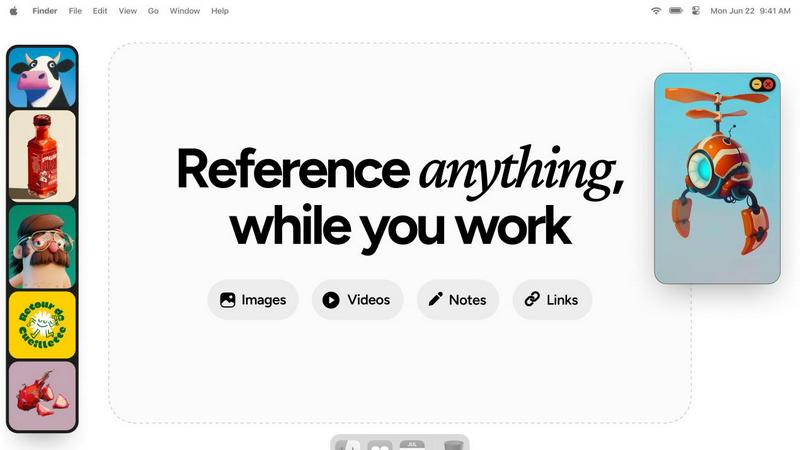
About Refbox
Refbox is an innovative floating reference application tailored for creatives who need a streamlined workflow. Designed specifically for artists, designers, and other creative professionals, Refbox enables users to pin images, GIFs, videos, and notes in always-on-top frames, ensuring that inspiration is always visible while working on projects. By reducing the need for constant window switching—common during sketching, designing, animating, or modeling—Refbox enhances productivity and focus. Users can easily import media from various sources, including their computer, web, or clipboard, into a customizable sidebar. With versatile viewing modes like Masonry Mode and a full-screen Gallery, Refbox is perfect for users who wish to optimize their creative environment. The app also features markdown-enabled notes and the ability to save links as bookmarks, making it an indispensable tool for anyone seeking to keep their references and inspirations at their fingertips.
Features of Refbox
Floating Reference Frames
Refbox allows users to float resizable frames over any application, keeping important references visible and accessible. This feature ensures that creatives can maintain focus without losing track of their inspiration, making tasks like sketching or designing more efficient.
Versatile Media Support
Users can pin a variety of media types including images, videos, GIFs, and notes. This flexibility means that all forms of inspiration can be gathered in one place, allowing for a comprehensive and organized reference library tailored to individual projects.
Multiple Viewing Modes
Refbox supports various viewing modes such as the aesthetically pleasing Masonry Mode, which offers a Pinterest-style layout, and a full-screen Gallery mode for second monitors. These options provide users with the versatility to display their references in a way that suits their workflow best.
Markdown-Enabled Notes
The application allows users to create notes with markdown support, enabling them to format text, create checklists, and organize thoughts seamlessly. This feature enhances note-taking and ensures that critical information is readily available alongside visual references.
Use Cases of Refbox
Graphic Design
Graphic designers can utilize Refbox to keep their color palettes, typography references, and inspirational designs visible while working on projects. This minimizes interruptions and enhances creativity by providing a constant source of visual guidance.
3D Modeling
For 3D artists, Refbox serves as a powerful tool for referencing textures, environmental concepts, and design elements. The ability to keep these references floating above modeling software allows for quick comparisons and adjustments, streamlining the modeling process.
Animation
Animators can benefit from Refbox by pinning storyboards, frame references, and animation techniques. This ensures that essential references are always within reach, enabling a smoother workflow and reducing the time spent searching for materials.
Moodboarding
Refbox simplifies the moodboarding process for creative professionals by allowing them to collect and organize inspirations in a visually satisfying manner. Users can easily swap out references and create cohesive boards that reflect their artistic vision, all while maintaining focus on their primary tasks.
Frequently Asked Questions
How does Refbox improve my workflow?
Refbox enhances your workflow by eliminating the need for constant window switching, allowing you to keep your references visible and easily accessible while you work on your projects.
Can I use Refbox with multiple applications?
Yes, Refbox is designed to float above any application, which means you can use it seamlessly while working in design software, browsers, or any other tools you may need.
What types of media can I pin in Refbox?
You can pin a variety of media types including images, GIFs, videos, and notes. This versatility allows you to create a comprehensive reference library tailored to your needs.
Is there support for markdown in notes?
Absolutely! Refbox supports markdown in notes, enabling you to format text, create lists, and organize your thoughts effectively, ensuring that important information is easily accessible while you work.
Explore more in this category:
Similar to Refbox

Fast file search for the Mac. Results as you type, files inside Mail and Photos, works with Wi-Fi off. $19 once.

Eighteen PDF tools in one native Mac window: merge, split, compress, OCR, Bates numbering, forms, signing and redaction. Offline. $29 once.

Hold a key, say what you mean, let go. Clean, punctuated text lands at the cursor in any app on your Mac or iPhone.

Mainspring turns the settings macOS hides into 90+ one-click, fully reversible power-ups for Finder, Dock, screenshots and more. $29 once.

A Mac menu bar app for a full disk. See what is using your space, read whether it comes back on its own, and remove only what you tick.

Catch a thought without leaving what you are doing. Notes, checklists and a little companion in your Mac's notch. $12 once.

A Mac app that opens damaged video, PDFs, archives and documents and writes out everything it can still read. $9 once, no uploads.

Paste a URL and AI designs on-brand Open Graph images from your page's colours, fonts and logo. Free, no sign-up.