Refbox vs ScopeSnap
Side-by-side comparison to help you choose the right product.

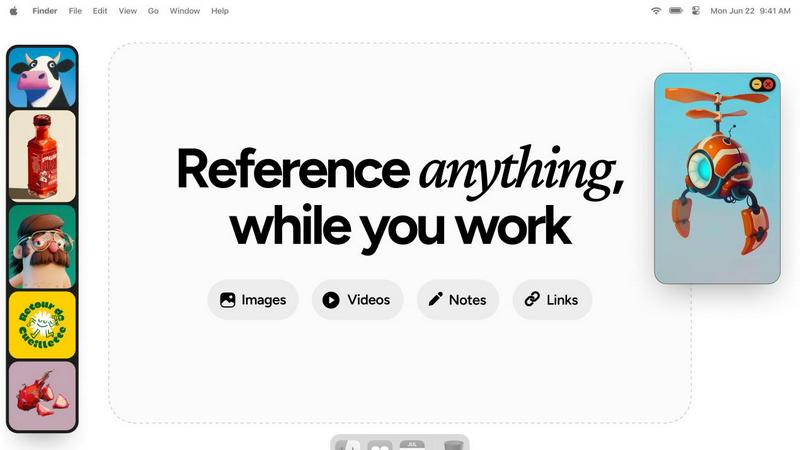
Refbox provides instant access to your images, videos, and notes, enhancing your workflow without distractions.
Last updated: February 28, 2026

ScopeSnap
ScopeSnap transforms your discovery notes into structured project scopes and polished proposals, streamlining your freelance workflow.
Last updated: March 18, 2026
Visual Comparison
Refbox
ScopeSnap

Feature Comparison
Refbox
Floating Reference Frames
Refbox allows users to float resizable frames over any application, keeping important references visible and accessible. This feature ensures that creatives can maintain focus without losing track of their inspiration, making tasks like sketching or designing more efficient.
Versatile Media Support
Users can pin a variety of media types including images, videos, GIFs, and notes. This flexibility means that all forms of inspiration can be gathered in one place, allowing for a comprehensive and organized reference library tailored to individual projects.
Multiple Viewing Modes
Refbox supports various viewing modes such as the aesthetically pleasing Masonry Mode, which offers a Pinterest-style layout, and a full-screen Gallery mode for second monitors. These options provide users with the versatility to display their references in a way that suits their workflow best.
Markdown-Enabled Notes
The application allows users to create notes with markdown support, enabling them to format text, create checklists, and organize thoughts seamlessly. This feature enhances note-taking and ensures that critical information is readily available alongside visual references.
ScopeSnap
AI-Driven Scope Generation
ScopeSnap leverages advanced AI technology to transform raw discovery notes into structured project scopes. By analyzing transcripts, emails, and notes, it identifies key requirements and generates a comprehensive backlog, ensuring nothing is overlooked.
Iterative Refinement Process
With ScopeSnap, users can iteratively refine their project scopes. This feature allows developers to review and adjust the structured backlog, assign roles, set estimates, and address any open questions, leading to well-defined project requirements.
Automated Proposal Creation
Once the scope is established, ScopeSnap takes the next step by automatically generating polished proposals or statements of work. This feature saves time and effort, allowing users to focus on project execution rather than proposal formatting.
Comprehensive Backlog Management
ScopeSnap provides a structured backlog management system, where users can visualize their project tasks. Developers can easily track epics, scope items, and any assumptions or questions, ensuring a clear understanding of the project at all times.
Use Cases
Refbox
Graphic Design
Graphic designers can utilize Refbox to keep their color palettes, typography references, and inspirational designs visible while working on projects. This minimizes interruptions and enhances creativity by providing a constant source of visual guidance.
3D Modeling
For 3D artists, Refbox serves as a powerful tool for referencing textures, environmental concepts, and design elements. The ability to keep these references floating above modeling software allows for quick comparisons and adjustments, streamlining the modeling process.
Animation
Animators can benefit from Refbox by pinning storyboards, frame references, and animation techniques. This ensures that essential references are always within reach, enabling a smoother workflow and reducing the time spent searching for materials.
Moodboarding
Refbox simplifies the moodboarding process for creative professionals by allowing them to collect and organize inspirations in a visually satisfying manner. Users can easily swap out references and create cohesive boards that reflect their artistic vision, all while maintaining focus on their primary tasks.
ScopeSnap
Freelance Project Scoping
Freelancers can use ScopeSnap to convert their discovery calls into structured project scopes. By inputting their notes, they can generate a clear and organized backlog, making it easier to provide accurate estimates and proposals.
Agency Collaboration
Software agencies can utilize ScopeSnap for team collaboration on client projects. The tool allows multiple team members to contribute to the scope, ensuring all perspectives are considered and enhancing the overall quality of the project plan.
Proposal Standardization
Agencies and freelancers can benefit from ScopeSnap's automated proposal creation feature. By standardizing the proposal format, users can ensure consistency in their client communications while saving significant time on document preparation.
Client Communication Enhancement
ScopeSnap improves communication with clients by providing clear and structured project scopes. This transparency helps build trust, as clients can see a detailed breakdown of the project, making it easier to align expectations and requirements.
Overview
About Refbox
Refbox is an innovative floating reference application tailored for creatives who need a streamlined workflow. Designed specifically for artists, designers, and other creative professionals, Refbox enables users to pin images, GIFs, videos, and notes in always-on-top frames, ensuring that inspiration is always visible while working on projects. By reducing the need for constant window switching—common during sketching, designing, animating, or modeling—Refbox enhances productivity and focus. Users can easily import media from various sources, including their computer, web, or clipboard, into a customizable sidebar. With versatile viewing modes like Masonry Mode and a full-screen Gallery, Refbox is perfect for users who wish to optimize their creative environment. The app also features markdown-enabled notes and the ability to save links as bookmarks, making it an indispensable tool for anyone seeking to keep their references and inspirations at their fingertips.
About ScopeSnap
ScopeSnap is an innovative AI-driven tool designed specifically for freelance developers and software agencies. It streamlines the often chaotic process of turning discovery notes into structured project scopes, precise estimates, and polished client proposals. Many developers find the estimation phase of custom software projects to be slow and fraught with risks; critical requirements can be overlooked, scopes remain vague, and assembling proposals can take hours. ScopeSnap addresses these challenges by providing a clear workflow that helps users break down project ideas into well-defined tasks. By iteratively refining the scope, developers can ensure that every feature is thoroughly understood and confidently estimated. Once the scope is finalized, ScopeSnap automatically generates a professional proposal or statement of work, ready for client delivery. This efficiency makes ScopeSnap an invaluable resource for freelancers, consultants, and agencies engaged in custom development projects.
Frequently Asked Questions
Refbox FAQ
How does Refbox improve my workflow?
Refbox enhances your workflow by eliminating the need for constant window switching, allowing you to keep your references visible and easily accessible while you work on your projects.
Can I use Refbox with multiple applications?
Yes, Refbox is designed to float above any application, which means you can use it seamlessly while working in design software, browsers, or any other tools you may need.
What types of media can I pin in Refbox?
You can pin a variety of media types including images, GIFs, videos, and notes. This versatility allows you to create a comprehensive reference library tailored to your needs.
Is there support for markdown in notes?
Absolutely! Refbox supports markdown in notes, enabling you to format text, create lists, and organize your thoughts effectively, ensuring that important information is easily accessible while you work.
ScopeSnap FAQ
How does ScopeSnap improve project estimation?
ScopeSnap enhances project estimation by breaking down project ideas into clear, estimatable tasks using AI. This reduces the risk of missing important requirements and helps ensure accurate estimates.
Can multiple users collaborate on a project in ScopeSnap?
Yes, ScopeSnap supports collaboration among team members. Users can work together to refine the project scope, assign roles, and review estimates, making it ideal for agencies and teams.
What types of documents can ScopeSnap generate?
ScopeSnap can automatically generate polished proposals and statements of work from the structured project scope. This feature allows users to present professional documents to clients quickly.
Is ScopeSnap suitable for all types of development projects?
ScopeSnap is specifically designed for freelance developers, consultants, and software agencies focusing on custom development projects. Its features are tailored to address the unique challenges faced in these environments.
Alternatives
Refbox Alternatives
Refbox is a floating reference application designed to enhance productivity for creatives by keeping images, videos, and notes visible above their workspace. This innovative tool allows users to pin various media types in frames that remain on top of other applications, facilitating a seamless workflow while sketching, designing, or animating. Users often seek alternatives to Refbox for reasons such as pricing, specific feature sets, or compatibility with their operating systems. When choosing an alternative, it is crucial to consider factors like usability, integration with other tools, customization options, and the ability to support the types of media you frequently use. Ensuring that the alternative meets your specific creative needs will ultimately streamline your workflow and boost efficiency.
ScopeSnap Alternatives
ScopeSnap is an AI-driven tool designed to streamline the project scoping and proposal process for freelancers, software agencies, and consultants. By transforming fragmented discovery notes into structured project scopes and client-ready proposals, it enhances productivity and minimizes the risks associated with estimating custom software projects. Users often seek alternatives to ScopeSnap for various reasons, including pricing concerns, the need for different features, or compatibility with specific platforms. When considering an alternative, it's crucial to evaluate the tool's usability, the comprehensiveness of its features, and how well it integrates into your existing workflow to ensure a seamless transition and continued efficiency.