
MultiMMR vs StatPecker
Side-by-side comparison to help you choose the right product.

MultiMMR
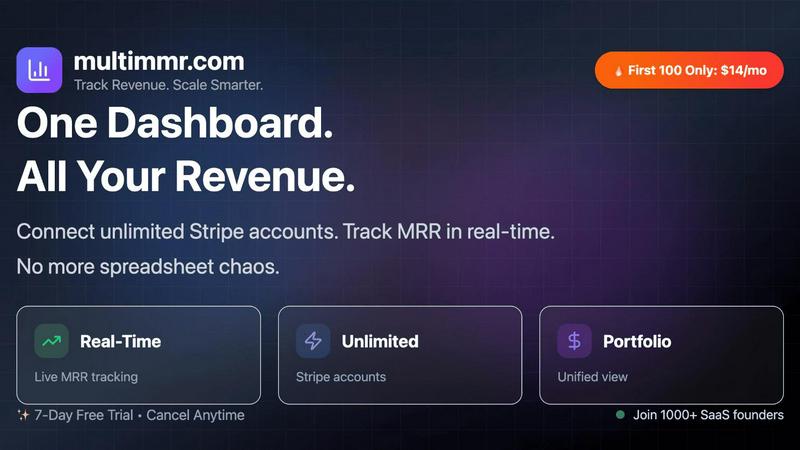
MultiMMR unifies your Stripe data to track all SaaS revenue in one simple dashboard.

StatPecker
StatPecker delivers fast AI-driven insights and stunning visuals from your data for effective business storytelling.
Last updated: March 1, 2026
Visual Comparison
MultiMMR
StatPecker

Feature Comparison
MultiMMR
Unified Financial Dashboard
This core feature eliminates the need to toggle between different accounts. By connecting all your Stripe accounts, MultiMMR aggregates data into one centralized view. You get a comprehensive, real-time snapshot of your total MRR, churn, and customer count across every project, presented through intuitive and visually clear charts that make performance tracking immediate and straightforward.
Real-Time MRR Tracking & Smart Alerts
Monitor your most critical metric as it happens. The dashboard updates in real-time, reflecting new subscriptions, upgrades, downgrades, and cancellations instantly. Coupled with Smart Alerts, you receive instant notifications for significant events like MRR spikes, drops, or high-value customer churn, enabling you to react proactively rather than discovering issues days later in a spreadsheet.
Goal Tracking & Progress Indicators
Move beyond observation to active growth management. Set specific MRR targets for your portfolio or individual projects. MultiMMR provides daily growth metrics and clear visual indicators showing whether you are on track to meet your goals. This transforms abstract ambitions into a measurable, daily process, keeping your growth strategy focused and accountable.
Social Media-Ready Screenshots
Easily share your business milestones and wins. With one click, generate beautiful, formatted screenshots of your key metrics and growth charts. These are perfectly sized for sharing on platforms like Twitter and LinkedIn, helping you build your brand, attract customers, and celebrate progress with your audience without any design effort.
StatPecker
Ask Your Query
This feature allows users to gain instant insights from validated sources simply by asking questions. There is no need for complex tools or extensive data manipulation; users can easily request information and receive immediate, accurate responses.
Publish & Embed
With this feature, users can create interactive visuals that are seamlessly integrated into various platforms such as blogs, articles, and websites. This capability enhances the user’s ability to communicate data-driven insights effectively and attractively.
Upload & Analyze CSVs
StatPecker enables users to upload local CSV files, facilitating the extraction of key insights without the hassle of traditional spreadsheet software. This feature allows data analysis to be performed quickly and efficiently, streamlining the process of data visualization.
Download & Use Anywhere
Users can export their created infographics as images, making them easy to include in reports, presentations, and other formats. This flexibility ensures that users can utilize their visuals wherever needed, enhancing the overall impact of their data storytelling.
Use Cases
MultiMMR
For SaaS Portfolio Founders
Founders running multiple SaaS products or micro-SaaS projects can finally see their entire business empire in one place. Instead of logging into five different Stripe accounts, they get a consolidated report on total monthly revenue, profitability per project, and overall growth trends, saving hours per week and providing strategic clarity for resource allocation.
For Agencies Managing Client Subscriptions
Digital agencies that handle subscription billing for their clients through separate Stripe accounts can use MultiMMR to monitor all client MRR seamlessly. This allows for efficient portfolio management, easy reporting to stakeholders, and quick identification of which client projects are thriving or need attention, all while maintaining clear separation of data.
For Indie Hackers & Solopreneurs
Solo builders who wear every hat need efficiency above all. MultiMMR automates the financial reporting they often neglect, giving them back precious time to code and market. They can track the performance of their various income streams, set realistic revenue goals, and get alerted to problems immediately, all through a simple, no-complexity dashboard.
For Investors & Advisors
Investors backing several SaaS startups can use MultiMMR to get a high-level, real-time view of the aggregate performance of their investments. By having founders share access to their MultiMMR dashboard, investors can track portfolio MRR growth and key health metrics without requesting manual reports, enabling more informed and timely guidance.
StatPecker
Content Creation
Content creators can use StatPecker to generate engaging infographics that visually represent data within their articles or blogs. This visual enhancement attracts readers' attention and improves comprehension of complex information.
Data Analysis
Data analysts can leverage StatPecker to quickly visualize trends and patterns from large datasets. By transforming raw data into actionable insights, analysts can present findings to stakeholders more effectively, facilitating informed decision-making.
Marketing Campaigns
Marketers can utilize StatPecker to create compelling visuals that illustrate campaign performance metrics. These infographics can be shared with teams and clients to highlight successes and areas for improvement, driving strategic discussions.
Education and Learning
Educators and students can benefit from StatPecker by creating informative visuals for presentations and assignments. This tool simplifies the process of conveying intricate concepts, making learning more engaging and enjoyable.
Overview
About MultiMMR
MultiMMR is the definitive financial command center for SaaS founders, entrepreneurs, and indie hackers managing multiple projects. If you're tired of the chaos of juggling separate Stripe accounts, manual spreadsheets, and disconnected analytics tools, MultiMMR provides the solution. It instantly syncs all your Stripe-connected projects into a single, unified dashboard, delivering a real-time, enterprise-grade view of your entire portfolio's financial health. The core value proposition is simple: replace complexity with clarity. Instead of wasting time on data aggregation, you gain immediate access to beautiful, actionable charts and key metrics like MRR (Monthly Recurring Revenue), allowing you to make swift, data-driven decisions. Designed with a practical, user-friendly interface, MultiMMR simplifies your reporting workflow from day one, freeing you to focus on strategic growth and scaling your business effectively. It's built for anyone who needs to track revenue across several SaaS products or client projects without the administrative overhead.
About StatPecker
StatPecker is an innovative AI-powered data visualization tool that transforms raw data into stunning, professional visuals within seconds. Designed to streamline the laborious process of data storytelling, it allows users to convert spreadsheets, CSV files, or simple queries into engaging infographics without needing design expertise. This tool is perfect for professionals across various fields, including content creators, journalists, data analysts, marketers, educators, and students. By automating the creation of visuals, StatPecker not only saves time and costs but also enhances the clarity and engagement of data communication. Users can focus on crafting compelling narratives and making informed decisions rather than getting bogged down in the complexities of chart creation. With StatPecker, advanced data visualization is no longer exclusive to specialists; it is accessible to everyone, empowering users to communicate insights effectively and visually.
Frequently Asked Questions
MultiMMR FAQ
How does MultiMMR connect to my Stripe accounts?
MultiMMR uses Stripe's secure OAuth connection process. You simply click "Connect Stripe" within the app, select the Stripe account you wish to link, and grant read-only access. This permission allows MultiMMR to pull your transaction and customer data to calculate metrics. We never have permission to make charges or modify your account. You can connect an unlimited number of Stripe accounts.
Is my financial data secure with MultiMMR?
Absolutely. Security is a top priority. We use strong encryption (TLS/SSL) for all data in transit and at rest. Our connection to Stripe is read-only, and we adhere to strict data privacy standards. We do not store your sensitive Stripe secret keys. Your data is used solely to generate your analytics dashboard and is protected with industry-best practices.
What is included in the 7-day free trial?
The free trial gives you full, unrestricted access to all features of the chosen plan for 7 days. This includes connecting unlimited Stripe accounts, real-time MRR tracking, goal setting, smart alerts, and priority support. You can explore the entire platform and validate its value for your workflow without any commitment. No credit card is required to start the trial.
Can I cancel my subscription at any time?
Yes, you have complete flexibility. You can cancel your monthly or yearly subscription at any time directly from your account settings. Upon cancellation, you will retain access to MultiMMR and all your data until the end of your current billing period. After that, your account will be downgraded, but you can re-subscribe anytime.
StatPecker FAQ
How does StatPecker ensure data privacy?
StatPecker prioritizes user privacy by conducting all data analysis locally on the user's device. This means that your data stays secure and is not transmitted over the internet, ensuring confidentiality.
Can I use StatPecker for large datasets?
Yes, StatPecker supports CSV uploads of up to 50 MB, allowing users to analyze substantial datasets efficiently. This capability ensures that users can still extract meaningful insights from larger files.
Is there a free version of StatPecker available?
Absolutely! StatPecker offers a free tier that allows users to create unlimited projects and embeds, making it easy to get started with data visualization without any upfront cost.
What types of visuals can I create with StatPecker?
Users can create a wide variety of infographics, including charts, graphs, and interactive visuals. These can be tailored to suit different presentation styles and purposes, ensuring effective communication of data insights.