Playwriter vs Tailride
Side-by-side comparison to help you choose the right product.

Playwriter
Playwriter lets AI agents control your actual Chrome browser with all your logins and extensions intact.
Last updated: March 18, 2026

Tailride
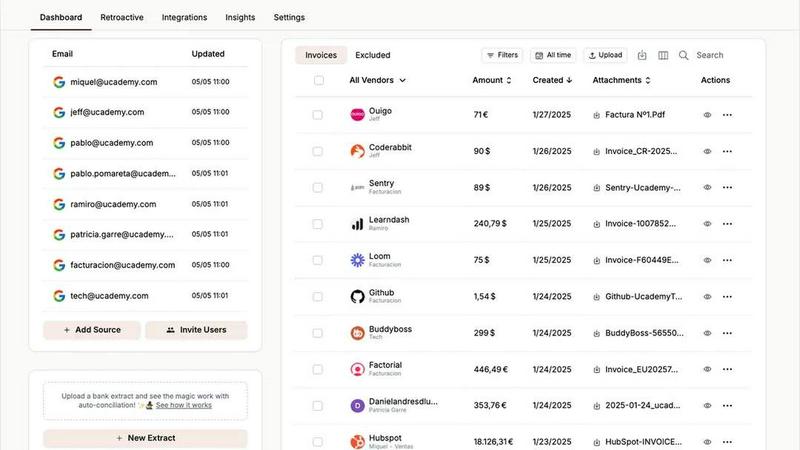
Tailride automates invoice and receipt management from your inbox, saving you time and streamlining your accounting.
Last updated: February 26, 2026
Visual Comparison
Playwriter

Tailride
Feature Comparison
Playwriter
Your Real Browser Session
Playwriter's core feature is granting AI agents access to your live Chrome session. Instead of launching a separate, "headless" browser that lacks identity and history, the agent operates directly in your open browser tabs. All your active logins, saved cookies, browser extensions (like ad blockers or password managers), and cached data are immediately available. This eliminates the friction of re-authenticating for every task and dramatically reduces the chance of being detected as a bot, as the browser fingerprint matches your legitimate, daily use.
Full Playwright API via a Single Tool
Unlike other MCP implementations that expose a limited, predefined set of browser actions (like "click" or "type"), Playwriter provides agents with the entire Playwright automation library through one execute tool. This means the agent can write and run any valid Playwright code—from complex interactions and network interception to performance profiling. This approach avoids "schema bloat" from dozens of individual tool definitions, keeping context usage low for AI models and providing maximum flexibility for tackling any web task.
Advanced Debugging & Inspection Suite
Playwriter transforms your browser into a debuggable runtime for AI agents. It includes a full-featured debugger where you can set breakpoints to pause execution, live-edit code on the fly, and step through commands. The tool also provides network interception to monitor and modify HTTP requests/responses and built-in screen recording to capture video of the agent's actions. This suite is invaluable for developing, testing, and understanding complex automation workflows.
Lightweight Accessibility Snapshots
Instead of relying on large, inefficient screenshots (often 100KB+), Playwriter generates compact accessibility snapshots (5-20KB). These snapshots provide the AI agent with a structured, semantic view of the page, including element roles, names, states, and a logical reading order. This allows the agent to understand the page layout and interact with elements reliably using ARIA attributes, all while consuming minimal context tokens and speeding up processing.
Tailride
Inbox Scanning
Tailride's inbox scanning feature enables users to find any invoice in their inbox within seconds. This replaces the need for manual searching through countless emails, allowing for efficient organization of financial documents. By monitoring inboxes for incoming invoices—regardless of format—Tailride ensures that nothing gets overlooked, providing peace of mind for users.
Online Portals
With Tailride, users can extract invoices from various online portals seamlessly. This feature is particularly useful for business owners who need to manage invoices from multiple sources without the hassle of logging into each platform manually. Tailride simplifies this process, saving time and reducing the risk of missing important documents.
AI Processing
Tailride utilizes advanced AI processing to intelligently recognize and categorize invoices and receipts. This feature allows users to set customizable rules that automatically sort incoming documents based on their specific needs, making the entire accounting process more efficient. It reduces manual data entry and increases accuracy, freeing up valuable time for finance teams.
Reconciliation
The reconciliation feature of Tailride ensures that all transactions are matched with the corresponding invoices, making it easy to identify any missing documents. This capability is crucial for maintaining accurate financial records and ensuring compliance during audits or tax filings. By automating this process, Tailride helps accountants and business owners streamline their workflows and enhance financial oversight.
Use Cases
Playwriter
Automated Testing & QA with Real User Data
Developers and QA engineers can use Playwriter to create and run automated tests that execute within a genuine user context. Since the agent uses your real browser session, tests can automatically navigate through authenticated areas of web applications, test features behind paywalls, or verify flows that depend on specific cookies or local storage—scenarios that are cumbersome or impossible to test with traditional, isolated automation frameworks.
AI-Powered Research & Data Extraction
For researchers, analysts, or anyone needing to gather information from multiple web sources, Playwriter enables AI agents to conduct deep, session-aware research. The agent can log into academic journals, navigate complex multi-page search results, accept cookie consents, and extract structured data—all while maintaining login sessions across different websites. You collaborate by handling unexpected pop-ups or CAPTCHAs in real-time.
Repetitive Web Task Automation
Automate tedious, daily web tasks without writing complex scripts. An AI agent powered by Playwriter can log into your admin dashboard, generate and download reports, fill out recurring forms, or monitor specific pages for changes. Because it works in your browser, it can access internal company tools or portals that require specific corporate authentication, turning multi-step manual processes into a single command.
Collaborative Web Development & Debugging
Front-end developers can work alongside an AI agent to debug issues. You can instruct the agent to reproduce a bug, intercept network calls to inspect API payloads, set breakpoints on specific user interactions, and take snapshots of problematic states. This turns the AI into a pair-programming partner that can manipulate the browser and inspect its state at a level of detail that goes beyond simple chat instructions.
Tailride
Streamlining Invoicing for Accountants
Accountants managing multiple clients can leverage Tailride to automate the extraction and organization of invoices from various email accounts. This eliminates the chaos typically associated with invoicing, ensuring that all documents are easily accessible and up to date.
Enhancing Expense Management
Business owners can utilize Tailride to simplify expense tracking by sending pictures of paper receipts to the platform. This feature allows employees to keep track of their expenses without the need for tedious manual entry, thus enhancing overall efficiency in financial management.
Automating Document Retrieval for Teams
Teams can benefit from Tailride by connecting their inboxes and allowing the platform to monitor and retrieve invoices collectively. This collaborative approach ensures that no invoices are missed, enhancing communication and efficiency within the organization.
Facilitating Audits and Compliance
Tailride simplifies the audit process by maintaining organized records of all invoices and receipts. Users can easily access historical data and reconcile transactions, ensuring compliance with regulatory requirements and making audits less stressful.
Overview
About Playwriter
Playwriter is a revolutionary developer tool that solves the fundamental problem of web automation for AI agents: access. Traditional methods force agents to operate in a sterile, isolated browser environment—a fresh Chrome instance with no logins, no extensions, and no cookies, which is instantly flagged by bot detection systems. Playwriter takes the opposite approach. It gives AI agents direct, programmable control over your actual, everyday Chrome browser session through a simple Chrome extension and CLI. This means your agents can interact with websites where you're already logged in, with your preferred extensions active, and with your existing cookies and local storage intact. It leverages the powerful Playwright automation API, exposing it through a single, flexible tool for AI clients via the Model Context Protocol (MCP). The result is robust, human-like browsing that bypasses common automation blocks, uses far less memory than spawning new browser instances, and enables deep debugging and inspection capabilities. It's open-source (MIT licensed), runs entirely locally, and is designed for developers and power users who need reliable, collaborative automation that works with the web as it exists for real users.
About Tailride
Tailride is an innovative AI-powered accounting automation platform designed to streamline the management of invoices and receipts by connecting directly to your email inbox. This powerful tool automatically detects, extracts, and processes invoices and receipts from emails and attachments through intelligent document recognition technology. Tailride is specifically designed for busy professionals, including accountants and business owners, who are looking to save time and eliminate the hassle of manual data entry. Its main value proposition lies in its ability to automate tedious accounting tasks, thereby allowing users to focus on strategic decision-making rather than administrative burdens. With features such as a Chrome extension for one-click extraction from over 20 platforms, customizable AI rules for automatic categorization, and seamless integrations with popular accounting software like QuickBooks and Xero, Tailride transforms the way organizations handle their financial documentation.
Frequently Asked Questions
Playwriter FAQ
How does Playwriter handle security and privacy?
Playwriter is designed with a strong local-first principle. All connections are made via a WebSocket relay running on your local machine (localhost:19988). No browser data, automation commands, or screenshots are sent to any remote server. The extension only communicates with the local relay, and you have full control over which tabs the agent can access by clicking the extension icon to attach or detach. You are always in the driver's seat.
Can I use Playwriter with any AI assistant or IDE?
Yes, Playwriter is built on the open Model Context Protocol (MCP), which is supported by a growing number of clients. This includes popular AI-powered IDEs like Cursor and Windsurf, AI assistants like Claude Desktop, and code editors like VS Code with appropriate extensions. As long as your client supports MCP, you can connect it to the Playwriter server and begin automating.
What happens if the agent gets stuck or encounters a CAPTCHA?
This is where Playwriter's collaborative nature shines. You are watching the browser in real-time. If the agent encounters a CAPTCHA, a unexpected pop-up, or simply gets stuck in a loop, you can manually intervene. You can solve the CAPTCHA yourself, click the necessary button, or even temporarily detach the extension from that tab to fix the state manually. Once you re-enable the extension, the agent can continue from the new state.
Is Playwriter only for Chrome?
Currently, Playwriter is implemented as a Chrome extension, so it requires the Chrome or a Chromium-based browser (like Brave, Edge, or Arc) to function. The automation API it exposes is Playwright, which is cross-browser, but the mechanism for attaching to your live session is specific to the Chrome DevTools Protocol (CDP) via the browser's extension system.
Tailride FAQ
How does Tailride work?
Tailride connects to your email inbox and uses AI technology to automatically detect and extract invoices and receipts from emails and attachments. It processes these documents for organization and easy retrieval.
What platforms does the Chrome extension support?
The Tailride Chrome extension supports over 20 platforms, including Amazon, Meta Ads, Notion, and ChatGPT, allowing users to extract invoices with a single click.
Can Tailride handle paper receipts?
Yes, Tailride can process paper receipts as well. Users can take pictures of their receipts and send them to a dedicated Telegram or WhatsApp bot, which will add them to their dashboard.
Is Tailride suitable for small businesses?
Absolutely! Tailride is designed to be flexible and scalable, making it an excellent choice for small businesses looking to automate their accounting processes and save time on administrative tasks.
Alternatives
Playwriter Alternatives
Playwriter is an open-source automation tool that allows AI agents to control a real, logged-in Chrome browser session via CLI or the Model Context Protocol. It solves the core problem of AI agents having either no web access or a sterile, temporary browser that lacks user data and triggers bot detection. This places it in the automation category, specifically for bridging AI and practical web interaction. Users often seek alternatives for various reasons. Some may require a different pricing model, such as a fully hosted service versus self-hosted software. Others might need specific features not present in one tool, or require integration with a different platform or ecosystem beyond MCP clients like Cursor or Claude. When evaluating alternatives, key considerations include how the tool handles browser sessions—whether it provides a fresh instance or a persistent, authenticated one. Also assess the depth of automation capabilities, the quality of debugging and observability features, and the overall architecture regarding security, privacy, and extensibility. The ideal choice aligns with your specific workflow and technical requirements.
Tailride Alternatives
Tailride is an AI-powered accounting automation platform designed to streamline the process of managing invoices and receipts. By connecting to users' email inboxes, it automatically detects and extracts relevant financial documents, making it a valuable tool for businesses seeking efficiency in their financial operations. Users often search for alternatives due to various reasons, including pricing concerns, the need for specific features, or compatibility with other platforms. When choosing an alternative, it’s essential to consider factors such as ease of use, integration capabilities, customization options, and overall cost-effectiveness to find a solution that best fits your business needs. --- [{"question": "What is Tailride?", "answer": "Tailride is an AI-powered accounting automation platform that automates the extraction and processing of invoices and receipts from emails and web portals."}, {"question": "Who is Tailride for?", "answer": "Tailride is designed for businesses and finance professionals looking to streamline their invoice and receipt management processes."}, {"question": "Is Tailride free?", "answer": "Tailride's pricing structure can vary, and users should check the official website for specific pricing details."}, {"question": "What are the main features of Tailride?", "answer": "Tailride features intelligent document recognition, customizable AI rules for categorization, a Chrome extension for invoice extraction, and seamless integrations with platforms like QuickBooks and Xero."}]