The Ultimate Piano vs voicebrief.io
Side-by-side comparison to help you choose the right product.

The Ultimate Piano
Master piano online with interactive tools, real-time feedback, and MIDI support for effective practice.
Last updated: March 4, 2026

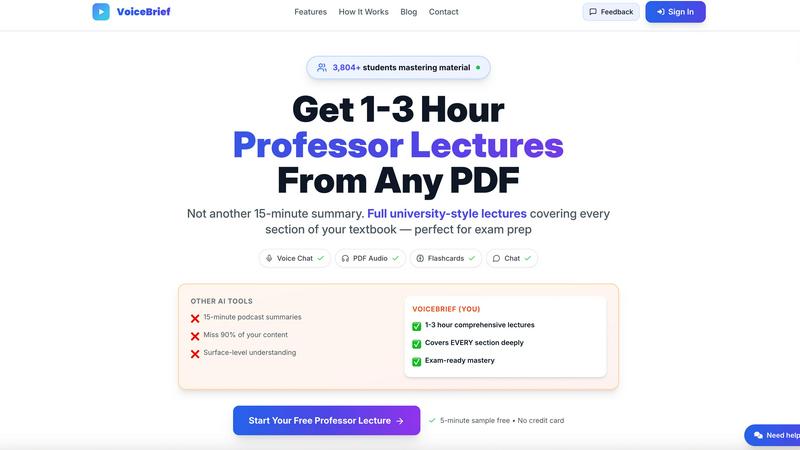
VoiceBrief converts dense PDFs into engaging audio lectures, enabling faster, smarter learning anytime, anywhere.
Last updated: February 28, 2026
Visual Comparison
The Ultimate Piano

voicebrief.io
Feature Comparison
The Ultimate Piano
Real-Time Chord Detection & Chord Explorer
As you play on your connected MIDI keyboard or computer keys, The Ultimate Piano instantly analyzes and displays the names of the chords you are playing. This immediate feedback is invaluable for understanding harmonic progressions during improvisation or song learning. The integrated Chord Explorer allows you to delve deeper into music theory, visualizing chord structures, inversions, and relationships on the keyboard to build a solid theoretical foundation.
Interactive Scale Trainer & Learning Modes
Move beyond rote memorization with the interactive Scale Trainer. Choose from 14 different scale types (like Major, Minor, Blues, or Pentatonic) in any key, and the tool will visually highlight the correct notes on the keyboard. It can even play the scale for you. This feature provides detailed performance analysis, helping you practice scales accurately and consistently, which is essential for technique and soloing.
Integrated Audio & YouTube Player
Practice along with your own music or any online tutorial seamlessly. Load MP3 files directly into the Audio Player, which can automatically analyze BPM and key. For online resources, paste any YouTube URL into the YouTube Player. You can slow down playback, set precise A-B loop points to repeat tricky sections, and save markers to jump to specific moments, making it an ideal tool for learning songs by ear.
MIDI File Support with Falling Notes Visualization
Upload any standard MIDI file to practice with a visual guide. The notes from the file will light up on the on-screen keyboard as they play, creating a falling-notes or "piano roll" style display. You have full control to slow down the tempo, pause, step through note-by-note, or loop difficult passages. This transforms any MIDI file into an interactive sheet music and practice aid.
voicebrief.io
Natural Voices
VoiceBrief utilizes premium AI voices that sound remarkably human, making the listening experience enjoyable and engaging. Users can absorb information without the fatigue often associated with traditional text-to-speech systems, allowing for longer study sessions without losing focus.
Smart Quizzes
The platform generates interactive quizzes based on the content processed. These quizzes incorporate spaced repetition techniques, helping users to reinforce their knowledge and retain information more effectively, making it easier to prepare for exams and master challenging subjects.
Voice Chat
VoiceBrief includes a voice chat feature that allows users to ask questions about their documents. This interactive element acts as an AI tutor, providing instant explanations and clarifications, thereby fostering a deeper understanding of the material being studied.
AI Summaries
With the AI summaries feature, users can quickly grasp the essential points of any document. This tool saves time by distilling dense materials into concise, easy-to-understand summaries, ensuring that users can focus on the most critical information at a glance.
Use Cases
The Ultimate Piano
The Self-Taught Beginner
A new pianist can start immediately without buying software or an expensive digital piano with learning features. They can use the computer keyboard to learn note names, engage with the fun Kids Mode with animal icons, and use the Scale Trainer to build fundamental technique. The real-time sheet music display helps connect keys on the keyboard to notes on the staff.
The Music Theory Student
A student enrolled in a music theory class can use the Chord Explorer and Scale Trainer to visualize and hear complex concepts like chord inversions, interval relationships, and modal scales. The ear training module specifically helps develop critical auditory skills for identifying intervals and chords by ear, directly supporting academic coursework.
The Song Learner & Cover Artist
Someone learning a new piece can use the YouTube Player to slow down a performance tutorial, loop the chorus, and practice alongside it. They can also load the song as an MP3, let the tool detect the BPM, and use the metronome to practice at gradually increasing speeds. The MIDI recorder allows them to capture their practice takes for review.
The Composer & Improviser
A musician sketching ideas can use the platform as a quick sound module and notepad. They can improvise, have chords identified in real-time to capture progressions, and use the MIDI recorder to instantly save their ideas as a downloadable file for import into their main Digital Audio Workstation (DAW) for further production.
voicebrief.io
Student Learning
Students can easily convert their textbooks and lecture notes into audio format, allowing them to study while commuting, exercising, or performing household chores. This flexibility caters especially well to auditory learners who benefit from listening rather than reading.
Professional Development
Professionals can stay updated with industry reports, whitepapers, and research materials by converting these documents into audio. This way, they can maximize productivity, turning otherwise unproductive commute time into valuable learning sessions.
Lifelong Learning
For lifelong learners, VoiceBrief offers the opportunity to turn any PDF into an audiobook. Whether it’s self-help books, historical texts, or scientific papers, users can explore a broad range of topics while multitasking, making learning a continuous part of their lives.
Exam Preparation
Candidates preparing for professional exams can leverage VoiceBrief by converting study materials into audio lectures. The ability to ask questions and receive instant explanations greatly enhances the study experience, leading to better retention and understanding of complex subjects.
Overview
About The Ultimate Piano
The Ultimate Piano is a comprehensive, browser-based piano practice platform designed to solve the common hurdles musicians face. It eliminates the need for expensive software downloads and complex setups, providing a full-featured digital piano and learning studio directly in your web browser. This tool is built for a wide range of users: from complete beginners taking their first steps, to students needing structured theory practice, to experienced pianists looking for a portable, versatile practice companion. Its core value proposition is delivering a professional-grade practice environment that is instantly accessible from any device with an internet connection. Whether you want to visualize chords and scales, slow down and loop songs from YouTube, record your improvisations, or simply have a high-quality piano sound at your fingertips, The Ultimate Piano consolidates these needs into one intuitive, powerful platform. It turns practice time into productive, engaging, and effective sessions by integrating real-time feedback tools with a vast library of learning resources.
About voicebrief.io
VoiceBrief.io is an innovative and dynamic AI-powered platform that is reshaping the way students and lifelong learners engage with complex academic materials. By converting PDFs, textbooks, and handwritten notes into immersive audio lectures, VoiceBrief makes it easier for users to absorb dense information in a more effective and engaging way. Its primary audience includes students in fields such as medicine, engineering, law, and business, along with individuals preparing for professional exams like the CPA, CFA, and MCAT. The standout feature of VoiceBrief is its ability to produce comprehensive audio lectures ranging from 1 to 3 hours, a significant improvement over the typical 15-minute summaries offered by competitors. Users can interact with the content, asking questions directly and receiving cited explanations, while also benefiting from auto-generated flashcards that utilize spaced repetition to enhance retention. This makes learning not only more efficient but also more accessible, enabling users to learn on-the-go—whether commuting, exercising, or multitasking.
Frequently Asked Questions
The Ultimate Piano FAQ
Do I need to install anything to use Ultimate Piano?
No installation is required. The Ultimate Piano is entirely browser-based and runs directly in your web browser (like Chrome, Firefox, or Safari). You can start practicing immediately by visiting the website, with no downloads or account creation needed for basic features.
Can I connect my MIDI keyboard?
Yes, you can connect a USB MIDI keyboard directly to your computer. The Ultimate Piano will automatically detect it, allowing you to play with a realistic, responsive feel. The platform also supports connecting a sustain pedal via MIDI for authentic note sustain and expression.
What chords and scales can I learn?
The platform offers comprehensive learning tools for a wide array of music theory elements. The chord detection works in real-time for any chord you play. The Scale Trainer includes 14 different scale types, such as Major, Natural Minor, Harmonic Minor, Melodic Minor, and Blues scales, all visualizable in every key.
Can I practice along with my own songs?
Absolutely. You can use the integrated Audio Player to upload and play along with MP3 files from your computer, with speed control and looping functions. Furthermore, the YouTube Player allows you to practice with any video from YouTube by simply pasting the link, offering the same powerful slowdown and looping tools.
voicebrief.io FAQ
How does VoiceBrief convert my documents into audio?
VoiceBrief uses advanced AI algorithms to analyze and process your documents, extracting content and generating natural-sounding audio lectures that are engaging and easy to follow.
Can I interact with the audio content?
Yes, VoiceBrief allows you to interact with the audio content by asking questions. The AI will provide instant answers and explanations, making it feel like you have a personal tutor available at all times.
What types of documents can I upload?
You can upload various types of documents, including PDFs, photos, handwritten notes (via OCR), and URLs. This versatility allows you to transform virtually any learning material into audio format.
Is there a money-back guarantee?
Yes, VoiceBrief offers a 30-day money-back guarantee, ensuring that you can try the service risk-free. If you are not satisfied within the first month, you can request a full refund.
Alternatives
The Ultimate Piano Alternatives
The Ultimate Piano is a browser-based piano practice and music learning tool, falling into the categories of online music software and educational technology. It allows musicians to play, learn theory, and train their ear directly from a web browser without any software installation. Users often seek alternatives for various practical reasons. These can include budget constraints, the need for specific advanced features not offered, compatibility with different operating systems or mobile devices, or a preference for downloadable software over a web app. Finding the right fit depends on individual goals and setup. When evaluating other options, consider your primary use case: is it for casual practice, serious music theory study, or song learning? Key factors to compare include the quality of sound samples, MIDI keyboard support, the depth of educational content, and whether the platform works on your preferred devices. Also, assess the pricing model to see if it aligns with your budget and practice commitment.
voicebrief.io Alternatives
VoiceBrief.io is an advanced AI-driven platform designed to transform dense academic materials such as PDFs and textbooks into engaging audio lectures. Positioned within the productivity and management category, it caters primarily to students and professionals who need to absorb complex information efficiently. Users often seek alternatives due to various factors, including pricing, feature sets, compatibility with specific platforms, and personal learning preferences. When choosing an alternative, it's crucial to consider the depth of content transformation, interaction capabilities, and the effectiveness of study aids like flashcards to ensure a comprehensive learning experience.