
Easy Watermark Remover
Remove Google Gemini watermarks and SynthID from images instantly with AI smart cleanup or quick crop, no signup or extension required.
Visit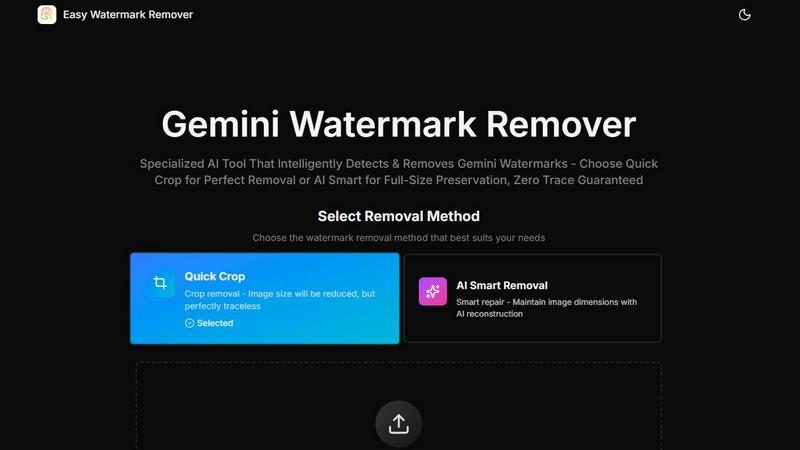
About Easy Watermark Remover
Easy Watermark Remover is a specialized, browser-based online tool designed to solve a specific and growing problem: removing the visible Gemini AI logo and invisible SynthID watermarks from images generated by Google's Imagen 3 model. As AI-generated imagery becomes more prevalent in marketing, content creation, and e-commerce, the need to present these visuals cleanly and professionally has become critical. This tool addresses that need directly by offering two distinct removal methods. The first, Quick Crop, is a fast, traceless solution that trims the watermark from the image edge, ideal for situations where the corner detail is non-essential. The second, AI Smart Removal, uses advanced deep learning pixel reconstruction to intelligently fill in the watermark area, preserving the original image dimensions and canvas size. This is crucial for layouts that require precise aspect ratios, such as product mockups, blog thumbnails, and social media graphics. A key value proposition is its commitment to privacy: all processing is performed locally on your device, meaning images are never uploaded to a server. This makes it a secure and trustworthy option for professionals handling sensitive or proprietary visual assets. The tool is completely free, requires no signup or installation, and supports popular formats like PNG, JPG, and WebP up to 16MB. It also enables batch processing and works seamlessly across all devices. Easy Watermark Remover is the practical, solution-oriented choice for content creators, marketers, and e-commerce users who need fast, professional, and private watermark removal without compromising on image quality.
Features of Easy Watermark Remover
Quick Crop Removal
This feature provides the fastest and most straightforward method for eliminating the Gemini watermark. When the visible logo is located on a plain background, empty sky, or a non-critical corner, Quick Crop simply trims that section of the image away. The result is a perfectly traceless, clean image with no risk of visual artifacts or reconstruction errors. This method is ideal for users who prioritize speed and need a no-fuss solution for images where the lower-right corner contains no important detail, such as product shadows, text, or subject edges.
AI Smart Removal
For images where the watermark overlaps critical visual elements like a product's edge, a subject's outline, or a layout-sensitive boundary, AI Smart Removal is the superior choice. This feature employs deep learning algorithms to analyze the surrounding pixels, texture, and lighting conditions. It then intelligently reconstructs the watermarked area, filling it with contextually appropriate content that matches the original image. This preserves the full image dimensions and canvas size, making it essential for professional applications where cropping is not an option.
Local Privacy-First Processing
A core design principle of Easy Watermark Remover is that all image processing happens directly on your own computer or device. Your images are never uploaded to any external server for processing. This local architecture guarantees complete privacy and data security, making the tool safe for handling confidential marketing materials, unreleased product shots, or any sensitive visual content. Users can process images with complete peace of mind, knowing their files remain under their control at all times.
Batch Processing and Universal Device Support
Designed for efficiency, the tool allows users to select and process multiple images at once, significantly speeding up workflows for projects that involve numerous Gemini-generated visuals. This batch capability is a major time-saver for content creators and e-commerce managers. Furthermore, Easy Watermark Remover is fully browser-based and works on any device with an internet connection, including desktops, laptops, tablets, and smartphones. There is no need to download, install, or configure any software or browser extensions.
Use Cases of Easy Watermark Remover
Professional Product Mockups
E-commerce sellers and product designers often use AI-generated images for mockups. A Gemini watermark on these images is unprofessional and distracting. Using AI Smart Removal, users can cleanly erase the watermark without altering the product's dimensions or cropping out important details like shadows or reflections. This ensures the final mockup is presentation-ready for online stores, catalogs, and advertising campaigns, maintaining the full visual impact of the product.
Social Media Content and Blog Thumbnails
Social media managers and bloggers frequently need clean, visually appealing images for posts and thumbnails. A watermark can clutter the image and reduce its professional appearance. For images where the watermark sits on a plain background, the Quick Crop feature provides an instant, traceless solution. This allows for rapid content creation without sacrificing quality or spending time on complex editing software.
Presentation and Report Graphics
Professionals creating presentations, reports, or pitch decks often incorporate AI-generated visuals. These graphics need to be clean and free of any extraneous markings. Since presentations often require specific aspect ratios and layouts, AI Smart Removal is the ideal choice. It removes the watermark while preserving the original canvas size, ensuring the image fits perfectly within the slide design without any awkward cropping or distortion.
Marketing and Advertising Creative Assets
Marketing teams require high-quality, unmarked visuals for ad creatives, banners, and landing pages. A visible Gemini watermark can undermine brand credibility and distract from the core message. Easy Watermark Remover provides a fast, private, and professional solution. By processing images locally, teams can maintain the confidentiality of upcoming campaigns while quickly producing a library of clean, watermark-free assets for various marketing channels.
Frequently Asked Questions
How does Easy Watermark Remover ensure my privacy?
All image processing is performed locally on your own device within your web browser. Your images are never uploaded to any external server for analysis or watermark removal. This means your data remains completely private and under your control, making the tool safe for handling sensitive or proprietary visual content.
What is the difference between Quick Crop and AI Smart Removal?
Quick Crop removes the watermark by trimming the edge of the image where the logo is located. This is fast and traceless but reduces the overall image dimensions. AI Smart Removal uses deep learning to reconstruct the watermarked area, filling it with matching pixels. This preserves the original image size and canvas, making it the better choice when the corner contains important visual detail.
What image formats and sizes are supported?
The tool supports the three most common web image formats: PNG, JPG, and WebP. You can upload images up to a maximum file size of 16MB. This covers the vast majority of standard and high-resolution images generated by Imagen 3.
Do I need to sign up or install any software?
No. Easy Watermark Remover is a completely free, browser-based tool. There is no requirement to create an account, sign up with an email, or install any software or browser extensions. You can simply visit the website, upload your images, and start removing watermarks immediately.
Explore more in this category:
Similar to Easy Watermark Remover

Create and edit AI images online with multiple models, text-to-image, image-to-image, background removal, and upscaling.

A fast, simple image studio powered by Nano Banana 2.1. Create and edit high-quality images with accurate details and readable text.

AIPetGen turns a photo of your dog, cat, or other pet, or a written description, into a new picture or a short animation.

Enhance photos, create images, and generate videos with AI workflows, creative effects, and a shared asset library.

A free browser-based toolkit for creating, cutting, converting, and previewing sprite sheet animations.

Free AI attractiveness test and face analysis with private, on-device photo processing.

Turn any image into editable layers with AI—separate subject, background, and objects as transparent PNG layers.

Turn videos, images, and files into secure direct links for sharing, embedding, and automated workflows.