
GIF Face Swap
Swap any face into a GIF instantly using just one photo and a short animation, with no editing skills needed.
Visit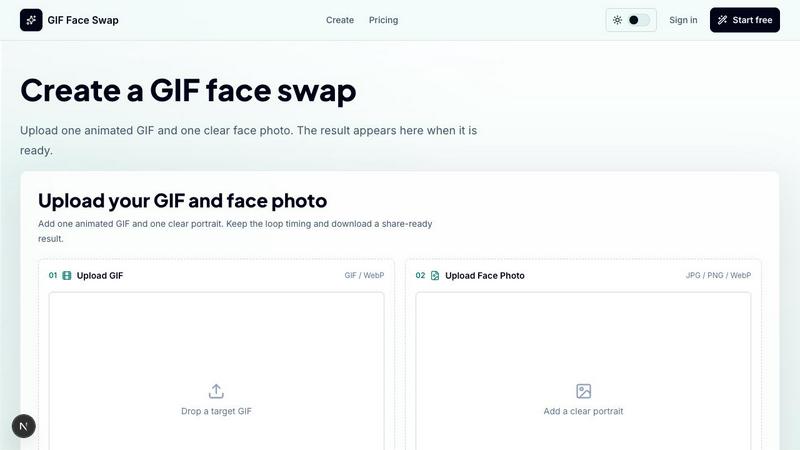
About GIF Face Swap
GIF Face Swap is an online tool designed to solve a specific problem: how to create personalized, animated face-swapped GIFs without needing to learn complex video-editing software. It is a practical solution for anyone who wants to turn a familiar reaction GIF, a movie scene loop, or a sports moment into something uniquely personal and shareable. The core workflow is straightforward: you upload a short animated file in GIF or WebP format, add one clear, front-facing photo of a person’s face, and the AI handles the rest. The result is a new animation where the original face has been replaced, while the timing, motion, and overall feel of the original loop are preserved. This tool is built for speed and simplicity, targeting meme creators, social media users, community managers, marketing teams, and friends who want to create quick, funny, or personalized animated replies. The platform emphasizes a clean, private experience; uploads and generated GIFs remain private by default, and guest download links expire. You can try the tool for free with a watermarked result before committing to a paid plan. The main value proposition is clear: get a usable, face-swapped animated GIF in minutes, not hours, without the overhead of traditional video editing tools. It also includes free utilities like a GIF compressor, analyzer, and converter to help prepare your source files before swapping.
Features of GIF Face Swap
Built for Animated GIFs and WebP
This feature focuses on preserving the core qualities that make reaction GIFs effective. The tool is specifically optimized for short, looped animations. When you upload a GIF or WebP file, the AI analyzes the original animation’s timing, frame sequence, and expression energy. The result is not a static image but a fully animated loop that retains the original motion and comedic or dramatic timing. This is crucial for creating shareable content that feels natural and fits seamlessly into social media feeds, group chats, and comment threads. The tool handles the technical complexity of frame-by-frame analysis so you do not have to.
Cleaner Face Results with Clear Source Photos
The quality of the output is directly tied to the quality of the input. This feature emphasizes that using a clear, well-lit, and front-facing portrait photo will produce significantly better and more natural face swaps. The AI is designed to extract facial features accurately, reducing common issues like blurring, distortion, or missed frames that can occur with low-quality source images. By guiding users to upload a sharp portrait, the tool minimizes the need for manual corrections and delivers a cleaner, more convincing final animation that works well for close-up reaction loops.
Private by Default with Expiring Guest Links
Privacy is a core design principle. All uploaded source files and generated GIFs are kept private by default. This means your content is not publicly accessible or indexed. Furthermore, when you download a result as a guest (without signing in), the provided download link is temporary and will expire after a set period. This feature is particularly valuable for teams, community managers, or individuals who need to share sensitive or personal content without leaving a permanent digital footprint. It provides a secure way to create and distribute face-swapped animations for internal use or private jokes.
Fast First Try Without Signing Up
The tool is designed to reduce friction for new users. You can upload one GIF and one face photo, initiate the swap, and preview a watermarked result without creating an account or providing any personal information. This "fast first try" feature allows you to evaluate the tool’s quality and speed before making any commitment. It solves the problem of having to register for a service only to find out it does not meet your needs. Once you see the result, you can then decide if you want to sign up for a paid plan to remove watermarks and generate more outputs.
Use Cases of GIF Face Swap
Meme Makers and Social Creators
The primary use case is for individuals who create and share content on social media platforms like Twitter, TikTok, Instagram, and Discord. Meme makers can take a trending reaction GIF and instantly insert a friend’s, colleague’s, or their own face to create a personalized, timely joke. This allows them to participate in viral trends quickly, turning a generic reaction into a specific, shareable moment that resonates with their audience or group chat. The speed of the tool is critical here, as it enables creators to post while the trend is still active.
Fandom Editors and Community Members
This use case targets fans who want to insert characters or themselves into iconic scenes from anime, movies, TV shows, or sports highlights. Instead of opening a full video editing suite to manually track and replace a face frame by frame, a fandom editor can use GIF Face Swap to achieve a similar effect in minutes. They can put a friend’s face onto a character in a famous reaction scene or insert a creator’s face into a game highlight loop. The tool simplifies a previously complex technical task, making it accessible to a wider audience.
Marketing Teams and Brand Managers
Marketing teams can use this tool to create lightweight, agile campaign content. For example, a brand can take a popular reaction GIF and swap in the face of their mascot or a company executive to respond to a trending topic or a customer comment. They can also create a set of internal celebration loops for team wins, product launches, or company birthdays. The key benefit is speed and simplicity; the team can produce a branded, animated reaction without needing a dedicated video editor, allowing for faster turnaround on social media responses.
Indie Filmmakers and Previs Artists
For filmmakers working on a tight budget or timeline, this tool offers a rapid way to test character expressions and scene beats. A previs artist can take a short animated clip of a character and quickly swap in a different actor’s face to see how a reaction might look. This allows for quick visual feedback on performance and emotional impact before committing to a full shoot or more complex visual effects work. It solves the problem of time-consuming test renders by providing a fast, low-fidelity preview that is still animated and contextually accurate.
Frequently Asked Questions
What file types and sizes are supported for the source animation?
The tool supports animated GIF and WebP files. For the best results, the animation should be short, ideally a loop of a few seconds. The maximum file size for the source animation is 20MB. Larger files may fail to upload or process correctly. Short loops with one clear, centered face work best for the AI to accurately perform the swap.
What kind of face photo should I upload for the best result?
For optimal results, you should upload a clear, well-lit portrait photo. The face should be front-facing and not obstructed by sunglasses, masks, or heavy shadows. The photo should be in JPG, PNG, or WebP format, and the maximum file size is 8MB per photo. A sharp, high-resolution image will result in a more natural and less blurry face swap in the final animation.
Is my uploaded content private, and how are download links handled?
Yes, your privacy is a priority. All uploaded GIFs, face photos, and the generated results are kept private by default. They are not publicly viewable or searchable. If you download your result as a guest (without signing in), you will receive a unique download link. This link is temporary and will expire after a set period, adding an extra layer of security for your content.
Can I use any GIF or face photo I find online?
No. You must only upload images and animations that you have the legal right to use. This means you should not upload copyrighted content or photos of people without their explicit consent. The platform encourages users to respect intellectual property and privacy. It is your responsibility to ensure you have permission to use both the source animation and the face photo before generating a swap.
Similar to GIF Face Swap

Create and edit AI images online with multiple models, text-to-image, image-to-image, background removal, and upscaling.

AI image generation and editing with sharp typography, native 2K output, and localized edits.

A fast, simple image studio powered by Nano Banana 2.1. Create and edit high-quality images with accurate details and readable text.

AIPetGen turns a photo of your dog, cat, or other pet, or a written description, into a new picture or a short animation.

ImageGPT is an all-in-one AI creative platform for generating, editing and transforming images and videos using AI.

Create release-ready album covers from a prompt or photo. Generate, refine, and export art for singles, EPs, mixtapes, and playlists.

Enhance photos, create images, and generate videos with AI workflows, creative effects, and a shared asset library.

A free browser-based toolkit for creating, cutting, converting, and previewing sprite sheet animations.