
Inkfox AI
Inkfox AI generates unlimited images for free with no sign-up, turning prompts into ads, product shots, and social visuals instantly.
Visit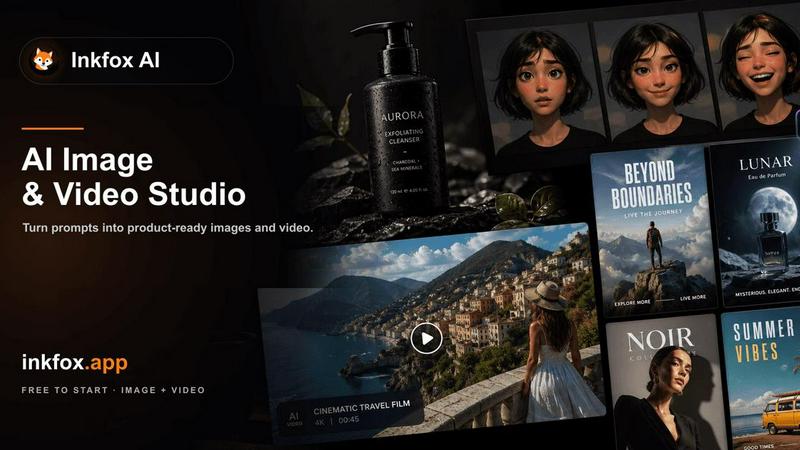
About Inkfox AI
Inkfox AI is a free, unlimited AI image and video generator designed to eliminate the barriers of cost, login requirements, and generation limits. The platform allows anyone to create high-quality visual content instantly without creating an account or signing up. Its core value proposition is accessibility: users can simply visit the website, describe the image they want, and generate results immediately. This makes Inkfox AI an ideal solution for marketers, content creators, small business owners, and anyone who needs quick visual assets for ads, product listings, social media posts, or creative projects.
The platform supports a range of advanced AI models, including Nano Banana 2.0, GPT Image 2.0, Flux, and Seedream, giving users flexibility in style and quality. Beyond basic image generation, Inkfox AI offers a comprehensive suite of tools: text-to-image, image-to-image editing, reference image creation, background removal, image upscaling, text-to-video, and image-to-video generation. Users can start with a simple text prompt or upload a reference product image to generate professional-grade visuals like ad creatives, product shots, and social media graphics. The platform also includes a prompt structure guide to help users refine their inputs for better results, focusing on subject, use case, style, and control parameters like aspect ratio, lighting, and composition. Whether you need a quick draft or a polished final asset, Inkfox AI provides a unified workspace to iterate, compare models, and produce campaign-ready visuals without any upfront cost or commitment.
Features of Inkfox AI
Free Unlimited Generations with No Login Required
Inkfox AI removes the most common friction points in AI image generation: cost and account creation. Users can generate an unlimited number of images completely free of charge without ever needing to sign up or log in. This feature is perfect for rapid prototyping, brainstorming visual concepts, or producing bulk content for social media campaigns. The platform stores guest results in the browser session, allowing users to iterate quickly. If a user wants to save their work permanently or remove watermarks, they can sign in from a result to keep it and access it later. This zero-barrier approach makes Inkfox AI accessible to everyone, from casual users to professional creators who need fast, unrestricted experimentation.
Multi-Model Support for Diverse Visual Styles
Inkfox AI integrates multiple advanced AI models, including Nano Banana 2.0, GPT Image 2.0, Flux, and Seedream, allowing users to choose the best tool for their specific needs. Each model offers unique strengths: some excel at photorealistic outputs, while others are optimized for cinematic, anime, 3D render, or conceptual art styles. Users can start with the free base model for quick drafts and then upgrade to premium models when they need higher-end, more controlled results. This flexibility enables users to compare outputs across models within the same workspace, ensuring they select the best aesthetic and quality for their project without switching platforms.
Comprehensive AI Image and Video Workflows
Beyond simple text-to-image generation, Inkfox AI provides a complete suite of visual creation tools. Users can generate images from text prompts, edit existing images through image-to-image workflows, create product photos from reference images, and produce ad creative variants. The platform also supports background removal, image upscaling, text-to-video, and image-to-video generation. This all-in-one approach streamlines the creative process, allowing users to start from a rough idea, refine it with a reference image, and generate multiple campaign-ready visuals in a single workspace. The platform even includes presets for specific goals like product photography, cinematic shots, 3D renders, and logo directions.
Intelligent Prompt Structure and Control Parameters
To help users achieve better results consistently, Inkfox AI includes a structured prompt guide that breaks down the key elements of a strong image prompt: subject, use case, style, and control parameters. Users can specify aspect ratio, lighting, composition, and even upload a reference image to guide the generator. The platform also offers a "no style" option for neutral outputs. This feature solves the common problem of generic or unsatisfactory AI results by providing a clear checklist: add the target channel, a visual reference, and the production constraint before generating the next image. This structured approach empowers users to move from vague ideas to precise, high-quality visual assets with minimal trial and error.
Use Cases of Inkfox AI
Generating Ad Creatives and Social Media Visuals
Marketers and social media managers can use Inkfox AI to rapidly produce eye-catching visuals for Meta ads, Instagram posts, Twitter banners, and other social channels. The platform allows users to start from a text prompt or a reference image and generate multiple variants with different styles, compositions, and lighting. For example, a user can input "sneaker sports poster" or "beauty magazine cover" and instantly get campaign-ready images. The ability to generate unlimited free drafts means teams can test different visual approaches, iterate based on feedback, and finalize assets without worrying about per-generation costs or subscription limits.
Creating Product Photos for E-Commerce Listings
Small business owners and e-commerce sellers can leverage Inkfox AI to create professional-looking product photos for Shopify, Amazon, or other online marketplaces. Users can upload a reference product image and describe the desired scene, background, angle, and channel requirements. The platform can generate product shots with clean backgrounds, lifestyle settings, or infographic-style displays, such as "Hanfu structure infographic" or "real estate listing." This eliminates the need for expensive photoshoots or complex editing software, making high-quality product photography accessible to anyone with a product to sell.
Concept Art and Mood Board Development
Creative professionals, designers, and artists can use Inkfox AI to quickly generate concept art, blog images, and mood boards. Starting from a rough text prompt, users can enhance it into a complete AI image prompt and generate free drafts using the base model. The platform supports various styles, including photorealistic, cinematic, anime, and 3D render, making it suitable for exploring visual directions for projects like game design, film pre-production, or interior design. The ability to compare outputs across different models helps users refine their vision before committing to a final direction.
Producing Marketing Collateral and Campaign Variants
Agencies and in-house marketing teams can use Inkfox AI to produce a wide range of marketing collateral, including travel posters, food ads, fashion editorials, and car tuning blueprints. The platform's presets for product photo, cinematic, 3D render, and logo directions enable users to generate multiple campaign-ready visual angles from a single prompt. For instance, a user can create a "Visit China travel poster," an "iced coffee ad," or a "dark fashion editorial" with consistent branding. This use case is particularly valuable for A/B testing different visual approaches or creating localized versions of campaigns without starting from scratch each time.
Frequently Asked Questions
Do I need to create an account to use Inkfox AI?
No, you do not need to create an account or sign up to use Inkfox AI. The platform is designed for instant access: simply visit the website, describe the image you want, and generate it immediately. All generations are free and unlimited. If you want to save your images permanently or remove the watermark, you can sign in from a result to keep it and access it later across sessions.
What AI models does Inkfox AI support?
Inkfox AI supports multiple advanced AI models, including Nano Banana 2.0, GPT Image 2.0, Flux, and Seedream. The platform also offers a free base model for quick drafts. Users can choose the model that best suits their needs, whether they want photorealistic outputs, cinematic styles, anime, 3D renders, or conceptual art. You can compare outputs across different models within the same workspace to find the best result for your project.
Can I generate videos with Inkfox AI?
Yes, Inkfox AI supports video generation in addition to image generation. The platform offers both text-to-video and image-to-video capabilities. This allows users to create short video clips from text prompts or animate existing images. Video generation is part of the platform's comprehensive suite of visual tools, which also includes background removal, image upscaling, and image-to-image editing.
How can I improve the quality of my generated images?
To get better results, use the platform's prompt structure guide. Focus on four key elements: subject (what should be in the image), use case (ad, product photo, social post, etc.), style (photoreal, cinematic, anime, 3D render, or no style), and control parameters (aspect ratio, lighting, composition). You can also upload a reference image to guide the generator. If your initial result looks generic, try adding the target channel, a visual reference, and a production constraint before generating the next image.
Similar to Inkfox AI

All-in-one AI video creation for text-to-video, image-to-video, editing, avatars, music, subtitles, and upscaling.

Edit text already printed in any photo: change a price, date or label and AI redraws that area in the original style. Three versions per edit, free HD

Create and edit AI images through conversation, using text or reference images and refining results in chat.

Clone any webpage pixel-perfect, export HTML/CSS/ZIP or React/Vue components.

Explore open-source creative software by workflow, platform and development stage, with comparisons and official project links.

Generate iOS and Android app icons from any image and export all platform sizes for free.

Free, open-source 2D CAD app in Rust: command-line drafting, layers, dimensions, DWG/DXF support, and AI-agent automation via MCP/CLI.

Free AI image and video studio with no sign-up: generate images from text or photos, turn prompts into short videos, plus editing and upscaling.