
Pixeliser
Pixeliser is a free, client-side tool that instantly pixelizes images to protect privacy or create pixel art, all while ensuring confidentiality.
Visit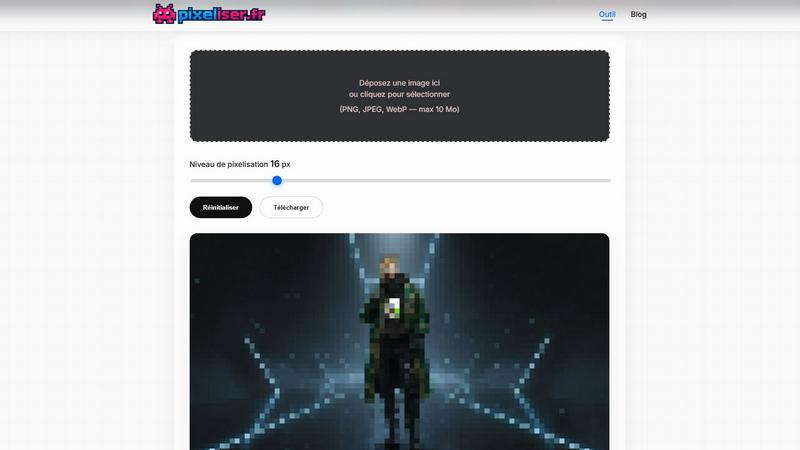
About Pixeliser
Pixeliser is a powerful client-side image pixelization tool that prioritizes user privacy, speed, and ease of use. Unlike traditional online editors that require uploading images to remote servers, Pixeliser processes everything directly within your browser. This means your photos never leave your device, making it an ideal choice for anyone looking to anonymize sensitive information such as faces, license plates, and addresses. With Pixeliser, you can effortlessly prepare your images for sharing on social media, websites, or any other platform without compromising your privacy. Its intuitive interface allows users of all skill levels to pixelate images quickly and securely, making it perfect for both casual users and professionals alike. Whether you are working on a creative project or need to redact sensitive data, Pixeliser meets a wide variety of privacy needs while delivering high-quality results.
Features of Pixeliser
Local Processing
Pixeliser operates completely client-side, ensuring that your images are processed locally in your browser. This means there is no need for uploads to external servers, maintaining your privacy and confidentiality at all times.
Instant Preview
With Pixeliser, you can see real-time updates as you adjust the pixel block size using a simple slider. This instant feedback allows you to experiment with various levels of pixelation without any delay, ensuring you achieve the perfect look for your project.
Customizable Pixelation Levels
The tool offers a range of pixelation options from 4 pixels for a subtle mosaic effect to 64 pixels for a pronounced retro pixel art style. This flexibility allows users to tailor the pixelation intensity to meet specific project needs or personal preferences.
High-Quality PNG Downloads
Once you are satisfied with the pixelated image, you can download it in a lossless PNG format. This ensures that the quality is preserved, making your images suitable for various uses, including social media, print, or digital assets.
Use Cases of Pixeliser
Privacy Protection
Pixeliser is an essential tool for anyone needing to protect their privacy online. It allows users to blur faces, license plates, and other sensitive information in photos, making it safer to share images without revealing personal data.
Creative Projects
For artists and designers, Pixeliser is a fantastic resource for creating pixel art and retro-style graphics. Whether you are developing sprites for indie games or designing lo-fi album covers, this tool can transform your images into nostalgic visuals.
Social Media Sharing
When posting on social media, users can utilize Pixeliser to create artistic blurs or pixelated effects that enhance the creativity of their posts. This can be particularly effective for memes, teasers, or humorous content, giving your images a unique flair.
Professional Needs
Pixeliser serves professional purposes by allowing users to redact sensitive data in UI mockups, legal evidence, or documentation screenshots. This ensures compliance with privacy regulations while making it easy to share critical information without exposing private details.
Frequently Asked Questions
How can I pixelate an image without sending my photos online?
Pixeliser operates entirely within your browser, so your images are processed locally on your device. There is no need to upload anything to external servers, ensuring your privacy is protected.
What is the maximum image size supported by Pixeliser?
Pixeliser supports images in PNG, JPEG, and WebP formats, with a maximum file size limit of 10 MB. This allows you to work with a wide range of images without any hassle.
Can I pixelate just a portion of an image?
While Pixeliser allows you to adjust the overall pixelation level, it is recommended to zoom in on the specific area you wish to pixelate before applying the effect. This way, you can achieve precise results for sensitive content.
Is Pixeliser really free and does it require registration?
Yes, Pixeliser is completely free to use, and there is no registration required. Users can access the tool without any limitations, ensuring a seamless experience without the hassle of creating an account.
Explore more in this category:
Similar to Pixeliser

ImageGPT is an all-in-one AI creative platform for generating, editing and transforming images and videos using AI.

Create release-ready album covers from a prompt or photo. Generate, refine, and export art for singles, EPs, mixtapes, and playlists.

A free browser-based toolkit for creating, cutting, converting, and previewing sprite sheet animations.

Free AI attractiveness test and face analysis with private, on-device photo processing.

Explore Flux LoRA online workflows in a browser-based AI Studio, with a roadmap for dedicated Flux LoRA models, generation, and training.


Create videos from prompts and images with an independent Runway AI video generator, plus task tracking and API resources.

Turn any image into editable layers with AI—separate subject, background, and objects as transparent PNG layers.