
ProcessSpy
ProcessSpy is a powerful process monitor for Mac that provides advanced real-time insights and filtering for optimal performance analysis.
Visit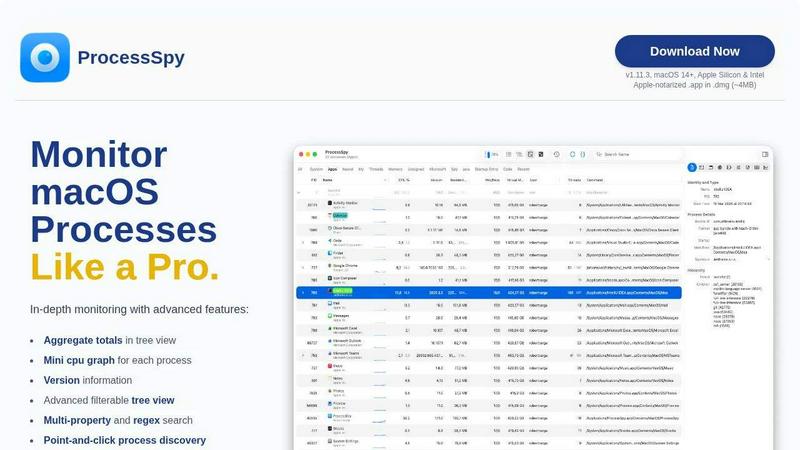
About ProcessSpy
ProcessSpy is a powerful macOS Process Explorer and advanced monitoring tool designed specifically for developers and power users who require deeper insights into their system's processes. Unlike the standard Activity Monitor, ProcessSpy reveals the hidden details that are often obscured, such as full command-line arguments, version information, and environmental variables. This makes it an essential tool for anyone who needs to manage multiple applications, particularly in development environments where different versions of Java or other frameworks are in use. The application's intuitive interface allows users to visualize process trees, inspect open files, and kill stubborn applications with ease. With features that support advanced filtering, point-and-click discovery, and JSON export, ProcessSpy offers a comprehensive solution for monitoring and managing macOS processes, ensuring that users can maintain optimal system performance and productivity.
Features of ProcessSpy
Advanced Tree View
ProcessSpy's advanced tree view provides a detailed and organized representation of processes, allowing users to see aggregate totals for CPU, Memory, and Threads. This feature enhances visibility into resource usage and helps identify performance bottlenecks efficiently.
Javascript Filters
With Javascript filters, users can create complex filtering conditions to hone in on specific processes. This powerful feature enables multi-condition searches that simplify the discovery of processes based on tailored criteria, making monitoring more precise and effective.
Version Information
ProcessSpy displays the version information of each running process directly in the main table. This feature is crucial for developers who need to track which versions of software are in use, enabling better management of dependencies and compatibility issues.
Process History Recording
This paid feature allows users to record historical values for CPU, Memory, and Threads, providing insights into application performance over time. Users can export these results to CSV for further analysis, making it easier to identify trends and optimize resource allocation.
Use Cases of ProcessSpy
Development Environment Management
Developers juggling multiple applications and versions can use ProcessSpy to quickly identify which process corresponds to each application. This is especially useful in scenarios where different JDKs are in use, preventing confusion and enhancing productivity.
System Performance Optimization
System administrators can leverage ProcessSpy to monitor resource consumption across various processes. By visualizing CPU and memory usage, they can identify resource-hogging applications and take action to optimize overall system performance.
Debugging and Troubleshooting
When applications misbehave or become unresponsive, ProcessSpy allows users to inspect open files and environment variables to diagnose issues effectively. This level of detail helps in pinpointing the root cause and facilitates quicker resolution of problems.
Security Monitoring
Security professionals can utilize ProcessSpy to track newly discovered processes and flag any suspicious activity. By monitoring process start times and command-line arguments, they can maintain a secure environment and respond promptly to potential threats.
Frequently Asked Questions
Is ProcessSpy safe to install on my Mac?
Yes. ProcessSpy is Apple-notarized and distributed as a signed .app inside a .dmg file. It has been verified and is safe to use on both Intel and Apple Silicon Macs, ensuring peace of mind while monitoring your processes.
Does ProcessSpy support older versions of macOS?
ProcessSpy is specifically designed for macOS 14 and newer. Users on older versions of macOS will need to upgrade their operating system to utilize this tool.
What is the license model?
The license for ProcessSpy is valid for one user across unlimited devices. It includes lifetime updates and new features, providing long-term value for users who need ongoing support and enhancements.
How can I unlock advanced features in ProcessSpy?
Users can unlock advanced features by purchasing a license on Gumroad for $24.99. This one-time fee grants access to all paid features, ensuring users can fully leverage ProcessSpy’s capabilities for enhanced process monitoring and management.
Similar to ProcessSpy

Residential and datacenter proxy provider with 50M+ ethically sourced IPs across 150+ countries. Unlimited from $4.08/hr, pay-per-GB from $1.64/GB.

No-code 2D game editor: visual node logic, drag-and-drop scenes, live preview. Exports to Windows, macOS, Linux, Android, iOS, Web.

Jev-compatible typed decisions API: moderation, routing, intent and scoring for any text, hosted in the EU.

A free directory of 950+ projects built on Laya, the open-source decision model. Updated daily.

A free browser-based toolkit for creating, cutting, converting, and previewing sprite sheet animations.

The #1 Native Form Builder Plugin for Framer - No Code, No Embeds, No External Platforms.

