
retroshelf
Retroshelf automatically logs your retro handheld gaming sessions so you can track what you play and discover trending games.
Visit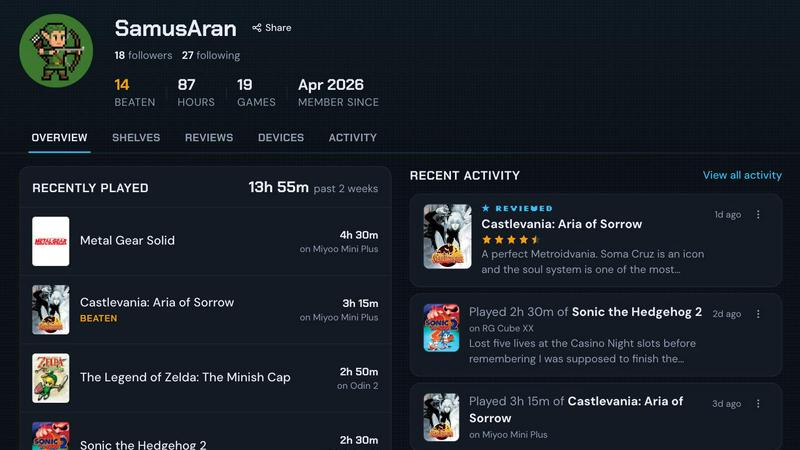
About retroshelf
For retro handheld gaming enthusiasts, the joy of playing classic titles across devices like the Miyoo, Anbernic, and Odin often comes with a frustrating problem: keeping track of what you have played, finished, or replayed. You end up juggling spreadsheets, scribbling notes, or relying on memory to recall which game you were deep into on which device. retroshelf solves this exact problem by providing a dedicated play-tracking and discovery app built specifically for the retro handheld community. Instead of manual logging, retroshelf uses a tiny plugin that runs directly on your handheld device, automatically capturing every gaming session. This means the game title, the exact playtime, and the specific handheld you used are logged without any effort on your part. The result is a public shelf that showcases your current gaming activity, completed games, reviews, and replays, all organized by device context. retroshelf turns scattered, forgotten sessions into a browsable, meaningful timeline of your gaming year. It is designed for players who own multiple retro handhelds and want a single, reliable place to see their entire gaming history. Beyond personal tracking, retroshelf is a discovery platform. You can browse what other players are picking up, finishing, and replaying right now. You can filter shelves by specific devices to see what games are popular on a Miyoo versus an Odin. Reviews include the handheld context, so a star rating tells you more than just a score; it tells you the experience. retroshelf is currently in closed beta, inviting passionate retro handheld players to help shape the community from the beginning. It is the practical, automatic solution for anyone tired of losing their gaming history across multiple devices and platforms.
Features of retroshelf
Automatic Session Logging
The core problem retroshelf solves is manual tracking. A lightweight plugin runs silently on your handheld device, whether it runs muOS or OnionOS. Every time you start a game, the plugin captures the title. When you finish playing, it logs the session duration and the specific handheld used. Your shelf updates in real time, often while you are still on the couch. This eliminates the need for spreadsheets, notes, or memory, giving you a complete, accurate log without any extra work.
Device-Context Shelf
Your public shelf is not just a list of games; it is organized by device context. This means you can see exactly what you played on your Miyoo Mini, your Anbernic RG35XX, or your Odin 2. This feature is crucial for retro handheld enthusiasts who own multiple devices and use them for different types of games. It provides a clear, segmented view of your gaming habits, making it easy to remember which device you were using for a specific title and how much time you invested on each platform.
Community Discovery and Browsing
retroshelf transforms personal tracking into a community discovery tool. You can browse the shelves of other players to see what games are gaining traction in the retro handheld world. A dedicated "Popular this week" section shows you what people are currently picking up, finishing, and replaying. You can also filter the entire community's activity by specific devices, such as Miyoo, Anbernic, or Odin, to see which games are most popular on the hardware you care about most.
Contextual Reviews and Play Data
Reviews on retroshelf are more meaningful because they include the handheld context. A star rating is paired with the specific device the game was played on, giving you a better understanding of the reviewer's experience. Every game page shows you who is currently playing it, on what handheld, and for how long. This data helps you decide if a game is worth your time based on how the community actually engages with it across different devices.
Use Cases of retroshelf
Tracking Your Multi-Device Gaming History
If you own three different retro handhelds, keeping track of which games you have started on each device is a nightmare. With retroshelf, you simply drop the plugin on each device's SD card and link them to your account. Every session across all your devices is automatically logged into one unified timeline. You can easily see that you played 45 minutes of Final Fantasy on your Miyoo last night and 20 minutes of Castlevania on your Anbernic this morning, all without lifting a finger.
Discovering New Games Based on Real Player Activity
Instead of relying on static lists or outdated recommendations, you can use retroshelf to see what the community is actually playing right now. You can browse the "Popular this week" section to find games that other retro handheld players are picking up and finishing. You can also filter by device to find titles that perform well or are popular on your specific hardware, helping you discover hidden gems that the community is actively enjoying.
Making Informed Purchase Decisions for New Handhelds
When you are considering buying a new retro handheld, you want to know what games people actually play on it. retroshelf lets you browse shelves filtered by device. You can see the most played games on an Odin 2 or a Miyoo Mini Plus. Combined with contextual reviews that include the handheld, you get a realistic picture of the gaming experience on that device. This data helps you decide if a new handheld fits your preferred game library.
Reflecting on Your Year of Retro Gaming
At the end of the year, you can look back at a complete, legible timeline of your retro gaming sessions. retroshelf turns scattered play sessions across different handhelds into a cohesive story. You can see which games you finished, which ones you started and abandoned, and how your gaming habits shifted between devices. This use case is perfect for players who want to quantify their hobby and share their gaming journey with friends or the community.
Frequently Asked Questions
How does the automatic logging plugin work?
The plugin is a small file that you drop onto the SD card of your supported handheld device. It runs silently in the background while you play. When you start a game, it logs the title. When you finish a session, it records the playtime and the specific device. This data is then synced to your retroshelf account. The entire process is automatic and requires no manual input from you during gameplay.
Which handheld devices and operating systems are supported?
retroshelf currently supports devices running muOS and OnionOS. These are popular custom firmware options for many retro handhelds. The team is actively working on expanding support to more operating systems. If your device runs one of these OS options, you can use the plugin. You can check the official plugin page or the community Discord for the most up-to-date list of supported hardware.
Is my shelf public, and can I control what others see?
Yes, your shelf is designed to be public as part of the community discovery feature. This allows other players to see what you are playing, finishing, and reviewing, which helps everyone find new games. You have control over your profile and the information you share. The focus is on game titles, playtime, and device context, not personal data. If you have specific privacy concerns, you can review the platform's privacy policy for detailed controls.
How can I join the closed beta?
retroshelf is currently in a closed beta phase. The team is opening access in small waves to retro handheld players who want to help shape the community from the beginning. To join, you can visit the retroshelf website and click the "Join beta" button. You will likely be asked to provide your email address and possibly some information about your handheld devices. You will be notified when a spot opens up for you in the next wave.
Explore more in this category:
Similar to retroshelf

Wheel of Names Spin Wheel Picker tool for classrooms or events

Wery is an AI-powered virtual creative studio for entertainment content.

Snapkin is a calorie tracker you use by photographing your plate.

Adopt a virtual baby who grows, learns, and remembers you.


Anonymous Instagram viewer. Browse profiles, stories, and posts without an account or leaving a trace.

GeoRank lets you explore, compare, and rank any place on earth by sunshine, cost, tax, and visa rules, then ask AI about your shortlist.

Get instant private AI face analysis for attractiveness scoring, celebrity look-alikes, and body shape calculation without any signup or uploads.