
TaleHug AI Story Generator for Kids
Turn a child's voice, drawing, or idea into a safe, illustrated AI storybook for co-reading in minutes.
Visit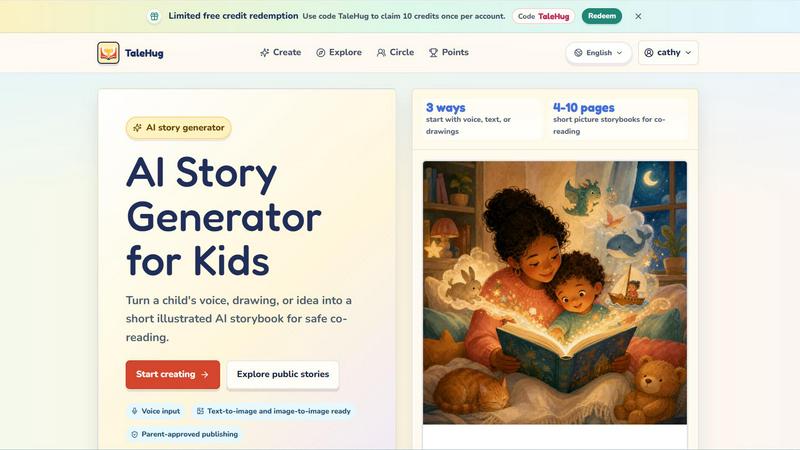
About TaleHug AI Story Generator for Kids
TaleHug is an AI-powered storytelling platform designed specifically for children to create their own illustrated storybooks. The core problem it solves is making creative writing and storytelling accessible, engaging, and safe for young children, particularly those in preschool and kindergarten ages (3-6). Instead of facing a blank page, children can start with a voice recording, a drawing, or a simple idea, and TaleHug transforms that input into a short, illustrated storybook with 4-10 pages. This approach removes the intimidation of writing and empowers kids to express their imagination immediately. For parents and educators, the platform addresses critical safety concerns. TaleHug is built around parent-guided sharing, meaning all stories start as private drafts, and any public publishing requires adult approval. The platform minimizes personal data collection, uses safe display names instead of real names, and does not include public comments in the MVP. This makes it a practical tool for co-reading and shared creative activities between adults and children. TaleHug is operated by Vava AI Labs LLC and offers a limited free credit redemption system, where users can use the code "TaleHug" to claim 10 credits once per account. The platform supports multiple languages, including English and Chinese, as shown in the public gallery examples. Ultimately, TaleHug is not just a story generator; it is a safe, kid-friendly creative environment that turns a child's voice, drawing, or idea into a short illustrated AI storybook for safe co-reading.
Features of TaleHug AI Story Generator for Kids
Three Input Methods for Story Creation
Children can start their story creation journey using three distinct methods: voice input, text input, or drawing input. With voice input, a child can simply speak their story idea aloud, and the AI transcribes and processes it into story pages. With text input, older children or parents can type a prompt or idea. With drawing input, a child can upload a hand-drawn picture, and TaleHug uses image-to-image AI technology to generate illustrated story pages based on that drawing. This flexibility ensures that children of all ages and abilities, including those who cannot yet write, can participate in story creation.
AI-Powered Illustrated Storybook Generation
TaleHug transforms a child's initial idea into a complete picture storybook with 4-10 pages. Each page features a strong, colorful AI-generated illustration paired with one short sentence of text. The platform stores the prompt used for each image, allowing parents or children to regenerate a page if the illustration does not match their vision. This feature makes the creation process iterative and collaborative, empowering children to refine their story until it matches their imagination.
Parent-Approved Publishing and Visibility Controls
Safety is a core design principle of TaleHug. Every story starts as a private draft by default. The platform offers three visibility modes: private, circle, and public. Publishing to the circle or public modes requires adult review and approval. This ensures that no child-generated content goes live without a parent or guardian's explicit consent. Additionally, the platform uses safe display names instead of full child names, does not collect school names, addresses, or contact details, and has disabled public comments in the MVP to prevent unwanted interactions.
Curated Story Prompts and Public Gallery
To help children get started, TaleHug provides a library of parent-approved story prompts and example scenes. These include themes like "Moon rabbit bedtime," "Sharing the red truck," "First school morning," and "Garden courage." These prompts serve as safe, ready-made starting points for a first draft. The platform also features a public gallery where users can read AI storybook examples from young creators, showcasing the range of stories possible, from "Leo and the Chocolate Monkey" to "小火车,嘟嘟嘟!". This gallery uses only approved examples, providing inspiration while maintaining a safe environment.
Use Cases of TaleHug AI Story Generator for Kids
Bedtime Story Creation for Parents and Children
Parents can use TaleHug to create personalized bedtime stories for their children. Instead of reading a generic book, a parent can help their child describe a dream, a favorite toy, or a recent adventure. TaleHug transforms that idea into a short, illustrated storybook perfect for co-reading before sleep. The 4-10 page length is ideal for a short bedtime routine, and the colorful illustrations keep young children engaged. This turns storytime into an interactive, co-creative experience that strengthens the parent-child bond.
Classroom Storytelling Activities for Kindergarten Teachers
Kindergarten teachers can integrate TaleHug into their curriculum to encourage creative writing and artistic expression. Teachers can use the voice input feature for children who are not yet writing, allowing them to dictate a story about a class pet or a field trip. The resulting storybook can be projected on a screen for the whole class to read together. This use case supports literacy development, vocabulary building, and social-emotional learning, as children can create stories about sharing, bravery, or friendship using prompts like "Sharing the red truck" or "Feelings under the sea."
Therapeutic and Emotional Expression for Young Children
TaleHug can be a valuable tool for helping children process emotions or experiences. A child who is nervous about starting school can use the "First school morning" prompt to create a story about a brave character. A child dealing with a difficult emotion can explore feelings through the "Feelings under the sea" prompt. By externalizing their feelings into a story with a protagonist, children can gain perspective and feel more in control. The private draft mode ensures these sensitive stories remain confidential until the child and parent decide to share them.
Multilingual Story Creation for Bilingual Families
TaleHug supports multiple languages, as demonstrated by the public gallery featuring stories in both English and Chinese (e.g., "小火车,嘟嘟嘟!"). This makes it an excellent tool for bilingual families who want to encourage literacy in both languages. A parent can help a child create a story in their heritage language, reinforcing vocabulary and cultural connections. The AI handles the text generation and illustration, removing the language barrier for the child. This use case supports language preservation and dual-language development in a fun, engaging format.
Frequently Asked Questions
How does TaleHug ensure my child's safety and privacy?
TaleHug is built with privacy and safety as foundational principles. All stories start as private drafts by default. Publishing a story to the "circle" or "public" visibility modes requires explicit adult review and approval. The platform uses safe display names instead of real child names, does not collect school names, addresses, or contact details, and has disabled public comments in the MVP to prevent unwanted interactions. The public gallery only features pre-approved examples, not user-generated content without review.
How many credits do I get, and how do I redeem them?
New users can claim 10 free credits once per account by using the code "TaleHug" on the platform. Each credit likely corresponds to one story generation or a set number of pages. To redeem, simply enter the code "TaleHug" in the designated redemption area on the TaleHug website. This allows you to try the service and create a few storybooks before deciding if you want to purchase additional credits.
What age group is TaleHug designed for?
TaleHug is specifically designed for children aged 3-6, targeting preschool and kindergarten ages. The storybooks are short, with 4-10 pages, and each page contains only one short sentence, making them perfect for co-reading with an adult. The three input methods (voice, text, drawing) ensure that children who cannot yet write can still participate fully. However, older children and even adults can also enjoy creating stories using the platform.
Can my child start with a drawing they made?
Yes, absolutely. TaleHug supports image-to-image generation. Your child can upload a hand-drawn picture, and the AI will use that drawing as inspiration to generate illustrated story pages. This feature turns a simple crayon drawing into a fully illustrated storybook, validating the child's artistic effort and encouraging them to see their ideas come to life in a new format. This is one of the three main input methods, alongside voice and text.
Explore more in this category:
Similar to TaleHug AI Story Generator for Kids

Learn Morse code by keying it on a machine you can press. Write messages, turn Morse into text and back, and key Morse in any app on your Mac.

An adaptive AI tutor that turns topics or your materials into courses, lessons, and answers tailored to how you learn.

A game show board for the TV, with real buzzers on every player's phone

Most likely to, would you rather and more: the TV shows it, every phone votes

Create a free live poll, share a QR code, and watch the votes come in live.

Master networking with interactive, hands-on practice directly in your browser. Solve real terminal challenges, debug routes, and build core IT skills

Verla is an AI academic assistant for university and college students, combining AI essay writing, academic research, AI detection, AI humanization, p

An interactive coding platform featuring bite-sized Python exercises designed to build real coding skills through hands-on practice.