

Alternatives to HappyHorse AI
HappyHorse AI instantly creates cinematic videos for ads and social media from your text or images.
Explore 20 alternatives to HappyHorse AI. Compare features, pricing, and find the best fit for your needs.

ButterShare
Send files straight between two browsers with a 6-digit key. No signup, no install, nothing stored on a server.



Foreman
See every app and what it's using in plain English, and end or slow down the one that's hogging your Mac.
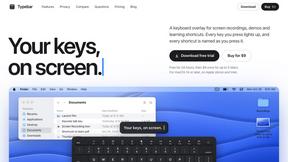
Typebar
Every key you press lights up on an on-screen keyboard, and each shortcut is named as you press it.

Todowing
Chrome extension that nests sub-tasks under their parents in Todoist's Today, Upcoming, Filter and Label views. Free tier, $19.99 one-time unlock.

Notchpals
Little characters peek out of your Mac's notch to remind you to drink water, eat, sit up and get to bed. Quiet during calls. $4.99 once.

Everywhere
Fast file search for the Mac. Results as you type, files inside Mail and Photos, works with Wi-Fi off. $19 once.

Basalt
Eighteen PDF tools in one native Mac window: merge, split, compress, OCR, Bates numbering, forms, signing and redaction. Offline. $29 once.

Voice Keyboard Pro
Hold a key, say what you mean, let go. Clean, punctuated text lands at the cursor in any app on your Mac or iPhone.

Mainspring
Mainspring turns the settings macOS hides into 90+ one-click, fully reversible power-ups for Finder, Dock, screenshots and more. $29 once.

Crumb
A Mac menu bar app for a full disk. See what is using your space, read whether it comes back on its own, and remove only what you tick.
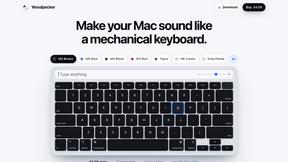
Woodpecker
Make your Mac sound like a real mechanical keyboard. Every key plays its own recording, 22 switches, quiet on calls. $4.99 once.

Inkling
Catch a thought without leaving what you are doing. Notes, checklists and a little companion in your Mac's notch. $12 once.

Manatee
A Mac app that opens damaged video, PDFs, archives and documents and writes out everything it can still read. $9 once, no uploads.


Screen Issues
Free Online Screen Test Tool - Instantly diagnose dead pixels, lines, color issues, and flickering. Multiple test modes, no download needed.



About HappyHorse AI Alternatives
HappyHorse AI is a browser-based AI video generator that falls into the category of creative automation software. It specializes in transforming simple text prompts or images into cinematic-style videos, making it a powerful tool for creating ads, social media content, and marketing materials quickly. This type of platform is ideal for users who need to produce professional-looking video content without the steep learning curve of traditional video editing suites. Users often explore alternatives to find a solution that better fits their specific needs. Common reasons include budget constraints, as pricing models and subscription tiers can vary significantly. Others may seek different core features, such as specific video styles, longer output durations, more control over editing, or integration with other platforms in their workflow. When evaluating alternatives, it's crucial to consider your primary use case, required video quality, the importance of an intuitive interface, and the overall value relative to the cost. The goal is to find a tool that not only matches your technical requirements but also streamlines your content creation process effectively.
FAQs about HappyHorse AI Alternatives
What is HappyHorse AI?
HappyHorse AI is an innovative browser-based AI video generator designed to simplify cinematic video creation. It empowers users to convert text prompts or uploaded images into high-quality videos quickly and easily, without needing editing skills or complex software. The platform is built for speed and usability, making it an efficient solution for producing ads, social media clips, and other marketing materials directly from your ideas.
Who is HappyHorse AI for?
HappyHorse AI is built for creators, marketers, and teams who need to produce engaging video content rapidly. It is particularly valuable for small businesses, social media managers, and content creators who may lack extensive video editing expertise or resources. The platform's user-friendly interface and prompt-based workflow make it an ideal solution for anyone looking to accelerate their content production and tell compelling visual stories with minimal effort.
What are the main features of HappyHorse AI?
The core features of HappyHorse AI center on its advanced AI models that support both text-to-video and image-to-video generation. It boasts a user-friendly interface that prioritizes simplicity, allowing for the quick creation of cinematic-quality videos. Key capabilities include transforming ideas from a simple prompt into finished visual content, significantly accelerating production timelines for marketing and social media use.
Why choose HappyHorse AI?
You would choose HappyHorse AI for its emphasis on speed, simplicity, and usability in the AI video generation space. It removes the technical barriers typically associated with video production, enabling users to create professional-looking content in minutes. The platform is an efficient, browser-based tool that is ideal for teams and individuals looking to streamline their workflow and transform ideas into compelling videos effortlessly.