Cosy vs Flok Social
Side-by-side comparison to help you choose the right product.

Cosy automates Slack onboarding and member introductions, saving you hours and enhancing community engagement.
Last updated: February 28, 2026

Flok Social
Flok Social connects you to nearby people through live maps and real-time local messaging.
Last updated: March 1, 2026
Visual Comparison
Cosy
Flok Social
Feature Comparison
Cosy
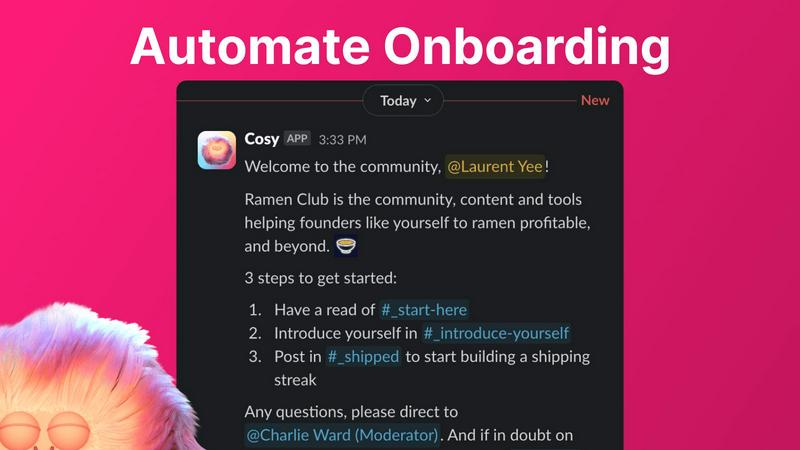
Automate Onboarding
Cosy simplifies the onboarding process by allowing community managers to create and automate up to 10 distinct welcome DM sequences. These messages can be sent from a community leader or the Cosy bot, ensuring that new members receive a warm welcome tailored to their preferences. The automation is customizable, allowing for personalized messages and time delays, ensuring that no new member is overlooked, even during off-hours.
Connect Your Members
To foster engagement, Cosy automatically introduces community members to each other through direct messages. This feature can be set to trigger at regular intervals, helping members connect and build relationships over time. The customizable introduction message and scheduling options allow for a tailored experience, enhancing community interaction without requiring manual effort from managers.
Member Directory
Cosy provides a searchable member directory that enables community members to find and connect with one another easily. Users can create and customize their profiles, while the directory allows for keyword searches and filtering. This feature enhances member interactions by making it easier to identify and reach out to others with shared interests or expertise, all within the Slack environment.
Content Highlights
With Cosy, community managers can quickly surface the most engaging posts through simple slash commands. This feature highlights the top 10 most engaged messages within a specific channel or across all public channels, as well as unreplied messages. This capability ensures that valuable content is not lost in the shuffle, helping to maintain an active and informed community.
Flok Social
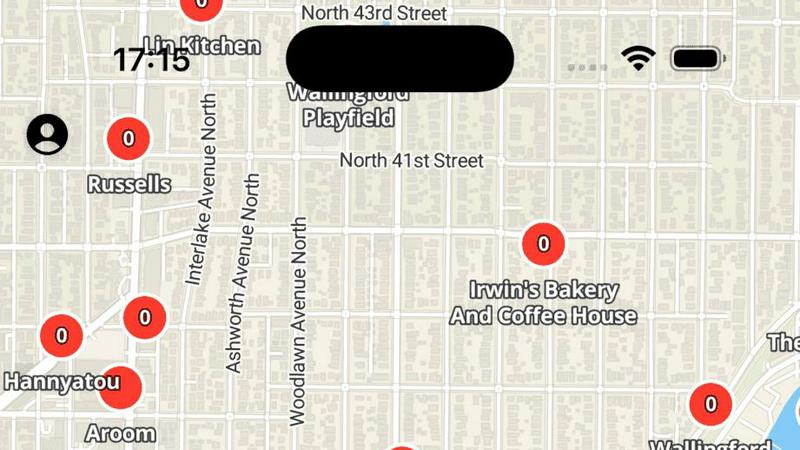
Interactive Location-Based Map
The core of Flok Social is its interactive map interface, which replaces the traditional social media feed. This map displays live chatrooms and events pinned to their exact real-world locations. You can zoom in on your neighborhood, a downtown area, or a travel destination to instantly see what digital conversations and gatherings are active around you. This visual, map-centric approach provides immediate context and makes discovering local interactions intuitive and engaging, moving beyond abstract friend lists to tangible places.
Real-Time Local Chatrooms
Each location on the map hosts its own real-time chatroom. Whether it's for a coffee shop, a public park, a university campus, or a music festival, you can join these chats to converse with people who are physically nearby or interested in that specific spot. This feature facilitates spontaneous discussions, local Q&A, event coordination, and shared experiences as they happen, fostering a sense of immediate community and breaking the ice in physical spaces without the pressure of direct, face-to-face initiation.
Privacy-First Location Sharing
Flok Social is engineered with user privacy as a foundational principle. While the app uses your location to populate the map with relevant nearby chatrooms, it does not broadcast your precise coordinates to other users. You participate in location-tagged conversations without revealing your exact spot, giving you control over your privacy while still enabling you to benefit from hyper-local connectivity. This careful balance encourages open participation by minimizing privacy concerns.
Local Event Discovery and RSVP
Beyond casual chatting, Flok Social helps you discover and plan local happenings. Users can create events—like a pickup soccer game, a book club meeting, or a concert meetup—and pin them to the map. Detailed event pages provide information, and a built-in RSVP system allows you to indicate your attendance. The app also includes an undo action for RSVPs, providing flexibility. This transforms the map from a communication tool into a practical platform for organizing and finding real-world activities within your community.
Use Cases
Cosy
Streamlining New Member Onboarding
Community managers can utilize Cosy to automate the onboarding process for new members, ensuring they receive essential information and introductions without manual intervention. This allows community leaders to focus on engagement strategies rather than administrative tasks, enhancing the overall member experience.
Enhancing Member Connections
By using the automated member introduction feature, community leaders can increase engagement within their community. Regular introductions foster serendipitous connections among members, encouraging collaboration and interaction that might not occur otherwise.
Building a Comprehensive Member Directory
Cosy allows communities to create a searchable member directory, making it easier for members to find one another based on shared interests or expertise. This feature can be particularly valuable in larger communities where personal connections may be overlooked.
Highlighting Community Engagement
Community managers can leverage the content highlights feature to keep members informed about popular discussions and posts. By surfacing engaging content, managers can encourage participation and ensure that important conversations remain active, facilitating a vibrant community atmosphere.
Flok Social
Building Local Community Ties
For residents looking to feel more connected to their neighborhood or apartment complex, Flok Social provides a digital town square. Join the chat for your local park to organize a weekend clean-up, use your street's chat to find a lost pet, or connect with neighbors in your building's lobby chat to form a running group. It solves the problem of living near people but having no structured way to meet them, helping to build stronger, more supportive local networks.
Enhancing Travel and Exploration
Travelers and digital nomads can use Flok Social to move beyond tourist guides and connect with the authentic pulse of a new city. Before arriving, you can check chats for popular hostels or landmarks to get tips. Once there, join the chat for a specific bar or museum to find fellow travelers or friendly locals for a spontaneous meetup, dinner, or guided exploration, turning a solo trip into a shared adventure.
Facilitating Event and Venue Networking
At conferences, festivals, concerts, or large campus events, Flok Social becomes a powerful networking tool. Instead of being limited to the people immediately around you, you can join the event's dedicated chatroom to ask questions, share insights, arrange meetups with other attendees, and continue discussions after a talk. This maximizes the connection potential of any gathering and helps you find people with shared interests in a crowded space.
Discovering Spontaneous Local Happenings
For someone looking to break the routine and find something to do, Flok Social serves as a real-time discovery engine. Open the map to see if a pop-up market has a chat with special announcements, if someone has organized an impromptu frisbee game at the park, or if a local cafe is hosting a trivia night you didn't know about. It solves the problem of "what's going on right now?" by surfacing live, user-generated activities in your immediate area.
Overview
About Cosy
Cosy is a powerful Slack-native application that revolutionizes how communities operate within the Slack platform. Designed specifically for community managers, team leaders, and anyone responsible for fostering engagement, Cosy addresses the tedious manual tasks that often consume valuable time. With features like automated onboarding, intelligent member introductions, and a member directory, Cosy streamlines the process of welcoming new members and facilitating connections. This means less time spent on administrative tasks and more time focusing on strategic engagement. By creating a vibrant community experience directly within Slack, Cosy eliminates the need for external tools, ensuring that members can interact, collaborate, and access valuable content seamlessly. The application is built for diverse users, including startup founders, marketing leads, and dedicated community managers, making it the go-to tool for anyone looking to cultivate a thriving community.
About Flok Social
Flok Social is a revolutionary social networking app designed for iPhone and iPad that directly tackles the modern paradox of feeling digitally connected yet physically isolated. It transforms how you interact with your immediate surroundings by making your location the starting point for genuine, real-time connection. Instead of scrolling through a generic, global feed, you open an interactive map to see live chatrooms pinned to real-world locations like your local cafe, a city park, a concert venue, or a popular landmark. This allows you to join conversations happening around you, effectively bridging the gap between the digital and physical worlds. Built with a privacy-first approach, the app ensures you can connect locally without ever revealing your exact location to other users. Perfect for anyone looking to build a stronger local community, discover spontaneous events, meet like-minded people while traveling, or simply see who's at their favorite spot, Flok Social turns any location into an opportunity for meaningful connection and local discovery. It's the practical tool for solving the problem of being surrounded by people but having no way to easily engage with them.
Frequently Asked Questions
Cosy FAQ
How does Cosy automate the onboarding process?
Cosy automates the onboarding process by allowing community managers to set up welcome DM sequences that are triggered when new members join. These messages can be customized and delivered automatically, ensuring timely communication without manual effort.
Can I customize the member directory fields?
Yes, Cosy allows community managers to create a customizable member directory where they can select up to 10 fields for members to fill in. This can include various types of input, such as text entries and multiple-choice options, to tailor the directory to the community's needs.
What kind of content can Cosy highlight?
Cosy can highlight the top 10 most engaged posts within a specific channel or across all public channels. It can also identify unreplied messages, enabling community managers to surface important discussions and engage members effectively.
Is there a limit on the number of members I can have with Cosy?
Cosy offers a free tier for up to 250 members, while providing a 30-day trial for unlimited members. This allows communities of various sizes to experience the full capabilities of the tool before committing to a paid plan.
Flok Social FAQ
Is Flok Social free to use?
Yes, Flok Social is currently a free application available for download on the App Store for iPhone and iPad. The provided context does not mention any subscription plans, in-app purchases, or premium tiers, indicating users can access its core features of interactive mapping, real-time chatrooms, and event discovery without any cost.
How does Flok Social protect my privacy?
Flok Social employs a privacy-first design. The app requires location access to show you relevant nearby chatrooms on the map, but it does not share your precise, real-time location with other users. You participate in chats that are tagged to a general location (like a park or cafe) without revealing exactly where you are within that area. The developer's privacy policy also states that collected data, such as contact info and user content, is not linked to your identity.
What devices are compatible with Flok Social?
Flok Social is designed specifically for Apple's iOS ecosystem. It is compatible with both iPhone and iPad devices. As of its latest version (1.7), the app requires a minimum of iOS 17.0 or later to be installed and run properly. It is not available for Android devices or via web browser.
Can I use Flok Social to organize my own event?
Absolutely. A key feature of Flok Social is the ability to create and promote local events. You can pin an event to a specific location on the interactive map, add details and a banner image, and manage RSVPs from the community. The app also allows attendees to undo their RSVP if their plans change, making event planning and coordination simple and flexible directly within the local context.
Alternatives
Cosy Alternatives
Cosy is an innovative Slack-native application that automates community onboarding, member introductions, and content sharing to enhance productivity and engagement. It belongs to the productivity and management category, aimed at community managers and team leaders who strive to create a vibrant and self-sustaining workspace. Users often seek alternatives to Cosy for various reasons, including pricing, specific feature requirements, or compatibility with different platforms. When considering an alternative, it's essential to evaluate the features that align with your community's needs, the ease of use, and whether the solution integrates seamlessly with your existing tools and workflows.
Flok Social Alternatives
Flok Social is a location-based social networking app for iOS that helps you discover and chat with people in your immediate vicinity using a live map interface. It falls into the niche category of hyperlocal social apps, which focus on connecting users based on their physical surroundings rather than pre-existing social graphs. Users often explore alternatives for various practical reasons. These can include needing an app available on Android, seeking different privacy controls, desiring a broader user base, or looking for specific features like event planning tools that go beyond simple chat. Budget considerations, such as preferring a completely free service, also drive this search. When evaluating an alternative, key factors to consider are the platform availability (iOS, Android, web), the core method of connection (location-based, interest-based, or both), the app's approach to privacy and data handling, and the overall activity level of its user community in your area. The right choice depends on which combination of these elements best solves your specific need for local connection.