EVENTFLYER.AI vs Gleem.AI Studio
Side-by-side comparison to help you choose the right product.

Generate a professional event flyer in seconds by simply pasting your event URL.
Last updated: March 18, 2026

Gleem.AI Studio
Gleem.AI Studio simplifies visual creation with an all-in-one platform for generating, editing, and managing images.
Last updated: February 26, 2026
Visual Comparison
EVENTFLYER.AI
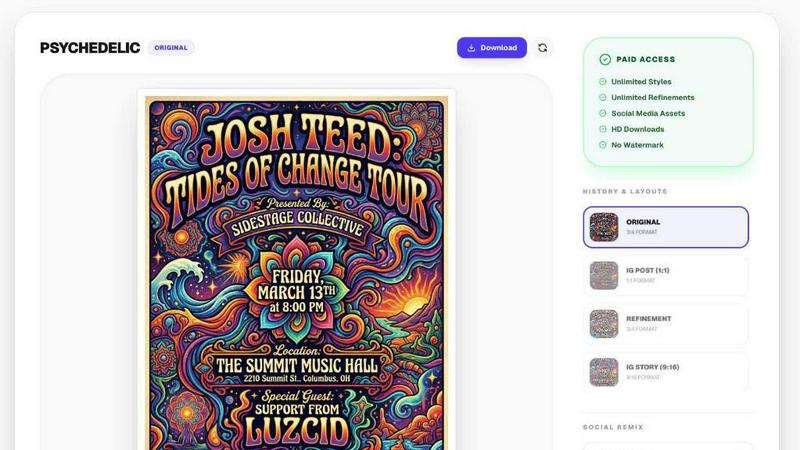
Gleem.AI Studio

Feature Comparison
EVENTFLYER.AI
Intelligent Social Remixing
This flagship feature eliminates the manual, frustrating work of resizing graphics for different platforms. Once your primary event flyer is generated, the AI intelligently reflows all design elements—text, logos, imagery—to create perfectly optimized versions for Instagram Stories (9:16), square posts (1:1), and website banners (16:9). This ensures your event looks professionally cohesive everywhere it's promoted, all with zero extra effort from you.
One-Click Event Data Import
Simply paste the URL from your event listing, and EVENTFLYER.AI's automation does the rest. It connects to and scrapes data from major event platforms like Eventbrite, Facebook, Partiful, and Luma, automatically populating your flyer with the correct event title, date, time, location, and description. This removes the risk of typos and saves you from manually copying and pasting information between tabs.
Designer-Curated AI Themes
Move beyond basic, generic templates. EVENTFLYER.AI offers a library of over 20 unique visual themes crafted by professional designers to capture specific energies and audiences. Whether you're hosting a rock concert, a corporate seminar, a minimalist art gallery opening, or a vibrant pop-art street festival, you can choose a theme that instantly communicates the right mood and attracts your target attendees.
Fast & Free Flyer Generation
The core service is built for speed and accessibility. The process from pasting a URL to receiving a complete, unique poster takes about 30 seconds. This rapid turnaround allows promoters to create and iterate on designs quickly, testing different themes to see what resonates best. The free access model lowers the barrier to entry, making professional design available to everyone.
Gleem.AI Studio
Text-to-Image Generator
The text-to-image generator transforms your ideas into stunning visuals with ease. Users can specify their desired image size and vision, while Gleem's Prompt Enhance feature refines input to ensure high-quality results. This empowers creators to visualize concepts quickly and effectively.
AI Image Editing
Gleem.AI Studio offers an intuitive AI image editing tool that allows users to make adjustments in one place. With simple and natural prompts, creators can add or remove objects, adjust poses, apply filters, and restore old images, all without needing extensive editing experience.
AI Avatars
The AI Avatars feature enables users to generate and personalize their own avatars, which can be placed into any scene. This functionality allows for creative flexibility, as users can adjust poses or try on different outfits without the need for additional photoshoots.
Project Organization
Gleem.AI Studio provides dedicated spaces for each project, keeping all saved prompts, edits, and versions organized. This systematic approach ensures that everything is easily accessible, promoting efficient reuse and iteration of ideas, which is vital for a fast-paced creative environment.
Use Cases
EVENTFLYER.AI
Nightlife & Entertainment Promoters
Bar owners, club promoters, and concert organizers can generate multiple, high-impact flyers for weekly events in minutes. They can quickly test different themes (like "Techno" or "Rock Concert") to see which drives more engagement, and then deploy the AI-remixed versions across Instagram Stories and feed posts to create a cohesive, relentless promotional campaign without any design overhead.
Non-Profit & Community Organizations
Groups operating on tight budgets can create professional-looking flyers for fundraisers, charity galas, and community workshops. The automatic data import ensures all event details are accurate, while the free tool allows them to allocate funds to their cause instead of design services. Consistent branding across social media helps build trust and authority.
Corporate Event & Seminar Planners
Professionals organizing conferences, team-building events, or client seminars can use the "corporate" and "minimalist" themes to create sleek, on-brand materials swiftly. The Intelligent Social Remixing feature is crucial for maintaining brand integrity when promoting the event on the company website (banner), LinkedIn (square post), and other professional channels.
Freelancers & Small Business Owners
Personal trainers hosting a fitness workshop, artists opening a gallery show, or coaches running a webinar can use EVENTFLYER.AI to present a polished, credible image. It enables a single individual to handle all aspects of event promotion, creating a suite of matching graphics that make their event appear well-organized and professionally managed.
Gleem.AI Studio
Marketing Assets Creation
Marketers can utilize Gleem.AI Studio to generate high-quality visuals for campaigns, social media posts, and advertisements. The platform allows for quick iterations, ensuring that marketing materials are visually appealing and aligned with branding strategies.
Social Media Visuals
Creators can design engaging social media visuals with ease. By combining the text-to-image generator and AI editing tools, users can create eye-catching graphics tailored for various platforms, enhancing their online presence and audience engagement.
Product Image Development
E-commerce businesses can benefit from Gleem.AI Studio by creating professional product images. The ability to edit and refine images in one space allows for consistent visual representation that can boost sales and improve customer trust.
Creative Variation Testing
Gleem.AI Studio supports A/B testing of creative variations, enabling teams to explore different design concepts without starting from scratch. This feature aids in discovering what resonates best with audiences, leading to more effective marketing strategies.
Overview
About EVENTFLYER.AI
EVENTFLYER.AI is an automated graphic design solution that transforms the time-consuming task of event promotion into a simple, one-minute process. It is built for anyone hosting an event—from bar owners and club promoters to non-profit organizers and corporate event planners—who needs professional, eye-catching marketing materials but lacks the budget for a designer or the time to learn complex software. The core value proposition is immense time savings and guaranteed brand consistency across all platforms. You simply paste the URL from your event page on sites like Eventbrite, Partiful, Luma, or Facebook. The AI instantly extracts all critical details like the event title, date, time, and description. Then, you select from over 20 designer-curated visual themes that match your event's vibe, from pop art and minimalist to techno and corporate. Within seconds, you receive a unique, print-ready poster. What truly sets EVENTFLYER.AI apart is its "Intelligent Social Remixing," which automatically and perfectly adapts your core design into formats for Instagram Stories, square posts, and website banners, maintaining 100% visual consistency. It’s the fastest way to design less and promote more, giving every event a professional edge.
About Gleem.AI Studio
Gleem.AI Studio is a unified AI image workspace tailored for individuals and teams who prioritize creativity over technical complexity. This innovative platform allows users to generate, edit, and remix images seamlessly within a single environment, eliminating the need for juggling multiple tools. Designed for marketers, creators, and small teams, Gleem.AI Studio streamlines the creative process, enabling users to focus on visual decisions and creative flow. With features like text-to-image generation and intuitive AI editing, creators can quickly iterate on ideas without getting bogged down by advanced settings or fragmented workflows. Whether crafting marketing assets, social media visuals, or product images, Gleem.AI Studio simplifies the process, fostering a fast and intuitive experience that encourages innovation and efficiency.
Frequently Asked Questions
EVENTFLYER.AI FAQ
What event websites does EVENTFLYER.AI work with?
EVENTFLYER.AI is designed to work with a wide range of event publishing platforms. It explicitly supports and automatically extracts data from major sites like Eventbrite, Partiful, Luma, and Facebook Events. The tool is built to be flexible and will attempt to pull information from any valid event URL you provide.
How does the "Intelligent Social Remixing" work?
After your main flyer is generated, our AI analyzes the layout, hierarchy, and key visual elements. It then intelligently rearranges and resizes these components—not just stretches them—to fit the specific dimensions and best practices of Instagram Stories (vertical), square social posts, and wide website banners. This preserves readability, visual impact, and, most importantly, complete brand consistency across every format.
Are the generated flyers truly unique, or are they templates?
The flyers are uniquely generated for each event. While the system uses designer-curated themes as a stylistic foundation, it combines your specific event data (title, date, imagery from the source) with the chosen theme's color palette, fonts, and graphic elements to produce a distinct composition. This ensures your flyer stands out from others using the same general theme.
Is EVENTFLYER.AI really free to use?
Yes, the core flyer generation and social remixing service is fast and free. This allows users to create professional event graphics without any upfront cost. You can paste your URL, choose a style, and download your formatted graphics for various platforms at no charge, making it accessible for individuals and businesses of all sizes.
Gleem.AI Studio FAQ
What types of images can I create with Gleem.AI Studio?
Users can create a wide range of images, including marketing assets, social media visuals, product images, and personalized avatars, all within a single platform.
Is there a learning curve for using Gleem.AI Studio?
Gleem.AI Studio is designed to be intuitive, minimizing the learning curve. Users can easily navigate the platform without needing extensive technical knowledge or experience.
How does the Prompt Enhance feature work?
The Prompt Enhance feature refines user input to produce better outcomes. By interpreting plain-language prompts, it helps users achieve professional-quality visuals without the need for complex prompt engineering.
Can I collaborate with my team on Gleem.AI Studio?
Yes, Gleem.AI Studio is built for small teams, allowing for collaboration in one unified workspace. This facilitates real-time feedback and iterative design processes among team members.
Alternatives
EVENTFLYER.AI Alternatives
EVENTFLYER.AI is an automated graphic design tool in the marketing category that specializes in creating event flyers and social media graphics. It streamlines the process by generating unique, ready-to-use designs directly from an event URL, saving significant time for organizers and promoters. Users often explore alternatives for various practical reasons. Common factors include budget constraints, the need for different feature sets like more manual design control or integration with other platforms, or simply a desire to compare options within the growing AI design tool market. It's a normal part of finding the right solution for specific workflow needs. When evaluating other tools, key considerations should include the core automation capability, the quality and variety of design outputs, and the ease of adapting a single design across multiple social media formats. The goal is to find a tool that effectively balances speed, professional quality, and consistency to enhance your event promotion without adding complexity.
Gleem.AI Studio Alternatives
Gleem.AI Studio is an all-in-one AI image workspace tailored for marketers, creators, and small teams. It simplifies the process of creating and editing visuals by combining image generation and editing into a single, intuitive platform. Users who seek alternatives often do so due to various reasons such as pricing concerns, specific feature requirements, or the need for compatibility with their existing workflows. When considering alternatives, it's essential to evaluate factors such as ease of use, the comprehensiveness of features, pricing models, and how well the platform can meet your unique creative needs. A good alternative should maintain a balance between functionality and simplicity to ensure a seamless creative process.