Gomotion vs Pixel Art Village
Side-by-side comparison to help you choose the right product.

Gomotion
Gomotion transforms text and images into stunning animations, making motion graphics creation effortless for all.
Last updated: February 28, 2026

Pixel Art Village
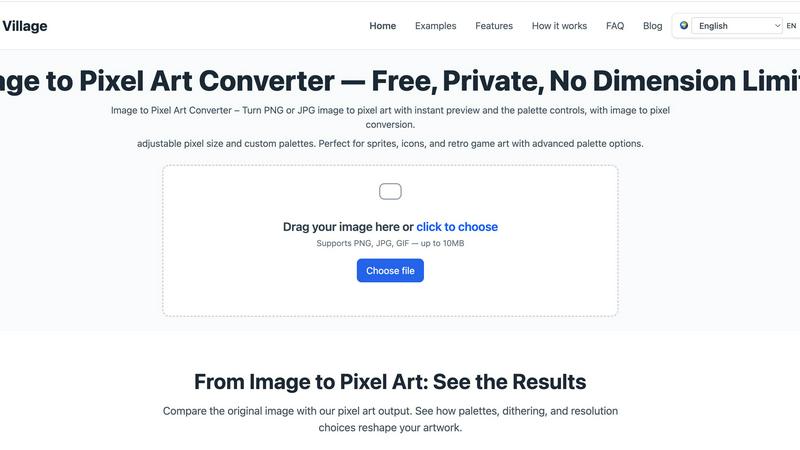
Pixel Art Village effortlessly converts images to pixel art with live previews, custom palettes, and easy exports—all in your browser.
Last updated: March 26, 2026
Visual Comparison
Gomotion

Pixel Art Village
Feature Comparison
Gomotion
Transform Words Into Motion
Gomotion allows you to animate text from a simple prompt, eliminating the need for complex keyframes. Just describe how you want your text to move, and Gomotion will instantly create engaging animations for titles, captions, and logos, perfect for product demos and creators seeking professional results.
Discover the Narrative Mode
With the Gomotion narrative mode, you can turn scripts into fully animated stories that sync images and videos seamlessly. This feature enables you to create ads or short videos in just minutes, streamlining the production process for marketers and content creators.
Design for Any Screen
Gomotion is designed to create animations that look great on any screen, from mobile devices to desktop displays. This versatility ensures that whether you are designing for Instagram, TikTok, or any other platform, your content will be perfectly aligned and visually appealing.
Complex Animations Made Easy
Gomotion simplifies the creation of complex animations, such as animated charts and simulations. This feature is ideal for explainers, presentations, and simulations, allowing users to communicate data effectively and engage their audience with visually striking content.
Pixel Art Village
Custom Palette
With Pixel Art Village, users can switch between pre-existing color palettes or create their own. This feature allows artists to align their artwork with specific retro systems or personal styles, enhancing the overall aesthetic of the pixel art produced.
Live Adjustments
The platform offers live adjustments for pixel size, brightness, contrast, saturation, and dithering. This means artists can see immediate results and make fine-tuned changes, ensuring the final output meets their creative vision without the need for multiple exports.
Private Processing
All image editing occurs client-side in your browser, keeping your images safe and private. Users can work on their projects with peace of mind, knowing that their data is not being uploaded to external servers or stored anywhere else.
No Dimension Limits
Pixel Art Village supports images of all sizes, from tiny icons to large reference images. This flexibility allows creators to work seamlessly on a variety of projects, ensuring that the final export can be scaled according to their specific needs.
Use Cases
Gomotion
Marketing Campaigns
Marketers can use Gomotion to create eye-catching animations for social media campaigns, enhancing brand visibility and engagement. The tool's ease of use allows for quick turnaround times, making it perfect for fast-paced marketing environments.
Content Creation
Content creators can leverage Gomotion to generate professional-quality animations for their videos and presentations. Whether it is for YouTube, TikTok, or other platforms, Gomotion helps elevate the visual storytelling of their content.
Educational Materials
Educators and trainers can use Gomotion to create animated explainers and presentations that simplify complex topics. The ability to animate charts and simulations helps make learning more engaging and accessible for students.
Brand Storytelling
Businesses can utilize Gomotion to craft compelling brand stories through animated content. By importing brand assets seamlessly, companies can create unique videos that resonate with their audience and enhance their brand identity.
Pixel Art Village
Game Development
Game developers can utilize Pixel Art Village to create sprites and UI elements that are both visually appealing and optimized for their games. The tool's palette and size adjustments make it easy to generate game-ready graphics efficiently.
Social Media Graphics
Social media managers can transform images into engaging pixel art for posts, stories, or promotional materials. The eye-catching nature of pixel art can help increase engagement and capture audience attention.
Digital Art Projects
Artists and designers can leverage Pixel Art Village to explore new styles and experiment with pixel art techniques. The platform allows for creative exploration without the need for extensive software knowledge.
Educational Purposes
Teachers and educators can use Pixel Art Village as a fun tool to introduce concepts of digital art and design to students. It provides an interactive way for learners to engage with technology and creativity in a classroom setting.
Overview
About Gomotion
Gomotion is an innovative AI-powered motion design tool that transforms how brands and creators approach animation. Bridging the gap between the complexity of traditional software like After Effects and the simplicity of user-friendly platforms, Gomotion enables users of all skill levels to create stunning animations effortlessly. Whether you are a marketer, content creator, or designer, Gomotion allows you to generate high-quality animations from simple text and image prompts. Its primary value proposition is to simplify the animation process, removing the steep learning curve that often hinders creativity. Users can animate titles, captions, and logos with cinematic flair, making it an invaluable asset for enhancing visual storytelling. With Gomotion, bringing ideas to life becomes a quick and effective endeavor, allowing brands to communicate their messages powerfully without needing extensive animation expertise.
About Pixel Art Village
Pixel Art Village is a powerful online tool designed for converting images into pixel art effortlessly. Whether you have a photo, sprite, or any other image in PNG, JPG, GIF, or WEBP format, this intuitive platform allows you to transform your visuals into charming pixel art instantly. The primary value proposition of Pixel Art Village lies in its simplicity and efficiency. With real-time previews and a user-friendly interface, both beginners and seasoned digital artists can navigate the conversion process with ease. The tool emphasizes privacy, as all image processing occurs in your browser, ensuring your images remain secure and private. Additionally, Pixel Art Village is completely free to use, allowing users to explore their creativity without any financial constraints. This makes it an ideal choice for game developers, designers, hobbyists, and anyone looking to create nostalgic art that harkens back to the retro gaming era.
Frequently Asked Questions
Gomotion FAQ
What types of animations can I create with Gomotion?
With Gomotion, you can create a wide range of animations, including text animations, animated charts, and full narrative videos. The platform is designed to cater to various needs, from social media posts to complex presentations.
Is Gomotion suitable for beginners?
Absolutely! Gomotion is designed with user-friendliness in mind, making it accessible for beginners and experienced designers alike. Its intuitive interface allows users to create professional animations without extensive training.
Can I use my own images and branding in Gomotion?
Yes, Gomotion allows you to import your own images and brand assets easily. This feature ensures that your animations align with your brand's identity and style, providing a cohesive visual experience.
What platforms does Gomotion support for publishing animations?
Gomotion supports a variety of platforms, enabling you to export animations optimized for mobile, tablet, and desktop displays. This flexibility ensures your content looks great on any device, maximizing audience engagement.
Pixel Art Village FAQ
Is this image to pixel art tool free to use?
Yes, Pixel Art Village is completely free. Users can upload images, make adjustments, and download their pixel art creations without any cost.
Do you upload images to a server?
No, all image processing is done client-side in your browser. This means your images are never uploaded to a server, ensuring your privacy and security.
What image formats does Pixel Art Village support?
Pixel Art Village supports various image formats, including PNG, JPG, GIF, and WEBP. Users can easily upload their images in any of these formats for conversion.
Can I create custom palettes for my pixel art?
Absolutely! Pixel Art Village allows users to create custom palettes or choose from built-in options. This feature is essential for aligning the artwork with specific themes or projects.
Alternatives
Gomotion Alternatives
Gomotion is an AI-powered motion design tool that simplifies the creation of stunning animations for users across various skill levels. It falls under the category of design tools, specifically for motion graphics, enabling marketers, content creators, and designers to bring their ideas to life quickly and effectively. Users often seek alternatives to Gomotion due to factors like pricing, specific features they may need, or compatibility with their preferred platforms. When searching for an alternative, it’s essential to consider the ease of use, the range of customizable templates, and the efficiency of the animation generation process. A solid alternative should also provide a user-friendly experience that caters to both beginners and experienced designers, allowing for seamless creativity without the steep learning curve typically associated with traditional motion design software.
Pixel Art Village Alternatives
Pixel Art Village is an innovative online tool designed for converting images into pixel art effortlessly. It falls under the categories of design tools, image and photo editing, and image generation, making it a versatile resource for artists and designers alike. Users often seek alternatives to Pixel Art Village for various reasons, including pricing, specific feature sets, or compatibility with different platforms and devices. When searching for an alternative, it's crucial to consider factors such as ease of use, available features, real-time preview capabilities, and export quality to ensure a seamless experience. --- [{"question": "What is Pixel Art Village?", "answer": "Pixel Art Village is an online tool that allows users to convert images into pixel art quickly and easily."}, {"question": "Who is Pixel Art Village for?", "answer": "Pixel Art Village is ideal for artists, designers, and anyone interested in creating pixel art from images."}, {"question": "Is Pixel Art Village free?", "answer": "The pricing details for Pixel Art Village can vary, so it's best to check the official website for the most current information."}, {"question": "What are the main features of Pixel Art Village?", "answer": "Main features include real-time preview, palette control, and high-quality export options."}]